Hardware
Processor
Intel® Pentium® 4 Processor 530J with Intel®
Hyper-Threading Technology
(3GHz1, 1MB L2 Cache)
Front Side Bus Speed
800MHz
Chipset
Intel® 915G
Memory
512MB PC-3200 400MHz DDR
(Expandable to 2GB)
Hard Drive
200GB27200rpm Serial ATA Hard Drive
Graphics
Intel® Graphics Media Accelerator 900
224MB Max. dynamically allocated shared video memory
Graphics Interface
VGA Out
x16 PCI Express
Optical Drive
DVD+R Double Layer/DVD±RW drive
Double Layer +R
DVD+R Write (2.4x MAX)
DVD±RW5
DVD-R Write (8x MAX), DVD-RW Write (4x MAX)
DVD+R Write (16x MAX), DVD+RW Write (4x MAX)
CD-R Write (32x MAX), CD-RW Write (24x MAX)
Additional Optical Drive
DVD-ROM
DVD Read 16x MAX; CD Read 40x MAX
Modem
V.90 compatible data/fax modem (RJ-11)
Ethernet
10Base-T/100Base-TX Fast Ethernet (RJ-45)
Port Connectors
Six USB 2.0 (two front/four rear)
Two PS/2® (Mouse/Keyboard)
One VGA Out
One Parallel Port
One Line In
One 6pin i.LINK®7Port (rear) / One 4pin
i.LINK® Port (front)
One Headphone
One Microphone
Expansion Slots
Multi-Media Card Reader6(Memory Stick®, Memory Stick
PRO™, Memory Stick Duo™, Compact Flash®
Type I and Type II, SmartMedia™, SD/MultiMediaCard™,
xD Picture Card®)
One PCI Express x16 slot (vacant)
One PCI Express x1 slot (vacant)
Two PCI Slots (One vacant)
Expansion Bays
Two 5.25” Half-Height (occupied)
One External 3.5” (occupied)
Four Internal 3.5” (one occupied)
Power Requirements
Min. 305W
100-240V 7A (50/60Hz)
Power Managment
ACPI 1.0 Compliant
Weight
25.35 lbs. (weight is approximate and may vary)
Dimensions
7.13”(W) x 16.9”(H) x 15.24”(D)
Supplied Accessories
VAIO® Keyboard
PS/2® Mouse
Speakers
Power Cord
Software
Operating System
Microsoft® Windows® XP Home with Service Pack 2
Sony Original Software
VAIO Zone™ with WinDVD™
Click to DVD™ - DVD Creation
PictureGear Studio™ - Digital Photo
DVgate Plus™ - Digital Video
SonicStage® - Digital Music
VAIO Media™ - Network File Sharing
Image Converter - PSP Transfer
Other Software Applications
Corel® WordPerfect® - WordPerfect® and Quattro Pro®
Trial
Intuit Quicken® 2005 New User Edition
Sonic RecordNow!® 7- CD/DVD Data Writing
Intervideo® WinDVD®
Anti-Virus and Recovery Software
Norton Internet Security™ 90-Day Subscription - Norton
AntiVirus®, Norton Personal Firewall, Norton Privacy
Contol, Norton AntiSpam®, and Norton Parental Control
Intermute™ SpySubtract™ 30-Day Trial
VAIO® Recovery Wizard
VAIO® Update
VAIO® Control Center
Internet Services
America Online® 90-Day Trial - New Users Only
Service and Warranty
Limited Warranty and Onsite Service
1 Year Limited Warranty and Onsite Service3
Telephone Support
1 Year toll-free technical telephone assistance, available
24-hours, 7 days-a-week4
Online and Email Support
Support available from http://www.esupport.sony.com
1. GHz denotes microprocessor internal clock speed; other factors may
affect application performance. CPU speed will be reduced under certain
operating conditions.
2. GB means one billion bytes when referring to hard drive capacity.
Accessible capacity may vary. A portion of hard disk space is reserved
as a recovery partition.
3. When available, Sony will provide Onsite Service in fulfillment of its
limited warranty obligations. Any such services are subject to the terms
and conditions of the limited warranty. See actual Limited Warranty for
details. Onsite Service will be provided via third-party technician to be
dispatched as needed following phone-based troubleshooting. Some
repairs may be accomplished with the self-repair kits. Onsite Service
may not be available in all locations.
4. For certain third party software applications,Sony provides first level
Phone Support. Additional telephone suuport may be available from the
applicable 3rd party vendor. Availability and schedule for any such
support is determined by the applicable software vendor.
5. DVD Media/Formats are not universally compatible.
6. Does not support Memory Stick® media and Memory Stick PRO™ media
using the MagicGate™ function. Tested to support Memory Stick PRO™
media for up to 1GB. Does not support 5.0V SmartMedia media or the ID
function of SmartMedia media with IDs. Does not support the SD Memory
Card media copyright protection function.
7. i.LINK is a trademark of Sony used only to designate that a product
contains an IEEE 1394 connector. All products with an i.LINK connector
may not communicate with each other.
Computer Interface: The computer industry lacks standards, and
therefore, there are a multitude of varying software packages and
add-on hardware options. This personal computer is not manufactured
to operate any specific software, and Sony does not and cannot make
any warranty or representation with respect to the performance of this
product with any particular software packages and/or non-Sony add-on
hardware option except those mentioned in this document. Sony hereby
disclaims any representations or warranty that this product is
compatible with any combination of non-Sony products you may choose
to connect. While Sony representatives or Sony authorized dealers may
be able to assist you and may make recommendations, they are NOT
authorized to vary or waive this disclaimer. Purchasers must determine
for themselves the suitability and compatibility of the hardware and
software in each and every particular instance. Some pre-installed
software titles may not include full documentation. Software titles
pre-installed on the Sony Desktop Computer are subject to change
without notice. Simulated graphic shown on display.
©2005 Sony Electronics Inc. All rights reserved. Reproduction in whole
or in part without written permission is prohibited. Sony, i.LINK, VAIO
Zone, SonicStage, Memory Stick, Memory Stick Pro, DVgate Plus,
Picture Gear Studio, MagicGate, VAIO Media, Click to DVD, Like No
Other, and VAIO are trademarks of Sony. Intel and Pentium are
registered trademarks of Intel Corporation. Microsoft and Windows are
trademarks of Microsoft Corporation. All other trademarks are
trademarks of their respective owners. This product meets the
standards of the International Energy Star Program for energy
efficiency. Features and specifications are subject to change without
notice. Non-metric weights and measurements are approximate.
Printed in U.S.A. 04/05.
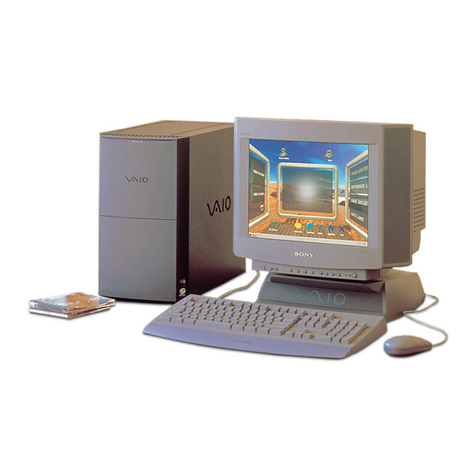
VAIO® RB Series Desktop PC
VGC-RB40
®Sony Electronics, Inc. • 16450 West Bernardo Drive • San Diego, CA 92127 • 1-800-222-7669 • www.sony.com
Please visit the Dealer Network for more
information at www.sony.com/dn
Last Updated 2005-04-29