BT550 / English Instruction Manual
name “BT550”and select it to pair.
4. If pairing is successful, a tone sound then message “Paired” will announce from
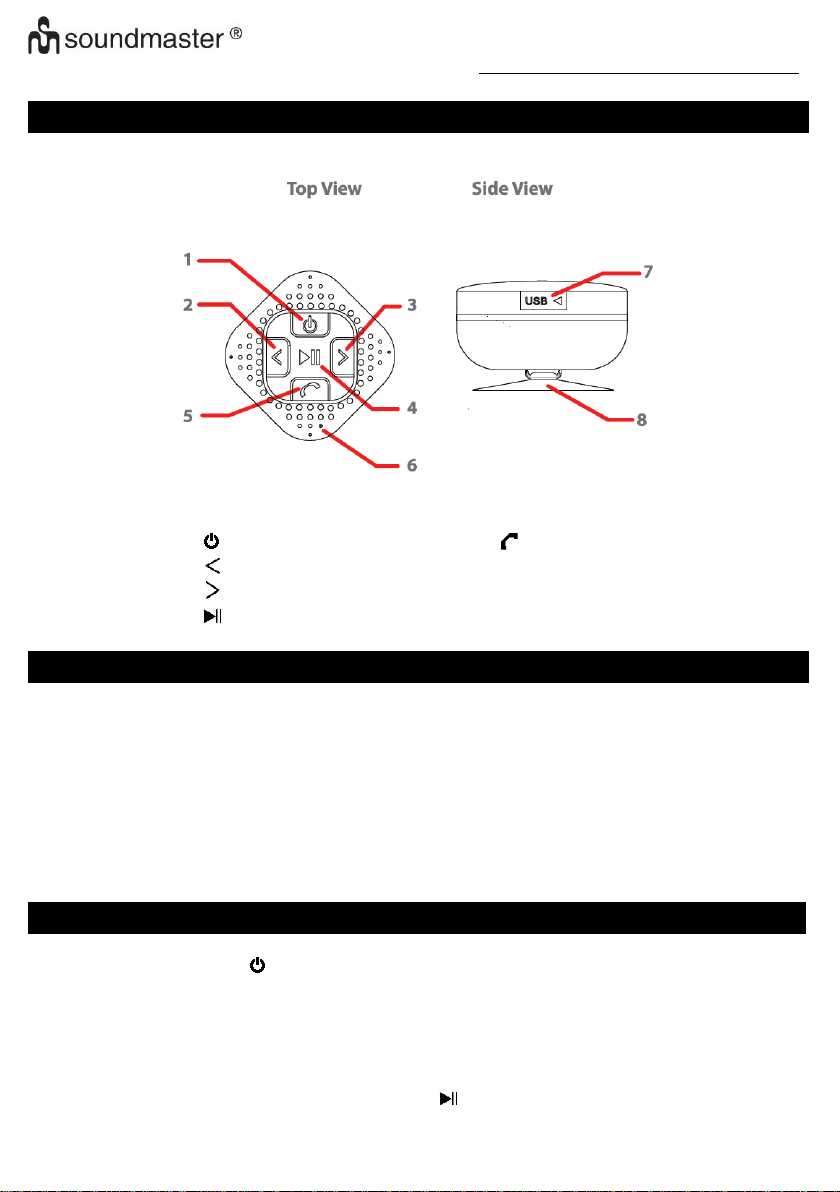
speaker and the Mode LED (2) light will switch to slow blink in blue (every 4
seconds once).
5. The Bluetooth Speaker will be reconnecting automatically if your mobile phone has
been paired. (Depend on the of mobile phone’s type and configuration, manual
reconnection may require on some devices)
6. Press and hold the button (1) for 2 - 3 seconds, a tone sound will announce and
Bluetooth speaker turned to OFF when you not use it.
Note: During in searching / pairing mode, the Bluetooth Speaker will power OFF
automatically in 8 minutes if no device is connected and idle.
Bluetooth Speaker Control Function
1. In playing music, press button (3) to pause music, press it once again to play.
2. Pressing or press and hold the button (7) to increases the volume level.
3. Pressing or press and hold the button (4) to decreases the volume level.
4. When maximum or minimum volume is reached, a tone sound will be heard.
5. Press the button (7) to play next music file.
6. Press the button (4) to play previous music file.
1. When there is an incoming call;
2. The ringing sound will up and the playing music will pause automatically.
3. Press button (5) to pick up the call if you want.
4. Now you have hand free function with the Bluetooth speaker.
5. Press button (5) again to hand up the call when finished. And,
6. The paused music will start to play automatically.
Tip: speak to the MIC hole (6) direct with distance in 30 cm to get the best
speakerphone performance when necessary.
Redial For Last Call function
1. To redial for last called number by the Bluetooth Speaker, even it is in music playing
mode.
2. Press twice the button (5) to enter into redial function, the playing will pause and
switch to hand free function for redial.
3. Press the button (5) again to hang up the redial call.