manuals.online logo
Brands
  1. Home
  2. •
  3. Brands
  4. •
  5. SWEEX
  6. •
  7. Accessories
  8. •
  9. SWEEX PA201 - QUICK_START_GUIDE User manual

SWEEX PA201 - QUICK_START_GUIDE User manual

Other SWEEX Accessories manuals

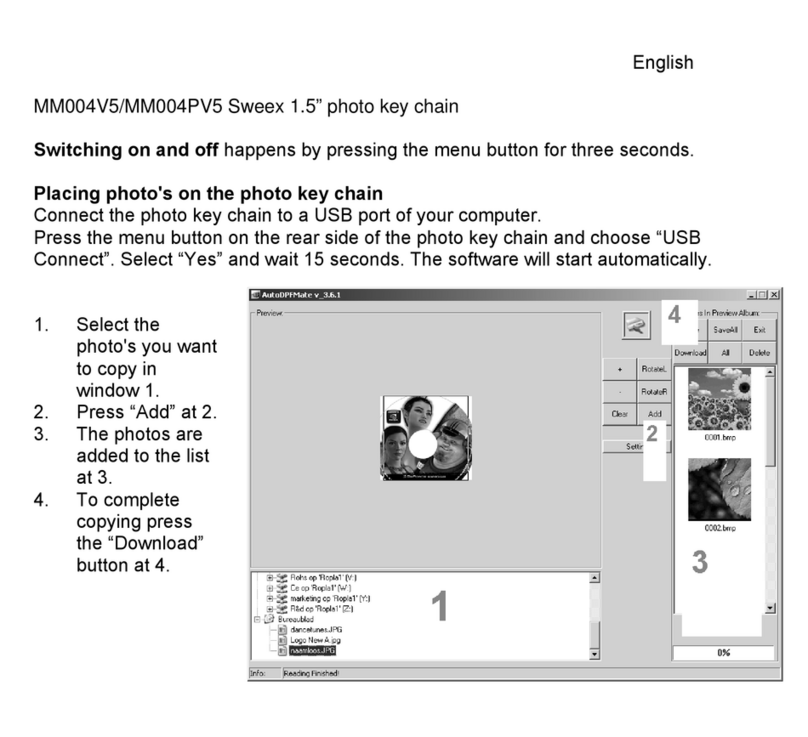
SWEEX MM004PV5 User manual

SWEEX

SWEEX MM004PV5 User manual

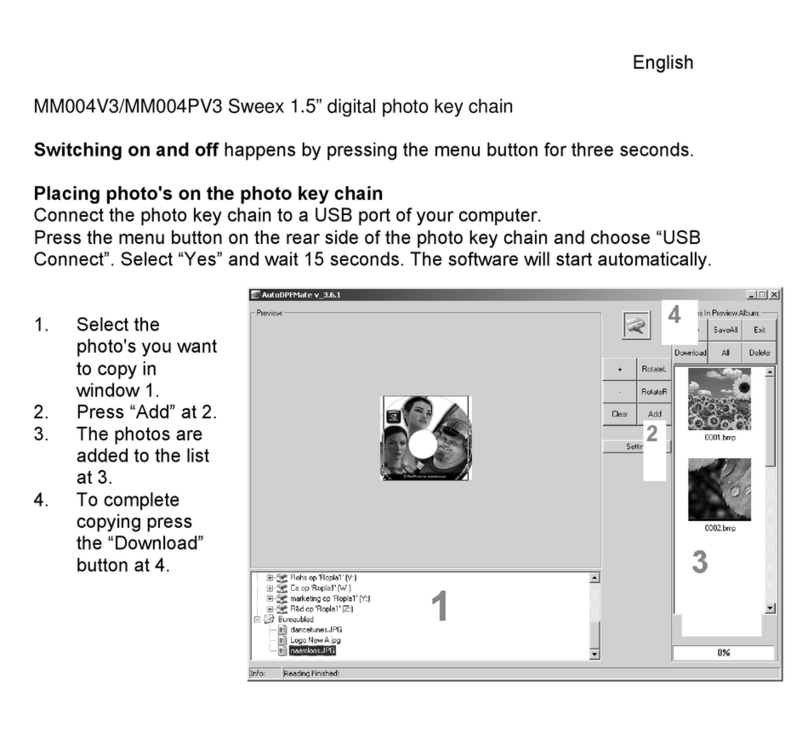
SWEEX MM004PV3 User manual

SWEEX

SWEEX MM004PV3 User manual

Popular Accessories manuals by other brands

Quincy lab 140AE-1 operating manual

Quincy lab

Quincy lab 140AE-1 operating manual

HomePro ZIR000 user manual

HomePro

HomePro ZIR000 user manual

DOL 20SCR Technical user guide

DOL

DOL 20SCR Technical user guide

RAB Smart Task installation manual

RAB

RAB Smart Task installation manual

Kemppi KMS 300 quick guide

Kemppi

Kemppi KMS 300 quick guide

Stearns 57,500 Series Installation and service instructions

Stearns

Stearns 57,500 Series Installation and service instructions

iGuzzini TWILIGHT COPENAGHEN manual

iGuzzini

iGuzzini TWILIGHT COPENAGHEN manual

Adelaide Annexe & Canvas Avan Deluxe installation guide

Adelaide Annexe & Canvas

Adelaide Annexe & Canvas Avan Deluxe installation guide

OHAUS 5000 instruction manual

OHAUS

OHAUS 5000 instruction manual

HOME8 WLS1300 quick start guide

HOME8

HOME8 WLS1300 quick start guide

MAXBOTIX MaxSonar quick start guide

MAXBOTIX

MAXBOTIX MaxSonar quick start guide

ioSmart iSmart56 Installation and user guide

ioSmart

ioSmart iSmart56 Installation and user guide

Focusrite Scarlett 18i8 user guide

Focusrite

Focusrite Scarlett 18i8 user guide

Velleman ED38105 user manual

Velleman

Velleman ED38105 user manual

JumpSport SkyBounce user manual

JumpSport

JumpSport SkyBounce user manual

Prima-Temp PRIYA Instructions for use

Prima-Temp

Prima-Temp PRIYA Instructions for use

Tefcold BC85I-BC85I W user manual

Tefcold

Tefcold BC85I-BC85I W user manual

Vaisala WMS302 user guide

Vaisala

Vaisala WMS302 user guide

manuals.online logo
manuals.online logoBrands
  • About & Mission
  • Contact us
  • Privacy Policy
  • Terms and Conditions

Copyright 2025 Manuals.Online. All Rights Reserved.

CODE SET
1
Select factory setting to 0000 by turning
the wheels.
2
Press button with a pointing device.
3
Turn wheels to preferred code while
button is pressed.
4
Release button.
USE
1
Locate a place to fix cable.
2
Select your chosen code.
3
Press the button.
4
Locate the lock hole of your notebook.
5
Insert cable lock into hole of laptop while the
button is pressed.
6
Release button and turn wheels to you’re
your code.