4
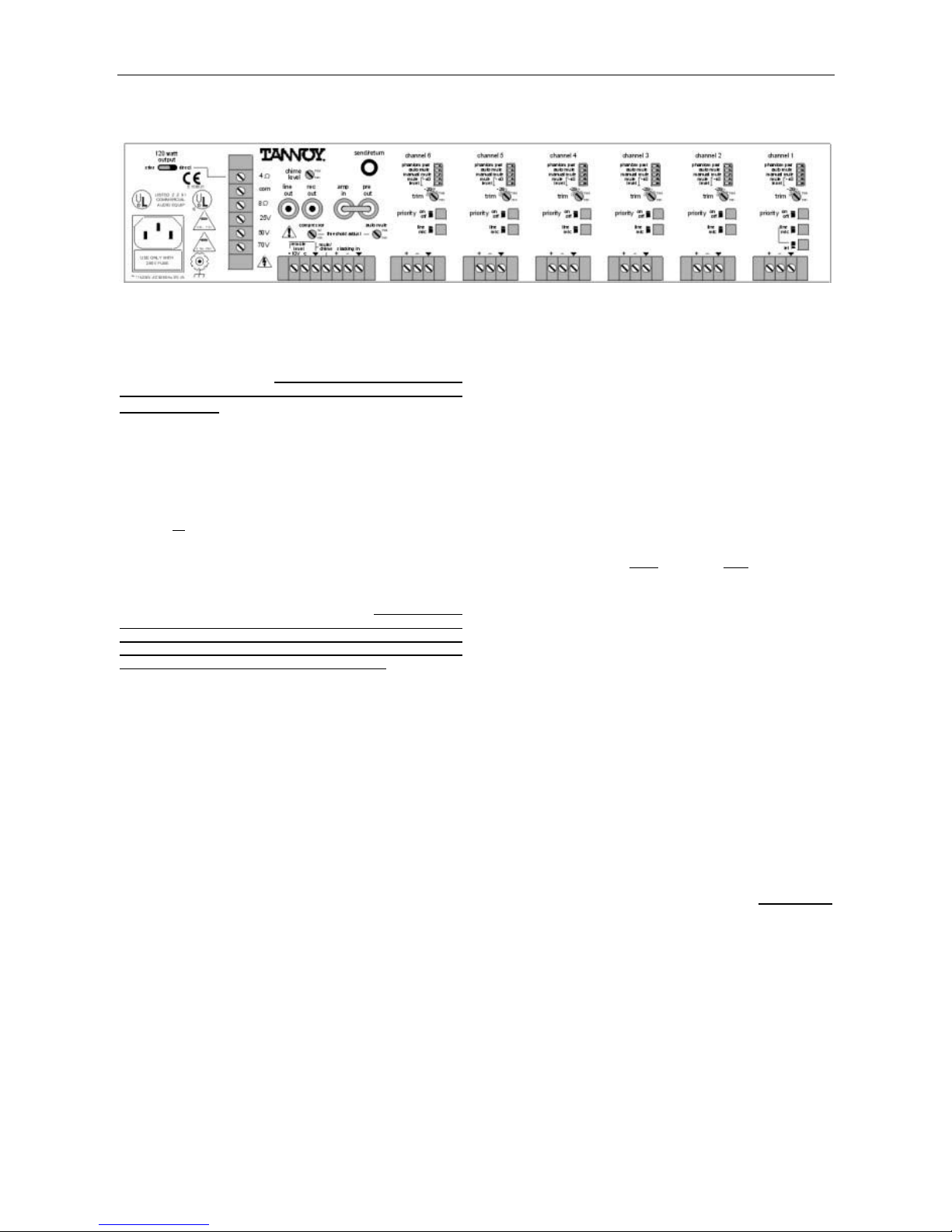
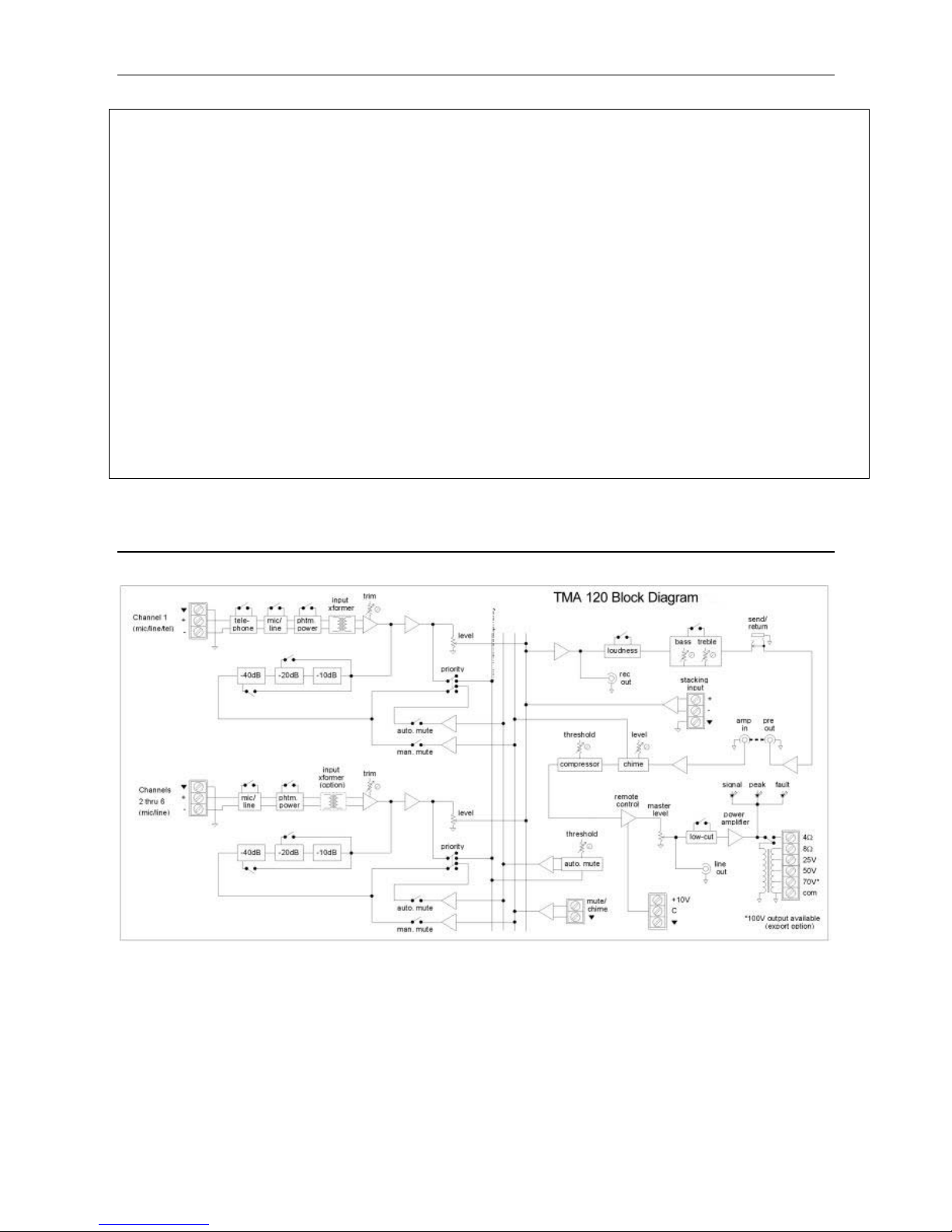
Remote Level: These two screw terminals (plus "ý")
provide remote volume control of the master level.
An internal voltage controlled amplifier (VCA) allows
remote control from up to 2000 ft (600m) away,
using any 5k~50klinear taper potentiometer and/or
switch to provide adjustment and/or muting of the
master level. Potentiometers are wired with high-
side to "+10V", low-side to "ý", and wiper to "C".
Switches simply connect (or disconnect) "+10V" to
"C", and do not require a ground (‘ý’) connection.
NOTE: The factory installed jumper (between
"+10V" & "C") must be in place when a remote
control is not being used.
Mute/Chime: This screw terminal (plus "ý") allows
manual muting of any selected channels, via an
external switch or contact closure (see Assignment &
Priority below). When the Chime Level control is
turned up (on), a pre-announcement chime tone will
also be activated by the switch or contact closure.
Stacking In: These screw terminals provide a
balanced line-level input to the mix bus, for input
expansion. Stacking In is before Loudness, Tone,
Compressor, Master Level, & Low Cut. For
unbalanced input, wire high to (+) and ground to
both (-) & (ý).
Assignment: These five DIP switches are used to
assign specific functions to the individual channels.
To assign a function, move the respective switch to
the left. Phantom Pwr assigns +24 Volts DC
phantom power to the channel input, for powering
condenser microphones. CAUTION: TO AVOID
DAMAGE TO EQUIPMENT, ASSIGN PHANTOM POWER ONLY
ON CHANNELS WHICH ARE SELECTED FOR 'MIC' INPUT
AND WHICH REQUIRE PHANTOM POWER. Auto Mute
assigns a (non-priority) channel to be muted
whenever signal is present in any "priority" channel.
Manual Mute assigns a channel to be muted
whenever the Mute/Chime terminals are shorted
together via a switch or contact closure. Mute Level
assigns the amount of muting (-10dB, -20dB, or -
40dB) which is applied to a channel, when triggered
by either Auto Mute or Manual Mute. NOTE: -10dB
muting will occur when both switches are to the right.
-40dB muting will occur when both switches are to
the left.
Trim: This control adjusts the input gain of the
channel, to compensate for various input signal
levels. Once the Line/Mic switch has been set to the
proper position (see Line/Mic below), the Trim
control should be adjusted so that peaks in signal
level do not cause distortion at the channel input.
Priority: This switch assigns a channel to "priority".
When signal is present in a "priority" channel, any
(non-priority) channels which are assigned to Auto
Mute will be muted by their selected amount. NOTE:
A "priority" channel cannot be auto muted by another
"priority" channel, but a "priority" channel can be
manual muted.
Line/Mic: This switch selects the proper impedance
and gain for either microphone or line-level input
signals. Depress the switch for line-level input.
Release the switch for microphone input. On
Channel 1, the Tel switch (see Tel below) must be
released for the Line/Mic switch to operate.
Tel (Channel 1 only): This switch selects the
proper impedance and gain for input from 600 ohm
sources. The input for Channel 1 includes an
isolation transformer, which allows connection to
most telephone system audio ports.
Inputs: These screw terminals provide a balanced
input connection for the channel. For unbalanced
input, wire high to (+) and ground to both (-) & (ý).
The input for Channel 1 includes an isolation
transformer.