manuals.online logo
Brands
  1. Home
  2. •
  3. Brands
  4. •
  5. Teac
  6. •
  7. TV
  8. •
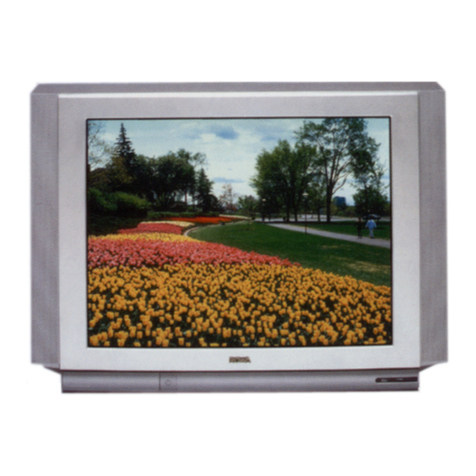
  9. Teac CT-M5140 User manual

Teac CT-M5140 User manual

Other Teac TV manuals

Teac CT-M5129STC User manual

Teac

Teac CT-M5129STC User manual

Teac CT-W3250S-1 User manual

Teac

Teac CT-W3250S-1 User manual

Teac CT-F5170 User manual

Teac

Teac CT-F5170 User manual

Teac CTM6845 User manual

Teac

Teac CTM6845 User manual

Teac CT-M342 User manual

Teac

Teac CT-M342 User manual

Teac CT-F5151 User manual

Teac

Teac CT-F5151 User manual

Teac LCDV3956FHD User manual

Teac

Teac LCDV3956FHD User manual

Teac CT-M805SR User manual

Teac

Teac CT-M805SR User manual

Teac LEV2292FHD User manual

Teac

Teac LEV2292FHD User manual

Teac CTH340 User manual

Teac

Teac CTH340 User manual

Teac EU3216STF User manual

Teac

Teac EU3216STF User manual

Teac 3290I User manual

Teac

Teac 3290I User manual

Teac CT-M687-STCR User manual

Teac

Teac CT-M687-STCR User manual

Teac EU-68 User manual

Teac

Teac EU-68 User manual

Teac CT-M511S User manual

Teac

Teac CT-M511S User manual

Teac EU2890ST User manual

Teac

Teac EU2890ST User manual

Teac CT-F689 User manual

Teac

Teac CT-F689 User manual

Teac LE40A4E1FHD User manual

Teac

Teac LE40A4E1FHD User manual

Teac EU-48 User manual

Teac

Teac EU-48 User manual

Teac EU2816STF User manual

Teac

Teac EU2816STF User manual

Teac CT-M661SR User manual

Teac

Teac CT-M661SR User manual

Teac CT-M5928TXT User manual

Teac

Teac CT-M5928TXT User manual

Teac TFT IDTV User manual

Teac

Teac TFT IDTV User manual

Teac EU2845ST User manual

Teac

Teac EU2845ST User manual

Popular TV manuals by other brands

IKEA UPPLEVA user manual

IKEA

IKEA UPPLEVA user manual

Toshiba 19A20 Service manual

Toshiba

Toshiba 19A20 Service manual

Sony XBR-100Z9D reference guide

Sony

Sony XBR-100Z9D reference guide

Sony Trinitron KV-HR36M90 Service manual

Sony

Sony Trinitron KV-HR36M90 Service manual

JVC AV-14AG16 instructions

JVC

JVC AV-14AG16 instructions

Loewe Table Stand Reference 55 user guide

Loewe

Loewe Table Stand Reference 55 user guide

Panasonic Genus TX-G10 operating instructions

Panasonic

Panasonic Genus TX-G10 operating instructions

Samsung LN26C350D1D Service manual

Samsung

Samsung LN26C350D1D Service manual

BBK LT1516D Service manual

BBK

BBK LT1516D Service manual

Samsung 55S9 B Series Quick setup guide

Samsung

Samsung 55S9 B Series Quick setup guide

Sharp LC-40FI5012E user manual

Sharp

Sharp LC-40FI5012E user manual

Evervue BN185 Operation manual

Evervue

Evervue BN185 Operation manual

North State TV2GO user guide

North State

North State TV2GO user guide

Toshiba CX35F70 owner's manual

Toshiba

Toshiba CX35F70 owner's manual

Magnavox PS1980 owner's manual

Magnavox

Magnavox PS1980 owner's manual

Philips 20HF5335D manual

Philips

Philips 20HF5335D manual

Panasonic QuintrixF TX-29AS1D operating instructions

Panasonic

Panasonic QuintrixF TX-29AS1D operating instructions

Samsung 4 Series Quick setup guide

Samsung

Samsung 4 Series Quick setup guide

manuals.online logo
manuals.online logoBrands
  • About & Mission
  • Contact us
  • Privacy Policy
  • Terms and Conditions

Copyright 2025 Manuals.Online. All Rights Reserved.

SERVICE MANUAL
CTM5140
51CM CTV
Effective: JULY02 CTM5140SERV
Ver1.2 1 December 2001
1
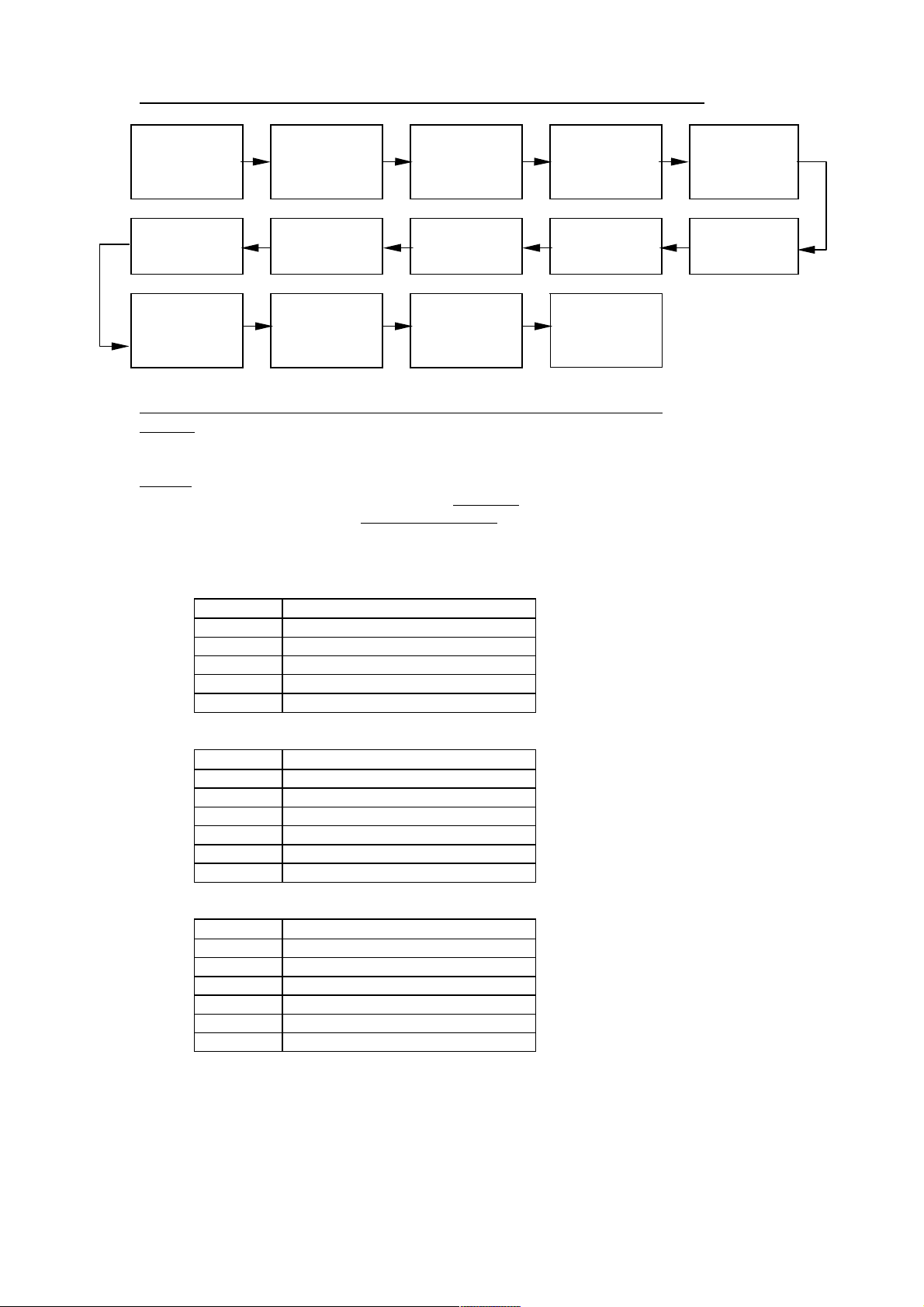

B+ adjustment VCO & AFT
Alignment NICAM
Adjustment Electrical
properties
checking for
chassis
RF AGC
adjustment
Sub-brightness
Adjustment White balance
Adjustment Aging Adjustment of
screen voltage
and focus
Sub-color &
Sub-tint
adjustment
Pincushion and
screen width
adjustment
Screen center
& size
adjustment
(PAL)
Screen center
& size
adjustment
(NTSC)
QC checking
 !"#$%!"!#&'''

Enter D-Mode by pressing D-Mode ON/OFF key, and then you can enter the D-mode.

Enter S-Mode by pressing VOLUME DOWN key on the unit until the volume decrease to minimum
level, then press the DISPLAY key on the remote handset (don’t release the volume key) and you can
enter S- mode.
After enter D-mode or S-mode, you can adjust the setting according to the following procedure,
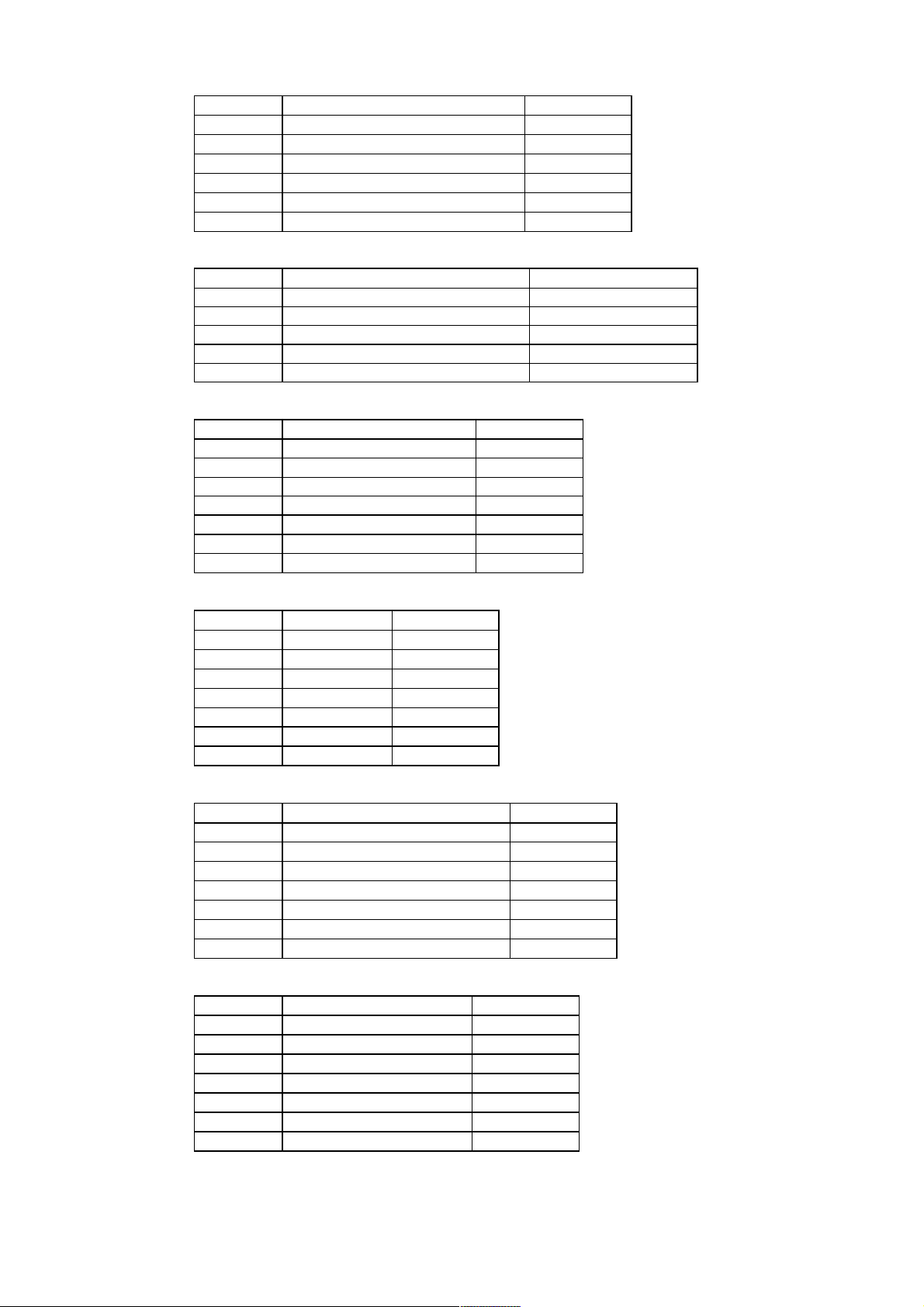
Press “1” to enter the white balance alignment menu,
  
  
  
  
  
  
Press “2” to enter picture geometry alignment menu for PAL system,
  
  
!  " 
!# $% 
 & 
  
   
 
Press “3” to enter picture geometry alignment menu for NTSC system,
  
' # 
! ' #$" 
!#' #$% 
' #& 
' # 
' #  
 
Ver1.2 1 December 2001
2
Press “4” to enter sharpness setting menu,
  
 ( 50% sharpness in 3.58 system (TV))
 ( 50% sharpness in 3.58 system (AV)*
 + 50% sharpness in 4.43 system (TV)*
 + 50% sharpness in 4.43 system (AV)*
 , Maximum sharpness(-
 # Minimum sharpness*

Press “5” to enter sound alignment menu,
  
#!. #!. /
* 0$1-.2 /
) 300$1-.2 /
!- %$4$ (
# %3 '
Press “6” to enter AGC and volume setting,
  
- 3 ))
- HAFC setting.
&&5 6%7 8
&&5 6%7 '
* Volume output level at 1%
) Volume output level at 25%*9
 Volume output level at 50%(*
Press “7” to enter system setting,
  
. System setting'9
.* System setting
.) System setting+
. System setting
.* System setting()
.) System setting-
!# System setting+
Press “8” to enter picture alignment menu 1, 
  
SCNTSub contrast for luminance signal
CNTXMaximum contrast(-
CNTNMinimum contrast9
BRTXMaximum brightness(9
BRTNMinimum brightness*9
COLXMaximum color/-
COLNMinimum color
Press “9” to enter picture alignment menu 2, 
  
CNTC50% contrast)'
BRTC50% brightness(9
COLC50% color+
TNTC50% tint+
COLPColor level for PAL
COLSColor level for SECAM+
BRTSSub brightness for SECAM
Ver1.2 1 December 2001
3
Press “0” to enter OSD setting menu,
  
OSDHorizontal position of OSD:
TXCXOSD intensity when maximum contrast(
RGCNOSD intensity when minimum contrast
TNTXMaximum tint level/-
TNTNMinimum tint level/-


1. Apply 110-240VAC(±5V) to mains power input, and Philips standard testing pattern to RF input.
2. Adjust VR801 in STANDARD mode until voltage at TP2 (B+) is 112V ±0.5V.

1. Apply a 38.9MHz signal to the IF input.
2. Monitor the DC voltage at pin 48 of IC201.
3. Adjust T201 until the voltage at pin 48 of IC201 becomes 4.62 +/- 0.2V (the picture must stable).
4. Enter D-mode and press the AFT (update/BBE) button. It will start Auto AFT Adjustment and the
screen will show “PIFAFT OK” if the process is finished.

1. Apply a 38.9MHz color bar with NICAM signal to the IF input.
2. Monitor the DC voltage at pin 15 of IC1101.
3. Adjust T1101 until the voltage at pin 15 of IC1101 becomes 2.5 +/- 0.1V.
4. Then check the waveform at pin 4 and 6 of P1103 and it must show correct audio signal.
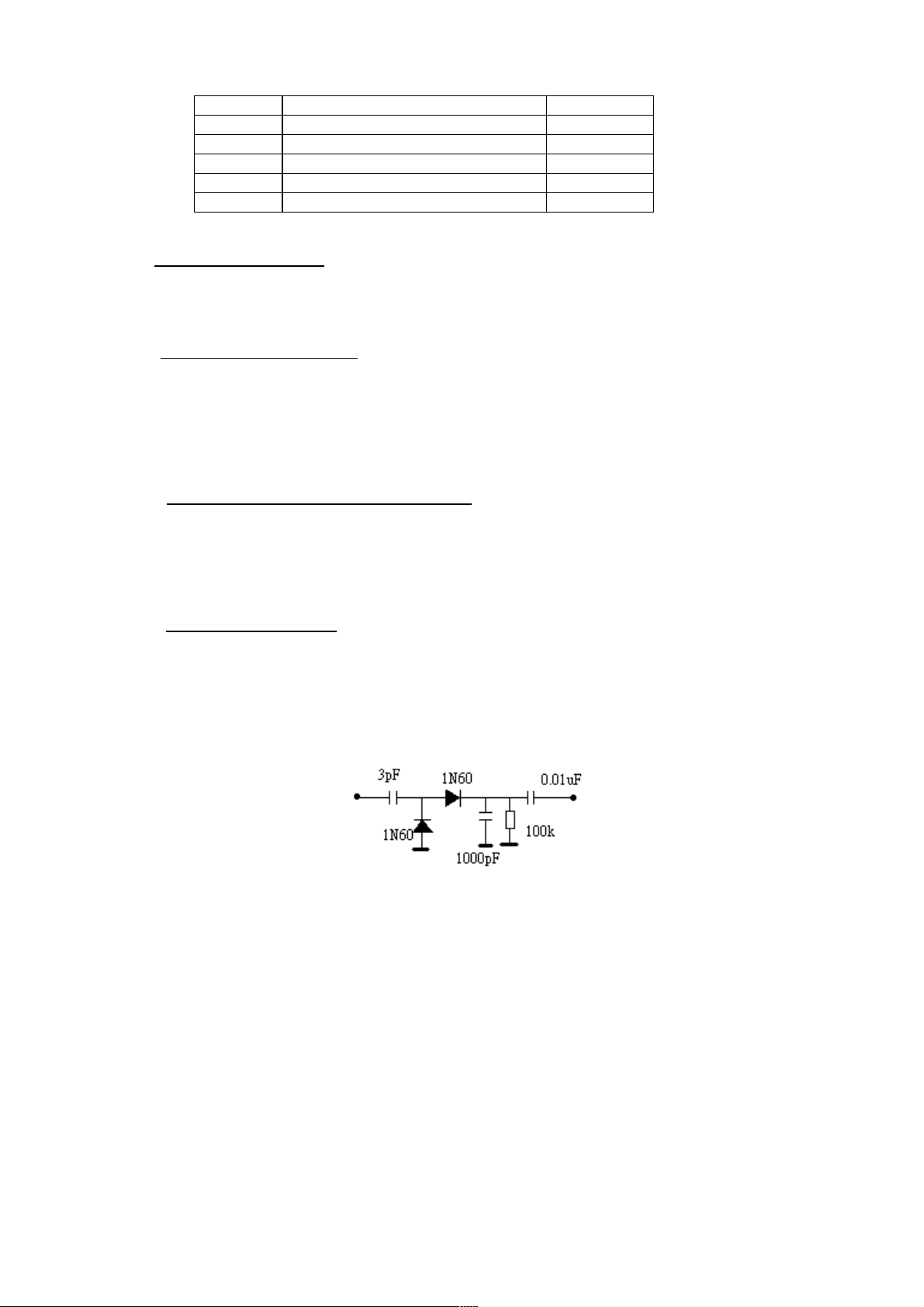
 !"
1. Connect the detector shown below to collector of Q101.
2. Receive a grey scale signal with 70dBV amplitude.
3. Adjust RFAGC item until the output of the detector becomes 0.8Vpp











Collector
of Q101 To CRO
Ver1.2 1 December 2001
4
#$%&'#$% #$%&#() *
1. Enter D-mode, and connect the probe of Oscilloscope to the conjunction between R217 and P201
(B-out).
2. Apply the Grey-scale/Colour-bar (NTSC signal) to the AV input, in STANDARD status.
3. Select CNTC to adjust the sub-contrast, until that the amplitude “A” is 2.5V as shown below.
4. Select COLC to adjust the sub-colour by tuning the amplitude of “a” and “d” to the same.
5. Select TNTC to adjust the sub-tint by tuning the amplitude of “b” and “c” to the same.
6. Apply the Grey-scale/Colour-bar (PAL signal) to the AV input, in STANDARD status.
7. Select COLP to adjust the sub-colour by tuning the amplitude of “a”, “b”, “c” and “d” to the
same.


&'#&#$%$ 
1. Receive a crosshatch pattern.
2. Adjust the “FOCUS” VR on the flyback the make the picture clear.
3. Enter D-mode and press “1--” key and the screen will become a horizontal line. Then adjust the
“SCREEN” VR on the flyback transformer to set the intensity of the line to a minimum visible
level (the line can just be seen).
4. Press “1--” key again and the TV will become full raster.
5. Select BRTC to adjust the sub-brightness, until that the 2 dark bar of 8 level grey scales just can
be seen.

+ $&
1. Receive a black and white pattern at STANDARD status.
2. Use a color analyzer to measure the black side of the screen. By changing the value of BCUT and
GCUT, set the reading of the color analyzer to x=284, y=299.
3. Then measure the white side of the screen. By changing the value of BDRV and GDRV, set the
reading of the color analyzer to x=284, y=299.
4. Repeat step 2&3 until you can get the correct reading for both black and white sides.

( & ( &+ ,
1. Receive a crosshatch pattern.
2. Adjust VR302 until the vertical line become straight.
3. Adjust VR303 for horizontal size.

a
b
c
d
Ver1.2 1 December 2001
5
-( &"()
1. Apply the crosshatch pattern (PAL signal) to the RF input, in STANDARD status.
2. Select HPOS50 to adjust the Horizontal center.
3. Select VPOS50 to adjust the Vertical center.
4. Select HIGH50 to adjust the Vertical amplitude.
5. Select VLIN50 to adjust the vertical linearity.
6. Select VSC50 to adjust the vertical S-correction.
-( &"#
1. Apply the crosshatch pattern (NTSC signal) to the RF input, in STANDARD status.
2. Select HPOS60 to adjust the Horizontal center.
3. Select VPOS60 to adjust the Vertical center.
4. Select HIGH60 to adjust the Vertical amplitude.
5. Select VLIN60 to adjust the vertical linearity.
6. Select VSC60 to adjust the vertical S-correction.
-#.,  
1. Enter D-mode and press key “0”, then choose OSD item and adjust the OSD horizontal position.
2. Enter D-mode and press key “2”, then choose the OSDV50 item and adjust the OSD horizontal
position.
3. Enter D-mode and press key “3”, then choose the OSDV60 item and adjust the OSD horizontal
position.
Ver1.2 1 December 2001
6
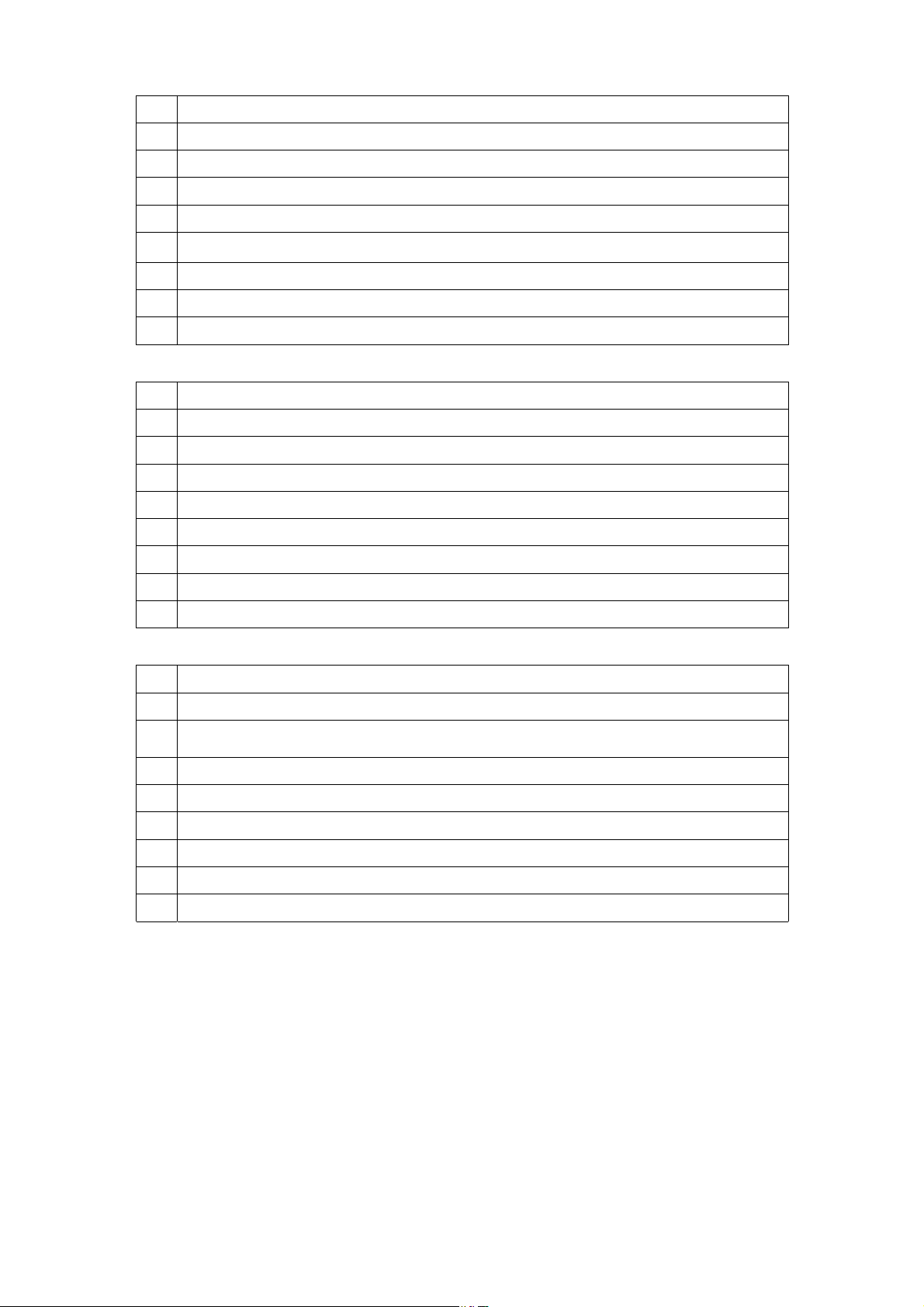

VCDM0 (default value: 68)
BIT Item
0 System switch: 0 : normal identify mode 1 : weak signal identify mode
1 White peak suppress: 0: on 1: off
2,3 ABL gain
00: -0.74v 01: -0.64v 10: -0.37v 11: -0.12v
4,5 ABL start point
00: -0.01v 01: -0.11v 10: -0.3v 11: -0.45v
6 CW-SW: TB1238N, pin 29 Fsc CW output 0 : AUTO, 1 : 4.43M
7 In force system mode, the status of color killer when weak signal
0: on 1: off
VCDM1 (default value: 00)
BIT Item
0 Blanking: 0: on 1: off
1,2,3,4,5 V-Mute timing: = 200ms + 8ms Data
6 Base band filter in NTSC system: 0: on, 1: off
7 VMOD
VCDM2 (default value: 40 for 38MHz IF, 30 for 38.9MHz IF)
BIT Item
0 AFT-mute: 0: on 1: off
1 SECAM-ADJ: 0: SECAM correction off 1: SECAM correction on
2 TB1238N_VMOD
3 PIF VCO ADJ 0: follow bit 0 1: manual adjust
6,5,4 IF frequency:
111: 33.9MHz 110: 33.95MHz 101: 34.47MHz 100: 38MHz
011: 38.9MHz 010: 39.5MHz 001: 45.75MHz 000: 58.75MHz
7 No use
MODE0
BIT Item
0 0: normal AV 1: SCART
1 0: English 1: English + Chinese
2 Low Noise Amp. at tuner: 0: off 1: on
3 No use
4, 5, 6,
7 Muting time when power on:
8ms 
Ver1.2 1 December 2001
7
MODE1
BIT Item
0 Logo: 0: disable 1: TCL Logo
1 No. of channel: 0: 49 1: 99
2 No use
3 Menu background 0: disable 1: black background
4 No. of AV 0: 1 1: 2
5 SECAM 0: off 1: on
6 D-mode 0: enable 1: disable
7 No use
MODE2
BIT Item
0 Teletext 0: off 1: on
1 NICAM & IGR 0: off 1: on
2 No use
3 No use
4 BG : 0 : off 1 : on
5 I : 0 : off 1 : on
6 DK : 0 : off 1 : on
7 M : 0 : off 1 : on
OPTION (default value: 04)
BIT Item
0 When blue background off (mute pin of CPU): 0: audio mute on 1: audio mute off
1 When blue background off (external mute pin of CPU):
0: audio mute on 1: audio mute off
2 When change channel: 0: picture mute off 1: picture mute on
3 Audio demodulation gain setting: 0: 50KHz 1: 25KHz
4 When no signal: 0: search channel by changing VT 1: use memorized VT
5 Power on mode: 0: previous 1: force standby
6 No use
7 No use
PART NUMBER DESCRIPTION QTY LOCATION
08-02111U-CR1 ASS'Y - CRT BD (S.S)
10-1N4148-ABX DIODE 1N4148 (SWITCHING) 2 D501, D502
11-0BF422-0BX TRANSISTOR BF422 3 Q501, Q503, Q505
11-A562TM-0BX TRANSISTOR 2SA562TM-0 1 Q507
11-SC1815-YBX TRANSISTOR 2SC1815Y 3 Q502, Q504, Q506
18-CB0102-JNX RES. C.F. 1K OHM 1/6W +/-5% 1 R515
18-CB0272-JNX RES. C.F. 2.7K OHM 1/6W +/-5% 1 R514
18-CB0561-JNX RES. C.F. 560 OHM 1/6W +/-5% 6 R501, R503, R505, R508, R510, R513
18-CB0681-JNX RES. C.F. 680 OHM 1/6W +/-5% 5 R502, R506, R509, R511, R522
18-FE0272-JNX RES. M.O. 2.7K OHM 1/2W +/-5% 3 R519, R520, R521
18-FG0153-JHX RES. M.O. 15K OHM 2W +/-5% 3 R516, R517, R518
25-BCB471-M1X CAP. ELEC 470 UF 16V +/-20% 1 C506
25-BLA100-M1X CAP. ELEC 10 UF 250V +/-20% 1 C504
26-AMK102-KRX CAP. CER 1000 PF 2KV +/-10% R 1 C505
26-EBP102-KBX CAP. CER 1000 PF 50V +/-10% B 2 C508, C509
26-EBP391-JCX CAP. CER. 390PF 50V +/-5% CH 3 C501, C502, C503
34-R569K2-1CX COIL CHOKE 5.6 UH +/-10% 2 L502, L503
35-139730-00X FERR. BEAD BF60 2 FOR C508 (L505 & L506)
40-2129MS-CRB P.C.B. CRT BD 1
41-WJ0050-B00 WIRE BARE JUMPER 5MM 2 L501, L504
41-WJ0060-B00 WIRE BARE JUMPER 6MM 3 R504, R507, R512
41-WJ0075-B00 WIRE BARE JUMPER 7.5MM 1 J503
46-10967W-01X PIN BASE *1 TJC1-1A 1 FOR CRT GROUNDING
46-30615H-04X HS 4P24 460 F/W TJC3-4Y/SCN-4 1 P502, FOR M. BD P402
46-37030H-05X HS 5P 2468#24 450 TJC3-5Y/SCN 1 P503, FOR M. BD P201
47-265540-0U7 SOCKET CRT GZS10-2-4 (C.B.) 1 S501
40-02139A-AVA P.C.B. FRONT AV BD 1
46-31530H-06X HS 6P24 F/W 300 TJC3/JC25-6Y 1 P1104B, FOR M. BD P904
47-RCA002-XX0 JACK RCA AV-3.2-1L-F3 WHITE 1 P1102
47-RCA003-XX0 JACK RCA AV-3.2-1L-F1 YELLOW 1 P1101
47-RCA017-XX0 JACK RCA 101P RED/SW 1 P1103
63-B26080-AB4 S/T SCREW B 2.8 X 8 AB 2 MTG F. AV BD TO F.CAB.
02-GND021-XX0 ASS'Y-CRT GND WIRE & HOUS.(21) 1
36-DEG210-XX1 DEGAUSSING COIL 2500MM 1
42-51208E-XX0 SPEAKER 50MMX120MM 8 OHM 6W 2 W601, W602
44-21OFLS-SZ2A CRT A51KQK99X01 (AUST) 1 CRT01
46-14026H-02X HS 2P24 570/7 F/W S11-02H 1 P601H, FOR M. BD P601
46-27688H-04X HS 4P A/B 400/13 RBGW TJC1/4Y 1 P401H, FOR D.Y COIL
46-35196H-02X HS 2P24 570/5 F/W TJC3-2Y 1 P602H, FOR M. BD P602
48-259140-003 SW. DOOR LOCK PR5 1
54-113971-0UE PVC TUBE #6 L=160MM 2 FOR SPK HOUSING
54-205140-000 SPACER CRT MOUNTING T=2MM 4 MTG CRT & F.CAB.
55-2111FC-0AN FRONT CABINET (94V-0 100%) 1
55-2111FD-0HA FRONT DOOR 1
56-2111FB-0HA PUSH BUTTON (2111D) 1
56-2111LS-0HC LENS - SENSOR & LED 1
56-2111PK-0HA POWER KNOB 1
58-2111FI-3UI INLAY FRONT AV (RCA 3 MONO) 1
59-130460-00X RUBBER PAD (25MMX7MM) 2 STICK ON F.CAB.(FOOTING)
62-10654X-00F UNI - TIE (2.5MMX95MM) 4 FOR DEGAUSSING COIL
62-216340-0UA HOLDER POWER CORD 1
62-312090-0HA ADAPTER-POWER KNOB (NEW PCB) 1
63-B26080-AB4 S/T SCREW B 2.8 X 8 AB 3 MTG PUSH BUTTON & F. CAB.
63-B26080-AB4 S/T SCREW B 2.8 X 8 AB 1 MTG LENS SENSOR & F. CAB.
63-H60250-AB4 S/T SCREW H 6 X 25 AB 4 MTG CRT & F. CAB.
63-W30100-AB4 S/T SCREW W 3 X 10 AB 8 MTG SPK & F. CAB.
65-A60180-20E EXT. TOOTH WASHTER 6 X 18 X 2 4 FOR CRT
67-126680-0E0 SPRING CRT 6MMX40MMX0.5MM 1
67-250450-0E0 SPRING KNOB 1
08-21114U-MA1 ASS'Y - MAIN BD
02-IRR001-XX0 IR RECEIVER MODULE 1 IR001
07-389VI5-NX4 TUNER UV1355-BK2(BG/HB/IEC/5V) 1 TU101
10-1N4001-EBX DIODE 1N4001 (RECTIFIER) 1 D301
10-1N4002-EBX DIODE 1N4002 (RECTIFIER) 1 D411
10-1N4148-ABX DIODE 1N4148 (SWITCHING) 9 D206, D206A, D312, D313, D314, D315, D601, D602,
D603
10-1N4148-ABX DIODE 1N4148 (SWITCHING) 1 J918, FOR (+)&J221 TO (-)&R901
10-55C4V7-DBX DIODE ZENER 4.7V 1/2W +/-5% 1 D208
10-55C5V1-DBX DIODE ZENER 5V1 1/2W +/-5% 1 D004
Page 1 of 7 CTM5140

PART NUMBER DESCRIPTION QTY LOCATION
10-55C8V2-DBX DIODE ZENER 8V2 1/2W +/-5% 1 D404
10-CW574C-DJX DIODE CW574CS 1 D001
10-TFR104-FBX DIODE TFR104 (FAST RECOVERY) 3 D401, D402, D403
11-2N3904-0BX TRANSISTOR 2N3904 (NPN) 1 Q001
11-DD1555-0AX TRANSISTOR 3DD1555 (HORIZ) 1 Q402
11-KSD882-0AX TRANSISTOR KSD882 (POWER) 1 Q608
11-SA1015-YBX TRANSISTOR 2SA1015Y 4 Q007, Q203, Q205, Q601
11-SC1815-YBX TRANSISTOR 2SC1815Y 14 Q004, Q005, Q006, Q201, Q202, Q204, Q208, Q603,
Q605, Q901, Q902, Q903, Q904, Q905
11-SC2482-0BX TRANSISTOR 2SC2482 1 Q401
11-SC3779-DBX TRANSISTOR 2SC3779D (RF AMPL) 1 Q101
11-TA124E-SBX TRANSISTOR DTA124ES (TP) 1 Q304
11-TC144E-SBX TRANSISTOR DTC144ES (TP) 3 Q301, Q606, Q607
13-000040-53P IC 4053 (ANALOG SW) 1 IC901
13-000040-66P IC 4066 (ANALOG SW.) 1 IC603
13-000L78-05S IC L7805 CV 5V 1A (REGUALTOR) 1 IC402
13-00M24C-04P IC M24C04 EEPROM 4K 1 IC002
13-00MC78-09S IC MC7809C LINEAR +9V 1A 1 IC401
13-0TA840-3KS IC TA8403K (VERT. OUTPUT) 1 IC301
13-0TDA74-96S IC TDA7496 (AUDIO) 1 IC601
13-A02V01-TOP IC TCLM17VR (CPU) 1 IC001
13-TB1238-ANP IC TB1238AN (P/SIF/VCD) CH/JP 1 IC201
14-LED05R-XX0 LED HFR105 (5MM) 1 D051A
18-CB0101-JNX RES. C.F. 100 OHM 1/6W +/-5% 4 R048, R049, R238, R251
18-CB0102-JNX RES. C.F. 1K OHM 1/6W +/-5% 26 J917, R028, R041, R054, R059, R129, R208, R211,
R226, R227, R234, R236, R267, R268, R269, R283,
R301, R302, R411, R622, R637, R903, R905, R907,
R910, R912
18-CB0103-JNX RES. C.F. 10K OHM 1/6W +/-5% 25 R001, R011, R012, R017, R019, R020, R033, R034,
R038, R043, R051, R052, R222, R228, R415, R602,
R604, R605, R607, R633, R636, R915, R916, R917,
R918
18-CB0104-JNX RES. C.F. 100K OHM 1/6W +/-5% 3 R035, R037, R042
18-CB0106-JNX RES. C.F. 10M OHM 1/6W +/-5% 1 R134
18-CB0123-JNX RES. C.F. 12K OHM 1/6W +/-5% 1 R231
18-CB0151-JNX RES. C.F. 150 OHM 1/6W +/-5% 2 R107, R109
18-CB0152-JNX RES. C.F. 1.5K OHM 1/6W +/-5% 1 R025
18-CB0153-JNX RES. C.F. 15K OHM 1/6W +/-5% 3 R004, R046, R902
18-CB0182-JNX RES. C.F. 1.8K OHM 1/6W +/-5% 2 R032, R642
18-CB0183-JNX RES. C.F. 18K OHM 1/6W +/-5% 1 R922A
18-CB0220-JNX RES. C.F. 22 OHM 1/6W +/-5% 1 R901
18-CB0222-JNX RES. C.F. 2.2K OHM 1/6W +/-5% 3 R230, R287, R313
18-CB0223-JNX RES. C.F. 22K OHM 1/6W +/-5% 1 R218
18-CB0224-JNX RES. C.F. 220K OHM 1/6W +/-5% 1 R232
18-CB0243-JNX RES. C.F. 24K OHM 1/6W +/-5% 1 R306
18-CB0271-JNX RES. C.F. 270 OHM 1/6W +/-5% 5 R215, R216, R217, R273, R292
18-CB0272-JNX RES. C.F. 2.7K OHM 1/6W +/-5% 3 R018, R021, R266
18-CB0303-JNX RES. C.F. 30K OHM 1/6W +/-5% 1 R210
18-CB0331-JNX RES. C.F. 330 OHM 1/6W +/-5% 2 R282, R284
18-CB0332-JNX RES. C.F. 3.3K OHM 1/6W +/-5% 2 R611, R614
18-CB0333-JNX RES. C.F. 33K OHM 1/6W +/-5% 3 R005, R006, R922
18-CB0363-JNX RES. C.F. 36K OHM 1/6W +/-5% 1 R304
18-CB0391-JNX RES. C.F. 390 OHM 1/6W +/-5% 2 R219, R220
18-CB0392-JNX RES. C.F. 3.9K OHM 1/6W +/-5% 2 R013, R015
18-CB0393-JNX RES. C.F. 39K OHM 1/6W +/-5% 2 R209, R294
18-CB0470-JNX RES. C.F. 47 OHM 1/6W +/-5% 4 R009, R010, R026, R061
18-CB0471-JNX RES. C.F. 470 OHM 1/6W +/-5% 7 R027, R110, R239, R401, R906, R908, R923
18-CB0472-JNX RES. C.F. 4.7K OHM 1/6W +/-5% 4 R047, R050, R606, R623
18-CB0473-JNX RES. C.F. 47K OHM 1/6W +/-5% 9 R036, R924, R925, R926, R927, R928, R929, R930,
R931
18-CB0560-JNX RES. C.F. 56 OHM 1/6W +/-5% 1 R112
18-CB0561-JNX RES. C.F. 560 OHM 1/6W +/-5% 1 R247
18-CB0562-JNX RES. C.F. 5.6K OHM 1/6W +/-5% 3 R029, R030, R031
18-CB0681-JNX RES. C.F. 680 OHM 1/6W +/-5% 1 R040

18-CB0683-JNX RES. C.F. 68K OHM 1/6W +/-5% 1 R307
18-CB0750-JNX RES. C.F. 75 OHM 1/6W +/-5% 2 R235, R904
18-CB0752-JNX RES. C.F. 7.5K OHM 1/6W +/-5% 1 R940

18-CB0820-JNX RES. C.F. 82 OHM 1/6W +/-5% 2 R909, R914
18-CB0822-JNX RES. C.F. 8.2K OHM 1/6W +/-5% 2 R014, R016
Page 2 of 7 CTM5140