manuals.online logo
Brands
  1. Home
  2. •
  3. Brands
  4. •
  5. TECO
  6. •
  7. Relay
  8. •
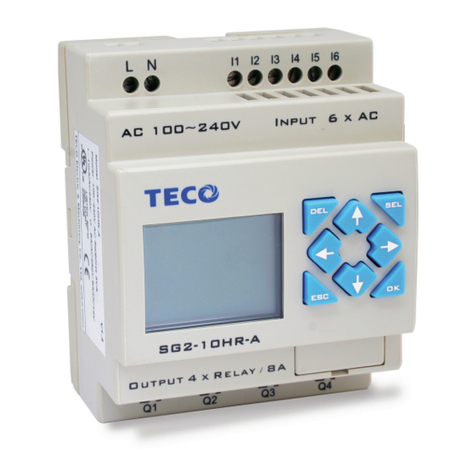
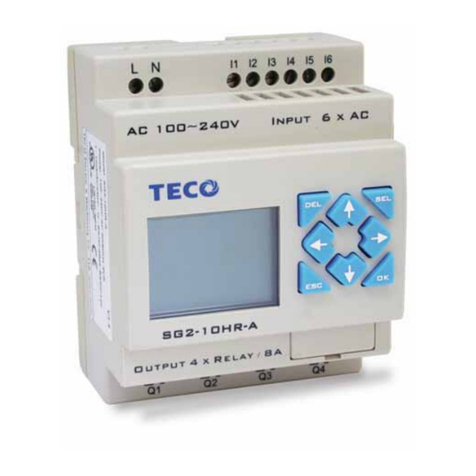
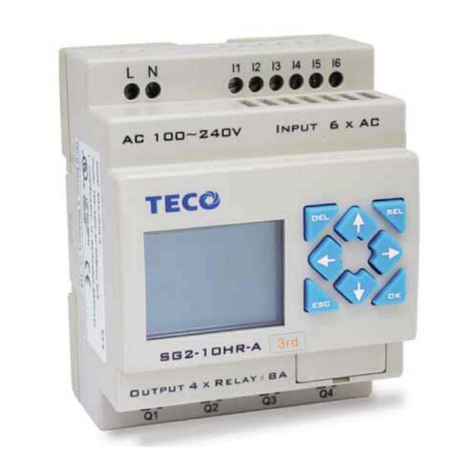
  9. TECO SG2-DNET User manual

TECO SG2-DNET User manual

This manual suits for next models

35

Other TECO Relay manuals

TECO SG2 Series User manual

TECO

TECO SG2 Series User manual

TECO SG2 PLR User manual

TECO

TECO SG2 PLR User manual

TECO SG2 Series User manual

TECO

TECO SG2 Series User manual

TECO SG2-12HT-D User manual

TECO

TECO SG2-12HT-D User manual

Popular Relay manuals by other brands

Woodward BU1-DC2 manual

Woodward

Woodward BU1-DC2 manual

ABB SSR32 product manual

ABB

ABB SSR32 product manual

Siemens SIRIUS 3UG4633 operating instructions

Siemens

Siemens SIRIUS 3UG4633 operating instructions

Siemens SIRIUS 3TK2824 A.20 Series Original operating instructions

Siemens

Siemens SIRIUS 3TK2824 A.20 Series Original operating instructions

Shelly Pro Series user manual

Shelly

Shelly Pro Series user manual

GE MVAX 11 Technical manual

GE

GE MVAX 11 Technical manual

ABB RELION REF615R manual

ABB

ABB RELION REF615R manual

Kemo Electronic B197 quick guide

Kemo Electronic

Kemo Electronic B197 quick guide

Seg MRM3 manual

Seg

Seg MRM3 manual

Basler BE1-700C manual

Basler

Basler BE1-700C manual

CD Automation REVEX 2PH 280A user manual

CD Automation

CD Automation REVEX 2PH 280A user manual

ABB SPAJ 142 C User manual and technical description

ABB

ABB SPAJ 142 C User manual and technical description

Ruelco 1S04 Operation manual

Ruelco

Ruelco 1S04 Operation manual

Basler V3E Z1P B2C1F instruction manual

Basler

Basler V3E Z1P B2C1F instruction manual

GE DGP instruction manual

GE

GE DGP instruction manual

Kyongbo Electronics GDR-D01 user manual

Kyongbo Electronics

Kyongbo Electronics GDR-D01 user manual

Eaton easyE4 series Application note

Eaton

Eaton easyE4 series Application note

Siemens BD2-AK03X/FS Series installation instructions

Siemens

Siemens BD2-AK03X/FS Series installation instructions

manuals.online logo
manuals.online logoBrands
  • About & Mission
  • Contact us
  • Privacy Policy
  • Terms and Conditions

Copyright 2025 Manuals.Online. All Rights Reserved.

Chipsmall Limited consists of a professional team with an average of over 10 year of expertise in the distribution
of electronic components. Based in Hongkong, we have already established firm and mutual-benefit business
relationships with customers from,Europe,America and south Asia,supplying obsolete and hard-to-find components
to meet their specific needs.
With the principle of “Quality Parts,Customers Priority,Honest Operation,and Considerate Service”,our business
mainly focus on the distribution of electronic components. Line cards we deal with include
Microchip,ALPS,ROHM,Xilinx,Pulse,ON,Everlight and Freescale. Main products comprise
IC,Modules,Potentiometer,IC Socket,Relay,Connector.Our parts cover such applications as commercial,industrial,
and automotives areas.
We are looking forward to setting up business relationship with you and hope to provide you with the best service
and solution. Let us make a better world for our industry!
Contact us
Tel: +86-755-8981 8866 Fax: +86-755-8427 6832
Email & Skype: [email protected]om Web: www.chipsmall.com
Address: A1208, Overseas Decoration Building, #122 Zhenhua RD., Futian, Shenzhen, China
  
SG2
Smart PLC
USER
Manual
SG2 Programmable Logic Smart Relay
4KA72X023 Version: 03 2009.07.03 0086-0510-8522-7555
Apply to: SG2 firmware version 3.0,
w w w .t aia n-technology.c om
PC client program software version 3.0
4KA72X023 I
Contents
Contents
...............................................................................................................................I
Summary of changes ....................................................................................................... Ⅳ
Chapter 1: Getting Started ................................................................................................. 1
Examination before Installation .............................................................................................................................. 2
Environmental Precautions ..................................................................................................................................... 2
SG2 Model Identification........................................................................................................................................ 2
Quick Start Setup...............................................................................................................4
Install SG2 Client Software.................................................................................................................................. 4
Connect Power to SG2 smart relay ..................................................................................................................... 4
Connect Programming Cable .................................................................................................................................. 5
Establish Communication ....................................................................................................................................... 5
Write simple program ............................................................................................................................................. 6
Chapter 2: Installation ......................................................................................................10
General Specifications ...........................................................................................................................................10
Product Specifications............................................................................................................................................13
Mounting................................................................................................................................................................14
Wiring ....................................................................................................................................................................16
Indicator Light .......................................................................................................................................................18
Chapter 3: Program Tools................................................................................................ 19
PC Programming Software “SG2 Client”............................................................................................................. 19
Installing the Software .................................................................................................................................. 19
Connecting the Software................................................................................................................................20
Start Screen ....................................................................................................................................................20
Ladder Logic Programming Environment .....................................................................................................21
Menus, Icons and Status Displays..................................................................................................................22
Programming..................................................................................................................................................23
Simulation Mode............................................................................................................................................24
Establish Communication ..............................................................................................................................24
Writing Program to smart relay......................................................................................................................25
Operation menu..............................................................................................................................................25
Online Monitoring/Editing.............................................................................................................................26
HMI/TEXT ....................................................................................................................................................27
Program Documentation ................................................................................................................................30
AQ Set…........................................................................................................................................................31
Memory Cartridge (sold separately) ......................................................................................................................33
LCD Display and Keypad ......................................................................................................................................34
Keypad ...........................................................................................................................................................34
Original Screen ..............................................................................................................................................34
LCD Display Main Menu...............................................................................................................................36
4KA72X023 II
Chapter 4: Relay Ladder Logic Programming .................................................................45
Common Memory Types........................................................................................................................................45
Specialty Memory Types........................................................................................................................................48
Output Instructions................................................................................................................................................ 49
Analog memory type..............................................................................................................................................50
Timer Instruction....................................................................................................................................................51
Counter Instructions.............................................................................................................................................. 59
Real Time Clock (RTC) Instructions .................................................................................................................... 69
Comparator Instructions.........................................................................................................................................76
HMI Display Instructions...................................................................................................................................... 79
PWM Output Instruction (DC Transistor Output Models Only)............................................................................82
Data Link/Remote I/O Instruction (SG2-20Vxxx model only)..............................................................................85
SHIFT (shift output).............................................................................................................................................. 88
AQ (Analog Output) ............................................................................................................................................. 89
AS (Add-Subtract) .................................................................................................................................................90
MD (MUL-DIV) ....................................................................................................................................................91
PID (Proportion- Integral- Differential).................................................................................................................92
MX (Multiplexer)...................................................................................................................................................93
AR (Analog-Ramp)................................................................................................................................................94
DR (Data register)..................................................................................................................................................96
MU (MODBUS) (only Vtype model) .................................................................................................................. 98
Chapter 5: Function Block Diagram Programming .......................................................101
Coil Block Instruction..........................................................................................................................................101
HMI..............................................................................................................................................................102
PWM function block (only transistor output version)..................................................................................102
Data Link function block .............................................................................................................................103
SHIFT function block ..................................................................................................................................103
Logic Block Instructions......................................................................................................................................104
AND Logic Diagram....................................................................................................................................104
AND (EDGE) Logic Diagram .....................................................................................................................104
NAND Logic Diagram.................................................................................................................................105
NAND (EDGE) Logic Diagram...................................................................................................................105
OR Logic Diagram.......................................................................................................................................105
NOR Logic Diagram....................................................................................................................................106
XOR Logic Diagram....................................................................................................................................106
SR Logic Diagram .......................................................................................................................................106
NOT Logic Diagram ....................................................................................................................................106
Pulse Logic Diagram....................................................................................................................................107
BOOLEAN Logic Diagram .........................................................................................................................107
Function Block.....................................................................................................................................................108
Timer Function Block ..................................................................................................................................109
Common Counter function block.................................................................................................................111
High Speed Counter Function Block ...........................................................................................................112
RTC Comparator Function Block ................................................................................................................113
Analog Comparator Function Block ............................................................................................................114
AS (ADD-SUB) function block ...................................................................................................................115

4KA72X023 III
MD (MUL-DIV) function block ..................................................................................................................115
PID (Proportion- Integral- Differential) function block...............................................................................116
MX (Multiplexer) function block.................................................................................................................116
AR (Analog-Ramp) function block..............................................................................................................116
DR (Data-Register) function block ..............................................................................................................116
MU (MODBUS) function block ..................................................................................................................117
Chapter 6: Hardware Specification ................................................................................118
Normal Specification ...........................................................................................................................................118
Product Specifications..........................................................................................................................................119
Power Specifications............................................................................................................................................120
Normal model machine Specifications ........................................................................................................120
12V DC model Specifications......................................................................................................................121
24V AC model Specifications......................................................................................................................121
Power circuitry diagram...............................................................................................................................122
Input Specifications..............................................................................................................................................123
100~240V AC model ...................................................................................................................................123
24V AC model .............................................................................................................................................123
24V DC, 12I/O model ..................................................................................................................................124
24V DC, 20I/O model ..................................................................................................................................125
Output Specifications...........................................................................................................................................126
Output Port wiring notice.....................................................................................................................................126
Light Load....................................................................................................................................................126
Inductance Load...........................................................................................................................................127
Life of relay..................................................................................................................................................127
Size diagram of SG2 ............................................................................................................................................128
Chapter 7: 20 Pointe V type High-powered Models Instruction....................................129
Function Summarization ......................................................................................................................................129
Detail Instruction .................................................................................................................................................129
Remote IO function......................................................................................................................................131
IO Link Function..........................................................................................................................................132
Modbus RTU master ....................................................................................................................................133
Slaver via Modbus RTU protocol ................................................................................................................135
SG2 Modbus protocol ..........................................................................................................................................136
Chapter 8: Expansion Module........................................................................................137
Summarize ...........................................................................................................................................................137
Digital IO module ................................................................................................................................................139
Analog module.....................................................................................................................................................145
Communication module.......................................................................................................................................148
ModBus module...........................................................................................................................................148
DeviceNet COMM. Module.........................................................................................................................151
ProfiBus .......................................................................................................................................................154
Appendix: Keypad Programming...................................................................................157
Appendix A: Keypad programming in Ladder mode...........................................................................................157
Appendix B: Keypad programming in Ladder FUNCTION BLOCK .................................................................161
4KA72X023 IV
Summary of changes
This user manual is modified by firmware V3.0 and SG2 Client programming software V3.0. SG2 V3.0 adds some
new functions with firmware version V3.0 to strong SG2 function. The upgrade content is shown as the 2 tables
below simply. More information about idiographic function to see function instruction.
Edit and Display
SG2 V3.0 SG2 V2.x
Ladder 300 lines 200 lines
FBD 260blocks 99blocks
LCD 4 lines * 16 characters 4 lines * 12 characters
Contact and function block
input output SG2 V3.0 SG2 V2.x
Auxiliary relay M M M 63(M01~M3F) 15(M1~MF)
Auxiliary relay N N N 63(N01~N3F) Ladder: NO
FBD: 15(N1~NF)
temperature input AT 4(AT01~AT04) NO
analog output AQ 4(AQ01~AQ04) NO
PWM P 2(P01~P02, P01 adds PLSY mode) 1(P1: PWM)
HMI 31(H01~H1F) 15(H1~HF)
Timer T T Ladder: 31(T01~T1F)
FBD: 250(T01~TFA)
15(T1~TF)
Counter C C Ladder: 31(C01~C1F)
FBD: 250(C01~CFA)
15(C1~CF)
RTC R R Ladder: 31(R01~R1F)
FBD: 250(R01~RFA)
15(R1~RF)
Analog Comparator G G Ladder: 31(G01~G1F)
FBD: 250(G01~GFA)
15(G1~GF)
AS(Add-Sub) Ladder: 31(AS01~AS1F)
FBD: 250(AS01~ASFA) NO
MD(Mul-Div) Ladder: 31(MD01~MD1F)
FBD: 250(MD01~MDFA) NO
PID Ladder: 15(PI01~PI0F)
FBD: 30(PI01~PI1E) NO
MX(Multiplexer) Ladder: 15(MX01~MX0F)
FBD: 250(MX01~MXFA) NO
AR(Analog Ramp) Ladder: 15(AR01~AR0F)
FBD: 30(AR01~AR1E) NO
DR(Data Register) 240(DR01~DRF0) NO
MU(MODBUS)
NO NO
Ladder: 15(MU01~MU0F)
FBD: 250(MU01~MUFA) NO
Logic function: BOOLEAN NOBlock
B B
260(B001~B260)The capability o
f
99(B01~B99)The capability of each
block is fixed
each block is alterable, and the total
capability of block is 6000bytes
PM05(3rd) PM05(3rd) can be used with all
version of SG2
PM05 can not be used with SG2 V3.x
Chapter 1: Getting Started 1
Chapter 1: Getting Started
The SG2 tiny smart Relay is an electronic device. For safety reasons, please carefully read and follow the paragraphs
with "WARNING" or "CAUTION" symbols. They are important safety precautions to be aware of while transporting,
installing, operating, or examining the SG2 Controller.
WARNING: Personal injury may result from improper operation.
CAUTION: The SG2 smart relay may be damaged by improper operation.
Precaution for Installation
Compliance with the installation instructions and the user manual is absolutely necessary. Failure to comply
could lead to improper operation, equipment damage or in extreme cases even death, serious bodily injury or
considerable damage to property.
When installing the open-board models, insure that no wiring or foreign materials can fall into the exposed
circuits and components. Damage to equipment, fire, or considerable damage to property could result.
Always switch off power before you wire, connect, install, or remove any module.
The wiring for the SG2 smart relay is open and exposed. For the open-board models, all electrical components
are exposed. For this reason, it is recommended the SG2 smart relay be installed in an enclosure or cabinet to prevent
accidental contact or exposure to the electrical circuits and components.
Never install the product in an environment beyond the limits specified in this user manual such as high
temperature, humidity, dust, corrosive gas, vibration, etc.
Precaution for Wiring
Improper wiring and installation could lead to death, serious bodily injury or considerable damage to property.
The SG2 smart relay should only be installed and wired by properly experienced and certified personnel.
Make sure the wiring of the SG2 smart relay meets all applicable regulations and codes including local and
national standards and codes.
Be sure to properly size cables for the required current rating.
Always separate AC wiring, DC wiring with high-frequency switching cycles, and low-voltage signal wiring.
Precaution for Operation
To insure safety with the application of the SG2 smart relay, complete functional and safety testing must be
conducted. Only run the SG2 after all testing and confirming safe and proper operation is complete. Any potential
faults in the application should be included in the testing. Failure to do so could lead to improper operation,
equipment damage or in extreme cases even Death, serious bodily injury or considerable damage to property.
When the power is on, never contact the terminals, exposed conductors or electrical components. Failure to
comply could lead to improper operation, equipment damage or in extreme cases even death, serious bodily injury or
considerable damage to property.
It is strongly recommended to add safety protection such as an emergency stop and external interlock circuit in
Chapter 1: Getting Started 2
case the SG2 smart relay operation must be shut down immediately.
Examination before Installation
Every SG2 smart relay has been fully tested and examined before shipment. Please carry out the following
examination procedures after unpacking your SG2 smart relay.
• Check to see if the model number of the SG2 matches the model number that you ordered.
• Check to see whether any damage occurred to the SG2 during shipment. Do not connect the SG2 smart relay to the
power supply if there is any sign of damage.
Contact if you find any abnormal conditions as mentioned above.
Environmental Precautions
The installation site of the SG2 smart relay is very important. It relates directly to the functionality and the life span
of your SG2. Please carefully choose an installation site that meets the following requirements:
• Mount the unit vertically
• Environment temperature: -4°F - 131°F (-20°C - 55°C)
• Avoid placing SG2 close to any heating equipment
• Avoid dripping water, condensation, or humid environment
• Avoid direct sunlight
• Avoid oil, grease, and gas
• Avoid contact with corrosive gases and liquids
• Prevent foreign dust, flecks, or metal scraps from contacting the SG2 smart relay
• Avoid electric-magnetic interference (soldering or power machinery)
• Avoid excessive vibration; if vibration cannot be avoided, an anti-rattle mounting device should be installed to
reduce vibration.
Disclaim of Liability
We have reviewed the contents of this publication to ensure consistency with the hardware and software described.
Since variance cannot be precluded entirely, we cannot guarantee full consistency. However, the information in this
publication is reviewed regularly and any necessary corrections are included in subsequent editions.
SG2 Model Identification
Quick Start Setup 4
Quick Start Setup
This section is a simple 5-steps guide to connecting, programming and operating your new SG2 smart relay. This is
not intended to be the complete instructions for programming and installation of your system. Many steps refer to
other sections in the manual for more detailed information.
Install SG2 Client Software
Install the SG2 Client Software from CD or from the free internet download at www.taian-technology.com
Connect Power to SG2 smart relay
Connect power to the Smart Relay using the below wiring diagrams for AC or DC supply for the applicable modules.
See “Chapter 2: Installation” for complete wiring and installation instructions.
Quick Start Setup 5
Connect Programming Cable
Remove the plastic connector cover from the SG2 using a flathead screwdriver as shown in the figure below. Insert
the plastic connector end of the programming cable into the SG2 smart relay as shown in the figure below. Connect
the opposite end of the cable to an RS232 serial port on the computer.
Establish Communication
a. Open the SG2 Client software and select “New Ladder Document” as shown below left.
b. Select “Operation/Link Com Port…” as shown below right.