System Characteristics1
Part Number and UPC
• Part Number: PSPB3U-01V00L
• UPC: 032017913042
Operating System
• Genuine Windows Vista™ Home Premium (32-bit version)
Processor and Chipset2
Intel®Centrino®Duo processor technology featuring:
• Intel®Core™ 2 Duo Processor T5450
-1.66GHz, 2MB L2, 667MHz FSB with 64-bit3
• Mobile Intel®965GM Express Chipset
• Intel®Wireless WiFi Link 4965AGN (802.11a/g/n)4,5
Memory6
• Configured with 2048MB PC2-5300 DDR2 SDRAM (both
memory slots may be occupied). Maximum capacity 4096MB
Hard Disk Drive7
• 200GB Serial ATA hard disk drive
Fixed Optical Disk Drive8
• HD DVD-ROM/DVD9SuperMulti (+/- double layer) drive (in one
optical drive), supporting 12 formats
-Maximum speed and compatibility: HD DVD-ROM (1),
CD-ROM (24), CD-R (24), CD-RW (10), DVD-ROM (8), DVD-R
(4), DVD+R (4),DVD-RW (4), DVD+R (Double Layer (2.4)),
DVD-R (Double Layer (2)), DVD+RW (4), DVD-RAM (3)
Display10
• 17.0” diagonal widescreen TruBrite® TFT LCD display at
1440x900 native resolution (WXGA+)
-Native support for 720p content
Graphics11
• Mobile Intel®Graphics Media Accelerator X3100 with 8MB-
256MB dynamically allocated shared graphics memory
Sound
• Built-in harman/kardon®stereo speakers
• Sound Volume Control Dial
• Built-in microphone
Input Devices
• 104 key US with 10-key
• TouchPad™ pointing device
• TouchPad™ Enable/Disable
• Control Buttons:
-Internet button to launch default browser
-CD/DVD control buttons (Play/Pause, Stop, Prev Track,
Next Track)
Communications
• Webcam and microphone built into LCD bezel
• Modem12
• 10/100Ethernet
• Intel®Wireless WiFi Link 4965AGN (802.11a/g/n)4,5
Expandability
• 2 main memory slots. Both slots may be occupied.
• ExpressCard™ slot (ExpressCard/34 and
Express Card/54)
• 5-in-1 Bridge Media Adapter
-Secure Digital, Memory Stick™, Memory Stick PRO™,
MultiMedia Card, xD Picture Card [shared slots]
Ports
• Video
-RGB (monitor) output port
-S-Video output port
• Audio
-S/P DIF output port
-Microphone input port
-Headphone output port
• Data
-i.LINK™ IEEE-1394
-USB v2.0 – 6 ports
• Security
-Fingerprint reader
Physical Description
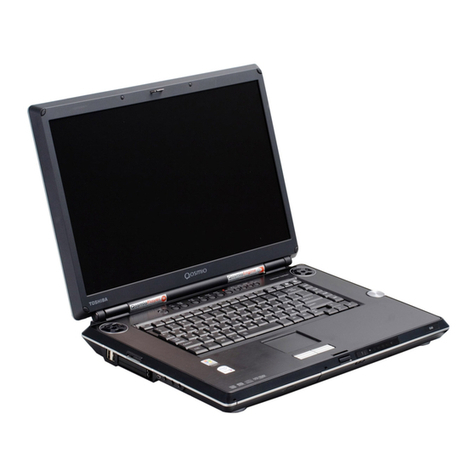
• Dimensions (WxDxH Front/H Rear): 15.7” x 11.3” x 1.42”
/1.83” without feet
• Weight: Starting at 8.79 lbs depending upon configuration13
• LCD Cover Color: Onyx Blue Metallic
Power Supply
• 90W (19V x 4.74A) 100-240V AC Adapter
-Dimensions (WxDxH): 5.24” x 1.21” x 2.28”
-Weight: starting at 0.89 lb
Battery14
• 4000mAh Lithium Ion battery pack
-Dimensions (WxDxH):8.18” x .83” x 2.91”
-Weight: starting at 0.77 lb
Software15
• Toshiba Software and Utilities
-TOSHIBA Value Added Package
-Electronic User’s Guide
-Bluetooth Stack for Windows by Toshiba
-TOSHIBA ConfigFree®
-TOSHIBA Assist
-TOSHIBA Security Assist
-TOSHIBA Disc Creator
-TOSHIBA Extended Tiles for Windows Mobility Center
-TOSHIBA Speech System
• Third-party Software
-TOSHIBA Game Console
-Microsoft Works Version 8.5
-Sun®Java™ 2 Runtime Environment
-Adobe®Acrobat®Reader 8.0
-Google™ Desktop
-Google™ Toolbar
-Google Picasa™
-Yahoo! Music™ Jukebox
-Ulead®DVD MovieFactory®5 for TOSHIBA
• Trial Software
-Microsoft Office Trial Home and Student 2007 Edition
(60-day trial)
-McAfee®Internet Security Suite (30-day trial)
• Special Offers
-Microsoft Office Live
-Shutterfly digital photo service
-Napster®music subscription service
-eMusic MP3 music subscription service
-VONGOSM internet video download service
-ebay®
-CNN Pipeline
-Skype internet communications
Limited Warranty16
• 1 Year Standard Limited Warranty
Memory Upgrade
• PA3512U-1M1G Toshiba 1GB DDR2-667 Memory
Module
• PA3513U-1M2G Toshiba 2GB DDR2-667 Memory
Module
Power
• PA3290U-3ACA Toshiba 120W Global AC Adapter
• PA3537U-1BRS Toshiba Primary Li Ion Battery Pack
(9 Cell)
Expansion
• PA3541U-2PRP Toshiba dynadock™ USB Docking
Station with VGA port
• PA3542U-2PRP Toshiba dynadock USB Docking
Station with DVI port
Security & Protection
• PA3611U-1ETC Toshiba Keyboard Protector
• PA410U Targus DEFCON CL Cable Lock
Storage
• PA3109U-3FDD Toshiba USB Floppy Disk Drive Kit
• PA1411U-1M1G Toshiba 1GB USB Hi-Speed Flash
Drive
• PA1412U-1M2G Toshiba 2GB USB Hi-Speed Flash
Drive
©2007 Toshiba America Information Systems, Inc. Satellite and TruBrite are
registered trademarks of Toshiba America Information Systems, Inc. and/or
Toshiba Corporation. Intel, Centrino and Core are trademarks or registered
trademarks of Intel Corporation or its subsidiaries in the United States and
other countries. Windows Vista is a trademark of Microsoft Corporation in the
United States and/or other countries. All other trademarks are the property
of their respective owners. While Toshiba has made every effort at the time of
publication to ensure the accuracy of the information provided herein, product
specifications, configurations, prices, system/component/ options availability
are all subject to change without notice. Reseller/Retailer pricing may vary. All
rights reserved.
1The product specifications and configuration information are designed for
a product Series. Your particular model may not have all the features and
specifications listed or illustrated. For more detailed information about the
features and specifications on your particular model, please visit Toshiba’s
Web site at pcsupport.toshiba.com. Toshiba America Information Systems,
Inc. reserves the right to modify or withdraw this offer at anytime without
notice.2CPU performance may vary. See Processor Legal Footnote at
www.info.toshiba.com. Intel® Dual Core Technology is a new technology
designed to deliver improved performance to the notebook PC. Performance
or compatibility may vary. For more information on Intel’s Core 2 Duo
processors, visit: http://www.Intel.com/core2duo/.364-bit processors are
designed to take advantage of 32 and 64 bit computing. 64-bit computing
requires that the following hardware and software requirements are met:
64-bit Operating System, 64-bit CPU, Chipset and BIOS (Basic Input/Output
System), 64-bit Device drivers, 64-bit applications. Certain device drivers
and/or applications may not be compatible with a 64-bit CPU and therefore
may not function properly. A 32-bit version of the operating system is
preinstalled on your computer unless explicitly stated that the operating
system is 64-bit. See “Detailed Specs” for more information.4May require
purchase of additional software, external hardware, or services. Transmission
speeds may vary. See Wireless Legal Footnote at www.info.toshiba.com.5
The Intel® Wireless Wi-Fi® Link 4965AGN (802.11a/g/n) adapter is based
on a draft “n” release version of the IEEE 802.11n specification, also known
as “Draft N”, which may not be compatible with, or support all features (e.g.,
security) of, certain Wi-Fi® equipment. Based on the theoretical bandwidth
maximum enabled by 2x3 Draft-N implementations with 2 spatial streams.
Actual wireless throughput and/or range will vary depending on your specific
operating system, hardware and software configurations. Compatible wireless
access point required. http://www.intel.com/network/connectivity/resources/
doc_library/tech_brief/316286.pdf.6 Memory size may vary. See Memory Legal
Footnote at www.info.toshiba.com.7 Hard drive capacity may vary. 1 Gigabyte
(GB) means 109 = 1,000,000,000 bytes using powers of 10. See Hard Disk
Drive Capacity Legal Footnote at www.info.toshiba.com.8 Copy protection
technology may prevent or limit recording or viewing of certain optical media
(e.g., CD or DVD).9Because HD DVD is a new format that makes use of new
technologies, certain disc, digital connection and other compatibility and/or
performance issues are possible. Advanced interactive and navigation features
of the HD DVD Video format including, but not limited to, Picture in Picture
(PIP) and network streaming features are not supported by this product. HD
DVD Application Logo (HD DVD-ROM) represents the optical drive’s conformity
with the DVD Forum’s verification criteria for HD DVD physical format, and
does not represent compliance with the HD DVD Video specification defined by
the DVD Forum. Advanced Access Content System (AACS) keys are integrated
into your computer for copy protection purposes. Occasional renewal of the
AACS key is required, and easily done by connecting to the Internet. AACS key
renewal will be provided at no charge to purchasers. If the AACS key is not
renewed, the HD DVD player software will stop playing AACS-protected HD
DVD content. However, it will continue to play other forms of content, such as
DVD discs or non-protected HD DVD content. For more information on AACS
key, visit www.aacsla.com/home.10 Small bright dots may appear on your
screen display when you turn on your PC. Your display contains an extremely
large number of thin-film transistors (TFT) and is manufactured using high-
precision technology. Any small bright dots that may appear on your display
are an intrinsic characteristic of the TFT manufacturing technology. Over a
period of time, and depending on the usage of the computer, the brightness of
the screen will deteriorate. This is also an intrinsic characteristic of the screen
technology. When the computer is operated on battery power, the screen with
dim and you may not be able to increase the brightness of the screen while
on battery power.11 GPU performance may vary. See Graphics Legal Footnote
at www.info.toshiba.com. 12 Due to FCC limitations, speeds of 53 kbps are
the maximum permissible transmission rates during download. Actual data
transmission speeds will vary depending on line conditions.13 Weight may
vary. See Weight Legal Footnote at www.info.toshiba.com.14 Battery life
may vary. See Battery Life Legal Footnote at www.info.toshiba.com.15 Some
software may differ from its retail version (if available), and may not include
user manuals or all program functionality. Internet access is required to
enable certain functionality of certain Microsoft products which may be
included with your computer. The Microsoft Office 2007 60-Day Trial software
(if applicable) is intended for evaluation purposes only. You must activate the
software before you can use it. Product activation procedures will be detailed
during initial launch of the software; activation requires Internet access. This
software has an expiration date of 60 days from date of first use, at which time
the software will operate under reduced-functionality mode, limiting end-
user options and operations. The Microsoft Office 2007 60-Day Trial software
is distributed without charge to the End User Customer but if the End User
wants to continue to use such product after the trial period, then the End
User Customer will have to pay a fee for the perpetual version of such Office
Product. For systems with Microsoft Money Essentials 2007 installed, note
that some online services for Microsoft® Money 2007 and Microsoft® Money
2007 Essentials will expire on the earlier of two years after your activation of
the software or September 1, 2009. Also, you may need to get some online
services separately from your financial institution, which may charge a fee.
See the online services policy at http://money.msn.com/Money/2007/OSP.
asp. 16 The terms and conditions of Toshiba’s standard limited warranty are
available at www.info.toshiba.com.
Satellite®P205-S6347
Accessories