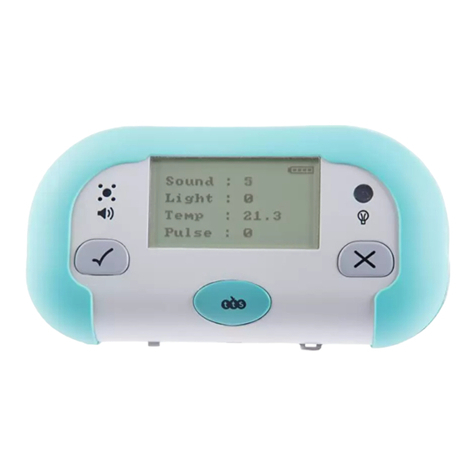
TTS SC01000 User manual

Bluetooth Data Logger
Easy to use tablet connecting data logger
User Guide
www.tts-group.co.uk

Important Information
¥ Please retain the information in this User Guide for future reference.
¥ Please read all instructions fully before using.
¥ To clean, wipe the surface with a clean damp cloth.
¥ Do not allow the product to come into contact with water or any other liquids.
¥ Keep the product away from direct sunlight and heat.
¥ If your product malfunctions please switch it off, remove the batteries, then replace the
batteries and switch back on.
Pack Contents
¥ Data Logger
¥ Temperature Probe
¥ 2 x CR2032 coin cell batteries
¥ User guide
Know Your Product
External
Temperature Probe
Central Unit
Infra Red
Temperature
Sensor
Light Sensor
Sound Sensor
LED Indicator

Bluetooth Data Logger
Using Your Product
To download the Bluetooth Data Logger app please visit the itunes store or Play Store.
The data logger and temperature probe will start transmitting data once the batteries are
inserted. The LED's will flash red to indicate data is being transmitted.
The Android or iOS app should then be used with the data logger. The app will allow live
data from the logger to be viewed. The app also allows a timed logging session to be
configured and for the captured data to be downloaded.
NB: More than one tablet device can connect to the same data logger at the same
time.
To turn off either device press the On/Off button. The LED will stop flashing.
To switch the devices on again press the On/Off button, the LED's will flash red.
If the data logger is not being used for a period of time, all batteries should be removed.
Reset ON / OFF
Battery hatch
ON / OFF
LED
Temperature Probe

Scheduled Data Logging
The app can be used to schedule a data logging session. When a schedule is set the LED
will flash blue twice and then turn back to red. The data logger should be left switched
on. When the scheduled session starts the LED will turn blue.
To reset the logger insert a pin into the reset hole.
Inserting the Battery
1. Unscrew the cover
on bottom
2. Insert the button cell battery
into battery holder to start
transmitting
3. Be sure the "+" polarity is
facing the top

Bluetooth Data Logger
Using the Data Logger
Data logger has an IR temperature, sound and sensor positioned on the front.
An external temperature probe is stored inside the data logger when not in use.
1. Unscrew the battery
door on bottom
2. Insert 4 x AA battery
according to the correct battery
polarity shown above
3. The red LED will flash when the data
logger is transmiting data captured from
the sensor
The red LED will flash
when data is being
transmitted
IR Temp Sensor
Light Sensor
Sound Sensor External Temp Probe

"reset" "on/off" button
Once you set the schedule in apps, the
blue LED will flash twice, then turn to red.
Blue LED on when
schedule time starts.
Once the batteries are inserted, transmitting
will start and the LED will flash. To turn off,
press on/off once, the red LED will turn off.
The Data logger will start transmitting once batteries are inserted (for main unit) or button
cell batteries are inserted (for external probe)
*LED will flash red when the data logger is transmitting data.
To stop transmitting on central unit press "on/off" swich on the bottom once (flashing
LED will then turn off, indicating that the data is no longer being transmitted). To re-start
transmitting press the "on/off" switch again (LED will flash red again).
To stop transmitting on external probe switch off using the "on/off" button.
"Reset" button on the bottom of the main unit allows user to reset "current" data reading.
You need to use a pin and insert into the reset hole.
Once schedule is set (use app to set), the blue LED will flash twice, then the LED will turn
back to red. When scheduled time starts the LED will turn blue (solid).

Bluetooth Data Logger
Battery Precautions
¥ Remove the battery hatch cover and carefully remove the batteries and dispose of
them responsibly.
¥ Insert new batteries, ensuring the correct polarity. Replace the battery hatch firmly and
accordingly.
¥ Different types of batteries or new and used batteries are not to be mixed.
¥ Exhausted batteries are to be removed from the toy.
¥ The supply terminals are not to be short circuited.
¥ Only batteries of equal size and type should be used.
¥ Non-rechargeable batteries are not to be recharged.
¥ Rechargeable batteries are only to be charged under adult supervision.
¥ Rechargeable batteries are to be removed from the toy before being charged.
Troubleshooting
Problem
No reading being received from the
sensors
Product won't switch on
Product is working intermittently
Solution
Check the sensors are not obscured or
blocked
Replace the batteries
Switch the product off, remove the
batteries, then replace the batteries and
switch back on.

Bluetooth Data Logger
Technical Support
Please visit www.tts-group.co.uk for the latest product information.
TTS Group Ltd.
Park Lane Business Park
Kirkby-in-Ashfield
Nottinghamshire
NG17 9GU, UK.
Freephone: 0800 318686 Freefax: 0800 137525
WARNING: Do not dispose of this product in household waste.
Hand it over to a collection point for recycling electronic appliances.
Made in China, on behalf of TTS Group Ltd.
TTS Product Code:
SC01000
TTS is proud to be part of plc
Table of contents
Other TTS Data Logger manuals