manuals.online logo
Brands
  1. Home
  2. •
  3. Brands
  4. •
  5. TXAM
  6. •
  7. Water Pump
  8. •
  9. TXAM HBT Series Installation and operating instructions

TXAM HBT Series Installation and operating instructions

Popular Water Pump manuals by other brands

Watershed Innovations HYDRAPUMP SMART FLEX Instructional manual

Watershed Innovations

Watershed Innovations HYDRAPUMP SMART FLEX Instructional manual

Graco Modu-Flo AL-5M instructions

Graco

Graco Modu-Flo AL-5M instructions

Messner MultiSystem MPF 3000 operating instructions

Messner

Messner MultiSystem MPF 3000 operating instructions

Xylem Bell & Gossett WEHT0311M Installation, operation and maintenance instructions

Xylem

Xylem Bell & Gossett WEHT0311M Installation, operation and maintenance instructions

WilTec 50739 Operation manual

WilTec

WilTec 50739 Operation manual

Franklin Electric Little Giant 555702 HRK-360S instruction sheet

Franklin Electric

Franklin Electric Little Giant 555702 HRK-360S instruction sheet

Ingersoll-Rand PD02P Series Operator's manual

Ingersoll-Rand

Ingersoll-Rand PD02P Series Operator's manual

VS ZJ Series Operating	 instruction

VS

VS ZJ Series Operating instruction

Flotec FPZS50RP owner's manual

Flotec

Flotec FPZS50RP owner's manual

SKF Lincoln FlowMaster II User and maintenance instructions

SKF

SKF Lincoln FlowMaster II User and maintenance instructions

Xylem Lowara LSB Series Installation, operation and maintenance instructions

Xylem

Xylem Lowara LSB Series Installation, operation and maintenance instructions

Water Duro Pumps DCJ500 Operating & installation instructions

Water

Water Duro Pumps DCJ500 Operating & installation instructions

Action P490 Operating instructions & parts manual

Action

Action P490 Operating instructions & parts manual

Flo King Permacore Reusable Carbon Bag Disassembly. & Cleaning Instructions

Flo King

Flo King Permacore Reusable Carbon Bag Disassembly. & Cleaning Instructions

ARO ARO PD15P-X Operator's manual

ARO

ARO ARO PD15P-X Operator's manual

Pumptec 112V Series Operating instructions and parts manual

Pumptec

Pumptec 112V Series Operating instructions and parts manual

Virax 262070 user manual

Virax

Virax 262070 user manual

Neptun NPHW 5500 operating instructions

Neptun

Neptun NPHW 5500 operating instructions

manuals.online logo
manuals.online logoBrands
  • About & Mission
  • Contact us
  • Privacy Policy
  • Terms and Conditions

Copyright 2025 Manuals.Online. All Rights Reserved.








HBT Series
TXAM Solar Powered Chemical Injection Pump

Assembly and Operations Manual

















Revision: 3.01
June 2013
ʹ
5623TuskegeeSt.
Houston,TX77091
Office:713.692.6400
Fax:713.692.6401








TABLE OF CONTENTS
PAGE



¾ASSEMBLY INSTRUCTIONS…………………………………………………..………..3

¾FIXTURE BASE, BATTERY BOX, AND SOLAR PANEL……………………………..3

¾SOLAR PANEL ORIENTATION………………………………………………………....4
oAzimuth……………………………………………………………………………4
oTilt………………………………………………………………………………... 6
¾SOLAR PANEL MAINTENANCE………………………………………………………. 6

¾USING THE TIMER………………...……………………………………………………. 7

¾PACKING ADJUSTMENT………………………………………………………………..8

¾PLUNGER ADJUSTMENT………………………………………………………………9

¾EXPLODED VIEW OF PUMP WITH NOMENCLATURE………………………….... 10

¾PREVENTATIVE MAINTENANCE…………………………………………………….. 11

¾TROUBLESHOOTING………………………………………………………………….. 12

¾REPAIRS…………………………………………………………………………………. 13

¾ORDERING PARTS…………………..………………………………………………….14

¾CONTACT INFORMATION……………………………………………………………...14

¾REFERENCE

oTilt Chart for the United States……………………………………………….. 15
͵
5623TuskegeeSt.
Houston,TX77091
Office:713.692.6400
Fax:713.692.6401





Assembly
Instructions

Fixture Base, Battery Box and Solar Panel


Mounting the solar panel can be done in a variety of ways. The solar panel is shipped with mounting
hardware attached to make field installation of the unit easier for the technician. The Solar Panel may
be installed on any permanent object or pole at the work site or on the fixture provided by TXAM. The
installer may want to leave the fixture mobile so it can easily be moved to another site or stake it into
the ground.








Stake

Stake
Battery Box








Battery Stand



Stake Cross


Stake



Illustration 1: Assembly of Mounting Fixture





To use the fixture provided by TXAM, you will need: 5/16” Allen wrench, adjustable wrench, and
hammer. All parts of the fixture are powder-coated for durability and resistance to the elements.

Slide the four ‘legs’ (2 foot poles) into the cross. The hole on top of the cross should face up. One
end of leg has two holes for the stake and should be pointed out. The stakes will be driven into the
ground from the outside toward the inside so the holes on top should be the outer most holes.
Tighten the four 5/16” set screws to hold the legs in place. Place the base you just assembled in the
location you have chosen. If you want the fixture to be permanent use the four metal stakes provided
to secure it to the ground. The stakes should be driven through the legs from the outside toward the
inside using the holes provided. The holes will angle the stake to maximize strength.
Ͷ
5623TuskegeeSt.
Houston,TX77091
Office:713.692.6400
Fax:713.692.6401






Next, slide the four foot mounting pole into the top of the cross and tighten the set screw to hold it in
place. This pole will hold the battery box and solar panel. Slide the battery stand onto the mounting
pole. The battery stand does not need to be tightened until you adjust it future steps.

Slide the pipe tee onto the mounting pole so that the remaining two holes face opposite sides and
tighten the set screw. The three set screws in the pipe tee should face the rear so that the solar panel
does not block access to them. Now the remaining pole (the ‘arm’) will slide through the two holes in
the pipe tee and will be used to secure the solar panel. Tighten the remaining two set screws before
mounting the solar panel.

The hardware on the back of the solar panel will connect to the pole. Tighten all of the pipe clamps
from the solar panel to the arm. Use care when mounting the solar panel so that the surface of the
panel does not get scratched or cracked. Damage to the solar cells can render the panel useless and
is not covered by warranty.

Try to adjust the battery box to a location that is shaded by the solar panel during midday and tighten
the bolt to hold it in place on the mounting pole. Protecting the battery from the hottest sun of the day
will help prolong battery life.



Solar Panel Orientation


Orientation of the solar panel should be set so that the maximum output is achieved. Power output of
solar systems is affected by direction (azimuth) and angle (tilt) to the sun. The location of the solar
panel for your system should be in an area with no obstruction of the sun. Shadows or shade will
prevent the panel from properly charging the battery.

Direction (Azimuth)

The direction of the solar panel can be adjusted by loosening the Bottom set screw on the pipe tee.
Solar arrays located in the Northern Hemisphere should always face true south not magnetic south.
The difference between the two is called magnetic declination and depends on your geographic
location. The map on the next page shows the magnetic declination for the United States.
ͷ
5623TuskegeeSt.
Houston,TX77091
Office:713.692.6400
Fax:713.692.6401





























East
West




To find true south you can use a compass but the reading must be corrected for magnetic declination.
First you will find true north. Some compasses allow for magnetic declination to be set, otherwise you
would need to offset the compass needle from true north by the declination angle. For example, if
your panel is in Houston, Texas, your magnetic declination angle is about 5 degrees east. For true
north compass bearing, rotate the compass until the needle points 5 degrees east of north on the
compass bearing scale. The opposite direction (180 degrees) of true north is true south - the direction
you wanted. If your declination were 5 degrees west, you would rotate until the needle was 5 degrees
west of north (it would point to 360 – 5 = 355 degrees).

An alternate method is to adjust the solar panel to solar noon. This method uses the fact that the sun
is always due south at solar noon. Solar noon is exactly half way between the sunrise and sunset
time. Shadows cast by objects at solar noon run true north-south. Therefore, at solar noon, the
shadow cast by any vertical edge or a plumb-bob string would determine true south.


Solar
Noon



South


East West
͸
5623TuskegeeSt.
Houston,TX77091
Office:713.692.6400
Fax:713.692.6401


Optimum Panel Angle (Tilt)

The tilt of the solar panel can be adjusted by loosening the Side set screws on the pipe tee. The solar
panel will produce the most power when it is pointed directly at the sun. Panels that are mounted to
fixed structures should be tilted so that performance is optimized for winter months. If your system is
producing adequate power in the winter months, performance should be satisfactory for the remainder
of the year.

The optimized angle for winter months will seem like too much tilt but the winter sun is much lower in the sky
than any other time of year. See the illustration below.

Winter Summer Fall & Spring


Use the reference chart on page 15 to find the optimum tilt angle for solar panels in your general area
of the United States. If your city is not listed, use the city closest to your latitudinal location (a city that
is not located much farther north or south of your location).


Solar Panel Maintenance

Minimal maintenance is needed to keep the solar panel operating efficiently. Charging capabilities of
the panel can be maximized by keeping the panels clean. Removing dust coating and bird droppings
will allow the panels to take full advantage of the sun. Use water and a soft cloth to clean the panels.
Harsh chemicals or abrasive cloths may damage the surface and reduce the ability of the panels to
charge the batteries.
͹
5623TuskegeeSt.
Houston,TX77091
Office:713.692.6400
Fax:713.692.6401





TXAM Smart Timer Instructions
The TXAM Smart Timer is a solid state controller 12v DC solar pumps. The timer has been designed to monitor battery voltage and prevent
full discharge of the battery. This feature extends battery life and allows for faster recharge. During low light / no light conditions as battery
voltage drops, the timer automatically recalculates and slows the frequency of injection. A sight glass or drum gauge should be used along
with the TXAM timer to insure accurate injection rates of the chemical. Many factors will affect injection rates.
Wires should be connected from the battery and the pump motor to the timer as the picture indicates below. A sticker has been placed on
the relay switch of each timer for your reference. Connecting the power incorrectly will damage the timer. Using a fuse rated higher than
20 Amps (15 Amps on earlier versions) voids the warranty on both the timer and the pump.

The TXAM timer is turned on by moving the toggle switch to the up or on position. After turning the timer on, allow up to one minute for
the timer to begin pump operation. When the timer is powered on it will run through a self-check process. A letter will flash on the display
indicating the software version of the timer followed by flashes of the green, yellow and red indicator lights. Next the display will flash CC
and five numbers. CC indicates “cycle count” and the first four numbers let you know how many times the timer has cycled the pump to the
nearest thousand, rounded down. The fifth number indicates the frequency rate. For example, CC01985 tells you the timer has cycled
198,000 times and the frequency is set to 5 cycles per minute. If the timer is turned off when the pump has cycled 198,999 times, the cycle
count will show CC01985 when it is powered back on and will begin counting again at 198,000, not 198,999.
Indicator lights

Display
Duration Button


Frequency Button


+
Battery Connections
_

Reference Sticker



Toggle Switch



+
Motor Connections


Picture 1 – TXAM Smart Timer Chart 1 – Cycle Indicator
NOTE: If your pump has the adjustable stroke feature make sure you set the stroke before setting the injection rate.

The TXAM timer controls chemical injection rates in two ways: frequency and duration. Frequency refers to the times (1 to 10) the pump
is turned on or cycled per minute. Duration refers to how long each cycle lasts (1 to 5 seconds) before turning off. The timer must be
between cycles to make adjustments. Turning the dial during a cycle will make changes to the next cycle.

Frequency is set by pushing the black button shown in picture 1 and determines the number of times the pump cycles per minute.
Frequency can be one time per minute up to ten times per minute. The display digit on the timer indicates the level selected (the number 10
is indicated by letter F).

Duration is set by the red button shown in picture 1 and determines how long each cycle lasts. Duration can be set for 1 second up to 5
seconds per cycle. To set the duration, push and hold down the red button. The display will scroll through numbers 1 to 5. Release the red
button when the display shows the number of seconds you want.

To see the duration at any time you can push and release the red button. The display will show the duration number for five seconds after
the button is pushed.

Adjustments to the timer settings will take effect after completion of the current cycle. Allow sufficient time (up to one minute) for new
settings to take effect.

Pump Cycle and Battery
Voltage

Battery voltage is shown by the indicator lights at the top of the timer which flash every ten seconds. The number of times the pump is
cycled by the timer is directly affected by the voltage of the battery. Refer to Chart 1 for cycle/voltage relationships. When battery voltage
reaches 12.0 or greater, the pump cycles at the selected frequency. During periods low light / no light conditions when the solar panel
cannot charge the battery, the timer will lower the frequency of injections based on voltage. For example, if the user has the frequency set
to 8 and the battery voltage drops to 11.8v, the timer will automatically lower the frequency from 8 to 6 (the display will continue to show 8 as
the frequency).

ͺ
5623TuskegeeSt.
Houston,TX77091
Office:713.692.6400
Fax:713.692.6401


Packing Adjustment


To adjust the packing on the HBT pump you will need a small hex key or similar tool just small enough
to fit in the adjustment holes on the nut. The packing can be adjusted by tightening or loosening the
packing nut as shown in the illustration below.

PACKING SHOULD ONLY BE ADJUSTED WHILE THE PUMP IS TURNED OFF












Loosen








Packing
Nut
Tighten




The following steps should be followed to tighten the packing:
a. Loosen the packing to the point the nut turns without resistance.
b. Retighten the packing nut to the point that it just snugs- up to the packing bushing.
c. Then tighten the packing nut only one more position (the distance between two holes).

Over tightening the packing will cause the pump to draw more power from the battery shortening the
amount of time the battery can run the pump in low-light or no light conditions. It can also shorten the
life of the battery and the packing.
ͻ
5623TuskegeeSt.
Houston,TX77091
Office:713.692.6400
Fax:713.692.6401






Plunger Adjustment

Plunger adjustment is used to alter the amount of chemical pumped into the well. There are three
setting per plunger (six possible settings for double-headedpumps).

Loosen one screw on the housing cover and remove the other so that the cover can be moved.
Replace the screw you removed so that it is not lost. The plunger is adjusted by carefully removing
the 1/8” stainless steel spring pin from the adjustment hole in the plunger and inserting it into another
hole in the plunger. If you damage the spring pin when removing it, replace it with another from the
spare parts bin. Reusing a damaged spring pin may cause it to break off in the plunger. See picture
below.










1 2 3 1 2 3








Plunger Adjustment holes
xPosition 1 = 50% Stroke Length
xPosition 2 = 75% Stroke Length
xPosition 3 = 100% Stroke Length


Moving the pin toward the center of the block lowers the injection amount.

Only one adjustment should be made at a time. The adjustment can be dramatic and should be
checked with the drum gauge before adjusting the other side.


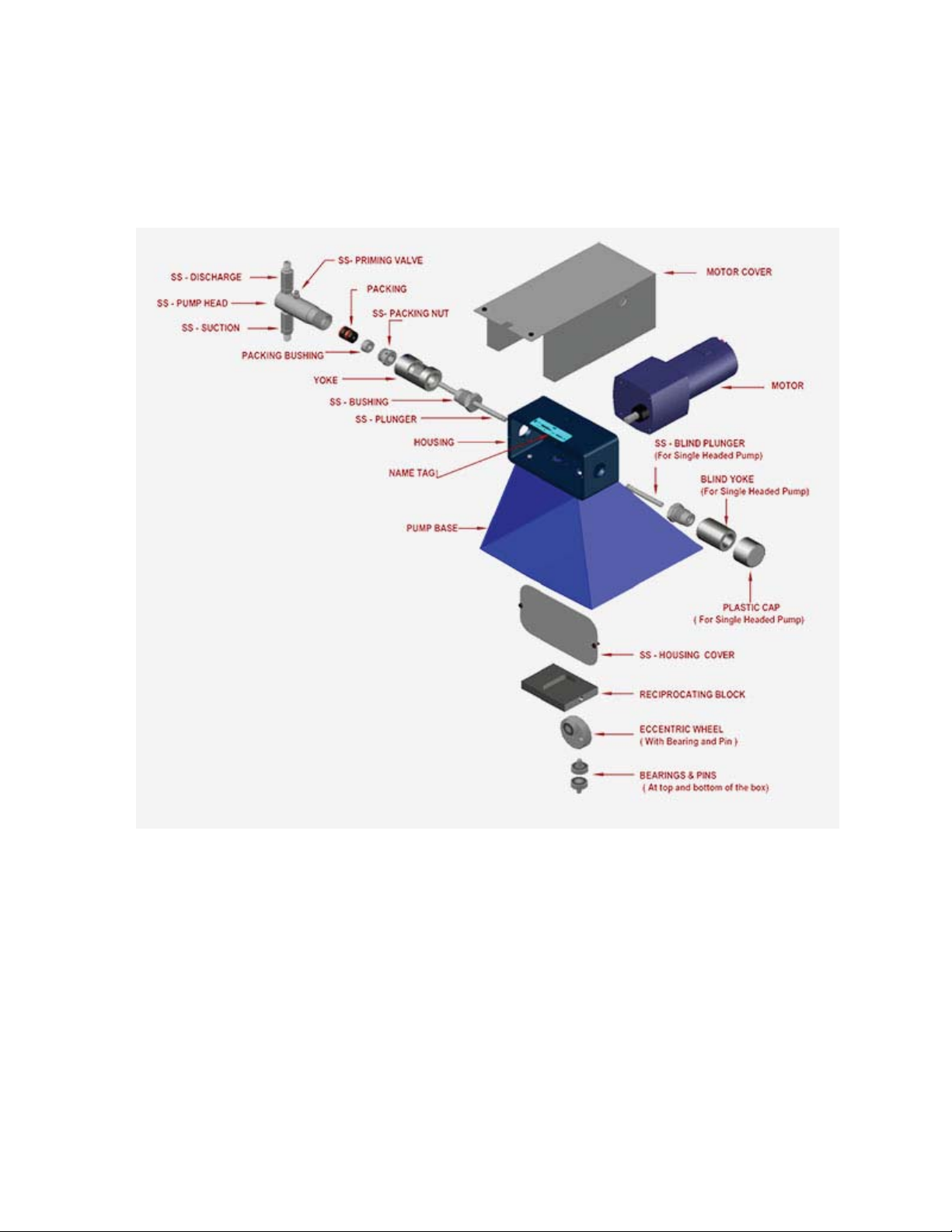
HBT
Pump-
Exploded View with Nomenclature



