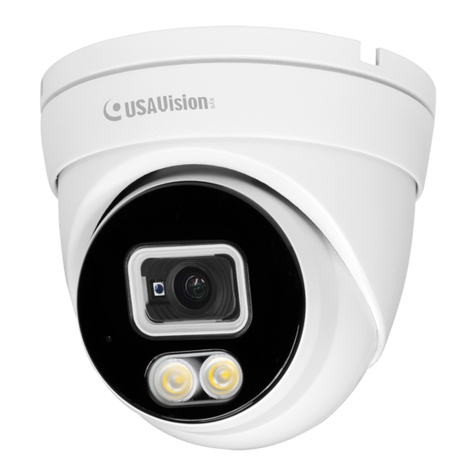
USAVision UVS-ABL1300 User manual

UVS-ABD1300, UVS-ABL1300, UVS-ADR1300
User's Manual
Before attempting to connect or operate this product,
please read these instructions carefully and save this manual for future use. UVS1300V101-A
Available from A1 Security Cameras
© 2017 USAVision, sys. All rights reserved.
Under the copyright laws, this manual may not be copied, in whole or in part,
without the written consent of USAVision.
Every effort has been made to ensure that the information in this manual is
accurate. USAVision, sys. makes no expressed or implied warranty of any kind
and assumes no responsibility for errors or omissions. No liability is assumed
for incidental or consequential damages arising from the use of the information
or products contained herein. Features and specifications are subject to
change without notice.
Note: No memory card slot or local storage function for Argentina.
USA Vision Systems Inc.
9235 Research Drive,
Irvine, CA 92618, USA
Tel: +1-949-583-1519
Fax: +1-949-583-1522
http://www.usavisionsys.com
Trademarks used in this manual: USAVision, the USAVision logo and UVS
series products are trademarks of USAVision, sys. Windows is the registered
trademarks of Microsoft Corporation.
May 2017
Available from A1 Security Cameras
Preface
This Manual is designed for the following models and firmware versions:
Model Model Number Firmware Version
Eyeball Dome ABD1300
V1.01
Bullet IP Camera ABL1300
Mini Fixed Rugged IP Dome ADR1300
Available from A1 Security Cameras

Contents
Naming Definition....................................................................iv
Note for Connecting to GV-VMS / DVR / NVR ........................v
Note for Recording ..................................................................vi
Note for Installing Camera Outdoor .....................................vii
Chapter 1 Introduction ..........................................................1
1.1 Key Features ......................................................................................................... 2
1.2 Packing List ........................................................................................................... 4
1.3 Optional Accessories ............................................................................................. 5
Chapter 2 Accessing the Camera.........................................6
2.1 Installing on a Network........................................................................................... 6
2.1.1 Checking the Dynamic IP Address............................................................. 7
2.1.2 Assigning an IP Address............................................................................ 9
2.2 Accessing Live View .............................................................................................11
2.2.1 The Live View Window ............................................................................12
Chapter 3 Administrator Mode ...........................................15
3.1 Common...............................................................................................................17
3.1.1 Basic Info..................................................................................................17
3.1.2 Local Settings ...........................................................................................18
3.2 Network ................................................................................................................20
3.2.1 Network ....................................................................................................20
3.2.2 DNS..........................................................................................................22
3.2.3 Port...........................................................................................................23
3.2.4 FTP.........................................................................................................25
3.2.5 E-mail .......................................................................................................27
3.3 Video ....................................................................................................................28
3.3.1 Video ........................................................................................................28
3.3.2 Snapshot ..................................................................................................30
3.3.3 Media Stream ...........................................................................................31
3.4 Image ...................................................................................................................33
3.4.1 Image .......................................................................................................33
3.4.2 OSD..........................................................................................................39
Available from A1 Security Cameras

3.4.3 Privacy Mask...............................................................................................40
3.5 Events .....................................................................................................................41
3.5.1 Motion Detection.......................................................................................41
3.6 Storage ...................................................................................................................44
3.6.1 Storage.....................................................................................................44
3.7 Security.................................................................................................................46
3.7.1 User..........................................................................................................46
3.7.2 Network Security.......................................................................................47
3.8 System..................................................................................................................49
3.8.1 Time .........................................................................................................49
3.8.2 Maintenance .............................................................................................51
Chapter 4 Recording and Playback ...................................52
4.1 Recording .............................................................................................................52
4.2 Playback from the Memory Card..................................................................53
4.2.1 Recording Download ................................................................................55
Chapter 5 Advanced Applications .....................................56
5.1 Upgrading System Firmware.................................................................................56
5.1.1 Using the Web Interface ...........................................................................57
5.1.2 Using the GV-IP Device Utility ..................................................................58
5.2 Restoring to Factory Default Settings....................................................................60
5.2.1 Using the Web Interface ...........................................................................60
5.2.2 Directly on the Camera .............................................................................61
Chapter 6 DVR Configurations ...........................................62
6.1 Setting Up IP Cameras on GV-System .................................................................63
6.1.1 Customizing the Basic Settings on GV-System.........................................65
6.2 Setting Up IP Cameras on GV-VMS .....................................................................66
Appendix .................................................................................68
A. RTSP Protocol Support.............................................................................................68
B. Optional Installation for ABD1300 .............................................................................69
C. Optional Installation for ADR1300.............................................................................78
D. Optional Installation for ABL1300..............................................................................83
E. Waterproofing the Cable ...........................................................................................88
Available from A1 Security Cameras
iii
Naming Definition
GV-System GeoVision Analog and Digital Video Recording Software. The GV-
System also refers to Multicam System, GV-NVR System, GV-
DVR System and GV-Hybrid DVR System at the same time
GV-VMS GeoVision Video Management System for IP cameras.
Available from A1 Security Cameras

Note for Connecting to GV-VMS / DVR / NVR
The Eyeball Dome, Bullet IP Camera and Mini Fixed Rugged Dome are designed to work
with and record on GV-VMS / DVR / NVR, a video management system. Once the cameras
are connected to the GV-VMS / DVR / NVR, the resolution set on the GV-VMS / DVR / NVR
will override the resolution set on the cameras’ Web interface. You can only change the
resolution settings through the Web interface when the connection to the GV-VMS / DVR /
NVR is interrupted.
Available from A1 Security Cameras

Note for Recording
Mind the following when using a memory card for recording:
1. Recorded data on the memory card can be damaged or lost if the data are accessed
while the camera is under physical shock, power interruption, memory card detachment
or when the memory card reaches the end of its lifespan. No guarantee is provided for
such causes.
2. The stored data can be lost if the memory card is not accessed for a long period of time.
Back up your data periodically if you seldom access the memory card.
3. Memory cards are expendable and their durability varies according to the conditions of
the installed site and how they are used. Back up your data regularly and replace the
memory card annually.
4. To avoid power outage, it is highly suggested to apply a battery backup (UPS).
5. For better performance, it is highly suggested to use Micro SD card of MLC NAND flash,
Class 10.
6. Replace the memory card when its read/write speed is lower than 6 MB/s or when the
memory card is frequently undetected by the camera.
Available from A1 Security Cameras

Note for Installing Camera Outdoor
When installing the camera outdoor, be sure that:
1. The camera is set up above the junction box to prevent water from entering the camera
along the cables.
2. Any power, audio and I/O cables are waterproofed using waterproof silicon rubber or the
like.
3. The screws are tightened and the cover is in place after opening the camera cover.
Available from A1 Security Cameras
vii

Available from A1 Security Cameras
This manual suits for next models
2
Table of contents
Other USAVision IP Camera manuals