manuals.online logo
Brands
  1. Home
  2. •
  3. Brands
  4. •
  5. Value Creator
  6. •
  7. Mouse
  8. •
  9. Value Creator perixx PERIMICE-520 User manual

Value Creator perixx PERIMICE-520 User manual

Other manuals for perixx PERIMICE-520

3

Other Value Creator Mouse manuals

Value Creator perixx PERIMICE-520 User manual

Value Creator

Value Creator perixx PERIMICE-520 User manual

Value Creator perixx PERIMICE-201 II User manual

Value Creator

Value Creator perixx PERIMICE-201 II User manual

Value Creator perixx PERIMICE-718 User manual

Value Creator

Value Creator perixx PERIMICE-718 User manual

Value Creator perixx PERIMICE-520 User manual

Value Creator

Value Creator perixx PERIMICE-520 User manual

Value Creator perixx PERIMICE-520 User manual

Value Creator

Value Creator perixx PERIMICE-520 User manual

Value Creator perixx PERIMICE-718 User manual

Value Creator

Value Creator perixx PERIMICE-718 User manual

Popular Mouse manuals by other brands

Viper V570 user manual

Viper

Viper V570 user manual

Cherry MC 2.1 user manual

Cherry

Cherry MC 2.1 user manual

Sven RX-G720 user manual

Sven

Sven RX-G720 user manual

Sharkoon Light2 180 manual

Sharkoon

Sharkoon Light2 180 manual

Cherry MW 8C ERGO user manual

Cherry

Cherry MW 8C ERGO user manual

Vantec NBW-100U user manual

Vantec

Vantec NBW-100U user manual

NGS HIT RB manual

NGS

NGS HIT RB manual

Sharkoon FireGlider manual 

Sharkoon

Sharkoon FireGlider manual 

Lenovo Wireless Mouse N3902 quick start guide

Lenovo

Lenovo Wireless Mouse N3902 quick start guide

BASETech BN-S11 operating instructions

BASETech

BASETech BN-S11 operating instructions

Dell WM326 user guide

Dell

Dell WM326 user guide

Areson B213 user guide

Areson

Areson B213 user guide

Targus AMU83EU operating instructions

Targus

Targus AMU83EU operating instructions

HP M17587-371 manual

HP

HP M17587-371 manual

Chatpen CHA-30 user manual

Chatpen

Chatpen CHA-30 user manual

GAMDIAS DEMETER GMS5000 Quick installation guide

GAMDIAS

GAMDIAS DEMETER GMS5000 Quick installation guide

HP KJ453AA - Wireless Laser Mouse datasheet

HP

HP KJ453AA - Wireless Laser Mouse datasheet

Trust GRAPHIN GXT 960 user guide

Trust

Trust GRAPHIN GXT 960 user guide

manuals.online logo
manuals.online logoBrands
  • About & Mission
  • Contact us
  • Privacy Policy
  • Terms and Conditions

Copyright 2025 Manuals.Online. All Rights Reserved.

PERIMICE-520
2
PERIMICE-520
請畫一個 USB 線插入電腦 USB 的小
圖
3
小圖 1 把球從洞中推出來清理後放回去的小圖
小圖 2 把角度調整的腳架裝上去的小圖, 有二個腳架(10 度和 20 度的)
4
EN
Specification
PERIMICE-520
Interface
USB2.0
Size
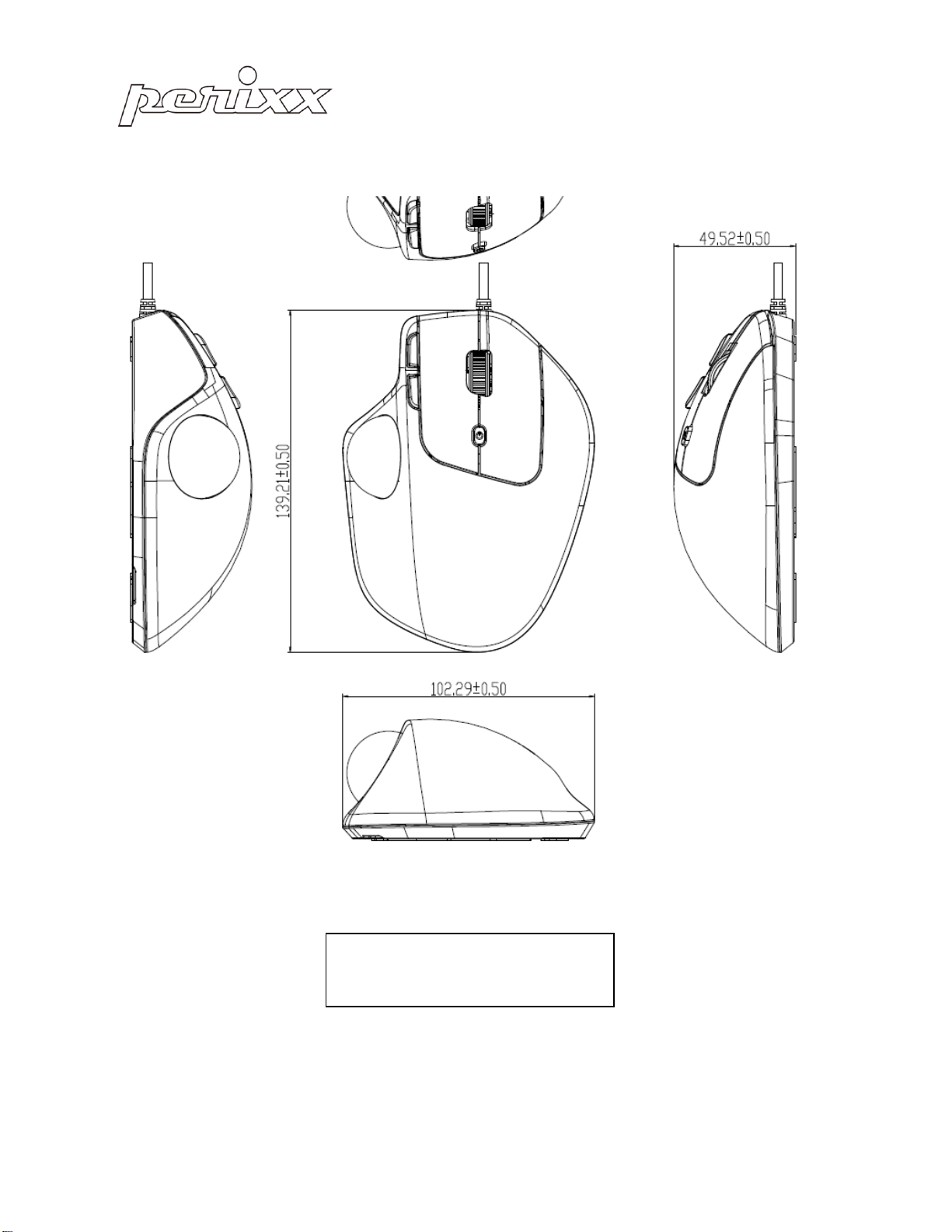
139*102*50mm
Cable Length
1800mm
Weight
134g
Material
ABS
OS requirement
Win 7 / above
Key number
6
DPI
400(L) / 1600(H)
Acceleration
10G
Tracking Speed
30 IPS
Report Rate
125Hz
Durability
3 million keypresses
Important Safety Instructions
. Avoid Dropping.
. Do not disassemble.
. Do no expose to liquids.
. This product is suitable for moderate climates only.
. The maximum ambient temperature during use of this product must not exceed 40 degree
. Open flame sources, such as candles, must not be placed on this product.
. Only use a dry cloth or brush to clean this product.
PERIMICE-720
LED Indicator
Status
Flashing Green (3 Times)
2.4G Active
Flashing Green (20 seconds)
2.4G Pairing
Flashing Blue (3 Times)
Bluetooth Active
Flashing Blue (3 minutes)
Bluetooth Pairing
Flashing Green (once per second)
Battery Low (2.4G mode)
Flashing Blue (once per second)
Battery Low (BT mode)
5
Perixx’s warranty obligations are limited to the terms set forth below. Perixx warrants this hardware product
against defects in materials and workmanship for a period of one (1) year from the date of original invoice.
If you discover a defect, Perixx will either repair or replace the product free of charge. You must contact
Perixx for a Return Merchandise Authorization number (RMA) prior to returning any product. For each
product returned for warranty service, please include your name, shipping address (no P.O. Box), telephone
number, copy of the bill of sale as proof of purchase and make sure that the package is clearly marked with
your RMA number.
THE WARRANTY AND REMEDIES SET FORTH ABOVE ARE EXCLUSIVE AND IN LIEU OF ALL OTHERS,
WHETHER WRITTEN, ORAL, EXPRESS OR IMPLIED. PERIXX SPECIFICALLY DISCLAIMS ANY AND ALL IMPLIED
WARRANTIES, INCLUDING AND WITHOUT LIMITATION, WARRANTIES OF MERCHANTABILITY AND FITNESS
FOR A PARTICULAR PURPOSE. NO PERIXX DEALER, AGENT, OR EMPLOYEE IS AUTHORIZED TO MAKE ANY
MODIFICATION, EXTENTION OR ADDITION TO THIS WARRANTY.
PERIXX IS NOT RESPONSIBLE FOR SPECIAL, INCIDENTAL OR CONSEQUENTIAL DAMAGES RESULTING FROM
ANY BREACH OF WARRANTY, OR UNDER ANY LEGAL THEORY, INCLUDING BUT NOT LIMITED TO LOST
PROFITS, DOWNTIME, GOODWILL, DAMAGE TO OR REPLACEMENT OF EQUIPMENT OR PROPERTY AND
ANY COST OF RECOVERING, REPROGRAMMING OR REPLRODUCING ANY PROGRAM OR DATA STORED IN
OR USED WITH PERIXX PRODUCTS. PERIXX’S MAXIMUM LIABILITY FOR ANY AND ALL DAMAGES ARISING
OUT OF USE OF THE PRODUCT SHALL BE LIMITED TO THE AMOUNTS PAID BY PURCHASER FOR SUCH
PRODUCT.

6
Caution
⚫The manufacturer and re-resellers are not responsible for any malfunctions, damage, or personal
injury incurred by:
oA misuse of the product
oAny attempt to dismantle, change or modify the product in any manner
⚫You are cautioned that changes or modifications not expressly approved by the party responsible
for the compliance could void your authority to operate the equipment.
⚫Mandatory repair charges are required for the following conditions, within the guarantee period:
oMalfunction or damage is due to misuse or improper alteration or repair.
oMalfunction or damage caused by the falling after the purchase.
oMalfunction or damage is caused by a fire, salt, gas, earthquake, lighting, wind, water, or
other natural calamities, or abnormal voltage.
oMalfunction or damage is caused by other devices connected to the keyboard.
⚫All brand names, trademarks and logos are the properties of their respective owners.
Please Note: Long-term repetitive use of any keyboard could cause injury to user. Perixx recommends
users avoid excessive use of this or any keyboard.
7
English (EN)
Software setting
Download the PERIMICE-520 driver from Perixx’s website and install it.
(http://perixx.eu/en/driver.html) After the installation, you can start the setting by clicking icon.
Main Control
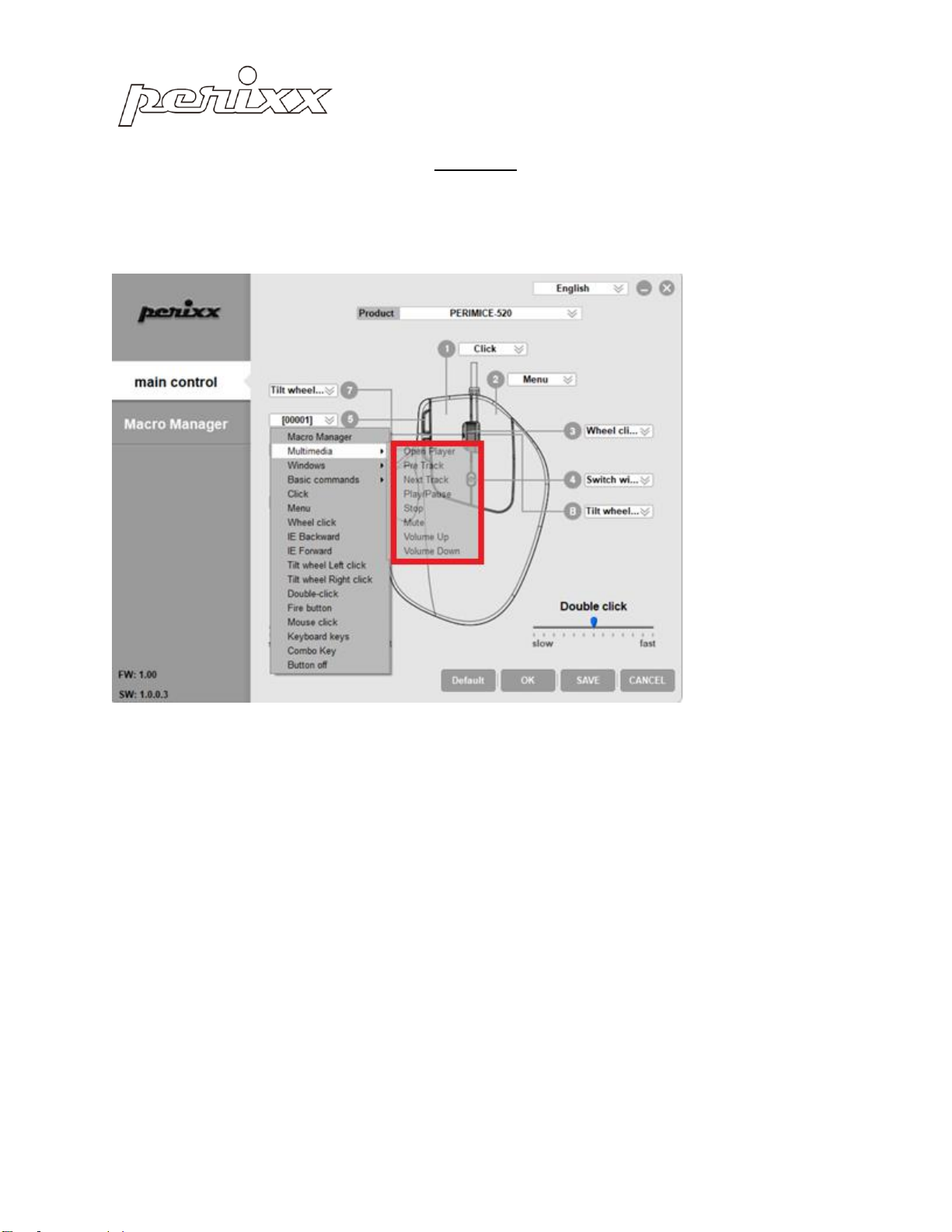
There are 8 buttons which can be set up. The 9th buttons only can setup the DPI.
8
English (EN)
All buttons in PERIMICE-520 are programmable with the following function: Click Macro Manager,
Multimedia, Windows, Click, Menu, Wheel click…etc.
The following pages will introduce how you can set up Macro, Multimedia and Windows function.
9
English (EN)
Macro Manager
You can create a new Macro setting by pressing the “+”button. Then you can enter the Macro name
in “00000”and press ENTER to save.
Start to record the Key Press Sequence by clicking “REC”button and stop the recording by pressing the
button again.
After the selection, please press “OK”to save the setting or “CANCEL”to discard the setting and
leave from the program.
Once the Macro is recorded, you can simply press “-“to abandon the setting.
10
English (EN)
The “Multimedia”, “Windows”, and “Basic commands”can provide with more options in multimedia,
windows and office setting.
Multimedia