Wincor Nixdorf TA60 User manual

TA60
POS Keyboard
User Guide
Edition March 2003

Copyright© Wincor Nixdorf International GmbH, 2003
The reproduction, transmission or use of this document or its contents is not
permitted without express authority.
Linux™ is a registered trademark of Linus Torvalds
Pentium™ is a registered trademark of the Intel Corporation
MS-DOS™, Windows 95™, Windows 98™, Windows NT™, Windows CE™,
Windows 2000™ and Windows XP™ are registered trademarks of the
Microsoft Corporation
BEETLE™ is a registered trademark of Wincor Nixdorf International GmbH

Contents
Manufacturer’s Declaration and Approval ........................1
General Authorization..................................................................................1
FCC-Class A Declaration ............................................................................1
Recycling the TA60 .....................................................................................1
Warranty......................................................................................................2
Safety Instructions.......................................................................................3
Cleaning Instructions...................................................................................3
Scope of supply...........................................................................................4
Mounting keys......................................................................5
Exchanging the Keys...................................................................................5
Inserting Key Labels....................................................................................6
Inserting Key Caps......................................................................................7
The Keyboard TA60.............................................................8
General........................................................................................................8
Keypad........................................................................................................9
Key switch ...................................................................................................9
Releasing the Cable Connection...............................................................10
Self-test.....................................................................................................10
Programming the TA60 .....................................................11
Modes........................................................................................................11
Main functions of the Programs.................................................................12
Keyboard Connection for Programming....................................................12
Keyboard connection in the field..........................................................14
Firmware Update and Version Display......................................................14
Help...........................................................................................................14
Creating Tables with KBUTI.EXE..............................................................15
Sending and Receiving Tables..................................................................16
Files for Programming...............................................................................17
Useful hints................................................................................................17
Appendix ............................................................................19
Technical Data ..........................................................................................19
Keyboard Codes TA60 (Default) ...............................................................20

Manufacturer’s Declaration and Approval
General Authorization
This device fulfills the requirements of the EEC standards
89/336/EEC “Electromagnetic Compatibility” and 73/23/EEC
“Low voltage Directive”.
Therefore, you will find the CE mark on the device or packaging.
FCC-Class A Declaration
This equipment has been tested and found to comply with the limits for a
Class A digital device, pursuant to part 15 of the FCC Rules. These limits
are designed to provide reasonable protection against harmful interference
when the equipment is operated in a commercial environment. This
equipment generates, uses, and can radiate radio frequency energy and, if
not installed and used in accordance with the instruction manual, may
cause harmful interference to radio communications.
Operation of this equipment in a residential area is likely to cause harmful
interference in which case the user will be required to correct the
interference at his own expense.
Modifications not authorized by the manufacturer may void users authority
to operate this device
This class A digital apparatus complies with Canadian ICES-003.
Cet appareil numerique de la classe A est conforme a la norme NMB-003
du Canada.
Recycling the TA60
Environmental protection does not begin when it comes
time to dispose of the TA60; it begins with the
manufacturer. This product was designed according to
our internal norm “Environmental conscious product
design and development”.
1
GENERAL AUTHORIZATION

The TA60 is manufactured without the use of CFCs und CCHS and is
produced mainly from reusable components and materials.
The processed plastics can, for the most part, be recycled. Even the
precious metals can be recovered, thus saving energy and costly raw
materials.
Please do not stick labels onto plastic case parts. This would help us to
re-use components and material.
You can protect our environment by only switching on your equipment when
it is actually needed. If possible, even avoid the stand-by-mode as this
wastes energy, too. Also switch your equipment off when you take a longer
break or finish your work.
At this time, there are still some parts that are not reusable. Wincor Nixdorf
guarantees the environmentally safe disposal of these parts in the
Recycling Center, which is certified pursuant to ISO 9001 and 14001.
So don’t simply throw your TA60 on the scrap heap when it has served its
time, but take advantage of the environmentally smart, up-to-date recycling
methods!
Please contact your competent branch or the Recycling Center Paderborn
(for European countries) for information on how to return and re-use devices
and disposable materials under the following fax number:
E-Mail: [email protected]
We look forward to your message.
Warranty
Wincor Nixdorf guarantees a limited warranty engagement for 24 months
beginning with the date of delivery. This warranty engagement covers all
those damages which occur despite a normal use of the product.
Damages because of
nImproper or insufficient cleaning,
nImproper use of the product or unauthorized modifications of the
product,
WARRANTY
2

nInadequate location or surroundings
will not be covered by the warranty.
All parts of the product which are subject to wear and tear are not included
in the warranty engagement. Please order spare parts at the Wincor Nixdorf
customer service.
Safety Instructions
Note the following safety information:
nLay all cables and supply lines so that nobody can tread on them or trip
over them.
nData cables should be neither connected nor removed during
thunderstorms.
nProtect the device from dust, moisture and heat.
nTake care to ensure that no foreign objects (e.g. paper clips) or liquids
can get into the inside of the device, as this could cause electrical shocks
or damage.
nPlace the keyboard on a non-slip, even surface.
Cleaning Instructions
The keyboard should be cleaned with a germicide from time to time. Before
cleaning in between the keys on the keyboard with a brush, loosen and
remove the key caps using the key removing device. Do not allow dust to
get in through the open keyboard mechanics.
3
SAFETY INSTRUCTIONS

Scope of supply
The product includes one TA60 keyboard, one User Guide and one
accessories kit containing the following:
nTransparent plates
n1 set of keys
The set of keys contains:
Key 1 for key position 1
Key 2 for key positions 1 and 2
Key 3 for key positions 1, 2 and 3
Key 4 for key positions 1, 2, 3 and 4
If damage has occurred during shipping or if the package contents do not
match the delivery note, promptly notify your Wincor Nixdorf sales outlet.
SCOPE OF SUPPLY
4

Mounting keys
Exchanging the Keys
You can remove each of the key
caps using a key cap puller,
pulling the key upwards.
The key cap puller is not
included in the scope of delivery,
Place the key cap puller on the
selected key until you hear a
click.
Now remove this key from the
keyboard by pulling upwards.
5
MOUNTING KEYS
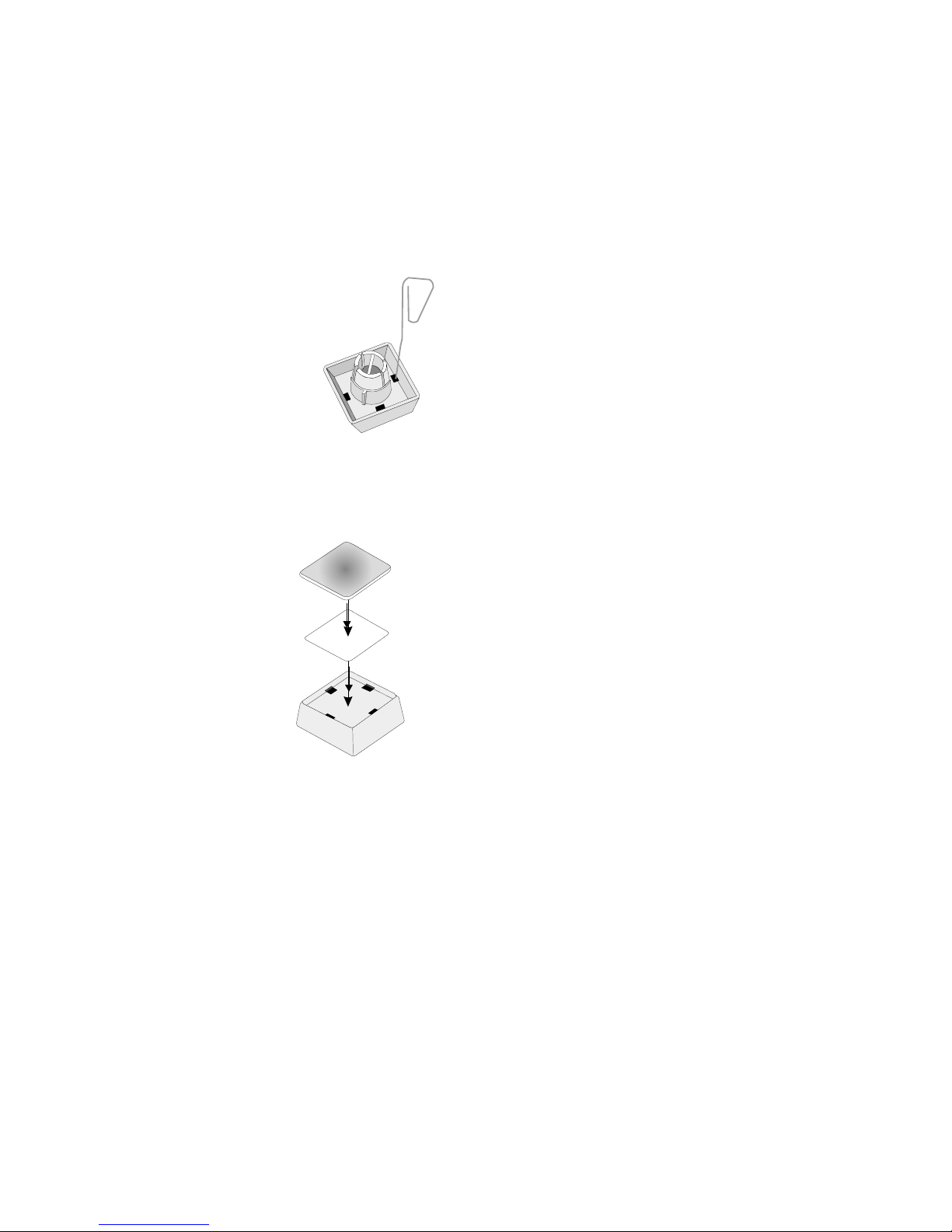
You can change the lettering as follows:
Using a thin object (e.g.
Paper-clip etc.), press upwards
against the plastic cover through
the opening on the underside of
the key. Please refer to the next
chapter for instructions on how to
insert the new label.
Inserting Key Labels
Below, you will find instructions on how to insert the key labels:
Each key should be labelled
individually.
Place the written label on the key
cap.
Insert the transparent key cover
with the mat and concave side
upwards until it clicks into place
in the key cap.
The labels are replaced as follows:
nRemove the key cap from the keyboard (see removing the key cap) and
pull the transparent key cap upwards.
nThe transparent key cover is then released and the label can be removed.
nReplace the label and fit the transparent key cover (with the mat and
concave side facing upwards) back into the key cap.
INSERTING KEY LABELS
6
Label for keys
Transparent key cover
with mat and
concave side up
Key cap

Inserting Key Caps
Insert the key cap in the keyboard and press firmly into place.
When inserting double keys,
please ensure that the guide
cylinder is on the left with a
horizontal arrangement and on
the top with vertical arrangement.
The quadruple key caps are
corresponding - with the guide
cylinder arranged on the upper
left. The sextuple key cabs have
the guide cylinder on the left in
the middle.
Ensure while putting on the key
caps that the white cam of the
rocker plate are in the planned
bulge of the keyboard.
If you hear a click, the key caps
are inserted correctly.
quadruple key cap with scissors
7
INSERTING KEY CAPS
cam
rocker plate
Table of contents
Other Wincor Nixdorf Keyboard manuals