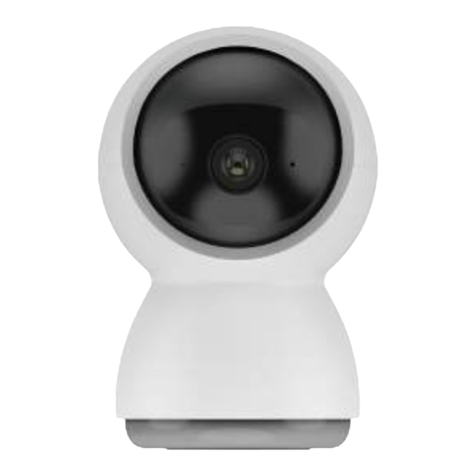
winees WP2700 User manual

Winees M2X Indoor PTZ Cam
Model WP2700 (NA)
Model WP2700 (EU)
Model WP2700 (J P)
Model WP2700 (UK)


Cautions
To avoid personal injury and/or possible product
damage, the following cautions must be followed:
1. Please use the provided adapter instead of others in
case of any damage to the product.
2. Keep out of reach of children. This product contains
small magnets and other small parts, which can cause
choking or injury if ingested.
3. To prevent early failure, the camera should only be
installed in operating environments ranging between -
20°C ~ 50°C(-4°F ~ 122°F).
4. Do not install
- close to heat source
- near the metal objects and mirrors that cause radio
signal attenuation or shading.
5. Do not disassemble or reinstall the camera, otherwise
it may cause security risks.
6. Unplug the power cord before cleaning. Do not clean
the camera with any liquids, spray cleaner or wet cloth.
7. The slot and opening are used for ventilation, not
allowed to be blocked or covered.
8. This product only can be connected to 2.4G WIFI.

Camera Power Adaptor
USB Cable Bracket
Screws Manual
Package Contents

Description
Power DC 5V/1A
Status light
•
Blinking red light: wait for network connection
(slow)connecting the network (fast)
•Solid blue light on: camera is working correctly
•Solid red light on: camera is malfunctional
Microphone Capture sound for your video
SD card slot Support local SD Card storage (Max.128 GB)
Reset
Press and hold for 5 seconds to reset the camera
(if you have modified settings, they will return to
factory defaults)

Installation
1. Put the camera on a flat surface.
2 . Use the included mounting bracket to fix the camera to a clean surface.

Connection
1. Scan the QR code below to download the CloudEdge APP from App
store or Google Play.
2. Log in the CloudEdge, select "Add Device", and add the smart camera to the
App according to the screen tips(Make the smart camera close to the
router when configuring).
Or search for “CloudEdge” in App Store or Google
Play.
NOTE: If you need to re-select the WiFi
network, please press and hold the
"RESET" button for 5 seconds, the device
will restart, and the indicator will be
flashing red.
3. Place the Winees M2X PTZ Cam in the area where you plan to install
to test the video quality, ensure that the camera can work normally after
the final installation.

Functions
Pan/Tilt
Rotate your camera by sliding on your smartphone, providing you with a good
vision.
Video flip
Flip your video stream up or down for maximum flexibility.
Full color vision
With white light, the captured pictures and videos of motion detection are
colorful which can provide you a better vision.
Motion detection
Support smart motion detection. The camera will detect movements, and
then send you push notifications and app alerts.
Record
Support 24H continuous recording with high capacity SD storage or Cloud
storage.
Day & Night
Never miss a moment, even in complete darkness, with powerful night-vision
technology.
Daytime Night

FCC Statement
This device complies with Part 15 of the FCC Rules.
Operation is subject to the following two conditions:
(1) This device may not cause harmful interference.
(2) This device must accept any interference received, including interference
that may cause undesired operation.
Note: The grantee is not responsible for any changes or modifications not
expressly approved by the party responsible for compliance. Such
modifications could void the user’s authority to operate the equipment.
Note: This equipment has been tested and found to comply with the limits for
a Class B digital device, pursuant to part 15 of the FCC Rules. These limits are
designed to provide reasonable protection against harmful interference in a
residential installation.
This equipment generates uses and can radiate radio frequency energy and, if
not installed and used in accordance with the instructions, may
cause harmful interference to radio communications. However, there is no
guarantee that interference will not occur in a particular installation. If this
equipment does cause harmful interference to radio or television reception,
which can be determined by turning the equipment off and on, the user is
encouraged to try to correct the interference by one or more of the following
measures:
- Reorient or relocate the receiving antenna.
- Increase the separation between the equipment and receiver.
- Connect the equipment into an outlet on a circuit different from that to
which the receiver is connected.
- Consult the dealer or an experienced radio/TV technician for help.
RF Exposure Statement
This equipment complies with FCC radiation exposure limits set forth for an
uncontrolled environment. This equipment should be installed and operated with
minimum distance of 20 cm between the radiator and your body.

This device contains licence-exempt transmitter(s)/receiver(s) that comply
with Innovation, Science and Economic Development Canada’s licence-exempt
RSS(s). Operation is subject to the following two conditions:
1.This device may not cause interference.
2.This device must accept any interference, including
interference that may cause undesired operation of the device.
L’émetteur/récepteur exempt de licence contenu dans le présent appareil est
conforme aux CNR d’Innovation, Sciences et Développement économique
Canada applicables aux appareils radio exempts de licence.
L’exploitation est autorisée aux deux conditions
suivantes :
1. L’appareil ne doit pas produire de brouillage;
2. L’appareil doit accepter tout brouillage radioélectrique subi, même si le
brouillage est susceptible d’en compromettre le fonctionnement.
This equipment complies with ISED RSS-102 radiation exposure limits set forth
for an uncontrolled environment.
This equipment should be installed and operated with a minimum distance of
20cm between the radiator and any part of your body.
Pour se conformer aux exigences de conformité CNR 102 RF exposition, une
distance de séparation d'au moins 20 cm doit être maintenue entre l'antenne
de cet appareil ettoutes les personnes.
ISED Statement
Contact us
Linkzone Technology Co., Limited
Room 510, 5/F, Wayson Commercial Building, 28
Connaught Road West, Sheung Wan, Hong Kong,
China
Phone: 1-855-334-9800
Website: www.iwinees.com
Email: suppor[email protected]
Made in China
Table of contents
Languages:
Other winees Security Camera manuals