XBOX ClubSport Fanatec User manual
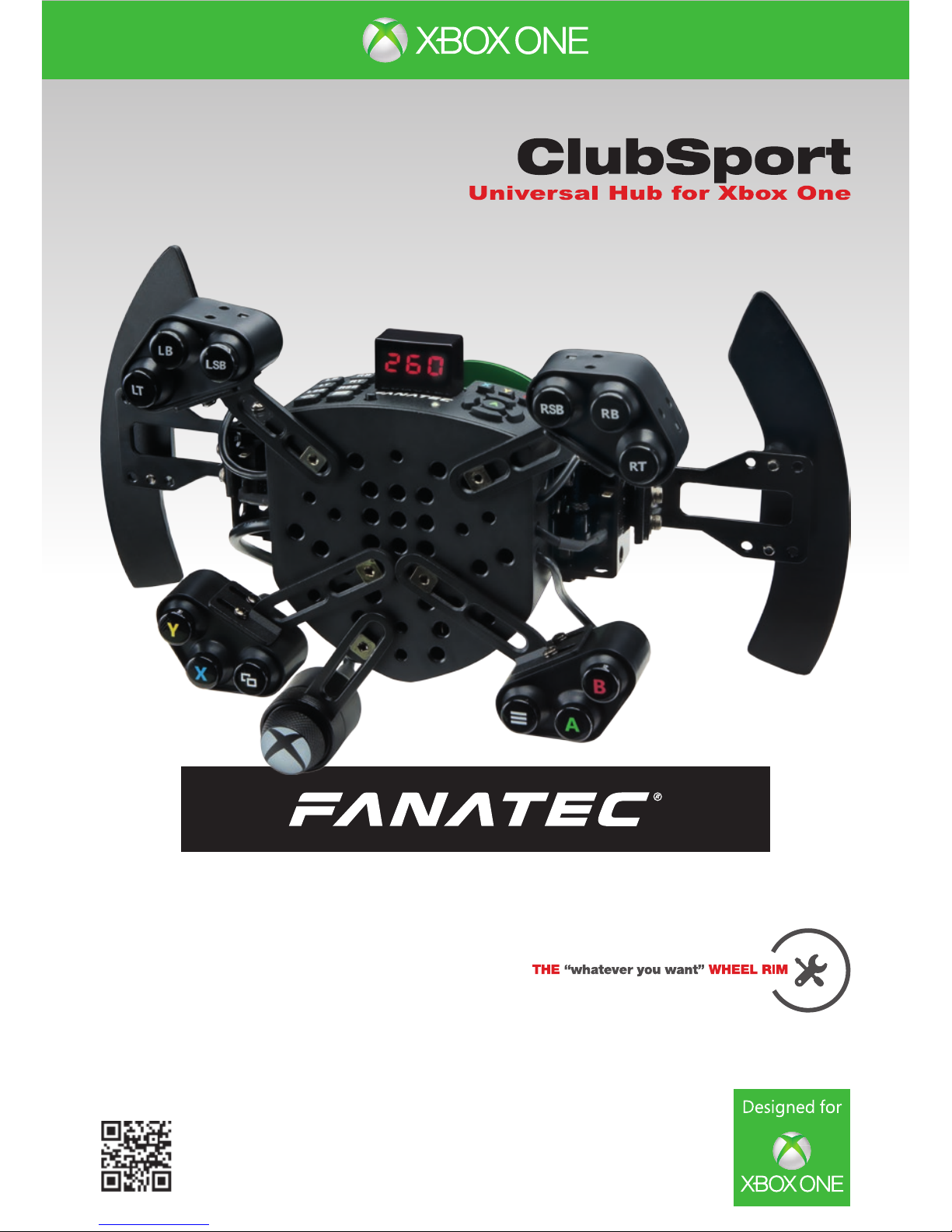
Manual
www.fanatec.com

Thank you for choosing
To get the most out of and before using your new ClubSport Universal Hub for
Xbox One, please read this manual for important information regarding your
health and how to safely use this product. This manual can also be used as a
great tool for future reference.

3
INDEX
1. General .................................................................................................. 6
2. Introduction ........................................................................................... 7
3. Compatibility.......................................................................................... 7
4. Preparation ............................................................................................ 8-9
4.1 Package contents............................................................................ 8
4.2 Tools ................................................................................................. 8
4.3 Part list ............................................................................................. 9
4.4 Firmware and driver update ........................................................... 9
5. Getting started....................................................................................... 10-14
5.1 Hotkeys ............................................................................................ 10-12
5.2 Usage on Xbox One console.......................................................... 12-13
5.3 Usage on PlayStation4 console ..................................................... 13-14
5.4 Usage on PlayStation3 console ..................................................... 14
5.5 Peripheral devices at consoles...................................................... 15
6. Assembly................................................................................................ 16-28
6.1 Plan your wheel ............................................................................... 16
6.2 Mounting / adjusting FunkySwitchTM and button boxes .............. 17-19
Button Mapping ............................................................................... 20-21
6.3 Wheel rim ......................................................................................... 22
Drilling template ............................................................................. 23
6.4 Shifter paddles ................................................................................ 24-26
6.5 Mobile phone ................................................................................... 27
6.6 Tuning display ................................................................................. 28
7. Electronic connectors........................................................................... 29-35
8. Cleaning ................................................................................................. 36
9. Troubleshooting .................................................................................... 36-37
10. Trademarks ........................................................................................... 38
11. Ecology Advice ..................................................................................... 39
12. FCC Compliance................................................................................... 39
13. CE Compliance ..................................................................................... 39
14. Warranty ................................................................................................ 40

4
WARNING! Photosensitive Seizures
A very small percentage of people may experience a seizure when exposed to certain visual im-
ages, including ashing lights or patterns that may appear in video games. Even people who have
no history of seizures or epilepsy may have an undiagnosed condition that can cause these „pho-
tosensitive epileptic seizures” while watching video games. These seizures may have a variety
of symptoms, including light-headedness, altered vision, eye or face twitching, jerking or shaking
of arms or legs, disorientation, confusion, or momentary loss of awareness. Seizures may also
cause loss of consciousness or convulsions that can lead to injury from falling down or striking
nearby objects. Immediately stop playing and consult a doctor if you experience any of these
symptoms. Parents should watch for or ask their children about the above symptoms – children
and teenagers are more likely than adults to experience these seizures.
The risk of photosensitive epileptic seizures may be reduced by taking the following precautions:
• Sit farther from the TV screen.
• Use a smaller TV screen.
• Play in a well-lit room.
• Do not play when you are drowsy or fatigued.
If you or any of your relatives have a history of seizures or epilepsy, consult a doctor before play-
ing.
WARNING! Musculoskeletal disorders
Use of game controllers, keyboards, mice, or other electronic input devices may be linked to seri-
ous injuries or disorders. When playing video games, as with many activities, you may experience
occasional discomfort in your hands, arms, shoulders, neck, or other parts of your body. However,
if you experience symptoms such as persistent or recurring discomfort, pain, throbbing, aching,
tingling, numbness, burning sensation, or stiffness, DO NOT IGNORE THESE WARNING SIGNS.
PROMPTLY SEE A QUALIFIED HEALTH PROFESSIONAL, even if symptoms occur when you
are not playing a video game. Symptoms such as these can be associated with painful and some-
times permanently disabling injuries or disorders of the nerves, muscles, tendons, blood vessels,
and other parts of the body. These musculoskeletal disorders (MSDs) include carpal tunnel syn-
drome, tendonitis, tenosynovitis, vibration syndromes, and other conditions.
While researchers are not yet able to answer many questions about MSDs, there is general
agreement that many factors may be linked to their occurrence, including medical and physical
conditions, stress and how one copes with it, overall health, and how a person positions and
uses their body during work and other activities (including playing a video game). Some studies
suggest that the amount of time a person performs an activity may also be a factor. If you have
questions about how your own lifestyle, activities, or medical or physical condition may be related
to MSDs, see a qualied health professional.

5
GENERAL NOTES
• Additional peripheral devices like the ClubSport Wheel Base, the ClubSport Handbrake and
others which might be mentioned in this manual are not included within the ClubSport Universal
Hub for Xbox One package and sold separately.
•
This manual explains a lot about assembly, connections and functions related to Fanatec wheel
bases, other additional peripheral devices and also about PC or console functionalities but this
manual is not a replacement for the manuals corresponding to the products! Read the quick
guides or user manuals for the other products as well!
• All specications in this document are subject to change. Especially the wheel base rmware
or the PC driver might be changed or updated to implement new features or for general
improvements.
•
The warranty does not include defects that are due to commercial use of the product. See
chapter “Warranty” at the end of this user manual as well as the terms & conditions on
www. fanatec.com for more details.
•
Technical copying partially or full product and reverse engineering is explicitly prohibited!
Violation might have legal consequences.

6
ATTENTION
• The device must not be exposed to rain or humidity in order to avoid risk of re and the danger
of electric shock.
• Operating temperature: 15°C – 35°C room temperature
• Long playing may cause health risks. Take a break of 5 minutes every 20 minutes, and do not
play for more than 2 hours per day.
• We strongly advise you to not drive a vehicle immediately after using a video game.
• Utilization of the vibration and Force Feedback function may cause damage to your health.
•
In case of interference with other wireless 2.4 GHz devices,the interfering devices must be
removed or switched off.
•
Not intended for children under the age of 6 years. Contains small pieces. Danger of swallowing!
• Do not open the casing of the device when connected to electrical power or connected to wheel
base.
•
This device contains components that cannot be repaired by the user. Proper handling of product
needed for warranty reasons.
WARNING! Electrical Safety
The Universal Hub must be used with ClubSport Wheel Base as an appropriate power source:
• For the used ClubSport Wheel Base use only the power supply and AC power cord that came
with your ClubSport Wheel Base or that you received from an authorized repair center.
•
For the used ClubSport Wheel Base do not use non-standard power sources, such as generators
or inverters, even if the voltage and frequency appear acceptable. Only use AC power provided
by a standard wall outlet.
•
Find more detailed information about this in the ClubSport Wheel Base user manual or on
www.fanatec.com/support
To avoid damaging the Universal Hub:
• Do not expose your Universal Hub to sources of heat.
• When connecting and / or disconnecting the Universal Hub to / from ClubSport Wheel Base
take care of the pins inside the quick release.
• Do not try to use the Universal Hub with a wheel base beside the Fanatec ClubSport Wheel
Base .
• Do not try to use the Universal Hub with an external power source.
• Unplug the power cord of your ClubSport Wheel Base during storms or when unused for long
periods of time to protect also your Universal Hub.
•
If the Universal Hub becomes damaged in any way, stop using it immediately and contact
Fanatec Customer Support..
GENERAL
1

7
INTRODUCTION
COMPATIBILITY
You have purchased a unique and innovative product which enables you to use
real race car steering wheel rims in simracing without losing any functionality.
Select the wheel rim of your choice and make it compatible to your ClubSport
Wheel Base unit without sacricing any buttons or functionality. Even the tun-
ing- and telemetry display is integrated.
Use a wooden rim to drive your classic cars or a big NASCAR style rim for oval
racing. What about a round rim without shifter paddles for drifting or a small and
open rim for formula racing? Everything is possible!
The ClubSport Universal Hub for Xbox One can be used with the ClubSport
Wheel Base and all other compatible base units from Fanatec.
It can be tted with many popular original race car steering wheels rims from
brands like SPARCO®, OMP®or MOMO®which are used in real race cars.
Option 1: Using the original hole pattern
If the rim has a 70mm diameter pattern with 6 holes or 50mm diameter with 3
holes as shown in the drawing page 14, then you can directly attach the rim to
the Universal Hub.
Option 2: Drilling holes
Specialty rims with a smaller diameter are delivered with no holes at all.
If you print out page 16 (A4) you can use the drawing as drilling template.
Option 3: Using an adapter
There are many adapters on the market to make almost any steering wheel rim
compatible to the popular 70 mm 6-hole pattern. Please ask the vendor of the
steering wheel rim.
2
3
8
PREPARATION
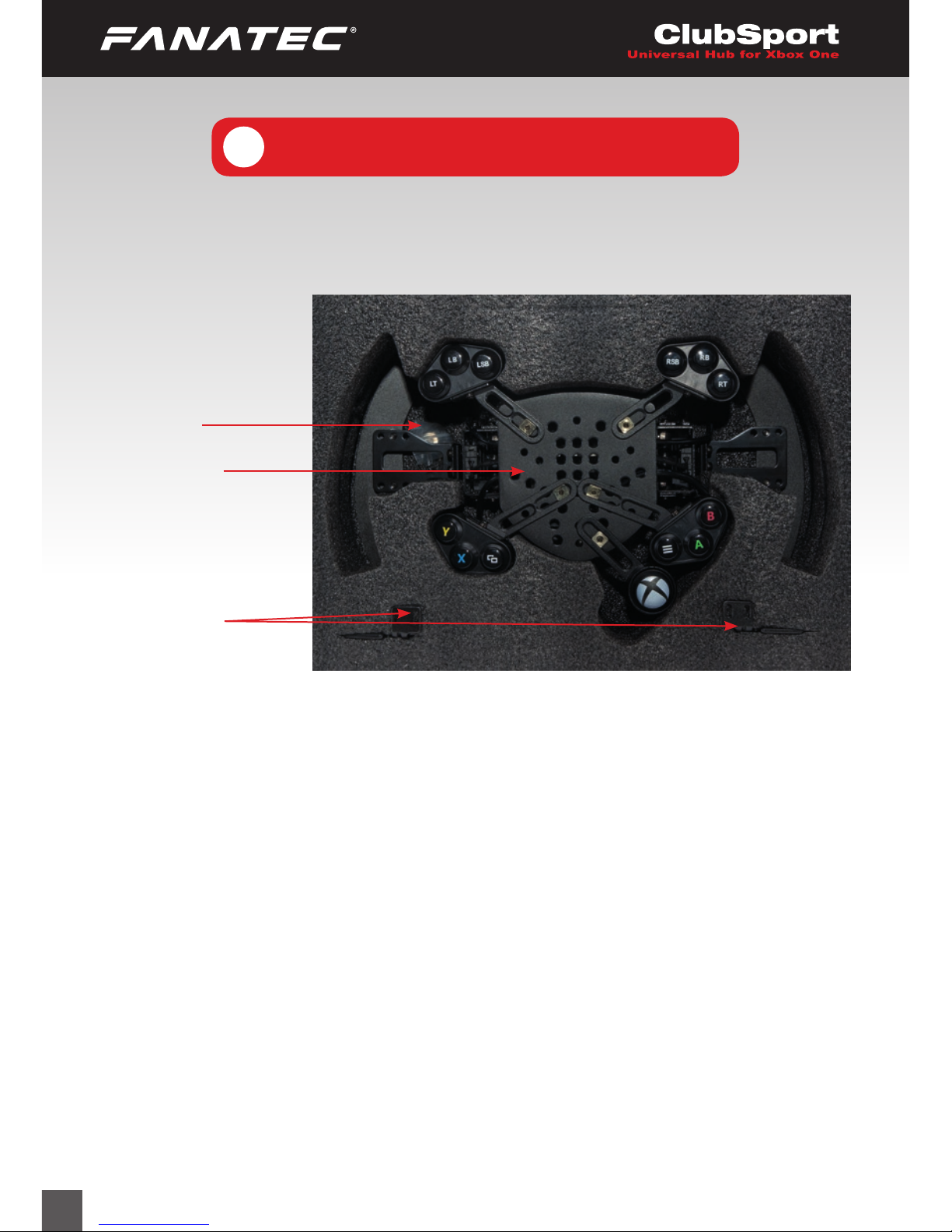
4.1 Package contents
4
Screw sets
Small Shifter
Paddles
Universal Hub
for Xbox One
4.2 Tools
Allen key 3 mm Allen key 2,5 mm
Allen key 1,5 mm Wrench 10 mm
Wrench 8 mm Screwdriver , Philips 0x50
Note: Required tools are not included in Universal Hub for Xbox One
package!!

9
4.3 Part list
Part number Part name usage Picture Description
S1 Screw
M5 x 11 mm
5Screw for button box
and FunkySwitchTM lever
(assembled out-of-box)
S2 Non-standard screw
M4
1Screw
S3 Screw
M5 x 16 mm
6Screw for third party rim
assembly
S4 Screw
M3 x 6.0 mm
4Screws for shifter
paddles
(assembled out-of-box)
N1 Nut
M5 x 7.8 mm x 4.7 mm
5Nut for tightening screw
S1
(assembled out-of-box)
W1 Spare washer
13.5 mm x 2.5 mm
4Spare replacing lever for
button boxes and
FunkySwitchTM
W2 Washer
M3 x 8.0 mm x 0.8 mm
4Washer for shifter pad-
dles screws S4
(assembled out-of-box)
4.4 Firmware and driver update
The ClubSport Wheel Base unit must be updated to the latest rmware version
which is available on our website www.fanatec.com/support.
You must also use the latest driver version in order to use the wheel base and
Universal Hub for Xbox One on a PC.
IMPORTANT: The ClubSport Universal Hub for Xbox One will not be
detected without these updates and will not work at all!
Please install these updates before rst use of the ClubSport Universal
Hub for Xbox One!
10
GETTING STARTED
5.1 Hotkeys
Basically all hotkeys of the wheel base can be used.
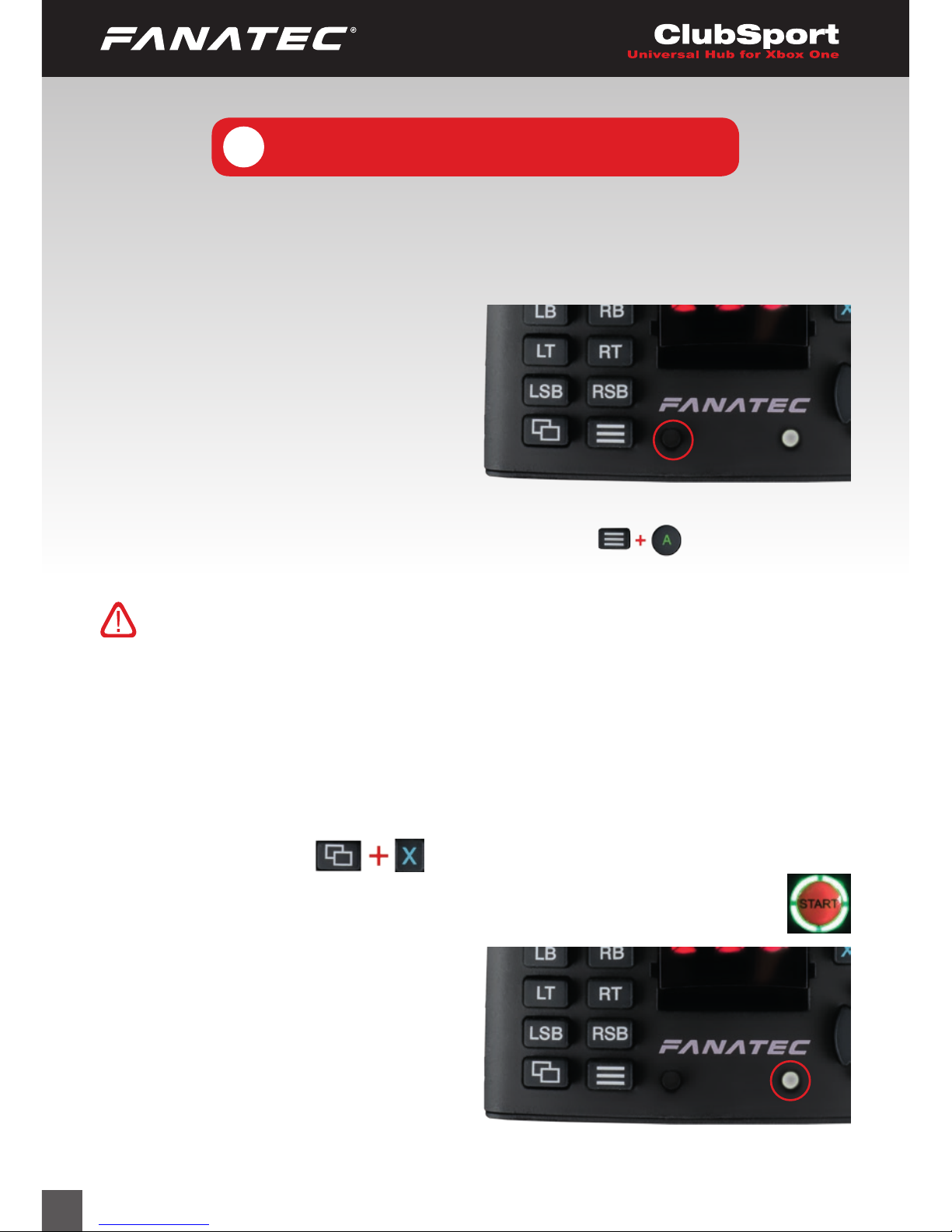
Center calibration: If a center cali-
bra- tion is needed when using the Uni-
ver- sal Hub for Xbox One you need
to enter the tuning menu by using the
small black button on top of the Univer-
sal Hub for Xbox One as shown on the
picture:
When tuning menu is active then press the buttons at the same time
to calibrate the wheel center.
ATTENTION: When initialisation and auto calibration of the wheel
base is in progress never touch the Universal Hub for Xbox One or wheel
rim in order to avoid injuries or incorrect calibration!
Xbox One Mode: By default the wheel base will switch to Xbox One mode after
initialisation and auto calibration is nished.
If you have switched to a different mode and want to go back to Xbox one mode
you can do this when the Xbox One console is connected to the wheel base
and press the buttons at the same time.
The Xbox One mode is indicated by green lit ring of light around the
wheel base START button as shown on picture on the right hand side:
The established connection between
wheel base and Xbox One console is
indicated by lit white status LED on top
side of the Universal Hub for Xbox One,
see Picture on the right hand side.
5
Table of contents
Other XBOX Game Console manuals