Safety Information
12.Grounding or Polarization This product may be equipped with a
polarized alternating-current line plug (a plug having one bladewider than
the other). Thisplug will fit into the power outlet only one way, This is a
safety feature. Ifyou are unable to insert theplug fully into the outlet, try
reversing the plug.If the plug should still failto fit, contact your electrician to
replace your obsoleteoutlet. Do not defeat the safetypurpose of the
polarized plug.
Alternate Warnings This product isequipped with a three-wire grounding-
type plug, aplug having a third (grounding) pin.This plug will only fit into a
grounding-type power outlet.This is a safety feature, If you are unable to
insert the pluginto the outlet, contact your electricianto replace your
obsolete outlet. Donot defeat the safety purpose ofthe grounding-type plug.
13.Power-Cord Protection Power-supply cords should be routed so that
they are notlikely to be walked on orpinched by items placed upon or
against them, payingparticular attention to cords at plugs,convenience
receptacles, and thepoint where they exit from theproduct.
14.Protective AttachmentPlug The product is equipped with an attachment
plug having overloadprotection. This is a safety feature. See instruction
Manual for replacementor resetting of protective device. Ifreplacement of
the plug isrequired, be sure the service technicianhas used a replacement
plug specified bythe manufacturer that has the sameoverload protection as
the original plug.
15.Outdoor AntennaGrounding - If an outside antennaor cable system is connected tothe product, be sure the antennaor cable
system is groundedso as to provide some protectionagainst voltage surges and built-up staticcharges. Article 810 of theNational
Electrical Code,ANSI/NFPA 70, provides information with regard to proper grounding of the mast and supporting structure, grounding
of the lead-inwire to an antenna discharge unit,size or grounding conductors, location ofantenna-discharge unit, connection to
grounding electrodes, andrequirements for the grounding electrode.
16.Lightning - Foradded protection for this product duringa lightning storm, or when itis left unattended and unused forlong periods
of time, unplugit from the wall outlet anddisconnect the antenna or cable system.This will prevent damage to the product due to
lightning and powerlinesurges.
17.Power Lines -An outside antenna system shouldnot be located in the vicinityof overhead power lines or otherelectric light or
power circuits, orwhere it can fall into suchpower lines or circuits. When installingan outside antenna system, extreme careshould
be taken tokeep from touching such power linesor circuits as contact with themmight be fatal.
1 8.Overloading -Do not overload wall outlets, extensioncords, or integral convenience receptacles asthis can result in a riskof fire
or electric shock.
19.Object and LiquidEntry - Never push objects ofany kind into this product throughopenings as they may touch dangerousvoltage
points or short-outparts that could result in afire or electric shock. Never spillliquid of any kind on the product.
20.Servicing - Donot attempt to service this productyourself as opening or removing coversmay expose you to dangerous voltageor
other hazards. Referall servicing to qualified service personnel.
2 1.Damage RequiringService - Unplug this product fromthe wall outlet and refer servicingto qualified service personnel under the
following conditions:
a. When thepower-supply cord or plug is damaged.
b. If liquidhas been spilled, or objects havefallen into the product.
c. If theproduct has been exposed to rainor water.
d. If theproduct does not operate normally byfollowing the operating instructions. Adjustonly those controls that are coveredby the
operating instructions asan improper adjustment of other controlsmay result in damage and willoften require extensive work by a
qualified technician torestore the product to its normaloperation.
e. If theproduct has been dropped or damagedin any way, and
f. When theproduct exhibits a distinct change inperformance - this indicates a needfor service.
22.Replacement Parts -When replacement parts are required, besure the service technician has usedreplacement parts specified
by the manufactureror have the same charateristics asthe original part. Unauthorized substitutions mayresult in fire, electric shock,
or other hazards.
23.Safety Check -Upon completion of any service orrepairs to this product, ask theservice technician to perform saftey checksto
determine that theproduct is in proper operating condition.
24.Wall or Ceiling Mounting - The product shouldbe mounted to a wall orceiling only as recommended by themanufacturer.
25. Heat -The product should be situated away from heat sources such as radiators, heat registers, stoves or other products
(including amplifiers) thatproduce heat.
2
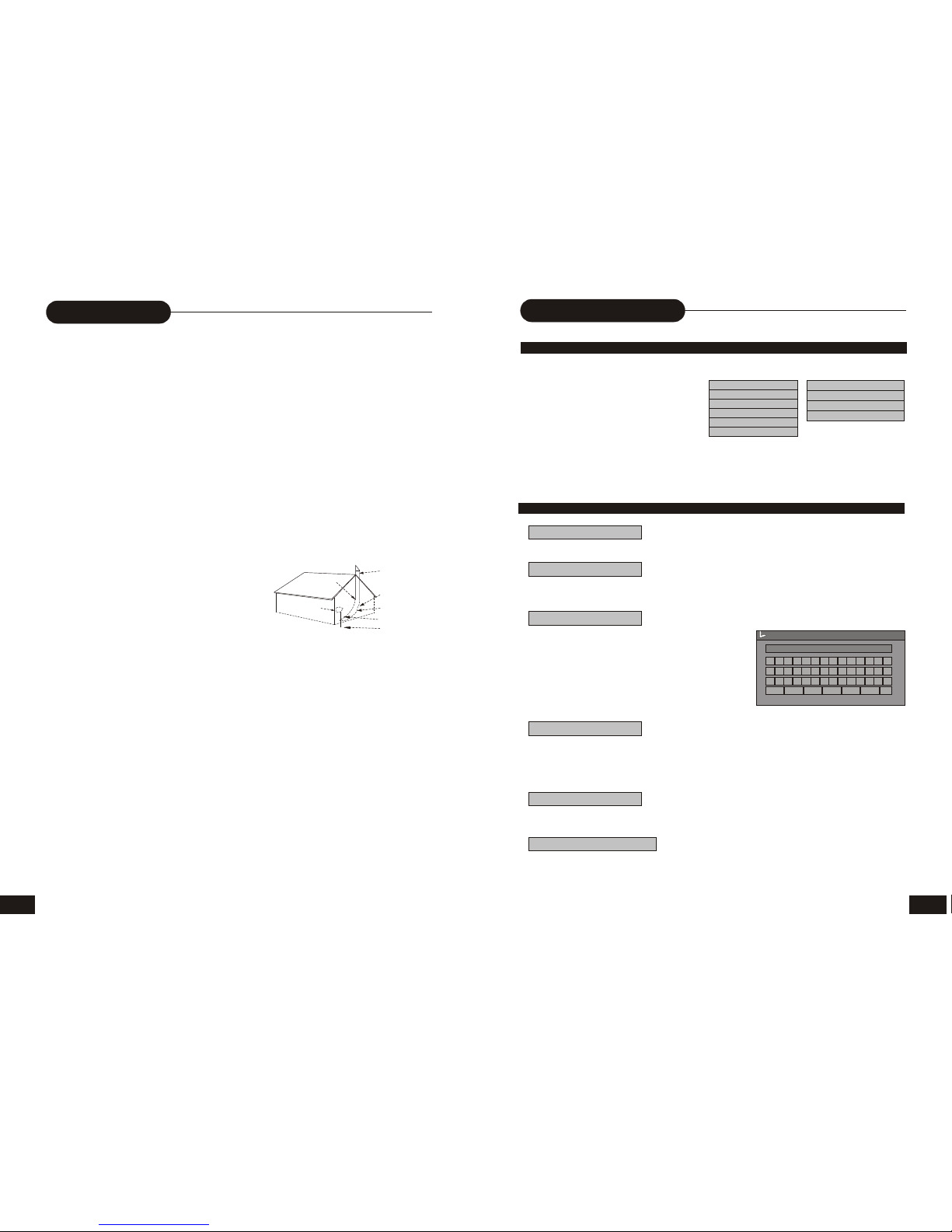
FIGURE A
EXAMPLE OF ANTENNAGROUNDING
AS PER NATIONALELECTRICALCODE
ANTENNA
LEAD
WIRE
ANTENNA
DISCHARGE UNIT
(NEC SECTION 810-20)
GROUNDING CONDUCTORS
(NEC SECTION 810-21)
GROUD CLAMP
POWER SERVICE
GROUNDING ELECTRODE
SUSTEM
(NEC ART 250, PARTH)
NEC-NA TIONALELECTRICALCODE
S2898A
ELECTRIC
SERVICE
EQUIPMENT
GROUND
CLAMP
31
CAUTION: Use ofcontrols or adjustments or performance ofprocedures other than those specified hereinmay result in
hazardous radiation exposure.
Please carefully studythis manual and always keep itavailable. There are, however, some installation and operation precautions
which You should beaware of.
1.Read Instructions -All the safety and operatinginstructions should be read before theproduct is operated.
2.Retain Instructions -The safety and operating instructions should be retained for future reference.
3.Heed Warnings - All warnings on the product and in the operating instructions should be adhered to.
4.Follow Instructions -All operating and use instructionsshould be followed.
5.Cleaning - Unplugthis product from the wall outletbefore cleaning. Do not use liquidcleaners or aerosol cleaners. Use adamp
cloth for cleaning.
6.Attachments - Donot use attachments not recommended bythe product manufacturer as they maycause hazards.
7.Water and Moisture - Do not use this product near water - for example, near a bath tub, wash bowl, kitchen sink, or laundry tub; in a
wet basement; ornear a swimming pool; and thelike.
8.Accessories - Donot place this product on anunstable cart, stand, tripod, bracket, ortable. The product may fall, causing serious
injury to achild or adult, and serious damageto the product. Use only witha cart, stand, tripod, bracket, or table recommended by the
manufacturer, orsold with the product. Anymounting of the product should followthe manufacturer s instructions, and shoulduse a
mounting accessory recommended by the manufacturer.
9.Aproduct and cartcombination should be moved with care.Quick stops, excessive force, and unevensurfaces may cause the
product and cartcombination to overturn.
1 0. Ventilation - Slotsand openings in the cabinet are provided for ventilation and to ensure reliable operation of the product and to
protect it fromoverheating, and these openings must notbe blocked or covered. The openingsshould never be blocked by placing the
product on abed, sofa, rug, or other similarsurface. This product should not be placed in a built-in installation such as a bookcase or
rack unless properventilation is provided or the ma n u f a ct u r e r s instructions have been adhered to.
11.Power Sources- This productshould be operated only from thetype of power source indicated onthe marking label. If you are not
sure of thetype of power supply to yourhome, consult your product dealer orlocal power company. For productsintended to operate
from battery power, or othersources, refer to the operating instructions.
31
Editing
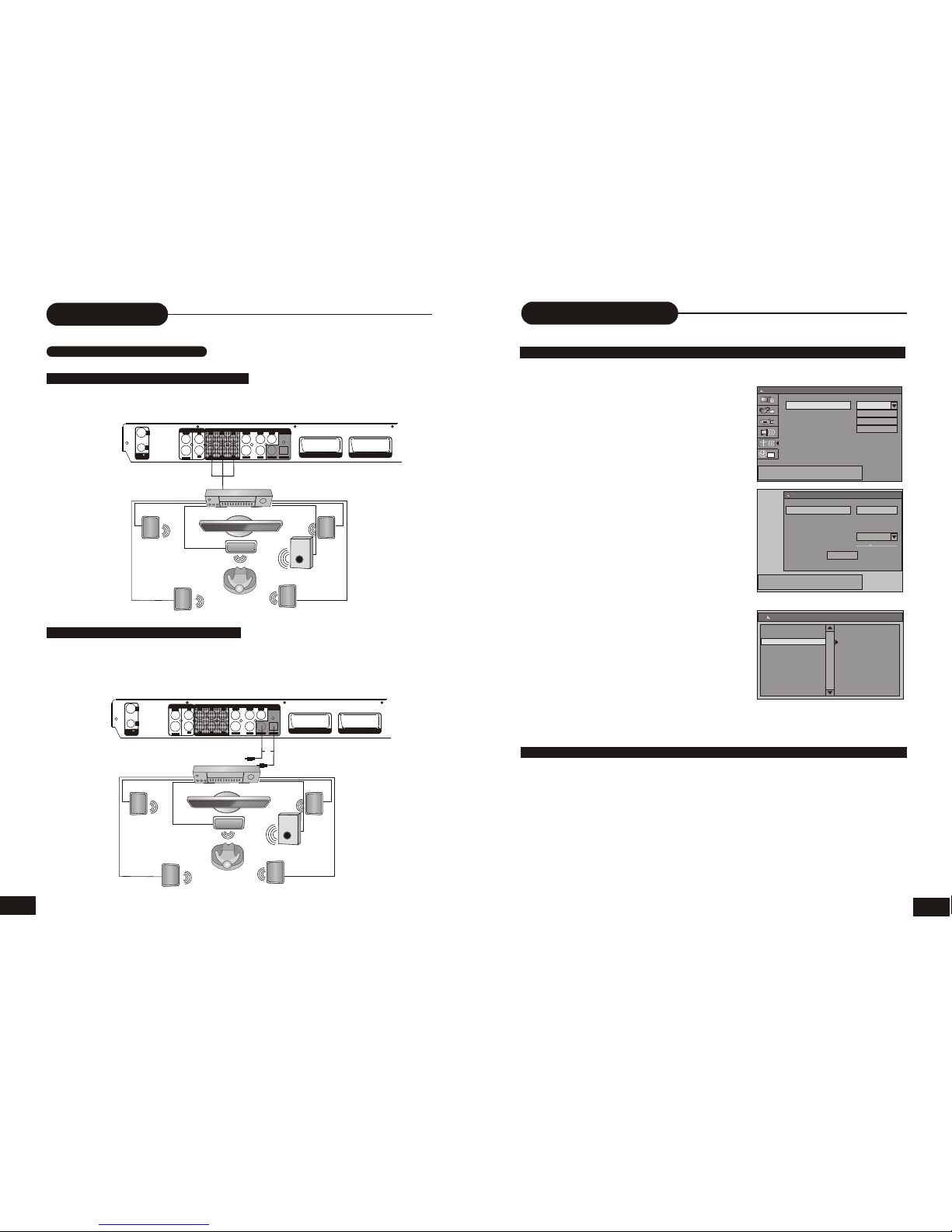
EDITING ADISC OF A DVD+RW
1.Insert a DVD+RW on the disc tray.
2.Press the DISC OPER button to access
the disc editing menu.
3. With each icon highlighted by pressing
the UP/DOWN button, the corresponding
description of each operation will display
on the screen, such as Erase disc, Rename
disc, Record a new title, Overwrite disc, etc.
4. Press the SELECT button to run the operation.
Play
Rename disc
Finalize disc
Record a new title
DVD+R Display
DVD+RW Display
Play
Erase disc
Rename disc
Record a new title
Overwrite disc
Lock disc
EDITING ADISC OF A DVD+RW OR DVD+R
ERASE (only DVD+RW )
Press the SELECT button to begin erasing.
Press the direction keys (UP/DOWN/RIGHT/LEFT)
to highlight the one which you want to input, and press
the SELECT button to confirm it.
The control bars of the last line in the keyboard is for
edit command. Select OK to save the name.
Note:
The maximum length of the title name is up to
9 characters.
Play
Press the SELECT button to playback from the disc.
Erase disc
Rename disc
A B C D E F G H I J K 01 2
L M N OPQR S T UV345
W X Y Z ( ) _ : ?. 678 9
Space Caps BkSp Delete Clear Exit OK
Disc name
W_
Lock disc
Record a new title
Finalize disc
LOCK(only DVD+RW )
When the icon display LOCK, it shows you can lock your current disc. If you have locked
Your disc, you can't make any changes any more except play it back, but you can unlock
it by UNLOCK.
Highlight the icon and press the SELECT button. It will take a few minutes to finalize the disc.
Note:
If a DVD+R has been finalized, you can not record or edit DVD+R any more. If you want
to make your disc compatible with the other DVD player, you should go on FINALIZE
operation.
Finalize(only DVD+R)
Press the UP/DOWN button to highlight the: Record a new title icon, then press the SELECT
button, the recorder will change to TV state.