manuals.online logo
Brands
  1. Home
  2. •
  3. Brands
  4. •
  5. Acnodes
  6. •
  7. Monitor
  8. •
  9. Acnodes RP 1205 User manual

Acnodes RP 1205 User manual

Other manuals for RP 1205

2

This manual suits for next models

7

Other Acnodes Monitor manuals

Acnodes APW5240 User manual

Acnodes

Acnodes APW5240 User manual

Acnodes APM 5064 User manual

Acnodes

Acnodes APM 5064 User manual

Acnodes PM 1910 User manual

Acnodes

Acnodes PM 1910 User manual

Acnodes RMS 8190 User manual

Acnodes

Acnodes RMS 8190 User manual

Acnodes PMW6190 User manual

Acnodes

Acnodes PMW6190 User manual

Acnodes APM5150 User manual

Acnodes

Acnodes APM5150 User manual

Acnodes APH8185 User manual

Acnodes

Acnodes APH8185 User manual

Acnodes PM 1510S User manual

Acnodes

Acnodes PM 1510S User manual

Acnodes PM6200 User manual

Acnodes

Acnodes PM6200 User manual

Acnodes RM 6210 User manual

Acnodes

Acnodes RM 6210 User manual

Acnodes RM-6170 User manual

Acnodes

Acnodes RM-6170 User manual

Acnodes APS901 Series User manual

Acnodes

Acnodes APS901 Series User manual

Acnodes APM 5064 User manual

Acnodes

Acnodes APM 5064 User manual

Acnodes PM6190 User manual

Acnodes

Acnodes PM6190 User manual

Acnodes RM 6153 User manual

Acnodes

Acnodes RM 6153 User manual

Acnodes RMW6170 User manual

Acnodes

Acnodes RMW6170 User manual

Acnodes PMW7028 User manual

Acnodes

Acnodes PMW7028 User manual

Acnodes PMW7017 User manual

Acnodes

Acnodes PMW7017 User manual

Acnodes RPQ1190 User manual

Acnodes

Acnodes RPQ1190 User manual

Acnodes RMW7175 User manual

Acnodes

Acnodes RMW7175 User manual

Acnodes RM 6190N User manual

Acnodes

Acnodes RM 6190N User manual

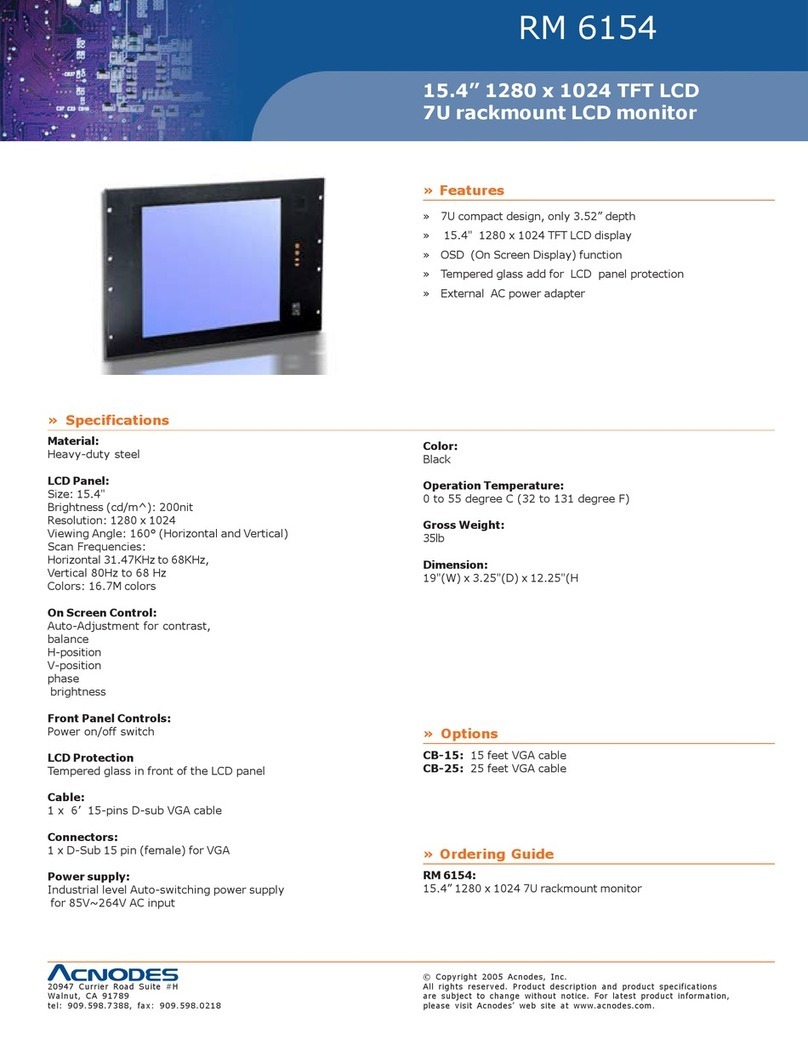
Acnodes RM 6154 User manual

Acnodes

Acnodes RM 6154 User manual

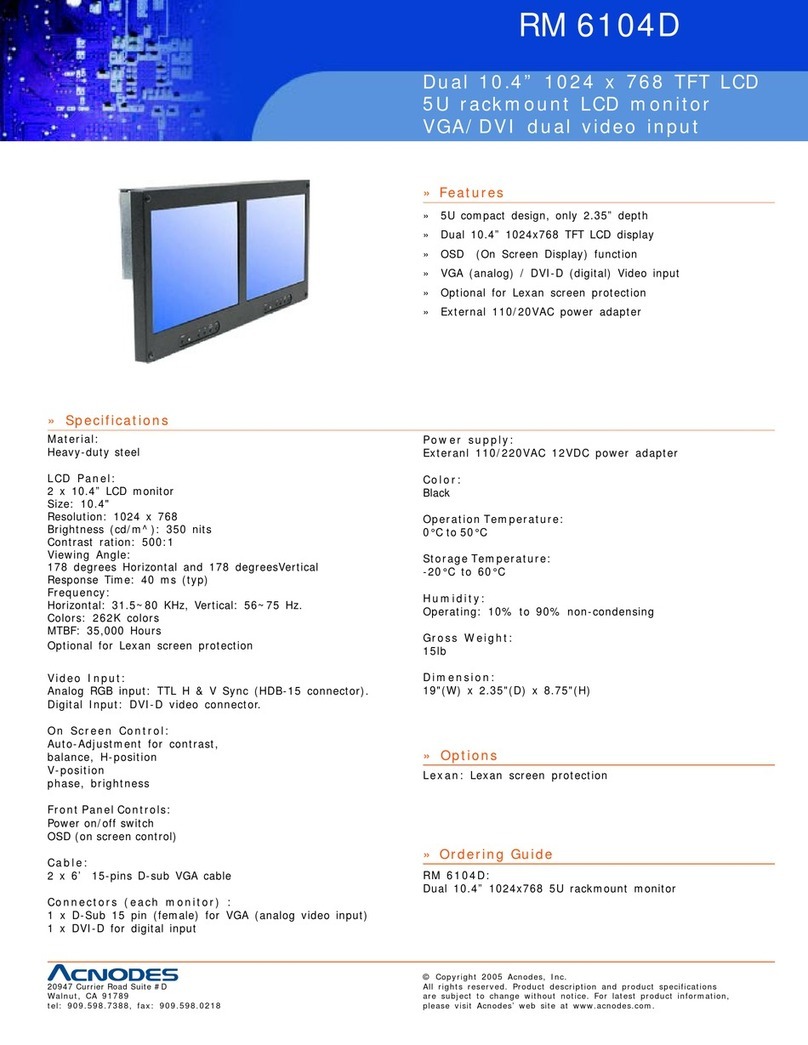
Acnodes RM 6104D User manual

Acnodes

Acnodes RM 6104D User manual

Acnodes RM 6173 User manual

Acnodes

Acnodes RM 6173 User manual

Popular Monitor manuals by other brands

Samsung ME32C user manual

Samsung

Samsung ME32C user manual

ViewSonic VA926-LED user guide

ViewSonic

ViewSonic VA926-LED user guide

Furuno Mu 120c Operator's manual

Furuno

Furuno Mu 120c Operator's manual

Asus VB171D - 17" LCD Monitor Service manual

Asus

Asus VB171D - 17" LCD Monitor Service manual

AOC 9GLR Technical specifications

AOC

AOC 9GLR Technical specifications

DMG RAFFAELLO manual

DMG

DMG RAFFAELLO manual

AOC LM720 - 17" Technical specifications

AOC

AOC LM720 - 17" Technical specifications

Sony Trinitron GDM-F500 Service manual

Sony

Sony Trinitron GDM-F500 Service manual

Memorex MT1701 user guide

Memorex

Memorex MT1701 user guide

ViewSonic VE510s-4 Service manual

ViewSonic

ViewSonic VE510s-4 Service manual

Farenheit T-1503CM instruction manual

Farenheit

Farenheit T-1503CM instruction manual

Ditel DINOS DN129/AT Quick installation guide

Ditel

Ditel DINOS DN129/AT Quick installation guide

Sony SDM-S51 Specifications

Sony

Sony SDM-S51 Specifications

Kenwood DMX1025BT quick start guide

Kenwood

Kenwood DMX1025BT quick start guide

Dell S2409WFP user guide

Dell

Dell S2409WFP user guide

EverFocus EN-7517E instruction manual

EverFocus

EverFocus EN-7517E instruction manual

Dell P3222QE user guide

Dell

Dell P3222QE user guide

Panasonic TH152UX1 - 152" PLASMA TV Service manual

Panasonic

Panasonic TH152UX1 - 152" PLASMA TV Service manual

manuals.online logo
manuals.online logoBrands
  • About & Mission
  • Contact us
  • Privacy Policy
  • Terms and Conditions

Copyright 2025 Manuals.Online. All Rights Reserved.

14628 Central Blvd,
Chino, CA91710
tel:909.597.7588, fax:909.597.1939
© Copyright 2011 Acnodes, Inc.
All rights reserved. Product description and product specifications
are subject to change without notice. For latest product information,
please visit Acnodes’ web site at www.acnodes.com.
User Manual
RP 1205/1170/1190/1172/1192
17-inch/19-inch/20-inch Rack
mount LCD monitor
RPS 1200/1170/1190
17-inch/19-inch/20-inch Rack
mount LCD monitor
(supprt Sun Native resolution)
© Copyright 2011 Acnodes, Inc.
All rights reserved. Product description and product specifications
are subject to change without notice. For latest product information,
please visit Acnodes’ web site at www.acnodes.com.
14628 Central Blvd,
Chino, CA91710
tel:909.597.7588, fax:909.597.1939
Chapter 1 Getting Started
1.1 Important Safeguards.............................................................1
1.2 Regulatory Notice....................................................................2
1.3 Before Installation....................................................................3
1.4 Unpacking................................................................................3
Chapter 2 RP1205, RP1170, RP1190, RP1172 & RP1192
RPS1200, RPS1170 & RPS1190
2.1 Package Contents..................................................................4
2.2 Structure Diagram...................................................................5
2.3 Specifications..........................................................................6
2.4 How to Install “One Man” Installation Slides......................7-8
2.5 How to Use the Slides............................................................9
2.6 Connection.............................................................................10
Chapter 3 Operation
3.1 On-screen Display Operation...............................................11
3.2 On-screen Menu.....................................................................12
Chpater 4 Optional Specification
4.1 DVI-D Option..........................................................................13
4.2 BNC+S-Video Option............................................................14
4.3 Audio Option...........................................................................15
4.4 Touchscreen Options........................................................16-17
4.5 Front NEMA/ IP65 Option......................................................18
4.6 DC Power Options.................................................................19
Contents
Chapter 5 Troubleshooting..............................................................20
14628 Central Blvd,
Chino, CA91710
tel:909.597.7588, fax:909.597.1939
© Copyright 2011 Acnodes, Inc.
All rights reserved. Product description and product specifications
are subject to change without notice. For latest product information,
please visit Acnodes’ web site at www.acnodes.com.
1.1 Important Safeguards Chapter 1
Please read all these instructions carefully before you use the device. Save this manual for future reference.
What the warranty does not cover
- Any product, on which the serial number has been defaced, modified or removed.
- Damage, deterioration or malfunction resulting from:
» Accident, misuse, neglect, fire, water, lightning, or other acts of nature, unauthorized product
modification, or failure to follow instructions supplied with the product.
» Repair or attempted repair by anyone not authorized by us.
» Any damage of the product due to shipment.
» Removal or installation of the product.
» Causs external to the product, such as electric power fluctuation or failure.
» Use of supplies or parts not meet our specifications.
» Normal wear and tear
» Any other causes which does not relate to a product defect.
- Removal, installation, and set-up service charges.
© Copyright 2011 Acnodes, Inc.
All rights reserved. Product description and product specifications
are subject to change without notice. For latest product information,
please visit Acnodes’ web site at www.acnodes.com.
14628 Central Blvd,
Chino, CA91710
tel:909.597.7588, fax:909.597.1939
1.2 Regulatory Notice
Legal Information
First English printing, October 2002
Information in this document has been carefully checked for accuracy; however, no guarantee is given to the correctness of the
contents. The information in this document is subject to change without notice. We are not liable for any injury or loss that
results from the use of this equpiment.
Safety Instructions
» Unplud equipment before cleaning. Don’t use liquid or spray detergent; use a moist cloth.
» Keep equipment away from excessive humidity and heat. Preferably, keep it in an air-condition environment with temperatures
not exceeding 40° Celsius (104° Fahrenheit).
» When installing, place the equipment on a sturdy, level surface to prevent it from accidentally falling and causing damage to
other equipment or injury to persons nearby.
» When the drawer is in an open position, do not cover, block or in any way obstruct the gap between it and the power supply.
Proper air convection is necessary to keep it from overheating
» Arrange the equipment’s power cord in such a way that others won’t trip or fall over it.
» If you are using a power cord that didn’t ship with the equipment, ensure that it is rated for the voltage and current labeled on
the equipment’s electrical rating label. The voltage rating on the cord should be higher than the one listed on the
equipment’s rating label.
» Observe all precautions and warnings attached to the equipment.
» If you don’t intend on using the equipment for a long time, disconnect it from the power outlet to prevent being damaged by
transient over-voltage.
» Keep all liquids away from the equipment to minimize the risk of accidental spillage. Liquid spilled on to the power supply or
on other hardware may cause damage, fire or electrical shock.
» Only qualified service personnel should open the chassis. Opening it yourself could damage the equipment and invalidate its
warranty.
» If any part of the equipment becomes damaged or stops functioning, have it checked by qualified service personnel.
Regulatory Notices Federal Communications Commission (FCC)
This equipment has been tested and found to comply with the limits for a Class B digital device, pursuant to Part 15 of the
FCC rules. These limits are designed to provide reasonable protection against harmful interference in a residential installa-
tion.
Any changes or modifications made to this equipment may void the user’s authority to operate this equipment. The equip-
ment generates, uses, and can radiate radio frequency energy and, if not installed and used in accordance with the instruc-
tions, may cause harmful interference to radio communications.
However, there is no guarantee that interference will not occur in a particular installation. If this equipment does cause
harmful interference to radio or television reception, which can be determined by turning the equipment off and on, the user
is encouraged to try to correct the interference by one or more of the following measures:
» Re-position or relocate the receiving antenna
» Increase the separation between the equipment and receiver.
» Connect the equipment into an outlet on a circuit different from that to which the receiver is connected.

14628 Central Blvd,
Chino, CA91710
tel:909.597.7588, fax:909.597.1939
© Copyright 2011 Acnodes, Inc.
All rights reserved. Product description and product specifications
are subject to change without notice. For latest product information,
please visit Acnodes’ web site at www.acnodes.com.
1.3 Before Installation
» It is very important to locate the Rackmount LCD Drawer/Display in a suitable environment.
» The surface for placing and fixing the Rackmount LCD Drawer/Display should be stable and level or
mounted into suitable cabinet.
» Make sure the place has good ventilation, is out of direct sunlight, away from sources of excessive
dust, dirt, heat, water, moisture and vibration.
» Convenience for connecting the Rackmount LCD Drawer/Display to the related facilities should be well
considered too.
1.4 Unpacking
The Rackmount LCD Drawer/Display comes with the standard parts shown on the package contents. Check and make sure
they are included and in good condition. If anything is missing, or damage, contact the supplier immediately
© Copyright 2011 Acnodes, Inc.
All rights reserved. Product description and product specifications
are subject to change without notice. For latest product information,

please visit Acnodes’ web site at www.acnodes.com.
14628 Central Blvd,
Chino, CA91710
tel:909.597.7588, fax:909.597.1939
2.1 Package Contents Chapter 2
RP1205, RP1170, RP1190, RP1172 & RP1192
RPS1200, RPS1170 & RPS1190
14628 Central Blvd,
Chino, CA91710
tel:909.597.7588, fax:909.597.1939
© Copyright 2011 Acnodes, Inc.
All rights reserved. Product description and product specifications
are subject to change without notice. For latest product information,
please visit Acnodes’ web site at www.acnodes.com.
2.2 Structure Diagram
RP1205, RP1170, RP1190, RP1172 & RP1192
RPS1200, RPS1170 & RPS1190
© Copyright 2011 Acnodes, Inc.
All rights reserved. Product description and product specifications
are subject to change without notice. For latest product information,
please visit Acnodes’ web site at www.acnodes.com.
14628 Central Blvd,
Chino, CA91710
tel:909.597.7588, fax:909.597.1939
2.3 Specification-
RP1170 & RP1172
Display Size: 17” LCD
Max. Resolution: 1280 x 1024
Brightness (cd/m^): 300
Color Support: 16.7M
Contrast Ratio: 1000:1
Viewing Angle (H/V): 160° x 160°
Display Area (mm): 338 x 270
Tr Response Time (ms): 1.3
LCD Panel MTBF (hrs): 50,000
Resolution:
720 x 400, 70Hz
640 x 480, 800 x 600, 1280 x 1024 60/70/72/75Hz
1024 x 768, 1152 x 864, 1280 x 720 60/70/75Hz
RP1190 & RP1192
Display Size: 19” LCD
Max. Resolution: 1280 x 1024
Brightness (cd/m^): 250
Color Support: 16.7M
Contrast Ratio: 1000:1
Viewing Angle (H/V): 160° x 160°
Display Area (mm): 376 x 301
Tr Response Time (ms): 1.3
LCD Panel MTBF (hrs): 50,000
Resolution:
720 x 400, 70Hz
640 x 480, 800 x 600, 1280 x 1024 60/ 70/ 72/ 75Hz
1024 x 768, 1152 x 864, 1280 x 720 60/ 70/ 75Hz
RPS1170
Display Size: 17” LCD
Max. Resolution: 1152 x 900
Sun Native Resolution: 1280 x 1024
Brightness (cd/m^): 300
Color Support: 16.7M
Contrast Ratio: 1000:1
Viewing Angle (H/V): 160° x 160°
Display Area (mm): 338 x 270
Tr Response Time (ms): 1.3
LCD Panel MTBF (hrs): 50,000
Resolution:
720 x 400, 70Hz
640 x 480, 800 x 600, 1280 x 1024 60/70/72/75Hz
1024 x 768, 1152 x 864, 1280 x 720 60/70/75Hz
RP1205
Display Size: 20” LCD
Max. Resolution: 1600 x 1200
Brightness (cd/m^): 300
Color Support: 16.7M
Contrast Ratio: 800:1
Viewing Angle (H/V): 160° x 160°
Display Area (mm): 408 x 306
Tr Response Time (ms): 1
LCD Panel MTBF (hrs): 50,000
Resolution:
1400 x 1050, 1600 x 1200 60Hz
720 x 400 70Hz
640 x 480, 800 x 600 60/ 70/ 72/ 75Hz
1024 x 768, 1152 x 864, 1280 x 1024 60/ 70/ 75Hz
1280 x 720 60/ 75Hz
RPS1190
Display Size: 19” LCD
Max. Resolution: 1152 x 900
Sun Native Resolution: 1280 x 1024
Brightness (cd/m^): 250
Color Support: 16.7M
Contrast Ratio: 1000:1
Viewing Angle (H/V): 160° x 160°
Display Area (mm): 376 x 301
Tr Response Time (ms): 1.3
LCD Panel MTBF (hrs): 50,000
Resolution:
720 x 400, 70Hz
640 x 480, 800 x 600, 1280 x 1024 60/ 70/ 72/ 75Hz
1024 x 768, 1152 x 864, 1280 x 720 60/ 70/ 75Hz
14628 Central Blvd,
Chino, CA91710
tel:909.597.7588, fax:909.597.1939
© Copyright 2011 Acnodes, Inc.
All rights reserved. Product description and product specifications
are subject to change without notice. For latest product information,
please visit Acnodes’ web site at www.acnodes.com.
RPS1200
Display Size: 20” LCD
Max. Resolution: 1152 x 900
Sun Native Resolution: 1600 x 1200
Brightness (cd/m^): 300
Color Support: 16.7M
Contrast Ratio: 800:1
Viewing Angle (H/V): 160° x 160°
Display Area (mm): 408 x 306
Tr Response Time (ms): 1
LCD Panel MTBF (hrs): 50,000
Resolution:
1400 x 1050, 1600 x 1200 60Hz
720 x 400 70Hz
640 x 480, 800 x 600 60/ 70/ 72/ 75Hz
1024 x 768, 1152 x 864, 1280 x 1024 60/ 70/ 75Hz
1280 x 720 60/ 75Hz
VGA Signal Input: Analog RGB, 0.7Vp-p
Sync. Type: Separate H/V, Composite, SOG
Plug & Play DDC: EDID 1.3
Connector: DB-15 connector
Power Input: Auto-sensing 100 to 240 VAC, 50/
60Hz
Power Consumption: Max. 48 Watt, Standby 5 Watt
Compatibility: Multi-platform - Mix PCs, SUNs, IBM,
HPs & DELLs.
Regulation Approval: FCC, CE
Graphic Input (Optional): DVI-D, BNC, S-Video &
Quad display input
DC Power (Optional): DC Power input with 12V, 24V,
48V selection
Touchscreen (Optional):
Resistive & Capacitive
AU: 35mm audio plug
NEMA4 / IP65: 4mm thickness of protective glass
Environmental:
Operation: 0° to 50°C Degree
Storage: -5° to 60° Degree
Relative Humidity: 5~90%, non-condensing
Shock: 10G acceleration (11ms duration)
Vibration: 5~500Hz 1G RMS random vibration
Standard Feature
Dimensions (W x D x H)
RP1200 & RPS1205: 17.4 x 25.6 x 1.73”
RP1170 & RP1190: 17.6 x 23.6 x 1.73”
RPS1170: 17.6 x 23.6 x 1.73”
RPS1190: 17.4 x 23.6 x 1.73”
RP1172 & RP1192: 17.6 x 18.9 x 1.73”
© Copyright 2011 Acnodes, Inc.
All rights reserved. Product description and product specifications
are subject to change without notice. For latest product information,
please visit Acnodes’ web site at www.acnodes.com.
14628 Central Blvd,
Chino, CA91710
tel:909.597.7588, fax:909.597.1939
2.4 How to Install “One Man” Installation Slides
Install into rack