manuals.online logo
Brands
  1. Home
  2. •
  3. Brands
  4. •
  5. ADEMCO
  6. •
  7. Radio
  8. •
  9. ADEMCO 7720 User manual

ADEMCO 7720 User manual

Other manuals for 7720

1

Other ADEMCO Radio manuals

ADEMCO 7720PLUS User manual

ADEMCO

ADEMCO 7720PLUS User manual

ADEMCO 7720V2 User manual

ADEMCO

ADEMCO 7720V2 User manual

ADEMCO 7720 User manual

ADEMCO

ADEMCO 7720 User manual

Popular Radio manuals by other brands

Grundig G6 AVIATOR owner's manual

Grundig

Grundig G6 AVIATOR owner's manual

Makita DMR114 instruction manual

Makita

Makita DMR114 instruction manual

PURE Move R3 manual

PURE

PURE Move R3 manual

Motorola CP040 Detailed service manual

Motorola

Motorola CP040 Detailed service manual

Bosch GPB18V-5C Operating/safety instructions

Bosch

Bosch GPB18V-5C Operating/safety instructions

Ocean Digital WR-230 user manual

Ocean Digital

Ocean Digital WR-230 user manual

Realistic TRC-457 owner's manual

Realistic

Realistic TRC-457 owner's manual

Uniden AX 144 owner's manual

Uniden

Uniden AX 144 owner's manual

SIGNIFY EA2173 instruction manual

SIGNIFY

SIGNIFY EA2173 instruction manual

auna multimedia 10026443 user manual

auna multimedia

auna multimedia 10026443 user manual

GME TX680 instruction manual

GME

GME TX680 instruction manual

Motorola MTM5 00 Series Basic service manual

Motorola

Motorola MTM5 00 Series Basic service manual

Tivoli Audio ONE+ owner's manual

Tivoli Audio

Tivoli Audio ONE+ owner's manual

Sirius Satellite Radio SDVK1 installation guide

Sirius Satellite Radio

Sirius Satellite Radio SDVK1 installation guide

Sirius XM RAdio EDGE user guide

Sirius XM RAdio

Sirius XM RAdio EDGE user guide

Trevi XF 100 user guide

Trevi

Trevi XF 100 user guide

EisSound KBSound iSelect user manual

EisSound

EisSound KBSound iSelect user manual

Kirisun DM588-02 user manual

Kirisun

Kirisun DM588-02 user manual

manuals.online logo
manuals.online logoBrands
  • About & Mission
  • Contact us
  • Privacy Policy
  • Terms and Conditions

Copyright 2025 Manuals.Online. All Rights Reserved.

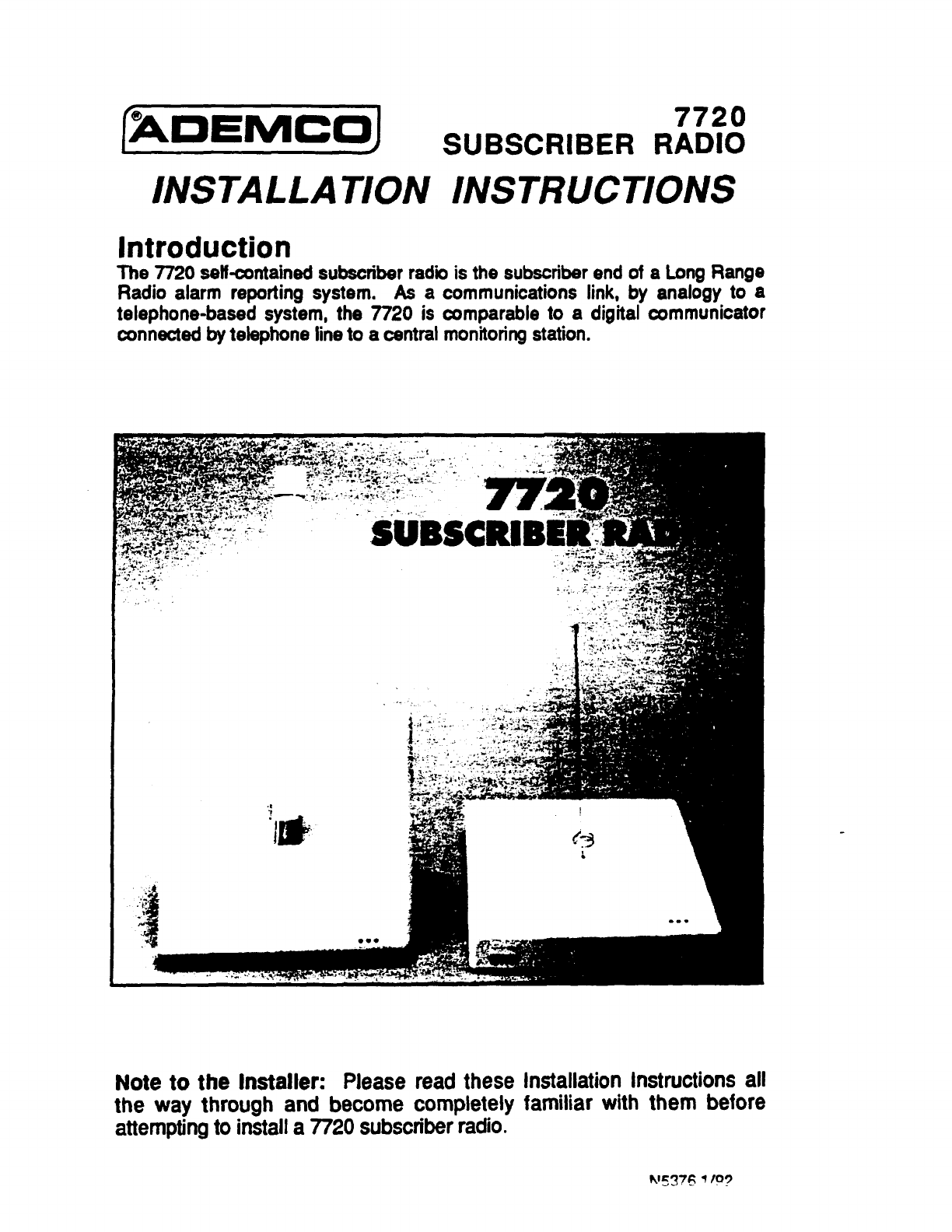
(W3EMCOJ 7720
SUBSCRIBER RADIO
INSTALLATION INSTRUCTIONS
Introduction
The 7720 selkontained subscriber radii is the subscriber end of aLong Range
Radio alarm reporting system. As acommunications link, by analogy to a
telephone-based system, the 7720 is comparable to adigital communicator
connected by telephone line to acentral monitoringstation.
I,.
Note to the Installer: Please read these
the way through and become completely
attemptingto installa 7720subscriberradio.
Installation Instructions all
familiar with them before
TABLE OF CONTENTS
SYSTEMFEATURES............... .....-..- ..... ANIEtwA#muNnNG.....- ...._..”...-- ......-.10
0PER4TKIN
.------ .------------. -”--- 3SELECTINGASITE(FASTMADE).......... 10
GErwviL”.-.--___””___ STANDARDWIREANTENNA——......”.10
Ma--_-----..-.._.”-.”------; ANTENNACONNECTORKIT———-. 10
LOWBAITERYSHUTDOWN—- TESTINGTEEm------------------------ 11
LEDNDcAmS._ ... ..-...___._—. WiDIOTRANSMISSKXl
TEST.................11
RAM) FAULTLEDPATTERNS.....................3 W~MW~.” ----------------------- 11
SmnNG THEJUMPER
wnoNs.....................4 STATUS=CCMWND 11
REM)VINGTHE7720’SCOVER........................4 .. ..... ..... .......
NOTESFORUL INSTALLATIONS—.......- 12
h/iRING,MCNJhmW&WRING .................5 =CFMH --------------------------- 12
P~_lNG ~ ~ “-”...”-”. ””-.-”.-... ~DIAGRAM............ ...... .... 13
USfNGA7720PPROGFWMTOCX....... ........
PROGWt?W QUESTK3NS......................6
EXITINGPROGRAMMCK)E........ ..................9
SYSTEM FEATURES
Wireless Reporting: All alarm and Antenna Included: The 7720 comes
status messages are transmitted to the
master station network via radio signals,
which means faster and more secure
reporting.
Integrated Electronics: The entire
radio link equipment, including interface,
transmitter, power supply, battery and
antenna, is housed masingle unk requiring
only battery charging power and alarm
inputs from a standard 12 volt afarm panel.
Selection of Input Interfaces: The
7720 can monitor alarm inputs from
Ademcc ACP, Ademco ECP, discrete 4
zone contact closures or their electrical
equivalent, or from external gate and
modulation inputs.
Compatibility: The 7720 is compatible
with existing installations using ADEMCO
equipment or other control panels. The
7720 can be used in conjunction with
digital communicators on the same
system, both acting as backup to one
another (use an ADEMCO 659-EN Line
Monitor connected to azone rnputto report
afine cut and backup ad~ital dialer), whiie
connecting the radm fauft output to azone
on the dster.
Built-in LED Indicators: Three LEDs
are used to indicate message
transmissions, low battery condtions and
radio faults. Ablinking yellow LED
rndbates normaf O~RdkX1.
Built-in Tamper Protection: For
added protection, built-in cover tamper
switches will triggeran afarm whenever the
chassis cover is removed, thus protecting
against unauthorized access to the 7720.
The tamper zone number must be entered
in programming question 25 to enable
protection.
-2-
with an omni-directional wire antenna, and
also features an optional antenna kit
(7720ANT) for using a 7625 antenna.
Programmable Features: The 7720
utilizes EEROM (Electrically Erasable
ROM) technology, which allows the 7720 to
be programmedwith a7720P Programming
Tool. The programming options incfude
channel assignments for Telco fault input,
inverted trigger inputs, delayed reporting
channels (16 second delay, if selected),
open/close/restore reporting channels,
etc.
Self-Diagnosing Transmitter:
Malfunctions of the transmitter, including
antenna fault, low output power, loss of
external power, bw internal DC vottage and
internal radio-frequency circuit problems
can be reported on both the ACP/ECP
interfaces, as well as being transmitted to
the master station network, if the fault
does not prectude such transmission. For
other alarm panels, faults can trigger
contact cfosures on aForm ‘C” relay to
rndicate radio faults.
Power Supply: The 7720 is powered by
its own 12 volt battery, which can be
charged by an alarm panel’s output voltage
(14.O-14.2VDC). The charging input draws
approximately 50mA continuous and
400mA peak current during transmission.
Low Battery Monitoring: The system
will notify the central station of alow
battery condition whenever the battery
voka~ drops bdOW 11 .2V (t 5’Yo).
Low Battery Shutdown: If for any
reason the battery voltage drops Mow
9.75 volts, the radio will automatically
shutdown. Refer to the LOW BAllERY
SHUTDOWN section for more information.

OPERATION
GENERAL: The 7720 receives alarm and
restore signals from the alarm control
panel and converts these signals to radio
messages which are transmitted to the
master station network, which in turn
refays the messages to the central station.
The 7720 can monitor either 4traditional
zone inputs, or can process serial data
from panels which use either ACP or ECP
data formats. For traditional zone inputs,
the first two zones may be configured by
jumper to activate on either Ovolts or
activate on 4.5-12VDC; zones 3and 4are
hard-wired to activate on 4.5-12VDC.
Zones 1-4 can also be programmed to
invert their input signals.
Upon receiving an alarm, restore, or status
message, the 7720 will transmit the
message to the master station network
after aprogrammed delay of either 250
milliseconds or 16 seconds. The
transmissionswill repeat for approximately
6minutes (total of 60 messages) to ensure
that the alarm or other report will be
received by the central monitoringstation.
The 7720 transmits peridIc supervisory
messages to alert the central station to
system problems. Acontact closure is
avaifabie to indicate aradio fault; this can
be either normally open or normafly closed.
In adcMin, it can be selected to be “fail-
safe” by programming the fault output to be
inverted (i.e. the relay is powered unfess
there is afauft). The fauft output is between
TB1-1 and TB1-2, whii float with reference
to the rest of the circuit.
The 7720 also provides status information
via its serial port, thus allowing radio
status to be dispfayed on command, using
either a772oP Programming Tool or a
computer terminal. Refer to the TESTING
THE 7720 section for informationregarding
the “S command and status messages.
ANTENNA:The 7720 can use either the
supplied wire antenna, or, by using the
optional 7720ANT connector I@ can use a
7625 omnidkectional antenna, 7625-MB
antenna (if additional gain is required), a
7674 or 7674-13 YAGI antenna (if
directional antenna is required). The
supplied antenna mounts directly to the
7720. The other antennas can be mounted
remotely (if desired) using pm-assembled
coaxial cable availabie from ADEMCO (5’,
12’or 25’ lengths).
LOW BATTERY SHUTDOWN: If
battery voltage drops below 9.75 volts, the
7720 will automatically shutdown, and ALL
LEDs WILL BE OFF. When the battery is
recharged to 10.25 volts, the LEDs will
begin to flash in rapid unison (see LED
table), until the battery is charged to 12.5
volts. During the charging cycle,
the 7720 will not transmit any
messages. The 772o will resume normal
operation after the battery is fully charged.
.E1
m
-
RN
r
m
iii
Jr
—
INDICA
~
~
S(JM
RapidFlesh
;1O/second)
SlowFlesh
II/second)
SlowerFleet
[1per3sac)
sold
Pattern
Consecutlvs
w
Unison
(lo/second)
slowlMsotl
(2/sacond)
IONS
MEANING
WithYELsdld. Message
transrmssion
With YELflashiW=HS
antennatest
Transmissionqlcle ON
TestorFASTmessage
Normaloperation
Normal,butlowMt. orDC
Ch@J condtiondetectec
Radio Faultdetected
SeeFlashPatternsTable
Powerorl/Rese[sequence.
Repeatedtwce before
enteringnormalmode.
Press~NTER] duringcycle
toenterProgramMode.
8atterynotfullycharged.
Repeatedaboutonceevery
2secondsuntilbatteryis
chargedto12.5vDc.
Radii isnotproperly
programmed.WIIIcontinua
until[ENTER]ispressedto
enterprogrammingmode.
s
transmission
5S-L-L-S VSWRisbed
~
I#-Fautt codenumber.See “S commandin the
TESTINGTHE ~20 sectionforadditionalstatus
. . . I
-3-
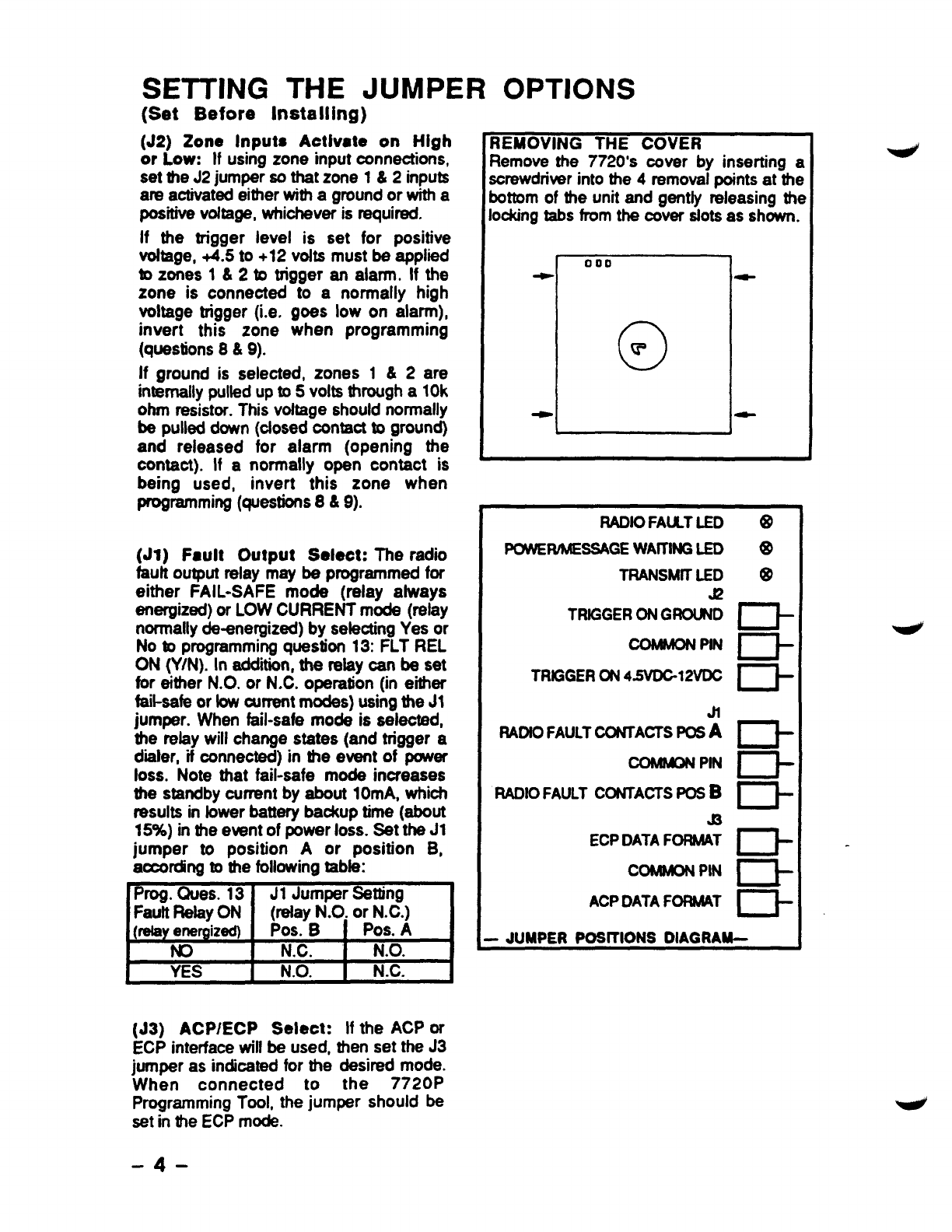
SETTING THE JUMPER OPTIONS
(Set Before Installing)
(J2) Zone Inputs Activate on High
or Low: If using zone input oonneotions,
set the J2 jumper so that zone 1&2inputs
are activated either with aground or with a
positive voftage, whiohever is required.
if the trigger level is set for positive
voftage, +4.5 to +12 vofts must be applied
to zones 1&2to trigger an alarm. If the
zone is connected to anormally high
voltage trigger (i.e. goes low on alarm),
invert this zone when programming
(questions 8&9).
if ground is selected, zones 1&2are
internally pulled up to 5volts through a 10k
ohm resistor. This vottage should normally
be pulled down (ofosed oontact to ground)
and released for alarm (opening the
contact). If anormally open contact is
being used, invert this zone when
~miw (ques~s 8&9).
(Jl) Fault Output Select: The radio
fault output relay may be programmed for
either FAIL-SAFE mode (reiay afways
energized) or LOW CURRENT mode (relay
normally de-energized) by seleoting Yes or
Nob programming question 13: FLT REL
ON (Y/N). In addiin, the relay can be set
for either N.O. or N.C. operation (in either
fail-safe or fowcurrent modes) using the JI
jumper. When fail-safe mode is selected,
the relay will change states (and trigger a
d=ier, if oonnected) in tie event of pcrwer
ioss. Note that fail-safe mode increases
the standby ourmt by about 10mA, which
results in lower batterv bsdam time (about
15%) in the event of ~wer loss. Set-the J1
jumper to position Aor position B,
according to the following tabie:
Prog. Oues. 13 J1 Jumper sating
Fauft Relay ON (refay N.0, or N.C.)
(J3) ACPIECP Select: If the ACP or
ECP interface will be used, then set the J3
jumper as indicated for the desired mode.
When connected to the 7720P
Programming Tool, the jumper should be
set in the ECP mode.
-4-
REMOVING THE COVER
Remove the 7720’s cover by inserting a
screwdriver into the 4removal points at the
bottom of the unit and gentfy releasing the
lockingtabs from the cover slots as shown.
ODD
O
r’
1-
LJ
RADtOFAULTLED
mwMESSAGE WAlllffi LED
TRANSMtTLED
a
TRIGGERONGROUND
COMMONPtN
TRIGGERON4~12vt)C
Jl
llADtOFAULTCONTACTSPOSA
C0MWP4
PIN
RADIOFAULT CONTACTSPOSB
@
ECPDATAFORMAT
COMMONPIN
ACPDATAFORMAT
D
m
D
cl-
Cl-
D-
rl-
R
n-
-JUMPER POSITIONS DIAGRAM--
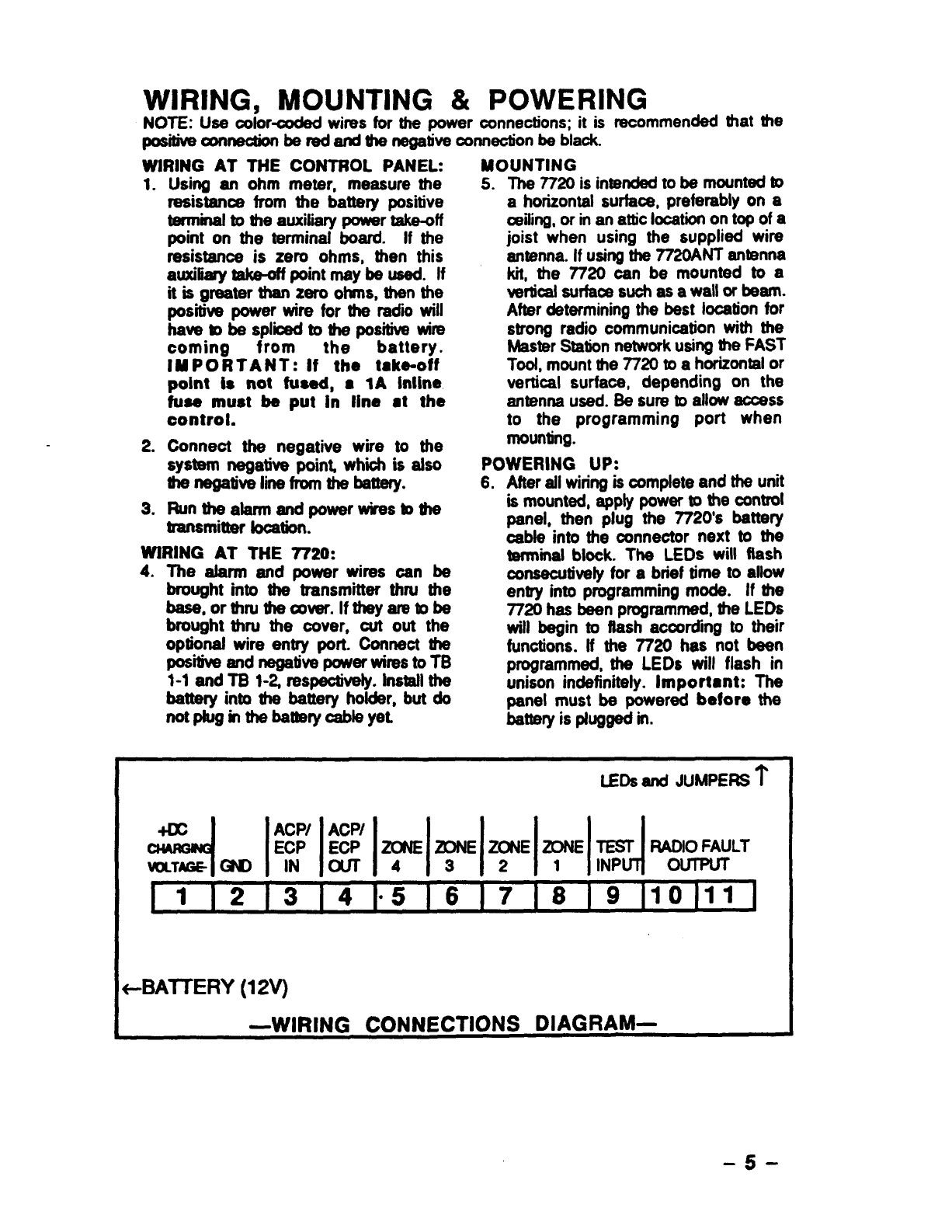
WIRING, MOUNTING &POWERING
NOTE: Use ooior-oodad wins for the power connections; it is recommended that the
_~- be ti afld UM negative connedon be black.
WIRING AT THE CONTROL PANEL:
1.
2.
3.
Using an ohm meter, measure the
resistance from the battery positive
terminaf to the auxiliary power takedf
point on the terminal board. If the
resistance is zero ohms, then this
auxifiafy takeoff pointmaybe used. If
it is greater than zero ohms, then the
positive power wire for the radii will
have mbe Splioedto the positiw wire
coming from the battery.
IMPORTANT: If the take-off
point Is not fueed, ●IA Mine
fuse must be put in line dthe
control.
Conneot the negative wire to the
system negative point whii is also
hnegative line from the batteIy.
Runtheatarm andoowerwkestothe
transmitter boation~
WIRING AT THE 7720:
4. The alarm and power wires can be
brought into the transmitter thru the
base, orthfutiaver.lf theyamtobe
brought thru the oover, out out the
optkmaf wire entry port. Connect the
POSitiw and ne@ive power Wi~S to ~
1-1 end T8 l-~ respectively. Install the
battery into the battery holder, but do
notpluginthe battetycableyet
MOUNTING
5. The 7720 is intended to be mount- to
ahorizontal surface, preferably on a
ailing, or man attic Iooationon top of a
joist when using the supplied wire
antenna. If using the 7720ANT antenna
kit, the 7720 can be mounted to a
wrticai surfaoe such as a wallorbeam.
After determining the best location for
strong radio cornmunioation with the
Master Station network using the FAST
Toot, mwnt the 7720 to ahorizontal or
vertical surface, depending on the
antenna used. Be sure to allow acoess
to the programming port when
mounting.
POWERING UP:
6, After ail wiring is oomplete and the unit
is mounted, apply power to the control
panel, then plug the 7720’s battery
oable into the mnnector next to the
terminal blook. The LEDs will flash
oonseoutively for abrief time to allow
entry into programming mode. If the
7720 has been programmed, the LEDs
will begin to flash acoordhg to their
funotions. If the 7720 has not been
programmed, the LEDs will flash in
unison indefinitely. important: The
pad must be powered before the
battery is plugged in.
LEDsand JUMPERS?’
+-BAITERY(12V)
-5-
PROGRAMMING THE 7720
USING A7720P PROGRAMMING TOOL
The 7720P Programming Tool is powered by the 7720, and connects to the telephone
connector on the 7720 PC Board. Set the 7720 ACP/ECP jumper to the ECP position.
Each key of the 7720P has two possible functions, anormal function and aSHIFT function.
To perform anormal key function, simply press the desired key. To perform aSHIFT key
function, press SHI17 key, then press desired function key.
7720P NORMAL &SHIFT KEY (shift LED lit) FUNCTIONS
Key INormal Key Function SHIFT Key Function
BSJEsc [BS]: Press to delete entry [ESC]: Resets EEPROM defaults*
lfr [1]: Scrolldown programming [T]: Scroflup programming
NIY [N]: Press for “NO”answer. [v :Press SHIFT-Y for “YESmanswer
,SHIH Press before pressing aSHIFT key function. Will Ight SHIFT LED.
LED goes out once a key is pressed. Must press again for each
SHIFT function desired.
11A
I2/6 I[21:For enteril
I-#n
I
1
4n3
I111:For entenng the number 1[A]: Used tor entenng C.S. ID number
ngthe number 2[6]: Used for entering C.S. ID number
For entering the number 3[C]: Used for entering C.S. ID number
For enterina the number 4ID]: Used forentering C.S. ID number
I[51:➤memenna me numDer 3I~E):Used forentering C.S. ID number
lumber6IIFl: Used for C.S. ID& FAST made
-. —[L 1 _. .._ .
*][6]; For enterincj~e m.
7JS [7 :For enterina the num~r 7IISI: Press to dklav diagnostic status
#l Iff?loFar mtwir
19nt
m=m
t-#ihZi
1..-. -. ..-..4 wthe number 8~]: Press to send TEST messages
I[91.For entering the number 9[X]: Press to reset the 7720
Not used with 7720 [SPACE]: Not used with 7720
11UJ. For entering the number ONo SHIFT function
I[#/ENTER]: Press to accept No SHIFT function
II~riable entries I
●Active only when the ‘REVIEW?” prompt is dispfayed.
After connecting the 7720P cable, power up the 7720 (ap@y power to the control panel and
plug in the battery connector).
Enter programming mode by pressing [ENTER] during the initial power up
period (while LEDs are ffashing consecutively).
Pressing SHIFT-X will reset the 7720 to its initial power up phase if it has already entered
normal mode. The followingwill be displayed:
IflDEMCO 7720 UI .2 I
1[c) Pittumy 1991 I
Press [ENTER] again to begin the programming session. Programming is
accomplished by answering disptayed questions. Most questions require only a[Y]es or
[N]o response, while others require anumerical response (ID numbers, etc.). For numerical
responses, press [ENTER] to comptete the entry and proceed to next question. A‘?
indicates an invafid entry. The current value is displayed on the second line in parenthesis
(). To accept the current entry, simply press the ENTER key. Use the UP/DOWN arrow
keys to scrollthrough the programming questions without changing any values.
-6-
SUBSCRIBER INFORMATION
1.
2. 10dd (V/N) I
3. 15 MIN SUPU (V/N) I
Enter the 4digit customer acoount number,
0001-9999.
Enter Yforodd flag (bit vafue 1), Nfor even
system ffag (bit value O).
Status repotiing is always enabled. Enter
the desired intewai as follows:
Y. Short form:every 15 minutes (6-hour
-.. —.... ..
wMow for COM-FAIL report)
N=Short form:every hour [standard 24
hour reportingfor COM-FAIL)
AiarmNet SYSTEM USERS (Private System users skip to #6)
4. fflmnNet (V/N) —
s!
5. CS ID
Enter Yif an AlarmNet installation. Enter N
for Private System users (skip to option 6).
Enter the primary central station’s system
ID number, 1-7P. Not appiioable for Private
System users.
PRIVATE SYSTEM USERS (AlarmNet users skip to #8)
6. Enter the Private System routing code, O-7.
Not appiioable for AlarmNet users.
8.
9.
10.
11.
12.
13.
INVERTED ZONE SELECTION
Invert 21 (V/N) 1
Inuert 22 (Y/N) I
\Inuert 23 (V/N) I
Invert 24 (Y/N) 1
FLTRELON(V/N) I
Enter the Private System channel number,
1-F. Not applicable forAfannNet users.
For questions 6-12, press Yto invert the
input signal for desired zones 1-4 &Test
zone (question 12).
Press Nfor normal input signal.
Press Yif fail-safe mode is desifed. In this
mode, the fault relay is normally energized
and W-IIreenergize in the event of aradio
fauft. Note that fail-safe mode draws
stighdymore standby ourrent. See the
JUMPER SElllNGS section for setting the
refay output.
-7-
14.
15.
16.
17.
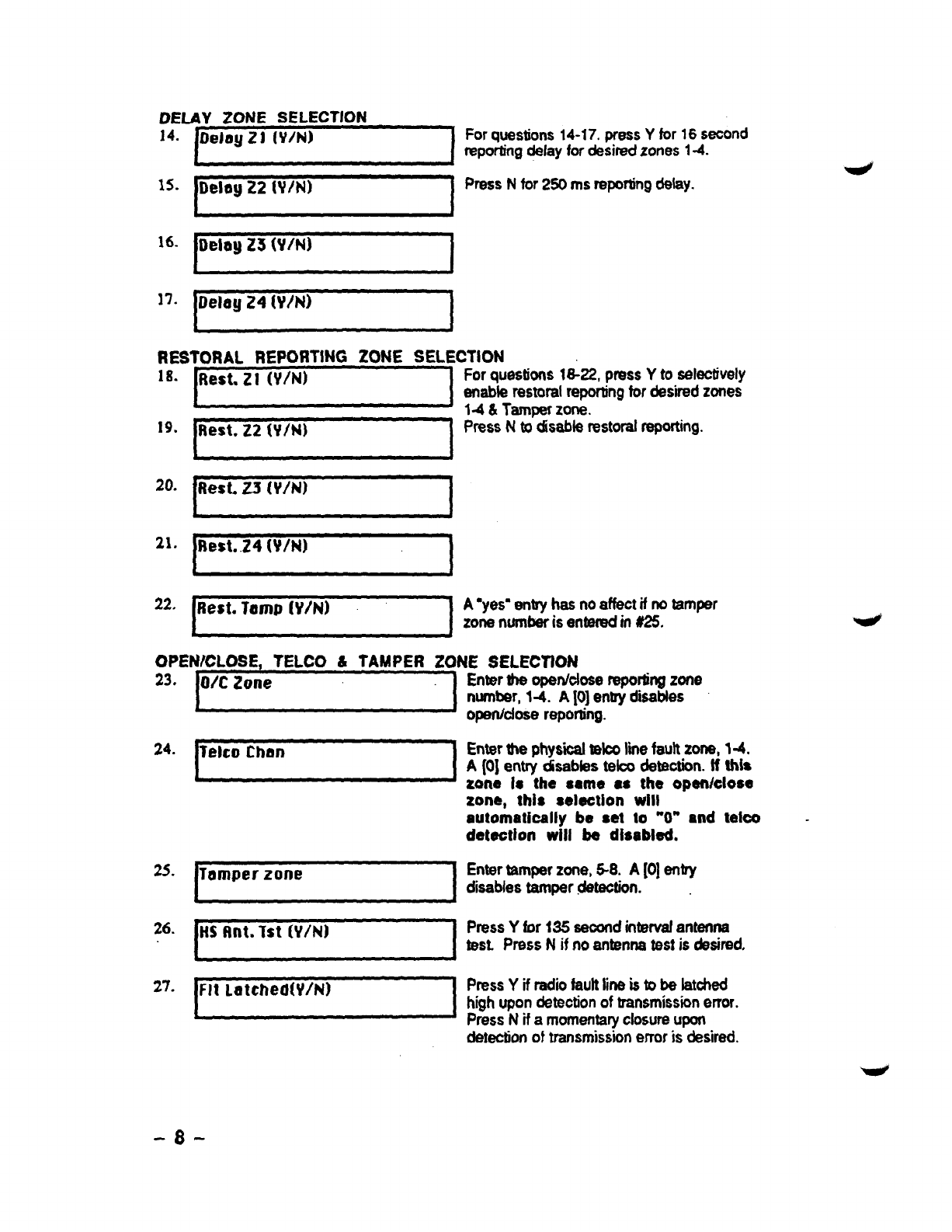
DELAY ZONE SELECTION
Delay 22 (Vlhl) I
I
Forquestions14-17, pressYfor16 second
reportingdelayfordesiredzones 14.
PressNfor250 msreportingdelay.
18.
19.
20.
21.
22.
RESTORAL REPOftTING ZONE SELECTION
Forquestions18-22, prws Yto selectively
enableresmralreportingfordes.bedzones
IJ14& Tamperzk. -
PressNtodisablerestoralreporting.
.~
Best. 24 W/N)
*
A‘yes”entryhasnoaffectif notamper
zonenumberisenteredm#25.
OPEN/CLOSE, TELCO &TAMPER ZONE SELECTION
23.
24.
25.
26.
27.
~0/C Zone ‘:-1
?elco than 1
Temper zone I
Enterthe opatidosa reporlingzone
number,14. A10]entryd~bles
opetidose reporling.
Enterthe phys”d telooIiie faultzone, 1-4.
A(0] entry disabfestelcodeteotion.ff this
zone Is the same se the open/close
zone, this seleotion will
automatically be set to “O” and teko
deteotion will be disabled.
Entertamperzone,98. A[0]entJY
disablestamper.Maotion.
HSf!nt. Tst (V/N) 1PressYfor 135 seoondintervafantenna
test. PressNif noantennstestisdesired.
Flt LalchedW/N) IPressYif radii faulttineistobe latched
highupondetectionoftransmissionerror.
PressNifamomentaryclosureupon
dewctionof transmissionerroris desired.
-8”
28.
29.
30.
31.
32.
33.
34.
35.
36.
37.
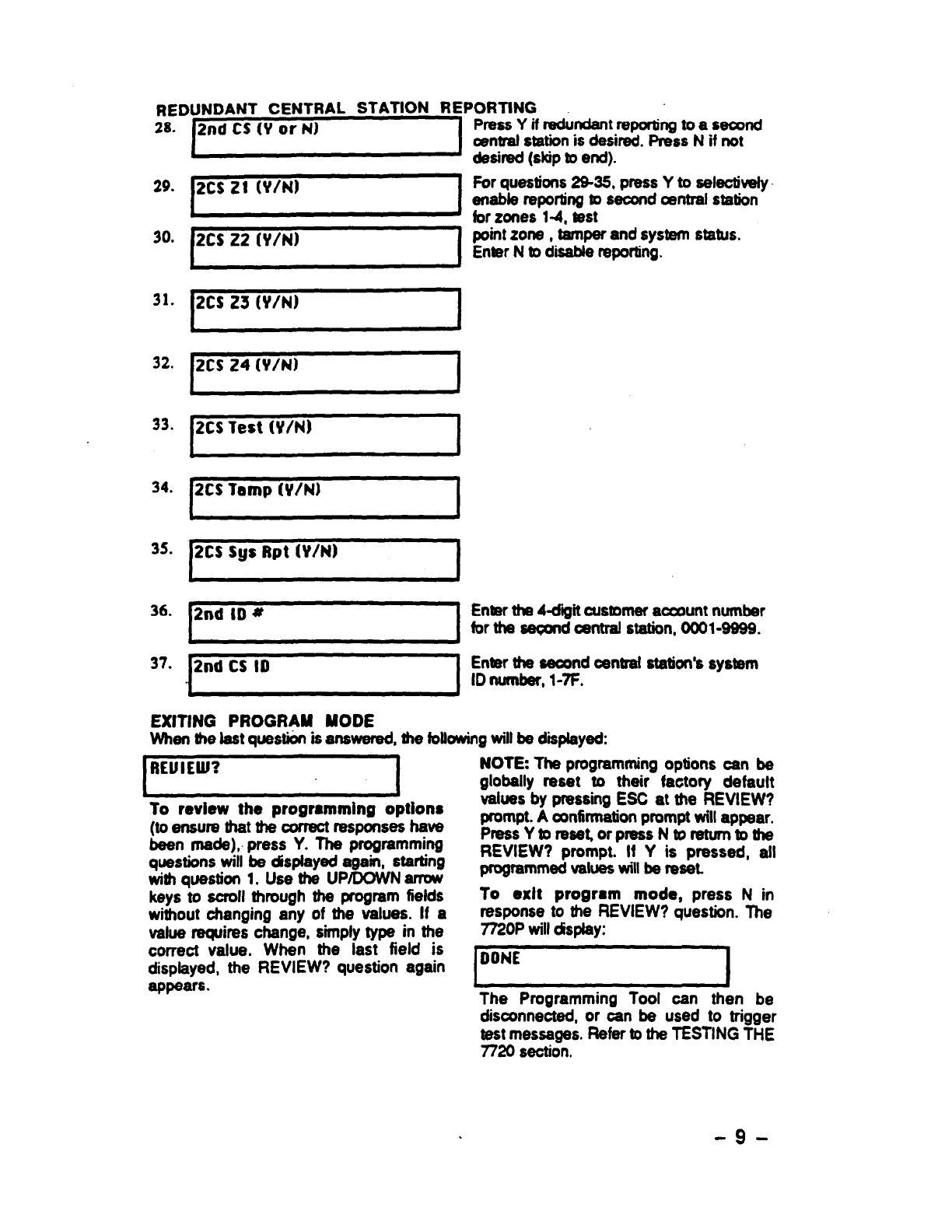
REDUNDANT CENTRAL STATION REPORTING
2CSZ1(YM I
2CS22(v/N) 1
2CS 23 (Y/N) I
2CS 24 (V/N) I
2CS Test Whl) 1
2CS Tamp (y/N) 1
2CS Sys Rpt tV/N) I
2nd ID *I
2nd CS 10 I
PressYifredundent repcwhlgtoasecxxld
centralstationis desirad.PressN ifnot
desired(skipmend).
Porquestions 29-35, press Yto selectively
enabfe reportingto seconda?ntralstation
forzones 1-4, test
pointzone, tamperand system status.
EnterNto disablereporting.
Enterthe 4diiit customeracamnt number
forthe seGw@oentralstation,0001-9999.
Enterthe saoondcantraf station%system
ID number,WI=.
LJ
EXITING PROGRAM MODE
When the lastquestion isanswered, the followingwillbe displayed:
RElflEW? I
}I
To review the programming options
(to ensure that the correotresponseshave
been made), press Y. The progmmming
questionswill be dtsplayedagain, starting
witi question 1. Use the UP/DOWN -
keys to scroll through the program fiefds
without ohanging any of the values. If a
vafue requires change, simplytype in the
correct vafue. When the last field is
displayed, the REVIEW? question again
appears.
NOTE The programmingoptions can be
globally reset to their factoty default
values by pressing ESC at the REVIEW?
prompt.Aaffirmation promptwillappear.
PressYtorase~orpress Ntoreturntothe
REVIEW? prompt. If Yis pressed, afl
programmedvalueswillbe reset.
To exit program mode, press Nin
response to the REVIEW? question. The
7720P willdisplay:
IDONE I
The Programming Tool can then be
disconnected, or can be used to trigger
testmessages. Refer tothe TESTfNG THE
7720 section.
-9-
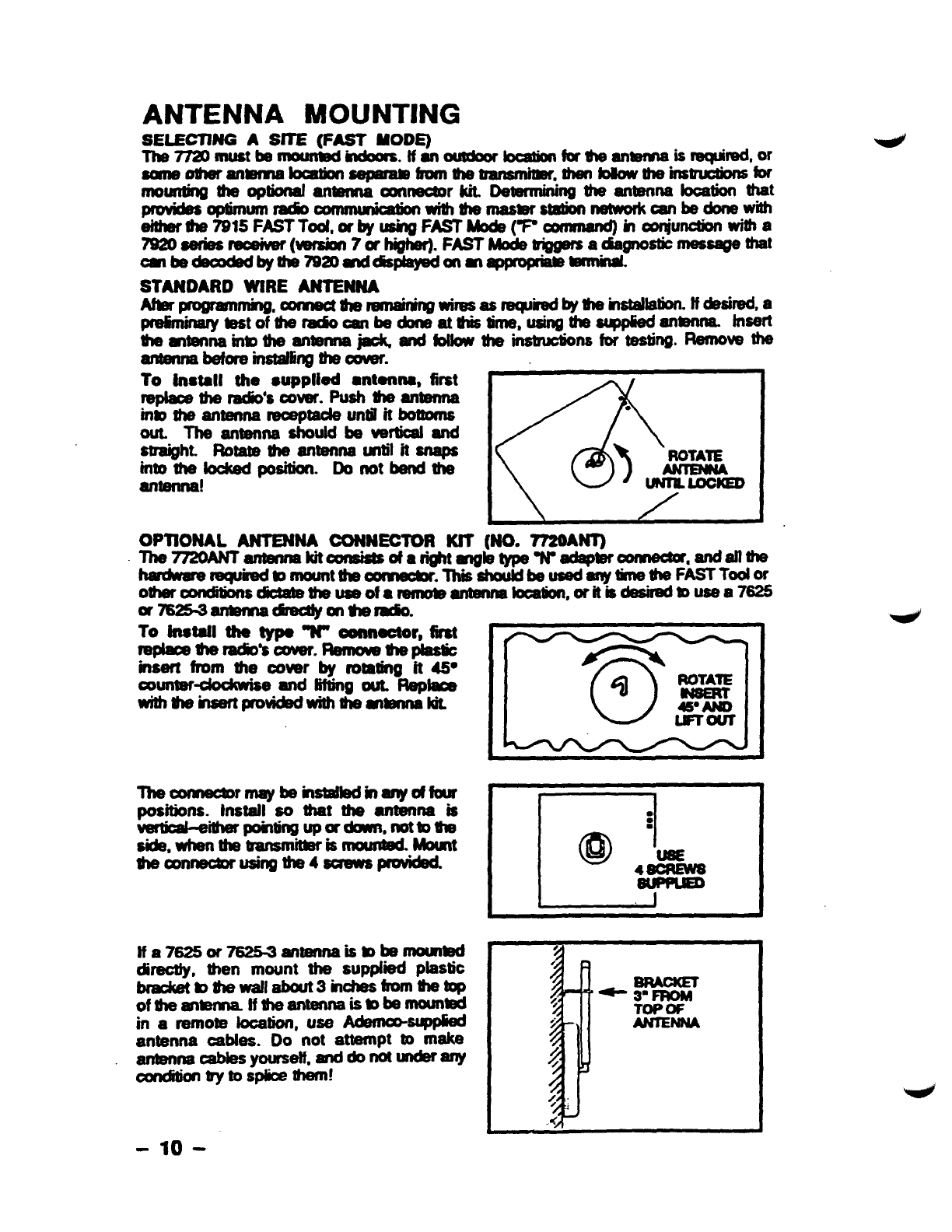
ANTENNA MOUNTING
SELECTJNG ASfTE (FAST MODE)
Tlwnamustbnmunw Moors. tfanoutdoOr bcationfortheantenna isrequired,w
Some Otheranmlnabcation aaparamfrom Ulebansmbr yhefwowtheins~for
mounting theoptimal antanna amneotor kit Determmmg the amenna Iooation that
-*W- . .
cmnmmbmwith bmaswstldion network wnbedonewti
either fha7915FASTT0d, or byushg FAST Mocfe(W00mmnd) inoonjunctionwifha
7920sarks~ (=sion 7whigher).FA43T-~~gnob m=- tit
omtiec&codedby the792Dd~onm~ .
STANDARDWfRE ANTENNA
Abrprognmnmhg,com30tuW3mmaidng
wimasraqhedbythernstdlatklf~mda
~=tofb-=nb bmmlimm$ml.ff=~mm tnsert
timennainmth eanmna~andfobw theimtmcbonsfortesting.Removethe
antannabefore instafrlngthe C&ar.
To fnstall the Supplied ●tanM, first
replaoethe radio’scovaf.mhtimenna
inmtheantennareoeptaokuntil it botmms
out. TheanWwlas houldbewtioaland
straight. Rotate Uw antenna until it snaps
intothe loolwfposition. Donot band the
antenna! &-●
‘) ROTAIE
lMILlmCED
OPllONAL ANTENNACONNECTOR KfT (NO. HNT)
The77ZOANT antennskitconsisS ofarightmgk3 typa Wac@Woomectw, andallthe
twdwamrewifedm mounttim~. ThisshouMbe usedwwtine*FA=Todw
or7625-3armnadlrediy ontifa&.
To fnstafl the typa “N” oonneotor, first
f’@-timdio’sawr. Remove thepiastic
insert fmm the oover by rotating it 45@
4ockwise and IiRingout. Rep&we
%%%aartproui&@with dlemmNt
The OomBuormay be~inanyoffour
positions.Install ao that the antennais
Vaio+eiipomingu pordouwi,nottoule
Side,whenthebansmitterismounteduount
ticonneotorusing the4aCa’awSprOvkM.
lfa76250r~antennaismb-ti
direotty, then mount the supplied plastic
bnaokatb$m wallabout3 inches fromthetop
Ofu’wmkmna lftheantenna i’$mb --
in aremote location, use ~$WP@d
antenna oables. Do not awpt mmake
antenna cable syour$w, -titi-w
oondkkm trytosplicalhem!
-1o-