manuals.online logo
Brands
  1. Home
  2. •
  3. Brands
  4. •
  5. ADEMCO
  6. •
  7. Security System
  8. •
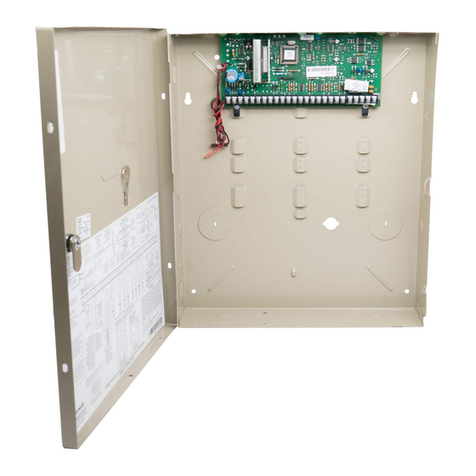
  9. ADEMCO VISTA XM Series Product manual

ADEMCO VISTA XM Series Product manual

This manual suits for next models

3

Other ADEMCO Security System manuals

ADEMCO VIA-30PSE User manual

ADEMCO

ADEMCO VIA-30PSE User manual

ADEMCO VISTA-25 User manual

ADEMCO

ADEMCO VISTA-25 User manual

ADEMCO Vista-128FB  User manual

ADEMCO

ADEMCO Vista-128FB User manual

ADEMCO Accord User manual

ADEMCO

ADEMCO Accord User manual

ADEMCO 5600 Alert II User manual

ADEMCO

ADEMCO 5600 Alert II User manual

ADEMCO 4110 User manual

ADEMCO

ADEMCO 4110 User manual

ADEMCO Security System User manual

ADEMCO

ADEMCO Security System User manual

ADEMCO 1025 User manual

ADEMCO

ADEMCO 1025 User manual

ADEMCO Vista-20 User manual

ADEMCO

ADEMCO Vista-20 User manual

ADEMCO Vista-20 User manual

ADEMCO

ADEMCO Vista-20 User manual

ADEMCO VISTA-20PS User manual

ADEMCO

ADEMCO VISTA-20PS User manual

ADEMCO Vista-128BP Operating instructions

ADEMCO

ADEMCO Vista-128BP Operating instructions

ADEMCO Ademco VISTA-40 User manual

ADEMCO

ADEMCO Ademco VISTA-40 User manual

ADEMCO Security System VISTA-10SE Assembly instructions

ADEMCO

ADEMCO Security System VISTA-10SE Assembly instructions

ADEMCO VISTA-50P User manual

ADEMCO

ADEMCO VISTA-50P User manual

ADEMCO VISTA-32FB User manual

ADEMCO

ADEMCO VISTA-32FB User manual

ADEMCO via30+ User manual

ADEMCO

ADEMCO via30+ User manual

ADEMCO Via-30P User manual

ADEMCO

ADEMCO Via-30P User manual

ADEMCO VISTA-48D Assembly instructions

ADEMCO

ADEMCO VISTA-48D Assembly instructions

ADEMCO VISTA Series Quick start guide

ADEMCO

ADEMCO VISTA Series Quick start guide

ADEMCO Security System VISTA-10SE Operating instructions

ADEMCO

ADEMCO Security System VISTA-10SE Operating instructions

ADEMCO VISTA-128B User manual

ADEMCO

ADEMCO VISTA-128B User manual

ADEMCO VISTA-50P User manual

ADEMCO

ADEMCO VISTA-50P User manual

ADEMCO VISTA 10 User manual

ADEMCO

ADEMCO VISTA 10 User manual

Popular Security System manuals by other brands

Polon-Alfa 4000 Installation and maintenance manual

Polon-Alfa

Polon-Alfa 4000 Installation and maintenance manual

Nexcom NViS 14162 Series user manual

Nexcom

Nexcom NViS 14162 Series user manual

Eminent EM8670 Quick install

Eminent

Eminent EM8670 Quick install

urmet domus alpha 1060 INSTALLATION AND USE BOOKLET

urmet domus

urmet domus alpha 1060 INSTALLATION AND USE BOOKLET

SmartPool YardGuard YG03 manual

SmartPool

SmartPool YardGuard YG03 manual

DSC PC5964 Mounting instructions

DSC

DSC PC5964 Mounting instructions

Secure USAB-1 operating instructions

Secure

Secure USAB-1 operating instructions

B&B 480 SERIES Operation & maintenance manual

B&B

B&B 480 SERIES Operation & maintenance manual

Inner Range Concept 2000 user manual

Inner Range

Inner Range Concept 2000 user manual

Johnson Controls PENN Connected PC10 Install and Commissioning Guide

Johnson Controls

Johnson Controls PENN Connected PC10 Install and Commissioning Guide

Aeotec Siren Gen5 quick start guide

Aeotec

Aeotec Siren Gen5 quick start guide

Swann SW-P-MC2 Specifications

Swann

Swann SW-P-MC2 Specifications

Ecolink Siren+Chime user manual

Ecolink

Ecolink Siren+Chime user manual

EDM Solution 6+6 Wireless-AE installation manual

EDM

EDM Solution 6+6 Wireless-AE installation manual

Siren LED GSM operating manual

Siren

Siren LED GSM operating manual

Detection Systems 7090i Installation and programming manual

Detection Systems

Detection Systems 7090i Installation and programming manual

FRIEDLAND MA10 Installation and operating instructions

FRIEDLAND

FRIEDLAND MA10 Installation and operating instructions

Se-Kure Controls MicroMini SK-4841 instructions

Se-Kure Controls

Se-Kure Controls MicroMini SK-4841 instructions

manuals.online logo
manuals.online logoBrands
  • About & Mission
  • Contact us
  • Privacy Policy
  • Terms and Conditions

Copyright 2025 Manuals.Online. All Rights Reserved.

VISTA
XM
SERIES
TECHNICAL REFERENCE
MANUAL
www.PDF-Zoo.com
firealarmresources.com
CONGRATULATIONS
- and WELCOME to the VISTA XM FAMILY!
Thepurposeof this TECHNICAL REFERENCEMANUAL is to give you, theinstaller,a
betterunderstandingof theoperationandcapabilitiesof theVISTA XM Seriesof products.
From the most basicconfiguration to themost complex, this manual will help you fully
understand each option, step-by-step. The manual defines the system components,
provides spec.ificwiring andprogramming instructions (complemented with numerous
diagrams)anddescribesthe system’soperation.In addition, a comprehensiveglossaryis
includedto helpavoidconfusionwith thesystem’sstateof theart terminology.
As always,ADEMCO is therefor YOU! Our SALES andTECHNICAL SUPPORTstaff
areeagerto assistyou in anyway they can,sodon’thesitateto call, for anyreason!
East Coast Technical Support: l-800-645-7492 (8 a.m.-6 p.m. EXT.)
West Coast Technical Support: 1-800-458-9469 (8 a.m.-5 p.m. P.S.T.)
Again,CONGRATULATIONS, andWELCOME ABOARD!
1 NOTE: THIS ISSUE HAS BEEN SUBSTANTIALLY REVISED. 1
ADEbfCO’s VISTA XM SERIES TECHNICAL REFERENCE MANUAL
www.PDF-Zoo.com
firealarmresources.com
3
TABLE OF CONTENTS
I. GENERAL INFORMATION ....................................................................................7
II. HARDWARE OVERVIEW
9
.......................................................................................
A VlSTA XM CONTROL PANELS ...................................................................................
B. REMOTE CONSOLES 8 KEYSWlTCH.. ..................................................................... 1:
C. DIALERS ................................................................................................................. 11
D. 2.WIRE SMOKE DETECTORS.. ................................................................................ 11
E. P-WIRE POLLING LOOP DEVICES ............................................................................ 12
F. WIRELESS DEVlCES.. ............................................................................................ .15
G. SOUNDERS ............................................................................................................. 16
H. MISCELLANEOUS ACCESSORIES.. ........................................................................ 17
Ill. ZONE TYPE DEFINITIONS ................................................................................19
IV. SYSTEM CONFIGURATION (ZONES)
......................................................... .21
A. BASIC 9 HARD-WIRED ZONES ................................................................................
B. ZONE EXPANSION MODULE .................................................................................. I:
C. P-WIRE POLLING LOOP EXPANSION ...................................................................... 25
D. WIRELESS ZONE EXPANSION ............................................................................... 30
E. ZONE EXPANSION COMBlNATlONS .............. ......................................................... .36
V. SYSTEM CONFIGURATION (PERIPHERALS) ........................................
97
A. REMOTE CONSOLES .............................................................................................. 37
B. EXTERNAL SOUNDERS .......................................................................................... 36
C. SMOKE DETECTOR CONFlGURATlONS .................................................................. 41
D. PASSIVE INFRARED MOTlON DETECTORS (PIRs) 43
...................................................
E. PHONE LINE INTERFACE.. ..................................................................................... .45
k AUXILIARY VOLTAGE TRIGGERS ............................................................................. 47
REMOTE KEYSWITCH OPERATlON 8 WIRING 48
..........................................................
VI. MOUNTING PROCEDURES ..............................................................................
49
A. MOUNTING THE 4140XM CABINET 49
...........................................................................
B. MOUNTING THE 413OXM/513OXM CONTROLS.. ...................................................... .49
C. ADJUSTING THE ALPHA CONSOLE LCD VIEW ANGLE ........................................... 54
VII. POWERING THE SYSTEM ...............................................................................55
VIII. SYSTEM OPERATION .........................................................................................
57
A. SECURI-W ACCESS CODES 57
....................................................................................
B. KEYPAD FUNCTIONS ........................................................................................... ..4 9
C. TROUBLE CONDITIONS .......................................................................................... .61
D. RECALLING ALARM/TROUBLE MESSAGES.. .......................................................... 62
IX. SYSTEM COMMUNICATIONS .........................................................................
63
A. DIGKAL COMMUNICATOR OPERATION .................................................................. .63
8. COMMUNICATION FORMATS .................................................................................. .64
ADEMCO’s VISTA Xbf SERIES TECHNXCAL REFERENCE MANUAL
www.PDF-Zoo.com
firealarmresources.com
4
TABLE OF CONTENTS (cont.)
X. PROGRAMMING THE SYSTEM ........................................................-.........-....71
A.
;:
ii:
E
H:
I;
K-.
L.
ri
0.
GENERAL INFORMAnON ........................................................................................ 71
SECURITY ACCESS CODES.. 75..................................................................................
ZONE DEFINlTlONS ................................................................................................. 76
RF OPTIONS ............................................................................................................ 78
SYSTEM OPTIONS .................................................................................................. . 0
SOUNDER OPTIONS .............................................................................................. .83
TELEPHONE OPTIONS 04...........................................................................................
REPORTING OPTIONS ............................................................................................ -87
SELECT REPORTING FORMAT.. ............................................................................. .88
3+1/4+1 STANDARD OR EXPANDED REPORT SELECTION ..................................... 89
ZONE CHANNEL ASSIGNMENTS ............................................................................. 91
REPORT CODES .....................................................................................................
4+2 EXPANDED FORMAT EVENT/ID CODES ........................................................... i:
DOWNLOADING OPTIONS ....................................................................................... 94
PROGRAMMING ZONE DESCRIPTIONS .................................................................. .95
Xl. DOWNLOADING.. ...................................................................................................99
XII. TESTING THE SYSTEM.. .................................................................................103
XIII. SPECIAL UL REQUIREMENTS.. ...................................................................105
XIV. TROUBLESHOOTING ........................................................................................I
13
A. CONSOLES.. ......................................................................................................... 113
B. HARD-WIRED ZONES, 1-9.. .................................................................................... 114
C. RPMs.. .................................................................................................................. .115
D. WIRELESS ........................................................................................................... .116
E. COMMUNICATIONS ............................................................................................... 118
XV. GLOSSARY OF TERMS.. ..................................................................................
I
19
XVI. SPECIFICATIONS ...............................................................................................
123
XVII. SUMMARY- OF CONNECTIONS & PROGRAMMING DEFAULTS.129
A. SUMMARY OF CONNECTIONS.. ............................................................................ .129
8. PROGRAMMING DEFAULT VALUES ...................................................................... 132
ADEMCO’s VISTA XM SERIES TECHNICAL REFERENCE MANUAL
www.PDF-Zoo.com
firealarmresources.com
5
LIST OF DIAGRAMS
1.
2A.
28.
3.
4.
5.
6.
7.
8.
9.
10.
11.
12.
13.
14.
15.
16.
17.
18.
19.
20.
21.
22.
23.
24.
25.
26.
27.
28.
29.
30.
31.
32.
33.
34.
35.
36.
37.
38.
39.
40.
41.
42.
43.
44.
45.
P-WIRE SMOKE DETECTOR HOOK-UP .............................................................................................. 21
ZONES 2-8 EOLR SUPERVISED CONFIGURATION ............................................................................ 22
ZONES 2-8 CLOSED-CIRCUlT UNSUPERVISED CONFIGURATIONS.. ................................................ .22
ZONE 9 FAST RESPONSE - UNSUPERVISED ONLY.. ....................................................................... .23
4152LMB INSTALLATION 8 WIRING .................................................................................................. -24
ZONE EXPANSION DIAGRAMS ......................................................................................................... -25
4197 POWER CONNECTIONS ........................................................................................................... 26
419OWl-l LEFT/RIGHT ZONES ........................................................................................................... -27
4208 SUMMARY OF CONNECTIONS.. .................................................. ............................................. .28
4280 AND 4280-8 RF RECEIVERS .................................................................................................... .31
SINGLE WIRELESS RECEIVER CONFIGURATION .............................................................................. 33
TWO WIRELESS RECEIVERS REDUNDANT CONFIGURATION ........................................................... 33
TWO WIRELESS RECEIVERS TO INCREASE COVERAGE. ................................................................ 34
ZONE EXPANSION COMBINATION CONFIGURATIONS ...................................................................... .36
REMOTE CONSOLE HOOK-UP.. ....................................................................................................... .37
SOUNDER OPTIONS FOR 4140XM CONTROL .................................................................................. .38
SOUNDER OPTIONS FOR 5130XM OR 4130XM CONTROLS .............................................................. 39
4148 RELAY MODULE.. .................................................................................................................... .39
TWO 702 SIRENS IN SERIES .............................................................................................................. 40
TWO 719 SIRENS IN PARALLEL.. ...................................................................................................... 40
ZONE 1 EOLR SUPERVISED FOR BWIRE SMOKE DETECTORS .................................................... ...4 1
ZONES 2-8 EOLR SUPERVISED FOR 4-WIRE SMOKE DETECTORS ................................................. .41
P-WIRE POLLING LOOP SMOKE DETECTORS.. ................................................................................ .42
RF SMOKE DETECTORS.. ................................................................................................................ .42
4196 POLLING LOOP PIR ................................................................................................................. .43
4275 POLLING LOOP PIR ............................................................................................................... ...4 4
5775 WIRELESS PIR.. ....................................................................................................................... .44
INSTALLING THE 4171XT-XM DIALER WlTH THE 4130XM15130XM CONTROLS ................................. .45
PHONE LINEAND GROUND START CONNECTlONS ......................................................................... .46
4171XT-XMI4171XM AUXILIARY VOLTAGE TRIGGERS ...................................................................... .47
KEYSWlTCH WIRING ......................................................................................................................... .48
SURFACE MOUNT INSTALLATIONS .................................................................................................. 50
FLUSH MOUNTING - BASIC ............................................................................................................... 51
INSERTING THE NAMEPLATE .......................................................................................................... ..5 2
FLUSH MOUNTING WlTH TRIM RING .................................................................................................. .53
PRE-WIRUNEW CONSTRUCTION.. .................................................................................................... 54
POWER FLOW CHART ....................................................................................................................... 55
POWER PACK AND BAlTERY CONNECTlONS .................................................................................. 58
4140ATX UL GRADE A INSTALLATION.. ............................................................................................ I 05
UL GRADE AA 4140ATX CONNECTED TO 698UL DERIVED CHANNELSTU.. .................................... .I06
UL GRADE AA TAMPER CIRCUIT WITH A 698UL STU.. ....................................................................... I 07
UL GRADE A4140ATX CONNECTED TO A 7621AD LONG RANGE RADIO TRANSMllTER ................. 108
UL GRADE AA INSTALLATION USING A 445 HIGH LINE SECURITY TRANSMITTER.. .......................... .109
UL GRADE A CENTRAL STATION INSTALLATION USING A 346 POLICE CONNECTlON ,110
.....................
414OXM SUMMARY OF CONNECTIONS DIAGRAM ............................................................................. 130
4130XM15130XM SUMMARY OF CONNECTIONS ............................................................................... 131
ADt?btCO’r VISTA XM SERIES TECHNICAL REFERENCE btANVAL
www.PDF-Zoo.com

firealarmresources.com
6
LIST OF TABLES
1. DIP SWlTCH TABLE, POLLING LOOP DEVICES.. ................................................................................ -29
2. DIP SWITCH TABLE, WIRELESS DEVICES ........................................................................................... 35
3. BATTERY STANDBY TABLE ................................................................................................................ 55
4. CONTACT ID REPORTlNG CODE DEFlNlTlONS ................................................................................... .66
5. LOW SPEED DIGITAL COMMUNICATOR MESSAGE FORMATS.. ......................................................... .70
6. SUMMARY OF PROGRAMMING COMMANDS ...................................................................................... .73
7. INDEX TO PROGRAMMING FIELDS ..................................................................................................... .74
8. VOCABULARY OF WORDS STORED IN MEMORY ................................................................................ 98
9. AUXILIARY CURRENT DRAW WORKSHEET.. ...................................................................................... .129
10. POLLING LOOP CURRENT DRAW WORKSHEET.. ............................................................................. .129
11. STANDARD PRE-PROGRAMMED DEFAULTS.. ........................... ....................................................... .132
12. STANDARD LOW SPEED 3+1/4+1 PRE-PROGRAMMING.. ................................................................. .143
13. EXPANDED LOW SPEED 3+1&l PRE-PROGRAMMING.. ................................................................. .145
14. ADEMCO HIGH SPEED PRE-PROGRAMMING .................................................................................... .147
15. 4+2 EXPANDED FORMAT PRE-PROGRAMMING ................................................................................ .149
STEP 1
STEP 2
STEP 3
STEP 4
STEP 6
STEP 6
STEP 7
SEVEN STEPS TO EASY INSTALLATION
The following steps are required to properly install a VISTA XM system:
Become familiar with the system by reading the GENERAL INFORMATION section.
Determine the hardware required for the installation by reviewing section II: 7-Y
HARDWARE OVERVIEW.
Determine the system’s zone configuration and wiring requirements by reviewing
section Ill: ZONE TYPE DEFINITIONS, section IV: SYSTEM CONFIGURATION
(ZONES) and section V: SYSTEM CONFIGURATION (PERIPHERALS). If the
installation is UL rated, check the special UL requirements in section XIII.
Once the wiring is completed, mount the Control and make power connections
following the instructions provided in section VI: MOUNTING PROCEDURES and
section VII:’ POWERING THE SYSTEM.
Learn how the system operates, including security codes and keypad functions by
reading section VIII: SYSTEM OPERATION.
lf the system is to be supervised by a central monitoring station, read section IX:
SYSTEM COMMUNlCATlON for descriptions of reporting formats and a list of
communication programming default tables.
Program the system via the keypad or by downloading from a remote location,
following the instructions in section X: PROGRAMMING THE SYSTEM and section Xl:
DOWNLOADING (if applicable).
Test the system and teach the user how to perform all commands, following the
procedures in section XII: TESTING THE SYSTEM.
If problems occur, refer to section XIV: TROUBLESHOOTING.
ADVlSORtES Throughout this manual, information that requires special attention is highlighted in
the ADVISORIES paragraphs. This information includes system limitations, caveats
and other information vital to the proper operation of the system. Be sure to read
these paragraphs carefully.
MODEL NUMBERS Unless otherwise noted, product model numbers listed in this manual refer to
Ademco products.
ADEMCO’s VISTA XM SERIES TECHNICAL REFERENCE Mi NVAL
www.PDF-Zoo.com
firealarmresources.com
SECTIONI
7
SECTION I
GENERAL INFORMATION
THE VISTA CONTROLS The VISTA XM Controls are microprocessor based programmable systems
which provide up to 9 wired zones of protection, expandable to 64 zones
(wired and/or wireless) when connected to a 2-wire polling bop. The VISTA
XM Series includes the 4130XM, 5130XM. and 4140XM Controls and the
4137 8 5137 Remote Consoles, which are look-alikes to the 4130XM 8
5130XM respectively. Connections to the Control are made via a plug-in
connector, which can be removed without disturbing any of the field wiring.
The phone lines are connected to a separate block located on the
communicator board (4171 XT-XM or 4171XM; ordered separately wtth the
413OXMI 5130XM; 4171 XT-XM included with the 4140XM).
l
4140XM
The 4140XM is housed in a metal cabinet, measuring 12’ x 12” x 3’, and
requires the use of either the 4137 fixed message or 5137 alpha-numeric
(allowing use of the 4140XM’s built-in vocabulary) remote consoles. and can
also be used with the 4146 keystation. A SPDT relay, rated @ 2.8 amps, is
built-in for use with a No. 702, or No. 719 (or equivalent) exterior sounder. For
UL mercantile installations, the 414OAlX can be used. The 4140ATX is the
same as the 4140XM, but features a larger, heavier gauge cabinet and a
cabinet tamper switch.
l
4130XM
The 4130XM is a self-contained Control with an LCD using 2 numeric digits
for zone identification, and a set of pre-designated English language
prompts, for system status (ex: ‘READY’, “NOT READY). A built-in 85dB UL
listed sounder is also included. The Control can be surface or flush mounted.
The 5130XM is also a selt-contained Control, but with a O-line, 32character
(16 characters per tine), back-lit, programmable alpha-numeric LCD. Unlike
the 4130XM, the 5130XM (and 4140XM. when used with the 5137 console)
contains a bultt-in 220 word vocabulary from which to choose words for
describing each zone in friendly English language. In addition. up to 5
custom word entries to suit the individual needs of each installation can also
be programmed. Like the 4130XM, the 5130XM contains a built-in 85dB UL
listed sounder and can be surface or flush mounted.
.
5130XM
a-
EASY PROGRAMMING
The Control can be programmed either on the job site directly from the
keypad, or remotely by using the ADEMCO 4130PC DOWNLOADING
SOFTWARE, an IBM (or compatible) computer, and a HAYES 1200
Smartmodem. (See the PROGRAMMING section for a complete explanation).
All programmed options are stored in non-volatile EEROM memory. This
means that old fashioned PROM chips are no longer needed, and the
program can be changed over and over again, as the needs of a particular
system grow. It also means that the program cannot be bst or changed In any
way if power to the Control is bst. Even if completely powered down for long
periods of time, the program will remain intact.
For installer convenience, the Control is pre-programmed with a set of
‘standam values that is designed to meet the needs of many installations.
These values, however, can be changed to suit the needs of any particular
installation. Specific programming instructions are provided in the
PROGRAMMING section of this manual.
ADEMCO'x VISTA XM SERIES TECHNIcAt REFERENCE MANUAL
www.PDF-Zoo.com
firealarmresources.com
8 GENERAL INFORMATION
.n
MEMORY-OF-ALARM
The VISTA Controls provide a memory-of-alarm feature, which, upon
disarming the system, automatically displays all zones that were in an alarm
condition while the system was armed. To cancel this display, the user simply
enters the security code and presses the OFF key. In addition, a 10 day
alarWtrouble history is maintained by the system, which helps the installer or
central station to identify problem sensors. To activate this feature, enter the
security code + the [O] key. To clear the display, enter the security code and
press the OFF key. Note that once the 10 day alanwtrouble history display
has been cleared, it is also cleared from the system’s memory.
BUILT-IN
For end-user wnvenience. the 5130XM and 4140XM (with 5137) contain a
USER’S MANUAL/
“built-in Users Manual. By depressing and holding any of the function keys
DESCRIPTOR REVIEW
on the console for 5 seconds, a brief explanation of that particular function
scrolls across the ALPHA-NUMERIC display. For example, if the user forgets
how to bypass a zone, he or she simply depresses the key marked
“BYPASS and holds it for 5 seconds. The information will then scroll across
the display, explaining how to bypass a zone.
In addition, all programmed zone descriptors can be displayed (one at a time)
by pressing and holding the READY key until the key’s instructions appear (5
seconds), then releasing the key. This serves as a check for installers to be
sure all descriptors are entered properly. This feature is also helpful to the
user when there is a need to know the zone number of a particular sensor (as
when bypassing zones).
COMMUNICATIONS
The system can be monitored by a central station, via the switched telephone
network. Upon alarms, programmed communicator reports will be transmitted
up to the programmed maximum (swinger suppression) in one armed interval.
Restoral reports will be sent when the zone is restored for a time greater than
#s physical response time (less than 1 second). In addiiion, the system also
sends system status reports(AC loss, system trouble, etc.). The system also
provides voltage triggers for other communication devices, such as
Ademco’s Long Range Radio system.
:--. .
..--..
ADEbiCO’s VISTA XM SERIES TECHNICAL REFERENCE MANUAL
www.PDF-Zoo.com
firealarmresources.com
SECl7ON II 9
SECTION II
HARDWARE OVERVIEW
- A. VISTA XM SERIES CONTROL PANELS -
COMMON FEATURES
l
4140XM
L Q
W’L XM
l
5130XM ’
l
Basic 9 wired zones, expandable to 84 zones (wired, and/of wireless).
l
22 user codes.
l
Downloadable (office or site initiated).
l
Independent auxiliary voitage trigger outputs for FIRE, PANIC, BURG,
and OPEN/CLOSE.
l
ADEMCO High Speed, 4+2, traditional low speed, ADEMCO’s Express
and the new Contact ID communication formats available.
VISTA XM CONTROL (Cabinet Mounted)
l
Housed in a metal cabinet measuring 12” x 12” x 3’.
9 700 mA continuous auxiliary power.
l
Built-in SPDT alarm relay rated for 2.8 amps @28 v&s.
l
Alpha-Numeric zone descriptors (with 5137 remote console) with a buift-
in 220 word dictionary, plus an additional 5 custom word entries and an
installer’s message can be programmed (ex: ABC Alarms Call 1-800-l 23-
4567).
. Removeable terminal strip for easy installation and service.
l
Up to a 6AH battery can be used for maximum standby time (gel cell
only!).
l
Built-in ‘User’s Manual” and ‘Descriptor Review Mode’ (with 5137 remote
console).
VISTA XM FIXED-WORD CONSOLE/CONTROL
l
Se!-contained, compact design.
l
Surface or Flush mounted (hardware included).
. Liquid Crystal Dispiay (LCD) with P-digit numeric zone identification and
pre-designated English language prompts for system status (ex:
-READY-,
l
NOT READY=).
l
Built-in UL sounder (85 dB Ql 0 leet).
l
Removeable wiring harness for easy installation and service.
VISTA XM ALPHA CONSOLE/CONTROL
l
Self-contained, compact design.
l
Surface or Flush mounted (hardware included).
l
a-line. 32-character. Alpha-Numeric Liquid Crystal Display (LCD),
programmable for English language descriptors of each zone (ex:
“JOHNNY’S ROOM”).
l
Builtin ‘User’s ManuaP and ‘Descriptor Review Mode’.
l
Built-in UL sounder (85 dB @ 10 feet).
. Removeable wiring harness for easy installation and service.
ADEMCO’s VISTA XM SERIES TECHNICAL REFERENCE MANUAL
www.PDF-Zoo.com
firealarmresources.com
10 HARDWARE OVERVIEW
- B. REMOTE CONSOLES & KEYSWITCH -
l
4137 49WIRE, 4130XM LOOK-ALIKE CONSOLE
l
Equrpped with a liquid crystal display (LCD) using P-digit numerics for
zone identification, and a set of predesignated English language
prompts, such as ‘READY’. ‘NOT READY. etc. for system status.
l
A built-in alarm sounder is also included, which eliminates the need for a
separate indoor sounder.
l
The 4137 can be used with the 4130XM. 5130XM, and 4140XM
Controls.
l
4146
4.WIRE, 5130XM LOOK-ALIKE CONSOLE
l
Equipped with a programmable O-line, 32-character (16 characters per
line), back-fit, ALPHA-NUMERIC LCD for complete zone identification in
English tanguage (if descriptors are programmed).
. An alarm sounder is built in, eliminating the need for a separate indoor
sounder.
. The 5137 can be used with the 5130XM and 4140XM Controls.
,-,
REMOTE KEYSWITCH KIT
l
The remote plate contains 2 LED’s for system status, and houses a
spring-loaded keyswitch for arming and disarming the system.
l
An optional tamper switch (No. 112) can be added, if desired.
l
All of the VISTA XM Controls can accommodate one No. 4146 remote
plate. (More than one can be used if 688-12 switching modules are used
to boost the LED drive outputs for ARMED and READY status.)
.n.
ADEMCO’s VISTA XM SERIES TECHNICAL REFERENCE MANUAL
www.PDF-Zoo.com
firealarmresources.com