manuals.online logo
Brands
  1. Home
  2. •
  3. Brands
  4. •
  5. ADJ
  6. •
  7. Dj Equipment
  8. •
  9. ADJ 7PZ IP User manual

ADJ 7PZ IP User manual

Other manuals for 7PZ IP

1

Other ADJ Dj Equipment manuals

ADJ M-1616 User manual

ADJ

ADJ M-1616 User manual

ADJ Focus Spot 5Z User manual

ADJ

ADJ Focus Spot 5Z User manual

ADJ InnoRollLED User manual

ADJ

ADJ InnoRollLED User manual

ADJ Startec RAYZER User manual

ADJ

ADJ Startec RAYZER User manual

ADJ HYD320 User manual

ADJ

ADJ HYD320 User manual

ADJ 32 HEX PANEL IP User manual

ADJ

ADJ 32 HEX PANEL IP User manual

ADJ ikon profile ww User manual

ADJ

ADJ ikon profile ww User manual

ADJ VF SNOW FLURRY HO User manual

ADJ

ADJ VF SNOW FLURRY HO User manual

ADJ Mega Bar 50 RGB RC User manual

ADJ

ADJ Mega Bar 50 RGB RC User manual

ADJ M-101HD User manual

ADJ

ADJ M-101HD User manual

ADJ MIRAGE Q6 PAK User manual

ADJ

ADJ MIRAGE Q6 PAK User manual

ADJ Royal 3D User manual

ADJ

ADJ Royal 3D User manual

ADJ PIXIE DRIVER 2000 User manual

ADJ

ADJ PIXIE DRIVER 2000 User manual

ADJ ELEMENT H6 PAK User manual

ADJ

ADJ ELEMENT H6 PAK User manual

ADJ 15 HEX BAR IP User manual

ADJ

ADJ 15 HEX BAR IP User manual

ADJ FS3000LED User manual

ADJ

ADJ FS3000LED User manual

ADJ MEGA TRI BAR User manual

ADJ

ADJ MEGA TRI BAR User manual

ADJ COB CannOn Wash DW User manual

ADJ

ADJ COB CannOn Wash DW User manual

ADJ Mega Bar RGBA User manual

ADJ

ADJ Mega Bar RGBA User manual

ADJ VIZI CMY300 User manual

ADJ

ADJ VIZI CMY300 User manual

ADJ MOD TW100 User manual

ADJ

ADJ MOD TW100 User manual

ADJ Hydro Profile User manual

ADJ

ADJ Hydro Profile User manual

ADJ WiFly Chameleon User manual

ADJ

ADJ WiFly Chameleon User manual

ADJ Mega GO Par64 PLUS User manual

ADJ

ADJ Mega GO Par64 PLUS User manual

Popular Dj Equipment manuals by other brands

MAGMATIC Prisma Wash 25 user manual

MAGMATIC

MAGMATIC Prisma Wash 25 user manual

HERA PROCOLOR 60 RGBW SERIES User manual & installation guide

HERA

HERA PROCOLOR 60 RGBW SERIES User manual & installation guide

EuroLite LED TSL-600 SCAN COB user manual

EuroLite

EuroLite LED TSL-600 SCAN COB user manual

Ledj Slimline 12HEX12 user manual

Ledj

Ledj Slimline 12HEX12 user manual

Laserworld Garden GS-50RG Xmas manual

Laserworld

Laserworld Garden GS-50RG Xmas manual

Chauvet OVATION E-930VW Quick reference guide

Chauvet

Chauvet OVATION E-930VW Quick reference guide

Snow Masters Zig Oscillator user manual

Snow Masters

Snow Masters Zig Oscillator user manual

EuroLite 50530554 user manual

EuroLite

EuroLite 50530554 user manual

Beamz BUV243 user manual

Beamz

Beamz BUV243 user manual

Eagletone 6 Eyes Flower user manual

Eagletone

Eagletone 6 Eyes Flower user manual

EuroLite FLD-1508 user manual

EuroLite

EuroLite FLD-1508 user manual

Technical Pro LG8xSEA user manual

Technical Pro

Technical Pro LG8xSEA user manual

JB Systems Lounge Laser DMX Operation manual

JB Systems

JB Systems Lounge Laser DMX Operation manual

Elation FUZE WASH Z350 user manual

Elation

Elation FUZE WASH Z350 user manual

Maverick MK3 WASH Quick reference guide

Maverick

Maverick MK3 WASH Quick reference guide

Infinity TF-260C7 Fresnel manual

Infinity

Infinity TF-260C7 Fresnel manual

Chauvet EVE E-50Z Quick reference guide

Chauvet

Chauvet EVE E-50Z Quick reference guide

Eliminator Lighting E 138 manual

Eliminator Lighting

Eliminator Lighting E 138 manual

manuals.online logo
manuals.online logoBrands
  • About & Mission
  • Contact us
  • Privacy Policy
  • Terms and Conditions

Copyright 2025 Manuals.Online. All Rights Reserved.

User Instructions
2/17
7PZ IP
©2017 ADJ Products, LLC all rights reserved. Information,
specications, diagrams, images, and instructions herein are
subject to change without notice. ADJ Products, LLC logo and
identifying product names and numbers herein are trademarks
of ADJ Products, LLC. Copyright protection claimed includes all
forms and matters of copyrightable materials and information
now allowed by statutory or judicial law or hereinafter granted.
Product names used in this document may be trademarks or
registered trademarks of their respective companies and are
hereby acknowledged. All non-ADJ Products, LLC brands and
product names are trademarks or registered trademarks of their
respective companies.
ADJ Products, LLC and all aliated companies hereby dis-
claim any and all liabilities for property, equipment, building, and
electrical damages, injuries to any persons, and direct or indi-
rect economic loss associated with the use or reliance of any
information contained within this document, and/or as a result
of the improper, unsafe, unsucient and negligent assembly,
installation, rigging, and operation of this product.
Europe Energy Saving Notice
Energy Saving Matters (EuP 2009/125/EC)
Saving electric energy is a key to help protecting the enviroment.
Please turn o all electrical products when they are not in use. To
avoid power consumption in idle mode, disconnect all electrical
equipment from power when not in use. Thank you!
ADJ Products, LLC - www.adj.com - 7PZ IP User Manual Page 3
7PZ IP Introduction
ADJ Products, LLC - www.adj.com - 7PZ IP User Manual Page 2
Unpacking: Thank you for purchasing the 7PZ IP by ADJ Products,
LLC. Every 7PZ IP has been thoroughly tested and has been shipped
in perfect operating condition. Carefully check the shipping carton for
damage that may have occurred during shipping. If the carton appears
to be damaged, carefully inspect your xture for any damage and be
sure all accessories necessary to operate the unit has arrived intact. In
the case damage has been found or parts are missing, please contact
our toll free customer support number for further instructions. Do not
return this unit to your dealer without rst contacting customer sup-
port.
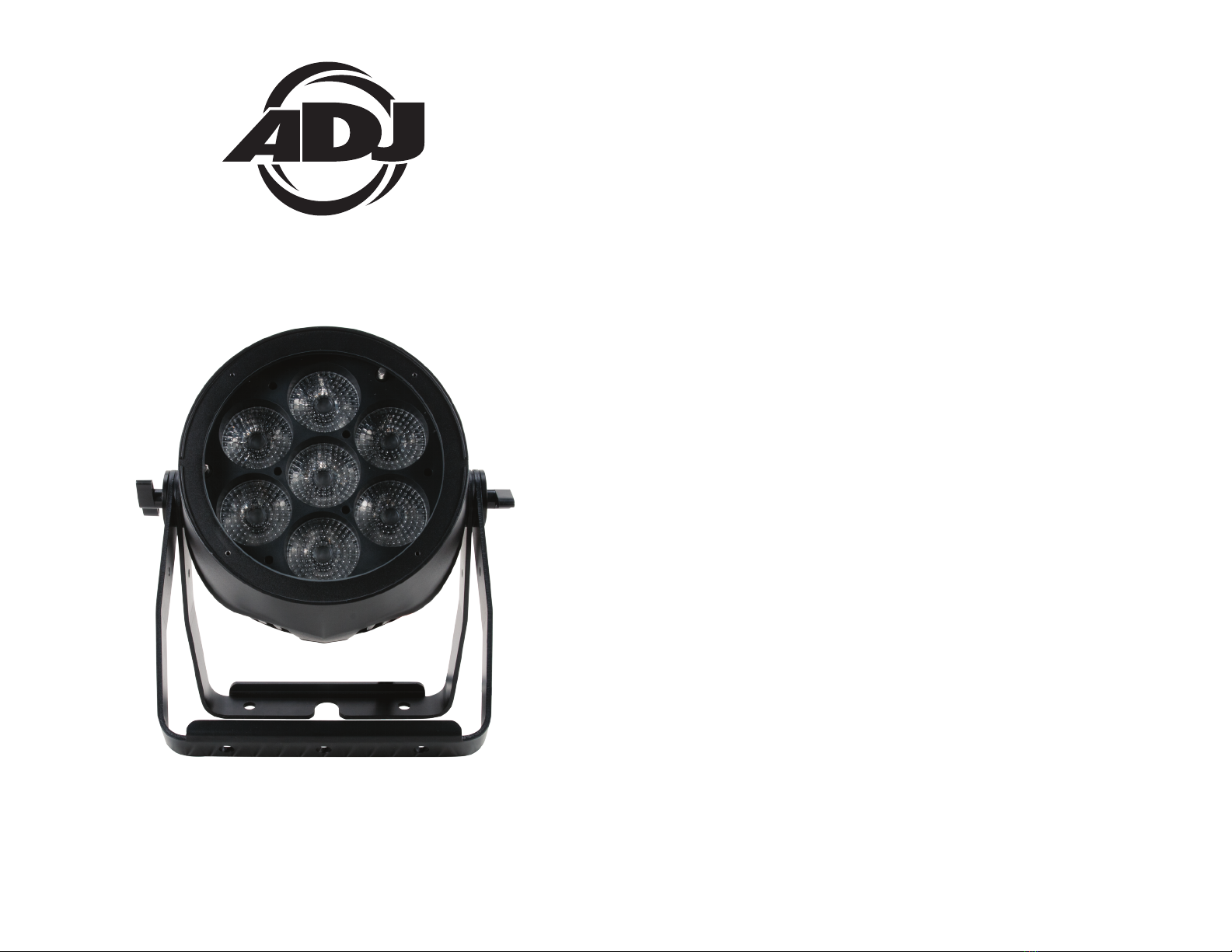
Introduction: The 7PZ IP is an IP65 outdoor rated, DMX intelligent,
zooming, LED par fixture with ADJ’s WiFly TransCeiver with wireless
DMX built-in. This xture can be used in a stand alone mode or con-
nected in a Master/Slave conguration. This wash has seven operat-
ing modes: 6 Color Change mode, 30 Color Change mode, Auto Fade
mode, Auto Run mode, Manual mode, Static Color mode, and DMX
control mode.
Customer Support: ADJ Products, LLC provides a customer support
line, to provide set up help and to answer any question should you
encounter problems during your set up or initial operation. You may
also visit us on the web at www.adj.com for any comments or sugges-
tions. Service Hours are Monday through Friday 8:00 a.m. to 4:30 p.m.
Pacic Standard Time.
Voice: (800) 322-6337
Fax: (323) 582-2941
E-mail: support@AmericanDJ.com
Warning! To prevent or reduce the risk of electrical shock or re, do
not expose this unit to rain or moisture.
Caution! There are no user serviceable parts inside this unit. Do not
attempt any repairs yourself, doing so will void your manufactures war-
ranty. In the unlikely event your unit may require service please contact
ADJ Products, LLC.
PLEASE recycle the shipping carton when ever possible.
• Multi-Colors
• Electronic Dimming 0-100%
• 5-45 Degree Beam Angle
• DMX-512 protocol
• 3-Pin & 5-Pin DMX Connections
• 12 DMX Channel Modes
• Built-In ADJ’s WiFly EXR Wireless DMX Up to 2,500 feet/760M
• Seatronic IP Connections for DMX & Power
• powerCON TRUE1 AC In/Out Outlets
• Power Cord Daisy Chain (See page 37)
Incuded Accessories:
1 x powerCON TRUE1 power cable
1 x Scissor Yoke
7PZ IP Warranty Registration
7PZ IP Features
The 7PZ IP carries a 2 year (730 Days) limited warranty. Please fill out
the enclosed warranty card to validate your purchase. All returned
service items whether under warranty or not, must be freight pre-paid
and accompany a return authorization (R.A.) number. The R.A. number
must be clearly written on the outside of the return package. A brief
description of the problem as well as the R.A. number must also be
written down on a piece of paper included in the shipping carton. If
the unit is under warranty, you must provide a copy of your proof of
purchase invoice. You may obtain a R.A. number by contacting our
customer support team on our customer support number. All pack-
ages returned to the service department not displaying a R.A. number
on the outside of the package will be returned to the shipper.
The unit should be mounted using a mounting clamp (not provided),
axing it to the mounting bracket that is provided with the unit.
Always ensure that the unit is rmly xed to avoid vibration and slip-
ping while operating. Always ensure that the structure to which you
are attaching the unit is secure and is able to support a weight of 10
times the unit’s weight. Also, always use a safety cable that can hold
12 times the weight of the unit when installing the xture.
The equipment must be installed by a professional, and it must be
installed in a place where it is out of the reach of people’s grasp.
7PZ IP Installation

ADJ Products, LLC - www.adj.com - 7PZ IP User Manual Page 5
7PZ IP Safety Precautions
ADJ Products, LLC - www.adj.com - 7PZ IP User Manual Page 4
• To reduce the risk of electrical shock or re, do not expose this unit
rain or moisture
• Do not spill water or other liquids into or on to your unit.
• Do not attempt to operate this unit if the power cord has been
frayed or broken. Do not attempt to remove or break o the ground
prong from the electrical cord. This prong is used to reduce the risk
of electrical shock and re in case of an internal short.
• Disconnect from main power before making any type of connection.
• Do not remove the cover under any conditions. There are no user
serviceable parts inside.
• Never operate this unit when it’s cover is removed.
• Never plug this unit in to a dimmer pack
• Always be sure to mount this unit in an area that will allow proper
ventilation. Allow about 6” (15cm) between this device and a wall.
• Do not attempt to operate this unit, if it becomes damaged.
• This unit is intended for indoor use only, use of this product out`
doors voids all warranties.
• During long periods of non-use, disconnect the unit’s main power.
• Always mount this unit in safe and stable matter.
• Power-supply cords should be routed so that they are not likely to
be walked on or pinched by items placed upon or against them,
paying particular attention to the point they exit from the unit.
• Cleaning -The fixture should be cleaned only as recommended by
t he manufacturer. See page 37 for cleaning details.
• Heat -The appliance should be situated away from heat sources
such as radiators, heat registers, stoves, or other appliances (inclu-
d ing amplifiers) that produce heat.
• The fixture should be serviced by qualified service personnel when:
A. The power-supply cord or the plug has been damaged.
B. Objects have fallen, or liquid has been spilled into the appliance.
C. The appliance has been exposed to rain or water.
D. The appliance does not appear to operate normally or exhibits a
marked change in performance.
CAUTION: This unit like any wireless device is highly susceptible
to static electricity. Static electricity can severly damage the unit.
7PZ IP IP Notice
IP65 RATED
An IP rated lighting fixture is one, which is commonly installed in outdoor
environments and has been designed with an enclosure that effectively
protects the ingress (entry) of external foreign objects such as dust and
water. The International Protection (IP) rating system is commonly expressed
as "IP" (Ingress Protection) followed by two numbers (i.e. IP65) where the
numbers define the degree of protection. The first digit (Foreign Bodies
Protection) indicates the extent of protection against particles entering the
fixture and the second digit (Water Protection) indicates the extent of
protection against water entering the fixture. An IP65 rated lighting fixture is
one, which has been designed and tested to protect against the ingress of
dust (6) and high-pressure water jets from any direction (5).
MARINE/COASTAL ENVIRONMENT INSTALLATIONS!
Please note although this fixture is IP rated, the fixture is NOT suitable for
marine and/or coastal environment installations. Installing this fixture in a
marine and/or coastal environment may cause corrosion and/or excessive
wear to the interior and/or exterior components of the fixture. Damages
and/or performance issues resulting from installation in a marine and/or

coastal environment will void the manufactures warranty and will NOT be
subject to any warranty claims and/or repairs.
Ensure ALL connections and end caps are properly sealed with a non-
conductive dielectric grease (available at most electrical suppl
iers) to
prevent water ingress/condensation and/or corrosion.
OPTIONAL CORROSION-RESISTANT COATING
Optional Corrosion-Resistant Coatings may be available for this fixture.
Please consult your Elation Professional sales representative for details.

ADJ Products, LLC - www.adj.com - 7PZ IP User Manual Page 7
ADJ Products, LLC - www.adj.com - 7PZ IP User Manual Page 6
Power Supply: The ADJ 7PZ IP contains an automatic voltage
switch, which will auto sense the voltage when it is plugged into the
power source. With this switch there is no need to worry about the cor-
rect power voltage, this unit can be plugged in anywhere.
DMX-512: DMX is short for Digital Multiplex. This is a universal pro-
tocol used as a form of communication between intelligent fixtures

and controllers. A DMX controller sends DMX data instructions from
the controller to the fixture. DMX data is sent as serial data that trav-
els from fixture to fixture via the DATA “IN” and DATA “OUT” XLR ter-
minals located on all DMX fixtures (most controllers only have a DATA
“OUT” terminal).
DMX Linking: DMX is a language allowing all makes and models of
dierent manufactures to be linked together and operate from a single
controller, as long as all xtures and the controller are DMX compli-
ant. To ensure proper DMX data transmission, when using several
DMX fixtures try to use the shortest cable path possible. The order
in which fixtures are connected in a DMX line does not influence the
DMX addressing. For example; a fixture assigned a DMX address of 1
may be placed anywhere in a DMX line, at the beginning, at the end,
or anywhere in the middle. When a fixture is assigned a DMX address
of 1, the DMX controller knows to send DATA assigned to address 1
to that unit, no matter where it is located in the DMX chain.
DMX Cable Requirements: The 7PZ IP can be controlled via DMX-
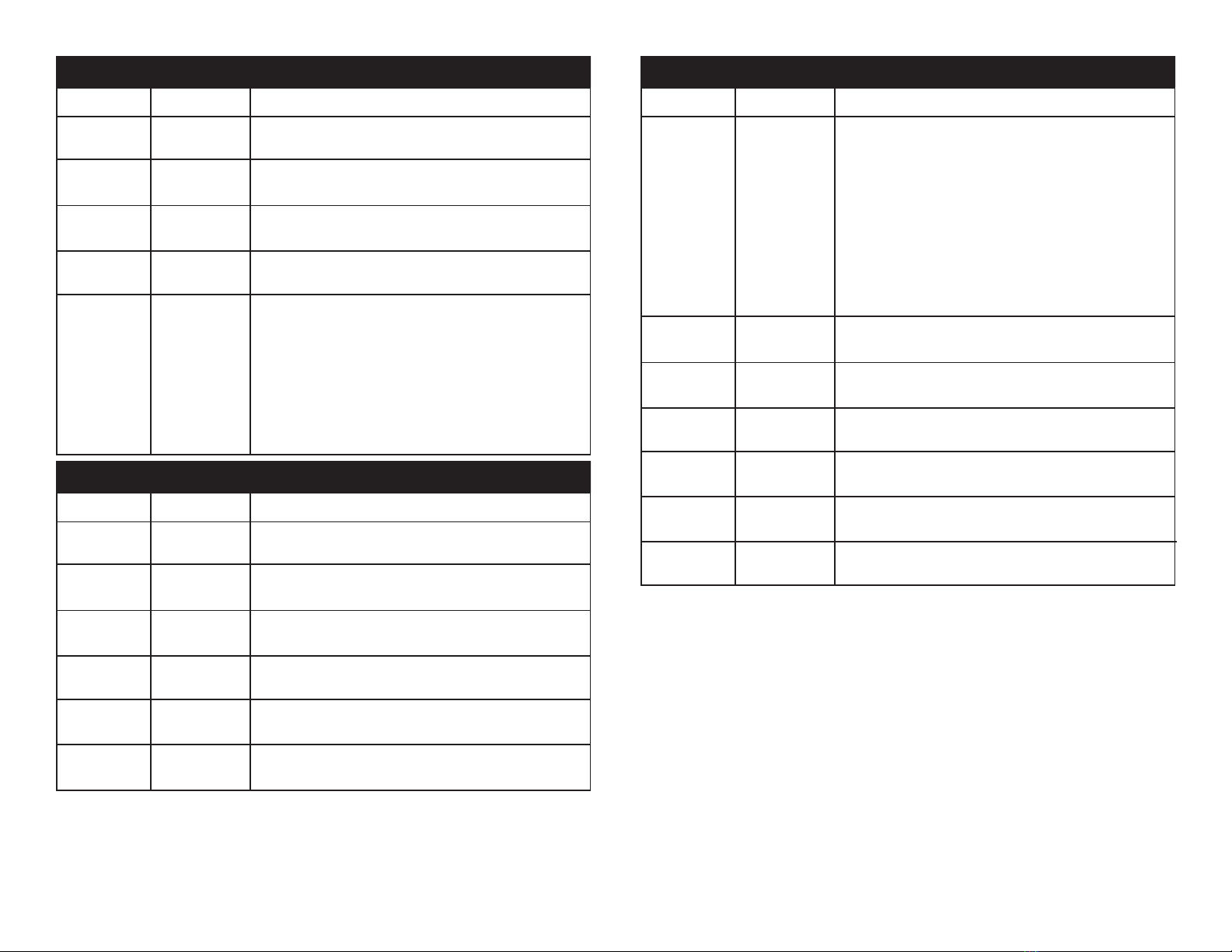
512 protocol. The 7PZ IP has 12 DMX channel modes, please see pages
9-21 for the dierent modes. The DMX address is set on the back panel
of the 7PZ IP.
Cable Requirements: This xture powered by powerCON TRUE1 power
cables. These cables are specically designed to maintain the integrity
of the IP rating. When using this xture outdoors be sure to ONLY use
the ADJ cables that have been manufactured to meet the IP rating.
“First” DMX Cables - Special DMX “First” cable may be purchased
from ADJ to provide a means of data communication with standard DMX

xtures for indoor use. These cables will come with the IP rated connec-
tor on one end and either a 3-pin XLR male or female connector on the
other depending on model. Be sure to only use these cables for inter-
grading this xture in a standard DMX chain.
7PZ IP Set Up7PZ IP Protective Valve
ADJ Products, LLC - www.adj.com - 7PZ IP User Manual Page 9
“First” Power Cable – A special power “First” cable is included with
every xture. This cable is used to provide power to your xture. This
cable comes with the IP rated twist lock connector on one end and a
standard Edison 3-prong, grounded prong on the other end. Be sure to
only use this cable for power distribution and never attempt to connect

this cable to the DMX lines.
You can chain multiple xtures together through serial linking. Using the
IP rated signal cables provided through ADJ (part# TRU113). Always
be sure to daisy-chain your in and out data connections, never split
or “Y” your DMX connections unless you are using an approved DMX
splitter such as the ADJ WiFly D6 Branch or the original D6 Branch
(Both not IP rated).
7PZ IP Set Up
Special Note: Line Termination.
When longer runs of cable are
used, you may need to use a terminator on the last unit to avoid erratic
behavior. A terminator is a 110-120 ohm 1/4 watt resistor which is con-
nected between pins 2 and 3 of a male XLR connector (DATA + and

DATA -). This unit is inserted in the female XLR connector of the last
unit in your daisy chain to terminate the line. Using a cable terminator
(ADJ part number Z-DMX/T) will decrease the possibilities of erratic
behavior.
DMX512 IN
3-PIN XLR
SOUND
REMOTE
CONTROL
INPUT
POWER
INPUT OUTPUT
SOUND
REMOTE
CONTROL
INPUT
POWER
INPUT OUTPUT
SOUND
REMOTE
CONTROL
INPUT
POWER
INPUT OUTPUT
DMX512
DMX+,DMX-,COMMON
1
2
3
Termination reduces signal errors and
avoids signal transmission problems
and interference. It is always advisable
to connect a DMX terminal, (Resistance
120 Ohm 1/4 W) between PIN 2 (DMX-)
and PIN 3 (DMX +) of the last fixture.
1
2
3
1
2
3
DMX +
DMX -
COMMON
DMX512 OT
3-PIN XLR
5-Pin XLR DMX Connectors.
Some manufactures use 5-pin DMX-
512 data cables for DATA transmission in place of 3-pin. 5-pin DMX
xtures may be implemented in a 3-pin DMX line. When inserting stan-
dard 5-pin data cables in to a 3-pin line a cable adaptor must be used,
these adaptors are readily available at most electric stores. The chart
below details a proper cable conversion.
Conductor 5-Pin XLR Male (In)3-Pin XLR Female (Out)
Pin 1
Do Not Use
Do Not Use
Pin 3
Pin 2
Pin 1
Pin 3
Pin 2
Not Used
Not Used
Data True (+ signal)
Data Compliment (- signal)
Ground/Shield
3-Pin XLR to 5-Pin XLR Conversion
ADJ Products, LLC - www.adj.com - 7PZ IP User Manual Page 8
Channel Value Function
1 RED
0 - 255 0% - 100%
2 GREEN
0 - 255 0% - 100%
3 BLUE
0 - 255 0% - 100%
4 WHITE
0 - 255 0% - 100%
5 ZOOM
0 - 255 NARROW - WIDE
7PZ IP 5 Channel - RGBW
7PZ IP 4 Channel - HSI
Channel Value Function
1 HUE
0 - 255 0% - 100%
2 SATURATION
0 - 255 0% - 100%
3 INTENSITY
0 - 255 0% - 100%
4 ZOOM
0 - 255 NARROW - WIDE
ADJ Products, LLC - www.adj.com - 7PZ IP User Manual Page 11ADJ Products, LLC - www.adj.com - 7PZ IP User Manual Page 10
Channel Value Function
1 HUE
0 - 255 0% - 100%
2 SATURATION
0 - 255 0% - 100%
3 INTENSITY
0 - 255 0% - 100%
4 ZOOM
0 - 255 NARROW - WIDE
5 DIMMER CURVES
0 - 20 STANDARD
21 - 40 STAGE
41 - 60 TV
61 - 80 ARCHITECTURAL
81 - 100 THEATER
101 - 255 DEFAULT TO UNIT CURVE SETTING
7PZ IP 5 Channel - HSI + Zoom
Channel Value Function
1 RED
0 - 255 0% - 100%
2 GREEN
0 - 255 0% - 100%
3 BLUE
0 - 255 0% - 100%
4 WHITE
0 - 255 0% - 100%
5 MASTER DIMMER
0 - 255 0% - 100%
6 ZOOM
0 - 255 NARROW - WIDE
7PZ IP 6 Channel - RGBW + Zoom
Channel Value Function
1 SHUTTER/STROBE
0 - 31 LED OFF
32 - 63 LED ON
64 - 95 STROBING SLOW - FAST
96 - 127 LED ON
128 - 159 STROBE PULSE SLOW - FAST
160 - 191 LED ON
192 - 223 RANDOM STROBE SLOW - FAST
224 - 255 LED ON
2 RED
0 - 255 0% - 100%
3 GREEN
0 - 255 0% - 100%
4 BLUE
0 - 255 0% - 100%
5 WHITE
0 - 255 0% - 100%
6 INTENSITY
0 - 255 0% - 100%
7 ZOOM
0 - 255 NARROW - WIDE
7PZ IP 7 Channel - sRGBWI
ADJ Products, LLC - www.adj.com - 7PZ IP User Manual Page 13ADJ Products, LLC - www.adj.com - 7PZ IP User Manual Page 12
Channel Value Function
1 RED
0 - 255 0% - 100%
2 GREEN
0 - 255 0% - 100%
3 BLUE
0 - 255 0% - 100%
4 WHITE
0 - 255 0% - 100%
5 MASTER DIMMER
0 - 255 0% - 100%
6 MASTER DIMMER (FINE)
0 - 255 0% - 100%
7 ZOOM
0 - 255 NARROW - WIDE
7PZ IP 7 Channel - RGBW
Channel Value Function
1 RED
0 - 255 0% - 100%
2 GREEN
0 - 255 0% - 100%
3 BLUE
0 - 255 0% - 100%
4 WHITE
0 - 255 0% - 100%
5 SHUTTER/STROBE
0 - 31 LED OFF
32 - 63 LED ON
64 - 95 STROBING SLOW - FAST
96 - 127 LED ON
128 - 159 STROBE PULSE SLOW - FAST
160 - 191 LED ON
192 - 223 RANDOM STROBE SLOW - FAST
224 - 255 LED ON
6 MASTER DIMMER
0 - 255 0% - 100%
7 MASTER DIMMER (FINE)
0 - 255 0% - 100%
8 ZOOM
0 - 255 NARROW - WIDE
7PZ IP 8 Channel - RGBW
ADJ Products, LLC - www.adj.com - 7PZ IP User Manual Page 15ADJ Products, LLC - www.adj.com - 7PZ IP User Manual Page 14
Channel Value Function
1 RED
0 - 255 0% - 100%
2 GREEN
0 - 255 0% - 100%
3 BLUE
0 - 255 0% - 100%
4 WHITE
0 - 255 0% - 100%
5 SHUTTER/STROBE
0 - 31 LED OFF
32 - 63 LED ON
64 - 95 STROBING SLOW - FAST
96 - 127 LED ON
128 - 159 STROBE PULSE SLOW - FAST
160 - 191 LED ON
192 - 223 RANDOM STROBE SLOW - FAST
224 - 255 LED ON
6 MASTER DIMMER
0 - 255 0% - 100%
7 MASTER DIMMER (FINE)
0 - 255 0% - 100%
8 ZOOM
0 - 255 NARROW - WIDE
9 DIMMER CURVES
0 - 20 STANDARD
21 - 40 STAGE
41 - 60 TV
61 - 80 ARCHITECTURAL
81 - 100 THEATER
101 - 255 DEFAULT TO UNIT CURVE SETTING
7PZ IP 9 Channel - RGBW
Channel Value Function
1 RED
0 - 255 0% - 100%
2 RED (FINE)
0 - 255 0% - 100%
3 GREEN
0 - 255 0% - 100%
4 GREEN (FINE)
0 - 255 0% - 100%
5 BLUE
0 - 255 0% - 100%
6 BLUE (FINE)
0 - 255 0% - 100%
7 WHITE
0 - 255 0% - 100%
8 WHITE (FINE)
0 - 255 0% - 100%
9 ZOOM
0 - 255 NARROW - WIDE
10 ZOOM (FINE)
0 - 255 NARROW - WIDE
7PZ IP 10 Channel - RGBW 16-bit
ADJ Products, LLC - www.adj.com - 7PZ IP User Manual Page 17ADJ Products, LLC - www.adj.com - 7PZ IP User Manual Page 16
Channel Value Function
1 SHUTTER/STROBE
0 - 31 LED OFF
32 - 63 LED ON
64 - 95 STROBING SLOW - FAST
96 - 127 LED ON
128 - 159 STROBE PULSE SLOW - FAST
160 - 191 LED ON
192 - 223 RANDOM STROBE SLOW - FAST
2 2 4 - 2 5 5 L E D O N
2 HUE
0 - 255 0% - 100%
3 SATURATION
0 - 255 0% - 100%
4 INTENSITY
0 - 255 0% - 100%
5 0 - 255 COLOR MACROS
(See page 34 for the Color Macro Chart)
6 ZOOM
0 - 255 NARROW - WIDE
7 AUTO PROGRAMS
1 - 20 PROGRAM 1
21 - 40 PROGRAM 2
41 - 60 PROGRAM 3
61 - 80 PROGRAM 4
81 - 100 PROGRAM 5
101 - 120 PROGRAM 6
121 - 140 PROGRAM 7
141 - 160 PROGRAM 8
161 - 180 PROGRAM 9
181 - 200 PROGRAM 10
201 - 220 PROGRAM 11
221 - 240 PROGRAM 12
241 - 250 PROGRAM 13
251 - 255 GRADIENT EFFECT
7PZ IP 10 Channel - HSI
Channel Value Function
8 AUTO PROGRAMS SPEED
0 - 255 SLOW - FAST
9 AUTO PROGRAMS FADE
0 - 255 SLOW - FAST
10 DIMMER CURVES
0 - 20 STANDARD
21 - 40 STAGE
41 - 60 TV
61 - 80 ARCHITECTURAL
81 - 100 THEATER
101 - 255 DEFAULT TO UNIT CURVE SETTING
7PZ IP 10 Channel - DMX Values & Functions
ADJ Products, LLC - www.adj.com - 7PZ IP User Manual Page 19ADJ Products, LLC - www.adj.com - 7PZ IP User Manual Page 18
Channel Value Function
1 SHUTTER/STROBE
0 - 31 LED OFF
32 - 63 LED ON
64 - 95 STROBING SLOW - FAST
96 - 127 LED ON
128 - 159 STROBE PULSE SLOW - FAST
160 - 191 LED ON
192 - 223 RANDOM STROBE SLOW - FAST
2 2 4 - 2 5 5 L E D O N
2 RED
0 - 255 0% - 100%
3 GREEN
0 - 255 0% - 100%
4 BLUE
0 - 255 0% - 100%
5 WHITE
0 - 255 0% - 100%
6 INTENSITY
0 - 255 0% - 100%
7 0 - 255 COLOR MACROS
(See page 34 for the Color Macro Chart)
8 ZOOM
0 - 255 NARROW - WIDE
9 AUTO PROGRAMS
1 - 20 PROGRAM 1
21 - 40 PROGRAM 2
41 - 60 PROGRAM 3
61 - 80 PROGRAM 4
81 - 100 PROGRAM 5
101 - 120 PROGRAM 6
121 - 140 PROGRAM 7
141 - 160 PROGRAM 8
161 - 180 PROGRAM 9
181 - 200 PROGRAM 10
7PZ IP 12 Channel - RGBWI
Channel Value Function
9 AUTO PROGRAMS
201 - 220 PROGRAM 11
221 - 240 PROGRAM 12
241 - 250 PROGRAM 13
251 - 255 GRADIENT EFFECT
10 AUTO PROGRAMS SPEED
0 - 255 SLOW - FAST
11 AUTO PROGRAMS FADE
0 - 255 SLOW - FAST
12 DIMMER CURVES
0 - 20 STANDARD
21 - 40 STAGE
41 - 60 TV
61 - 80 ARCHITECTURAL
81 - 100 THEATER
101 - 255 DEFAULT TO UNIT CURVE SETTING
7PZ IP 12 Channel - RGBWI