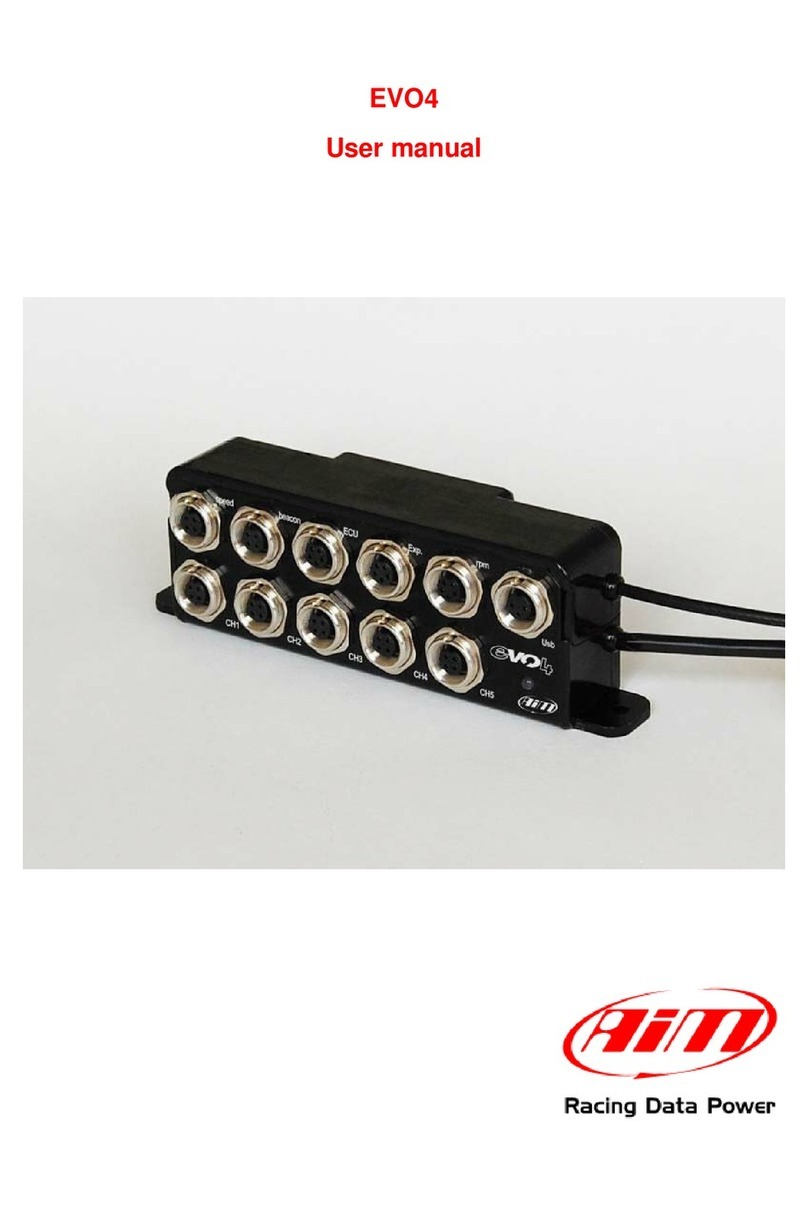
Aim EVO4 User manual

Ai Srl.
Via Cavalcanti, 8
20063 Cernusco S/N (MI)
Italia
Tel. (+39) 02.9290571
www.aim-sportline.com
EVO4 Data Logger
USER UIDE
Made in Italy

Thanks.
Firstly, we would like to thank you for choo-
sing the EVO4 Data Logging System as the
tool for improving your race craft setup and
on-track performance.
The EVO4 system, with its advanced expan-
sion and sampling capabilities, gives you
the flexibility of recording data from a va-
riety of sensors and sources.
With integrated PS, a built-in three axis ac-
celerometer, and direct connectivity to
hundreds of aftermarket and factory ECUs,
the EVO4 is an exceptional data platform.
As you begin working with your new EVO4
system, we are sure questions will come up.
If they do, please let us know…info@aim-
sportline.com. We are all too happy to help!
One more thing before digging into your
new data system…we are constantly wor-
king on bettering our software and fir-
mware, so please be sure to check the
website periodically for any applicable
software or firmware updates…www.aim-
sportline.com
02 03
INTRODUCTION
ETTIN STARTED
ENERAL INFORMATION
LINKS, SENSORS AND CONFI URATIONS
ECU CONNECTIONS
THE RPM CHANNEL
THE SPEED CHANNEL
ANALO INPUTS
PS
PS MANA ER SOFTWARE
DATA SHEET EVO4
04
08
12
16
20
22
28
32
36
38
48
EVO4 Data Logger

INTRODUCTION
04 05
What is EVO4?
What data reads?
EVO4 is a complete, compact and
expandable data logger, suitable for
installation on both car and motorcycle.
EVO4 acquires:
5 analog inputs, at a configurable fre-
quency from 1 to 1000 Hz per channel.
These signals can be: 0-5 Volt, 0-500
mV, 0-50mV, thermocouples K.
2 digital inputs, suitable to receive si-
gnals from speed sensors.
1 RP input, suitable to receive
signals from low voltage of the coil or
square wave 0-12 Volts.
Data coming from internal triaxial
accelerometer.
Data from the internal GPS with
external antenna.
Data coming from the engine con-
trol unit (ECU). There are three
hardware protocols available:
CAN, RS232 and Linea K.
Hundreds of ECU are fully supported.
The lap time transmitted from the
infrared receiver.
The internal temperature of the
system.
It is possible to acquire signals at a
maximum total frequency of 5000
samples per second (i.e. 5000 Hz).
hat is the
maximum frequency of
acquisition possible?
EVO4 has 16 MB of non-volatile
memory capable of recording more
than 4 hours of data at a total fre-
quency of 500 samples per second.
How much
memory is available?
Which displays can be
connected?
Which expansion
modules are available?
EVO4 can be connected to the follo-
wing dashes:
GDash
XL Dash
Formula Steering Wheel
GT steering wheel 32/35
EVO4 can be connected to the
following expansion modules (max.8)
Channel Expansion: 4 additional
analog channels 0-5 Volt. You can add
up to 7 channel expansion.
TCHub: 4 thermocouple channels.
LCU-One Lambda Controller
emory Key.
SmartyCam: the powerful camera
with data overlay.
The integrated PS is useful for
different purposes.
Lap time calculation:
A large database of world tracks are
avaliable.
The coordinates of the finish line are
available for meny world tracks.
When turned on, EVO4 recognizes
which track you are at and uses the
coordinates to calculate the lap time
with high precision.
easurement of the speed of the
vehicle:
In contrast to the measurement of the
wheel speed, the speed measure
based on PS signals is not affected by
the variation of the size of the wheel
(due to the centrifugal force, the cru-
shing and, in case of bikes, the inclina-
tion of the bke itself) and is thus more
precise.
Analysis of the trajectories:
PS receiver is an important tool to
properly calculate the trajectory at
every single lap and then to compare
the different driving strategies.
To what purpose you
can use the GPS?

INTRODUCTION
06 07
EVO4

CHAPTER 1
08 09
GETTING STARTED EVO 4
Speed 1-2
Beacon Ecu - Can RS232
Exp. RP K/L line
GPS Antenna Analog Input Channel
USB
Status EVO4
Power Connection 8-18 VDC
EVO4
GPS Output

EVO4 Kit includes.
- EVO4
- PS Antenna
- RPM cable + K Line + Dig. out
- Connection cable to ECU CAN/RS232
- USB cable for connection to PC
- Software RaceStudio2 CD
CHAPTER 1
1 2
3 4
5 6
10 11
1
2
3
4
5
6
GETTING STARTED EVO 4

12 11
Power.
Power is provided by connecting the appropriate cable to the battery of your vehicle. It is not
necessary to use special attention, because there is a stabilizer that regulates the internal power
supply used by the system.
So you can connect EVO4 without any problem to a NOT stabilized power source from 8 to 24
Volts. Even shutting down the system does not require special attention: when the power is
turned off, a small battery in the system keeps the internal power supply on for a few seconds
in order to properly close the internal data files.
If your power is too spiky, an external power filter (code X60FLCEVO4), is available.
Wiring diagram of external filter X60FLCEVO4
CHAPTER 2 GENERAL INFOR ATION EVO 4

Data Recording.
EVO4 is equipped with a 16 MB circular
memory *, capable of recording 8 million
samples.
The test length that can be recorded
depends on the sampling frequency
(i.e. how many channels per second are
recorded).
For example, in case your acquisition has a
global frequency of 500 Hz, which is fairly
common, the system can record almost 4
hours of testing.
If you require larger memory, the external
MemoryKey is available: it can store up to
32 ygabyte of data.
n The LED on the front shows:
n 1 Hz blink : Stand-by status
n Solid state : Data recording in progress
n 3 Hz blink: system configuration
problems
n Flashing in alternating colors: firmware
upgrade in progress
CHAPTER 2
14 15
Start/Stop Recording.
EVO4 starts recording when one of the
following situations persist for more than
three seconds:
nRP s over 500 rpm threshold
nSpeed over 10 km / h
Thanks to a pre-buffers, EVO4 records also
the three seconds before the engine starts.
Data Download.
After activating the Aim software Race Stu-
dio2, the data are transmitted to the PC
using the USB cable supplied with the pro-
duct.
Recording the test on the MemoryKey, you
can directly insert the SD card in your PC.
At the end of the data download, you can
delete the data in EVO4 or leave them in
memory, to eventually download them to
another PC.
GENERAL INFOR ATION EVO 4
*"Circular buffer" means that once it reaches saturation,
the oldest data are overwritten by the most recent
Status LED

CHAPTER 3 LINKS, SENSORS AND CONFIGURATIONS
16 117
Here are the different EVO4 connection
possibilities:
n To ECU
n To RPM signal
n To speed signal
n To analog inputs
n To expansions
n To the optical lap time receiver
When connecting EVO4 to a sensor, to ECU,
or to an expansion module, you must also
configure it in order to make EVO4 record
the proper data.
In particular, per every channel you have to
define:
n The connected sensor
n The frequency acquisition of the sensor
n The unit of measure
Please use Aim software RaceStudio2
for system configuration.
RaceStudio2
Configuration.
In this chapter it is explained how to confi-
gure EVO4 with RaceStudio2 software.
Connect EVO4 to your PC and run
RaceStudio2.
-> Select the button
"Device Configuration"
-> Select EVO4.
EVO 4
1
You will see this screenshot:
Press the “New” button and fill in the
required fields.
You must now define the parameters of the
system.
Each point will be explained in more depth
in the dedicated chapter.
Links, Sensors
and Configurations.

CHAPTER 3 LINKS, SENSORS AND CONFIGURATIONS
18 1199
System Configuration.
In the following RaceStudio2 page you can
set:
nHow RPMs are acquired: from ECU
data stream or reading a digital signal.
n The maximum rpm value.
n The division factor of the engine
revolutions, ie the constant for which to
divide the digital pulses number in order
to obtain the correct value.
Channels Configuration.
In the following RaceStudio2 page you can
define:
n Which channels are enabled.
n The type of sensor connected.
n The sampling frequency.
n The unit of measure.
EVO 4
n How to get the gear number:
by calculation, potentiometer or ECU.
n To use PS in order to get lap time
n To select a speed signal as Reference
Speed.
n How to manage digital output.
Other manuals for EVO4
3
Table of contents
Other Aim Data Logger manuals
Aim
Aim MyChron Light TGLog Guide
Aim
Aim MXL2 User manual
Aim
Aim TG Dash User manual
Aim
Aim HYDRA EMS NEMESIS 2.5 Instruction manual
Aim
Aim EVO4 User manual
Aim
Aim MyChron 3 Plus/Gold BIKE Guide
Aim
Aim evo3 pro User manual
Aim
Aim ANET42 User manual
Aim
Aim MXG Dash Logger User manual
Aim
Aim MYCHRON4 2T User manual