
AirTies NSW-105 User manual

YM.SW.105.UM.EN.D00REV25072008.FH11 Fri Jul 25 16:00:01 2008 Page 1
Composite
USER MANUEL
5 port 10/100 Mbps
Ethernet Switch
NSW-105

YM.SW.105.UM.EN.D00REV25072008.FH11 Fri Jul 25 16:00:01 2008 Page 2
Composite
This manual has been prepared by AirTies Wireless Networks Corporation. All rights reserved.
Manual Overview
This manual guides you through the steps necessary for setting up and configuring your
AirTies device. Please read this manual carefully before beginning the installation process.
The Warranty does not cover failure or damage as a result of not following the instructions
in the manual. AirTies will not be held responsible in such circumstances.
The ser Manual is an important resource you can refer to for safe and proper use of
your device. Please retain it for future reference.
Safety and Maintenance
In order to prevent damage to your device, be sure to keep it in its original box during
transportation.
The device must be used solely with its original power adapter.
Do not connect the LAN port to a PSTN phone jack.
If you encounter any problems, do not open or disassemble the device. Call AirTies
Technical Support.
In order to prevent electric shock, do not operate the device in wet or damp areas.
In the event of a gas leak, do not use the device. Do not turn the device on or off.
Do not plug or unplug the power cord.
Avoid using the device in dusty environments. If dust buildup should occur, use a dry
cloth to remove the dust.
To clean the exterior of the device use a dry cloth. Do not attempt to clean the interior.
There are no user serviceable components inside.
For information regarding the installation and configuration of the device consult the
remainder of this manual.
The average usage life of the device is 7 years as determined by the Authority of
Industry and Trade.

YM.SW.105.UM.EN.D00REV25072008.FH11 Fri Jul 25 16:00:01 2008 Page 3
Composite
1. INTRODUCTION.....................................................................................................................1
1.1. Main Features..............................................................................................................2
1.2. Minimum System Requirements.............................................................................3
1.3. Packa e Contents...............................................................................................................3
2. INSTALLATION.................................................................................................................4
2.1. Basic Cablin Procedure.............................................................................................4
3. Front Panel.............................................................................................................................5
4. Back Panel..........................................................................................................................6
5. Technical Specifications.........................................................................................................7
6. Physical Characteristics........................................................................................................7
Declaration of Conformity.......................................................................................................8
" Table of Contents
YM.SW.105.UM.EN.D00REV25072008.FH11 Fri Jul 25 16:00:01 2008 Page 4
Composite
1. INTRODUCTION
AAirTies NSW-105 5 Port 10/100 Mbps Ethernet Switch provides a fast and practical
networking solution anywhere. The NSW-105 is a high performance, easy-to-use switch
especially for environments where there are a large number of users and heavy network
traffic.
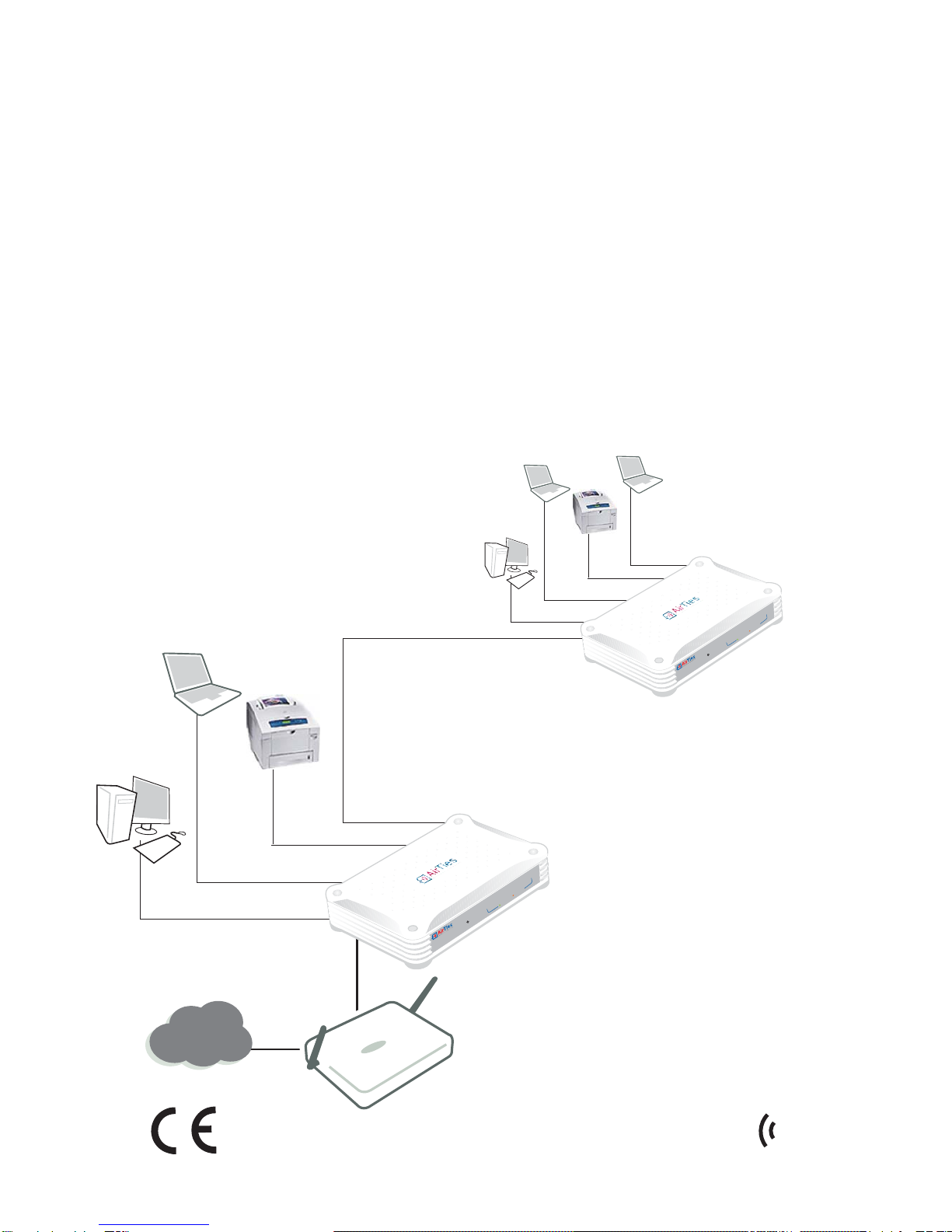
With the NSW-105, you can expand your network easily without having to change anything
in the existing infrastructure.
A perfect solution for corporate networks with its 100 Mbps Ethernet speed, the NSW-105
allows you to expand your network to include as many Ethernet compatible devices
(computers, network printers, IP Cameras, etc.) as you want without needing to reconfigure
them. Just connect and turn them on.
RT-205
NSW-105
NSW-105
Ethernet
Printer
1
AirTies NSW-105 User Manuel
Internet
Ethernet
Printer
NSW-105
5-Port Fast Ethertnet Switch
Power
12345
100Link/ACT10Link/ACT
NSW-105
5-Port Fast Ethertnet Switch
Power
12345
100Link/ACT 10Link/ACT

YM.SW.105.UM.EN.D00REV25072008.FH11 Fri Jul 25 16:00:01 2008 Page 5
Composite
1.1. Main Features
Auto MD /MD -X feature automatically detects the connection type of the remote
device and adjusts itself to work seamlessly without user intervention.
Store and Forward feature ensures data integrity on your network, prevents packet
loss and delay.
Full- / Half-Duplex operating modes provide automatic speed configuration based
on the speed (100Mbps or 10 Mbps) supported by the connected device.
Back-Pressure support for Half-Duplex mode provides increased performance for even
10 Mbps connections.
Uplink from any port
LED indicators: Power indicator and Link/Act indicators that also show transmission
speed (Green for 100 Mbps, Orange for 10 Mbps).
Robust against voltage fluctuations: Designed and developed to withstand wide
voltage fluctuations.
7 /24 AirTies Call Center and Technical Support (and support by the AirTies R&D team
when necessary)
3-year extended warranty
2
AirTies NSW-105 User Manuel
YM.SW.105.UM.EN.D00REV25072008.FH11 Fri Jul 25 16:00:01 2008 Page 6
Composite
1.3. Pa kage Contents
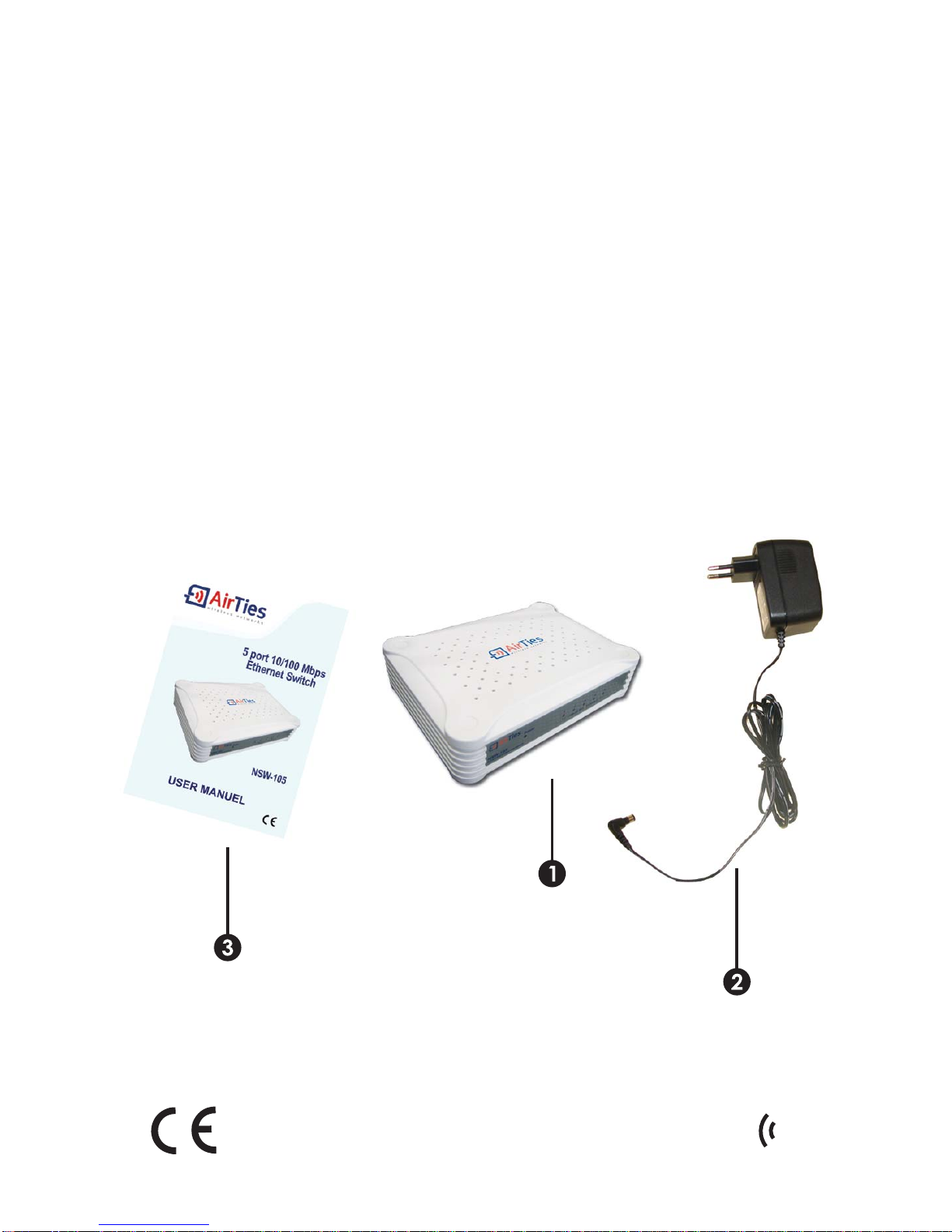
The following items are included in the AirTies NSW-105 Ethernet Switch box:
1.AirTies NSW-105 5 Port 10/100 Ethernet Switch
2.Power adapter
3. ser Manual
1.2.
Minimum System Requirements
A computer with an Ethernet card and running any version of Windows, NIX, Linux,
or Mac operating systems.
3
AirTies NSW-105 User Manuel

YM.SW.105.UM.EN.D00REV25072008.FH11 Fri Jul 25 16:00:01 2008 Page 7
Composite
NOTE: The AirTies NSW-105 Switch does not require any setup or configuration after making
the hardware connections. All settings valid for the network are also valid for the devices
connected to the NSW-105. You do not need any special settings for the network devices
connected to the NSW-105.
2. INSTALLATION
2.1. Basi Cabling Pro edure
You can make the hardware connections of your switch as shown in the diagram below:
1.Connect the power adapter cable to the switch. Plug the power adapter into the wall
outlet. Turn the device on.
2.Connect the Ethernet compatible network devices to the LAN ports of your choice.
RT-205
Ethernet
Printer
4
AirTies NSW-105 User Manuel
7.5V 1A
Power

YM.SW.105.UM.EN.D00REV25072008.FH11 Fri Jul 25 16:00:01 2008 Page 8
Composite
3. FRONT PANEL
5
AirTies NSW-105 User Manuel
The AirTies switch is ON.
The AirTies switch is OFF.
100 Mbps LAN connection is established and active.
100 Mbps LAN connection is active and data exchange
is taking place.
Link/Act 1-
Link/Act 5
Power
OFF
Green
Green Flashing
Green
Orange
Orange Flashing
OFF
10 Mbps LAN connection is established and active.
10 Mbps LAN connection is active and data exchange
is taking place.
No LAN connection.
NSW-105
5-Port Fast Ethertnet Switch
Power
23 45
1
100Link/ACT 10Link/ACT
L E D L GHT STATUS
YM.SW.105.UM.EN.D00REV25072008.FH11 Fri Jul 25 16:00:01 2008 Page 9
Composite
4. BACK PANEL
6
AirTies NSW-105 User Manuel
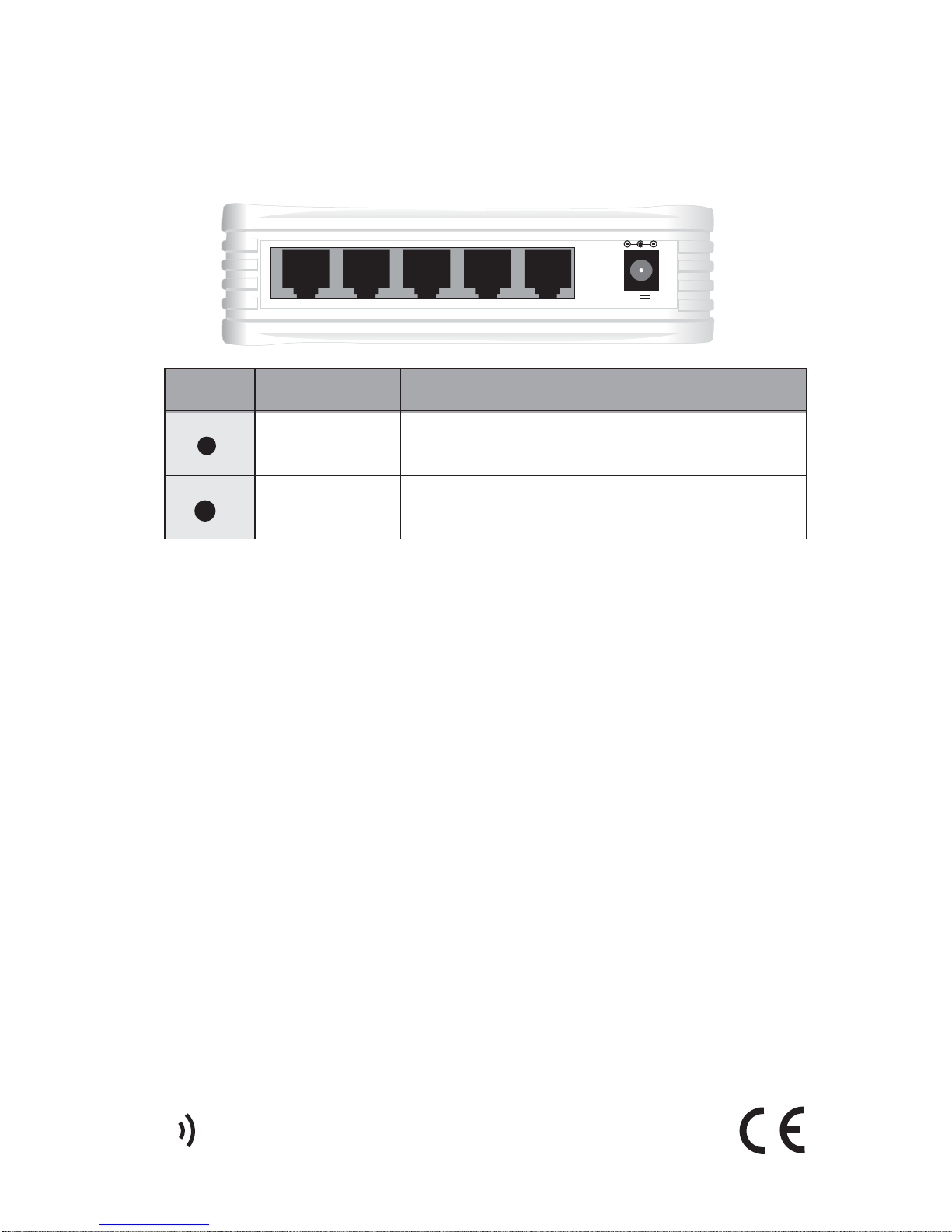
.5V power port. Connected to the power adapter.
Ethernet ports.
NO INTERFACE DESCRIPTION
POWER
LAN 1- LAN 5
1
2
7.5V 1A

YM.SW.105.UM.EN.D00REV25072008.FH11 Fri Jul 25 16:00:01 2008 Page 10
Composite
6.
Physical Characteristics
Dimensions: 150mm x 110mm x 35mm
Weight: : 220 gr
Power: 7.5V/1A(AC-DC)
Operating Temperature: 0°C ~ 40°C
Storage Temperature: -10°C ~ 70°C
Humidity: %5 - %90 non-condensing
5
Technical Specifications
Connection Standards: IEEE 802.3 10Base-T, IEEE 802.3u 100Base-T, Auto-Negotiation
feature; 10/100 Mbps operation, Full/Half Duplex operation, Flow Control for Full-Duplex
operation, Back-Pressure support for Half-Duplex operation, Auto MDI/MDI-X
Topology: Star
Transmission Method: Store and Forward
nterfaces: 10 BASE-T: Twisted-Pair TP/STP CAT. 3,4,5 or higher
100 BASE-T: Twisted-Pair TP/STP CAT. 5 or higher
Standards: CE
7
AirTies NSW-105 User Manuel
Other manuals for NSW-105
1
Popular Switch manuals by other brands

SMC Networks
SMC Networks SMC6224M Technical specifications

Aeotec
Aeotec ZWA003-S operating manual

TRENDnet
TRENDnet TK-209i Quick installation guide

Planet
Planet FGSW-2022VHP user manual

Avocent
Avocent AutoView 2000 AV2000BC AV2000BC Installer/user guide

Moxa Technologies
Moxa Technologies PT-7728 Series user manual

Intos Electronic
Intos Electronic inLine 35392I operating instructions

Cisco
Cisco Catalyst 3560-X-24T Technical specifications

Asante
Asante IntraCore IC3648 Specifications

Siemens
Siemens SIRIUS 3SE7310-1AE Series Original operating instructions

Edge-Core
Edge-Core DCS520 quick start guide

RGBLE
RGBLE S00203 user manual




