Press <CLEAR> to delete numbers you have selected.
Press once to delete one digit.
Press and hold to delete all digits.
CLEAR
Remote Control OperationAdvanced Features
To open the disc tray, press <OPEN/CLOSE>.
To close the disc tray, press <OPEN/CLOSE> again.
OPEN/CLOSE
During playback, press <POWER> to stop the player and
return to standby mode.
While the player is in standby, press <POWER> or any key
on the front panel to resume normal operation.
POWER
12
MUTE
Press <MUTE>to mute the Audio output.
Press <MUTE>again to resume normal audio output.
OSD
Press <OSD> to display the infomations of the video disc
on the TV screen, including song information, broadcast
time, remain time, etc..
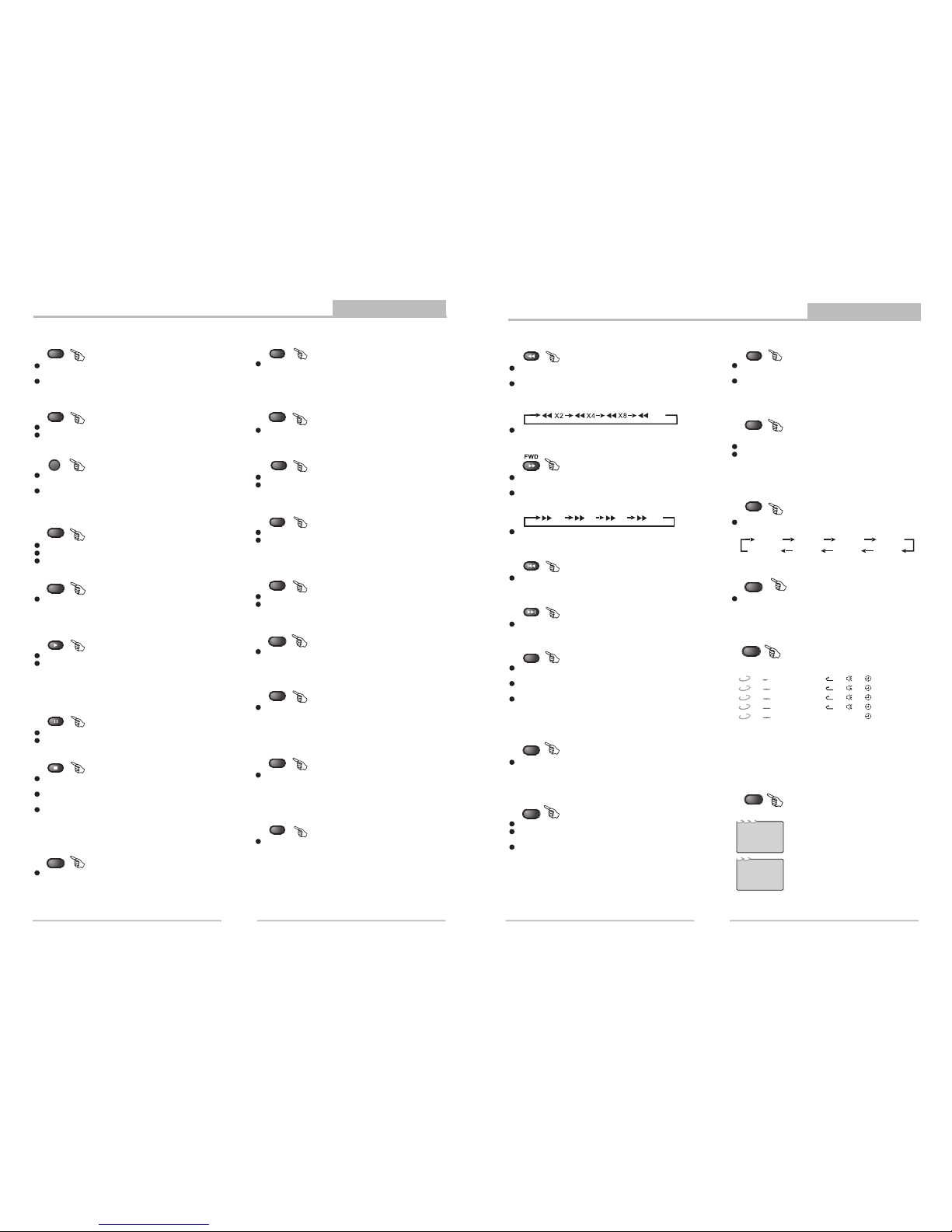
Press <SLOW> repeatedly to slow motion playback at
variable speeds: 1/2,1/3,1/4,1/5,1/6,1/7.
SLOW
Press <RETURN>to the main menu when PBCis on.
RETURN
During VCDplayback, press <PBC>(playback control) to
select PBCon and off.
PBC
LANGUAGE
During DVD playback, press <LANG> repeatedly to
select video languages.
Note: This functionvary bythedisc.
VOL+ VOL-
Press <VOL+>button to increase Volume.
Press <VOL->button to reduce volume till to no volume output.
L/R
During CD/VCD/SVCD playback.
Press <R/L> to select a audio channel (STEREO,
MONO L, MONO R, AUTO L, AUTO R).
During playback is stopped, press <P-SCAN> button twice
to switch to progressive scan mode, press <P-SCAN>
once to switch back to Interlace scan mode.
Note: If you connected the DVD player to your TV using the
component Video Output, you can use the <P-SCAN>
button to switch to progressive scan to superior
video quality.
P-SCAN
Note:
The screen saver will automatically turn on if playback is
stoped about 3 Minutes (When Screen Saver is set to on).
Press <STOP> once during playback to stop and hold
playback.
Press <PLAY> to resume playback from the point you
pressed STOP.
Press <STOP> twice to stop playback completely.
STOP
PAUSE
Press <PAUSE> during playback to pause playback.
Press <PLAY> to resume normal playback.
Note: MP3 discs and some DVD discs do not have a 10 second
review feature.
Press <PLAY> from stop mode to start playback.
Press <PLAY> during playback to replay the last 10 seconds.
This function is not available if the elapsed time of current
tracks less than 10 seconds.
PLAY
SUBTITLE
During DVD playback, press <SUBTITE> repeatedly to
select from up to 32 subtitle languages.
Note: This functionisdiscspecific (languageswill vary).
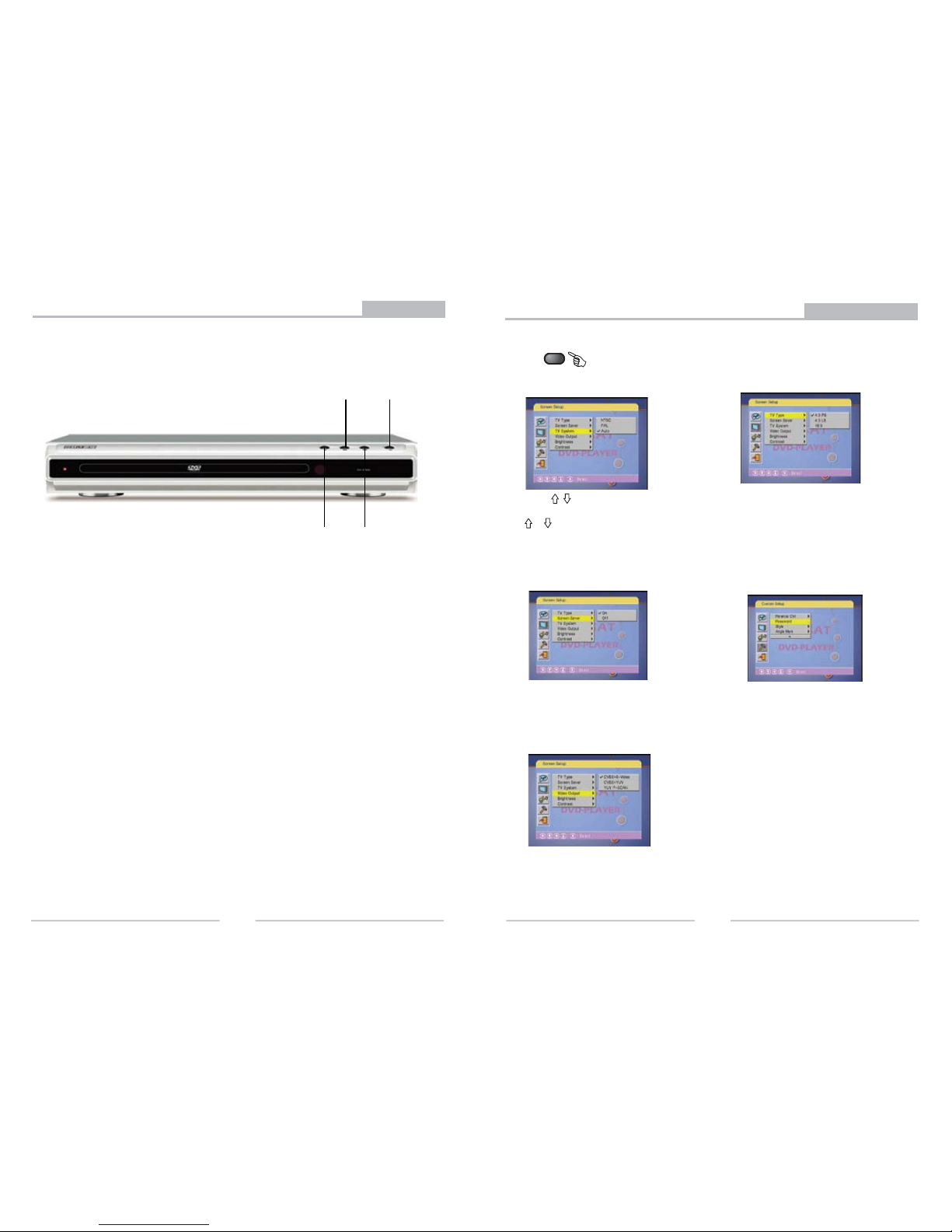
In the stop mode,press <N/P>to switch the system of the
DVD player (Auto,PAL60,PAL or NTSC).Each time when
press this botton,the system will switch to another one.
N/P
0-10+keys
These keys are used to input the time, as well as title,
chapter and track numbers.
When a numeric item is displayed on the screen, press the
0-10+ keys to select the desired entry, And press <ENTER>
to confirm.
13
Note: This functionissubject to thedisc.
During DVD, VCD or SVCD playback (with PBC on), press
<MENU> to return to the program menu.
In the Setup Menu, press <MENU> to return to the main
menu or stop mode.
Any time, press <MENU> to cancel the current OSD or
some menus.
MENU
TITLE
Note: This functionissubject to thedisc.
During DVD playback, press <TITLE> to display the DVD
title menu or play the first title.
Note: 1. During CD/SVCD playback, points A and B must
be within the same track.During DVD playback, points
A and B can be selected from different chapters.
2. This function is subject to the disc.
A-B
During playback, press <A-B> to select point A.
Press it again to select point B. The player will repeat the
section from A to B automatically.
Press <A-B> third time to cancel A-B repeat and clear points
A and B.
Press <REPEAT> to select Repeat Title, Repeat chapter,
Repeat off during DVD playback.
Press REPEAT to select Repeat Single, Repeat All and
Repeat off when PBC is off ( VCD, CD, SVCD ).
REPEAT
Remote Control OperationAdvanced Features
ANGLE
During DVD playback
Press <ANGLE> to view scenes from different camera angles.
Press <ANGLE> repeatedly to change from one camera
angle to another.
Note: This function is disc specific.
RESUME
During dealing with system setup menu, to store in momery
the settings entered by the user and to exit to the mode prior
to setup.
ZOOM
During VCD/SVCD/DVD playback, press <ZOOM> to
magnify the image as follows:
ZOOM1
ZOOM:OFF
ZOOM2ZOOM3ZOOM4
ZOOM1/2
ZOOM1/3
ZOOM1/4
Press <PREV> to skip to previous chapter or track.
PREV
X2X4X8X20
During DVD or CD/VCD playback, press <FWD> once to
play the next chapter, title or track.
During DVD or CD/VCD playback, press and hold <FWD>
to scan forward. The player will review
The disc at 2, 4, 8 and 20 times normal speed as follows:
Press <PLAY> to resume normal playback.
X20
During DVD or CD/VCD playback, press <REV> once to
play the previous chapter, title or track.
During DVD or CD/VCD playback, press and hold <REV>
to scan in reverse.
The player will review the disc at 2, 4, 8 and 20 times
Normal speed as follows:
Press <PLAY> to resume normal playback.
REV
Press <NEXT> to skip to next chapter or track.
NEXT
Notes:
1.Time searches for an exact time in the movie.
2.In Title/Chapter mode, you cannot select value outside the range of the
total number of titles or chapters.
3.For some DVD discs, the Search function is unavailable.
Usethenumberkeystoinput thedesiredTime, Title or Chapter,
thenpress<ENTER>toconfirm.Press<GOTO>again, to exit goto
menu.
GOTO
Duringplayback,press<GOTO>,andthe[TrackSearch] menuwill display
as follows:
DVD
DVD
TT07/27CH00:01:16
001/001
CDCD
TRK01/1200:01:31
X
VCD
VCD
TRK01/1500:00:41
X
SVCD
SVCD
TRK01/1600:01:22
X
Mp3
MP3
TRK01/1000:00:49
X
PROG
In stop mode,press <PROG> to display the [Program] submenu:
Input the track numbers in the order you would like
them to play. When finished, select [PLAY] and then
press <ENTER> to play the tracks in the new
programmed order. Select [CLEAR] and press
<ENTER> to clear all the numbers you have input.
Input the title number and the chapter number in the
desired order. Then select [PLAY] and then press
<ENTER> to play the chapters in the order you have
set. Select [CLEAR] and press <ENTER> to clear all
the numbers you have input.
CD
PROG
VCD
PLAY CLEAR
SVCD
1[--]
[--]
3[--]
4[--]
2
5[--]
6[--]
7[--]
8[--]
13[--]
14[--]
15[--]
16[--]
9
10
11
12
[ -- ]
[ -- ]
[ -- ]
[ -- ]
DVD
1 - - : --
2 - - : --
3 - - : --
4 - - : --
5 - - : --
6 - - : --
7 - - : --
8 - - : --
13 - - : --
14 - - : --
15 - - : --
16 - - : --
Mp3
PROG
9
10--:--
11--:--
12--:--
-- : - -
T C T C T C T C
PLAY CLEAR