8
WARM
COMPLETE
TEMP
READY
PATTERN START
ENTER
TIME
STOP
EXHAUST
HEAT
EXHAUST
START
TIMER
STERILIZE
℃
MIN
O.T.
HR
MON DAY
4
15 5 1
113 181312212216172324 6 9
7210192014 8
Option
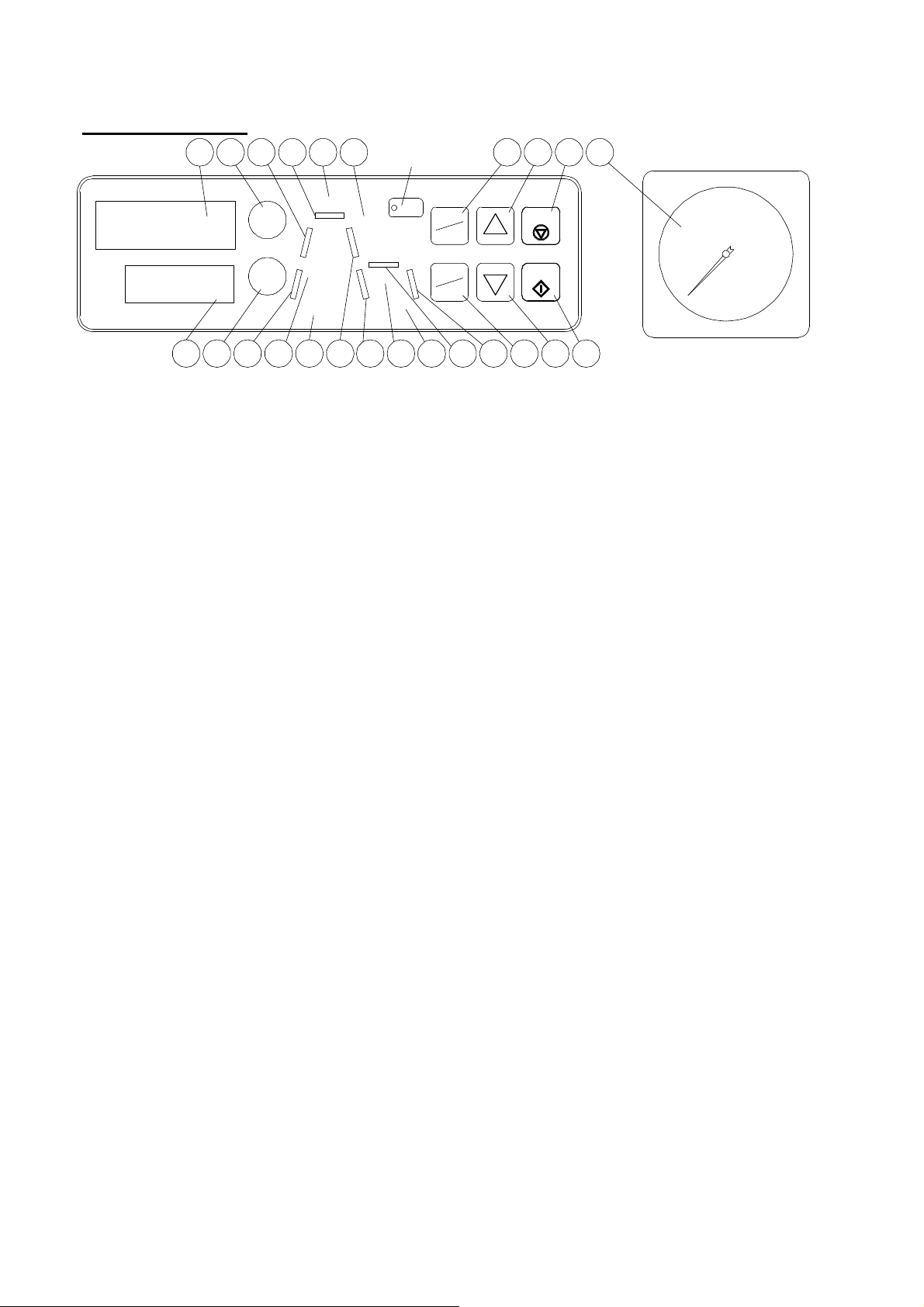
Operation panel
1. Pressure gauge
It indicates chamber pressure.
2. TEMPERATURE DISPLAY
It displays temperature in the chamber or setting
temperature. Also, it displays the date of an operation
reservation.
3. TIMER DISPLAY
It displays the remaining time to the process
completion. “down count” Also, it displays the time of
an operation reservation and error.
4. START KEY
Press it to start operation.
5. STOP KEY
Press it to stop operation on the way. Press it to reset
previous operation before starting operation.
6. PATTERN/ENTER KEY
Press it to fix an operation pattern and each setting.
7. TEMP/TIME KEY
Press it to check setting temperature, setting time
and the operation pattern. Press it to change setting
display’s blink.
8. CHANGE▲ KEY
Press it to increase the figure of the setting display.
9. CHANGE▼ KEY
Press it to decrease the figure of the setting display.
10. EXHAUST KEY
Press it to switch automatic exhaust ON and OFF or
set an automatic exhaust starting temperature. Press
it to exhaust manually.
11. START TIMER KEY
Press it to make a reservation of operation. Set an
operation starting time of month, day, hour, and
minute.
12. READY LAMP
The character lights up at the reservation condition.
The character blinks at setting change condition.
13. HEAT LAMP
The character lights up during heating or dissolving
process. The character blinks at dissolving setting
change condition.
14. STERILIZE LAMP
The character lights up during sterilizing process. The
character blinks at sterilizing setting change
condition.
15. EXHAUST LAMP
The character blinks during exhaust process.
The character lights up before exhaust process in
case of automatic exhaust ON.
16. WARM LAMP
The character lights up during warming process. The
character blinks at warming setting change
condition.
17. COMPLETE LAMP
The character lights up with the buzzer beeping at
the completion of all the processes. The character
blinks and reports whether lid can be opened when
pressing STOP KEY during operation.
PROCESS INDICATION BAR
They light up, blink, light off according to the status of
process.
18. HEATING-1 PROCESS LAMP
It blinks from start temperature of the sterilization to
the end of the air evacuation.
It blinks from start temperature of the dissolving to
the dissolving temperature.
19. HEATING-2 PROCESS LAMP
It blinks from the end of the air evacuation to the
sterilization temperature.
20. STERILIZATION PROCESS LAMP
It blinks during sterilization.
21. COOLING-1 PROCESS LAMP
It blinks to 100℃ after sterilization.
22. COOLING-2 PROCESS LAMP
It blinks from 99℃ after sterilization to the
completion.
23. WARMING PROCESS LAMP
It blinks during warming.
24. COOLING-3 PROCESS LAMP
It blinks from 99℃ after warming to the completion.