manuals.online logo
Brands
  1. Home
  2. •
  3. Brands
  4. •
  5. ALRIGHT DEVICES
  6. •
  7. Recording Equipment
  8. •
  9. ALRIGHT DEVICES Chronoblob2 User manual

ALRIGHT DEVICES Chronoblob2 User manual

Other manuals for Chronoblob2

2

Other ALRIGHT DEVICES Recording Equipment manuals

ALRIGHT DEVICES Chronoblob2 User manual

ALRIGHT DEVICES

ALRIGHT DEVICES Chronoblob2 User manual

ALRIGHT DEVICES Chronoblob User manual

ALRIGHT DEVICES

ALRIGHT DEVICES Chronoblob User manual

Popular Recording Equipment manuals by other brands

ThermoFisher Scientific Dionex DRS 600 Installation checklist

ThermoFisher Scientific

ThermoFisher Scientific Dionex DRS 600 Installation checklist

Shure ANIUSB-Matrix user guide

Shure

Shure ANIUSB-Matrix user guide

Nady Audio HE-1 user guide

Nady Audio

Nady Audio HE-1 user guide

AUDAC APM 01 User manual & installation guide

AUDAC

AUDAC APM 01 User manual & installation guide

Teac GF-350 owner's manual

Teac

Teac GF-350 owner's manual

Fractal Audio MFC-101 MARK III owner's manual

Fractal Audio

Fractal Audio MFC-101 MARK III owner's manual

bmcm USB-OI16 manual

bmcm

bmcm USB-OI16 manual

HHB BurnIT CDR-830 Service manual

HHB

HHB BurnIT CDR-830 Service manual

GE VersaMax IC200CPUE05 manual

GE

GE VersaMax IC200CPUE05 manual

IntesisBox MH-RC-MBS-1 user manual

IntesisBox

IntesisBox MH-RC-MBS-1 user manual

Attero Tech unD4l user manual

Attero Tech

Attero Tech unD4l user manual

Sennheiser UI 765 instruction manual

Sennheiser

Sennheiser UI 765 instruction manual

Sony RCD-W1 Operating Instructions  (primary... Service manual

Sony

Sony RCD-W1 Operating Instructions (primary... Service manual

Roland Planet-P  MKS-10 owner's manual

Roland

Roland Planet-P MKS-10 owner's manual

Roland BOSS GT-PRO Turbostart

Roland

Roland BOSS GT-PRO Turbostart

8x8 Inc Valcom V-2001A manual

8x8 Inc

8x8 Inc Valcom V-2001A manual

Waves SUB Align user guide

Waves

Waves SUB Align user guide

Mitsubishi Electric MAC-334IF-E installation manual

Mitsubishi Electric

Mitsubishi Electric MAC-334IF-E installation manual

manuals.online logo
manuals.online logoBrands
  • About & Mission
  • Contact us
  • Privacy Policy
  • Terms and Conditions

Copyright 2025 Manuals.Online. All Rights Reserved.

ALRIGHT DEVICES
CHRONOBLOB2
USER MANUAL
VERSION 1.3
TABLE OF CONTENTS
DESCRIPTION................................................................................................................................................... 3
SPECS................................................................................................................................................................. 4
QUICK REFERENCE.......................................................................................................................................5
USER INTERFACE...........................................................................................................................................6
SETTINGS.......................................................................................................................................................... 11
FIRMWARE UPDATE PROCEDURE..........................................................................................................11
FIRMWARE CHANGELOG..........................................................................................................................12
SUPPORT.......................................................................................................................................................... 13
2
DESCRIPTION
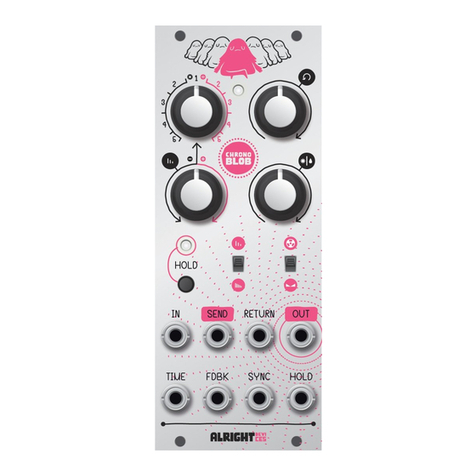
Chro oblob2 is a digital delay module!
Just like his little brother, Chro oblob2 ca sy c to a clock sig al. Patch o e
i to the SYNC i put a d choose a multiplier or divider for rhythmic delays.
Or leave SYNC u patched for access to co ti uously variable delay times!
Chro oblob2 offers four differe t delay modes! Dual delay mode provides two
separate delays with shared co trols. Pi g-po g mode exte ds this
i termi gli g eve further by placi g each delay i the feedback loop of the
other.
Si gle delay is the classic Chro oblob mode with feedback SEND a d RETURN.
Patch i a lowpass filter for smooth, shadowy echoes, or get weird with a
wavefolder or a y other effect! Cascade delay mode expa ds o this
archetype by also placi g the seco d delay i side the feedback loop of the
mai delay, creati g a wild multiplyi g echo effect.
Chro oblob2 provides co trol voltage i puts for TIME, FEEDBACK, a d
DRY/WET, a d bipolar atte uators for each so you ca dial i just the right
amou t of co trol.
I Dual a d Pi g-po g delay modes, although both delay times are co trolled
by the mai TIME k ob, you ca voltage-co trol each i depe de tly with the
two TIME CV i puts. The right TIME CV is ormalled to the left o e so you
ca easily co trol both with the same sig al. Additio ally, the left TIME CV is
ormalled to five volts, allowi g you to use the atte uators as offsets from
the positio of the mai TIME k ob.
Also i these 'pi k' modes, the right audio i put is ormalled to the left
3
i put, a d the right audio output is ormally mixed i to the left output
(patchi g i to the right jack breaks this co ectio ).
Like the origi al Chro oblob, you ca select the style of time modulatio
with the slide switch. Choose tape mode for sweepi g pitchbe d effects, or
fade mode for smoother, clea er cha ges.
Chro oblob2 offers a INFINITE LOOP butto a d gate i put to shut off the
delay i puts a d lock the feedback at 100%.
SPECS
•Audio: 16-bit, 48 kHz
•Delay: 5ms to 2.73s
•Power: +12V: 80mA, -12V: 15mA
•Width: 12HP
•Depth: 30mm (i cludi g power co ector)
4
QUICK REFERENCE
This refere ce card has bee i cluded with your Chro oblob2. If it becomes
lost or damaged, you ca pri t it agai from this page.
5
USER INTERFACE
6
A. FEEDBACK kn b
This k ob sets the level of the feedback sig al se t back to the delay
i put. The pi k sectio of the arc i dicates levels above 100%. The
maximum is 125%. Where the black a d pi k sectio s of the arc meet,
there is a small ra ge where the feedback level s aps to exactly 100%.
B. DRY/WET kn b
This k ob co trols the output mix betwee the origi al (dry) a d delayed
(wet) sig als for each delay. Whe it is tur ed fully to the left, o ly the
dry sig al is prese t. Whe it is tur ed fully to the right, o ly the wet
sig al is prese t. Otherwise, the dry a d wet sig als are mixed accordi g
to a equal-power curve.
C. TIME kn b
If a clock sig al is prese t at the SYNC i put, this k ob sets the delay
time to a multiplicatio or divisio of the clock. Otherwise, this k ob
sweeps the delay time from 5 milliseco ds up to 2.73 seco ds.
D. INFINITE LOOP butt n and CV input
Press the butto to activate the INFINITE LOOP. This shuts off the audio
i puts a d i ter ally co ects each delay's i put directly to its output
(or the other delay's output i PING-PONG mode), resulti g i a
i fi itely repeati g loop. The butto lights up whe INFINITE LOOP is
activated. You ca use the CV i put to co trol INFINITE LOOP with a CV
sig al. Whe the sig al is above 0.7 volts, INFINITE LOOP is activated.
Note: If a clock sig al is prese t at the SYNC i put, the module will wait
for the ext multiplied or actual edge from the clock before it activates
INFINITE LOOP. The butto lights up dimly while it is waiti g.
Note: By default the butto behaves like a toggle (press to tur o , press
7
agai to tur off), but you ca cha ge it to a mome tary butto (press
to tur o , release to tur off) i setti gs (see the SETTINGS sectio ).
E. MODULATION MODE switch
This switch selects the style of delay time modulatio . I TAPE mode, a
cha ge i delay time creates a pitch-shift effect as though the read
head is physically movi g alo g the tape. I FADE mode, the module
quickly fades i to the ew delay time.
F. DELAY MODE butt n and indicat rs
Use this butto to cycle through the four delay modes: DUAL, PING-PONG,
SINGLE, a d CASCADE. The curre t mode is i dicated by a pi k or blue
LED. The audio i puts a d outputs behave differe tly depe di g o the
selected delay mode.
I the pi k modes (DUAL a d PING-PONG), the LEFT i put a d LEFT output
correspo d to the LEFT delay, a d the RIGHT i put a d output correspo d
to the RIGHT delay. If othi g is co ected to the RIGHT i put, it is
ormally co ected to whatever is co ected to the LEFT i put. If
othi g is co ected to the RIGHT output, the the LEFT output becomes
a 50/50 mix of the LEFT a d RIGHT outputs.
I the blue modes (SINGLE a d CASCADE), the LEFT i put is the mai
delay i put a d the LEFT output is the delay output. The RIGHT output
a d i put act as SEND a d RETURN i these modes, allowi g you to patch
a exter al effect i to the delay's feedback loop. If othi g is co ected
to the RETURN i put, it is ormally co ected directly to the SEND
output.
8
G. Status Indicat rs
Each delay has a correspo di g status LED, which bli ks white at the
delay rate a d glows red whe the i put is overloaded (over 20Vpp). I
DUAL a d PING-PONG modes, they correspo d to the left a d right delays.
I CASCADE mode, the left i dicator correspo ds to the outer delay; the
right to the i er. I SINGLE mode, the i dicators behave ide tically.
H. CV attenuverters
These k obs co trol how stro gly the CV i puts affect the feedback
amou t, delay time, a d dry/wet mix. If a atte uverter is i its ce ter
positio , the correspo di g CV will have o effect. As it is tur ed to the
left, the CV has a i creasi g i verted effect (positive voltage reduces
feedback, shorte s delay time, or makes the mix more dry). Tur ed to the
right, the CV has a o i verted effect (positive voltage i creases
feedback, le gthe s delay time, or makes the mix more wet).
I. CV inputs
Co ect CV sig als to these i puts to modulate feedback amou t, delay
time, a d dry/wet mix. You ca scale the i comi g CV sig als by usi g
the correspo di g atte uverter.
Note: Whe othi g is co ected to the left TIME CV i put, it is ormally
co ected to +5V. Similarly, whe othi g is co ected to the right TIME
CV i put, it is ormally co ected to the same source as the left (either
a exter al CV sig al or the aforeme tio ed +5V). This allows you to use
the atte uverters as offsets co trolli g the le gths of two delays
separately without usi g exter al CV. I SINGLE delay mode, the right CV
i put has o effect.
9

J. Audi inputs
K. Audi utputs
These are the audio i puts a d outputs. They behave differe tly
depe di g o the selected delay mode. See (F) for details.
L. SYNC input
If a clock sig al is prese t at this i put, Chro oblob2 e ters SYNC mode
a d the delay time will s ap to multiplicatio s/divisio s of the clock
accordi g to the TIME co trols. Chro oblob2 detects whe somethi g is
co ected to this i put, so eve if the clock stops, it will remai i SYNC
mode u til the patch cable is removed.
10