manuals.online logo
Brands
  1. Home
  2. •
  3. Brands
  4. •
  5. Amphenol Socapex
  6. •
  7. Switch
  8. •
  9. Amphenol Socapex RESMLAC-12EMG-F35 Instructions for use

Amphenol Socapex RESMLAC-12EMG-F35 Instructions for use

Other Amphenol Socapex Switch manuals

Amphenol Socapex RJSMLAC 8MG CAPS VAC Instructions for use

Amphenol Socapex

Amphenol Socapex RJSMLAC 8MG CAPS VAC Instructions for use

Popular Switch manuals by other brands

SMC Networks SMC6224M Technical specifications

SMC Networks

SMC Networks SMC6224M Technical specifications

Aeotec ZWA003-S operating manual

Aeotec

Aeotec ZWA003-S operating manual

TRENDnet TK-209i Quick installation guide

TRENDnet

TRENDnet TK-209i Quick installation guide

Planet FGSW-2022VHP user manual

Planet

Planet FGSW-2022VHP user manual

Avocent AutoView 2000  AV2000BC AV2000BC Installer/user guide

Avocent

Avocent AutoView 2000 AV2000BC AV2000BC Installer/user guide

Moxa Technologies PT-7728 Series user manual

Moxa Technologies

Moxa Technologies PT-7728 Series user manual

Intos Electronic inLine 35392I operating instructions

Intos Electronic

Intos Electronic inLine 35392I operating instructions

Cisco Catalyst 3560-X-24T Technical specifications

Cisco

Cisco Catalyst 3560-X-24T Technical specifications

Asante IntraCore IC3648 Specifications

Asante

Asante IntraCore IC3648 Specifications

Siemens SIRIUS 3SE7310-1AE Series Original operating instructions

Siemens

Siemens SIRIUS 3SE7310-1AE Series Original operating instructions

Edge-Core DCS520 quick start guide

Edge-Core

Edge-Core DCS520 quick start guide

RGBLE S00203 user manual

RGBLE

RGBLE S00203 user manual

Thrustmaster FLIGHT SIMULATOR X quick guide

Thrustmaster

Thrustmaster FLIGHT SIMULATOR X quick guide

Southwire SURGE GUARD 41390 RVC troubleshooting guide

Southwire

Southwire SURGE GUARD 41390 RVC troubleshooting guide

Buhler Nivotemp NT 61 Brief instructions

Buhler

Buhler Nivotemp NT 61 Brief instructions

Kramer VS-41HDCP user manual

Kramer

Kramer VS-41HDCP user manual

Techly IDATA AU-270 user manual

Techly

Techly IDATA AU-270 user manual

Belkin F1U109 user manual

Belkin

Belkin F1U109 user manual

manuals.online logo
manuals.online logoBrands
  • About & Mission
  • Contact us
  • Privacy Policy
  • Terms and Conditions

Copyright 2025 Manuals.Online. All Rights Reserved.

RESMLAC
12E
MG
F35
-
UM
rev.
1
Page
1
/
16
www.amphenol-socapex.com
Tel: +33(0)4.50.89.28.00
IP67 rugged Ethernet Managed Switch
RESMLAC-12EMG-F35
-
ardware
User Manual
-
Contents
Section 1
General Information
Page 3
Section
2
Hardware
Page
4
Section
3
Installation
Page
5
Section
4
Wiring
Page
7
Section 5
Management
Page
1
2
Section
6
Features Overview
Page
1
3
Section
7
Service Information
Page 1
6
This manual applies to the following products:
•RESMLAC 12EMG F35 (options)
Rugged IP67 Managed Ethernet Switch, with 12 gigabit port, all LAN ports
shared within two MIL-DTL-38999 connectors.
Revision Date Modifications
1
August
20
2
2
Initial docu
men
t
RESMLAC
12E
MG
F35
-
UM
rev.
1
Page
2
/
16
www.amphenol-socapex.com
Tel: +33(0)4.50.89.28.00
AMPHENOL SOCAPEX GENERAL CONDITIONS OF SALE
(Effective as at 28th/09/2020)
(EXTRACT)
ARTICLE 11: GUARANTEE - LIABILITY
11.1. Products shall benefit from a legal guarantee of one year following the date of delivery in accordance with the terms and
conditions indicated hereunder.
11.2. In all instances, Seller’s guarantee shall be limited to free replacement, in identical quantities, of the Product
acknowledged as defective by Seller with the exclusion of any compensation or damages and interests and subject that Client
notifies Seller of defect immediately following discovery thereof by any written means during the legal guarantee period.
Defective Products shall be returned to Seller in accordance with the same procedure as that applicable to Products which do
not comply with orders as indicated under article 9 hereinabove.
11.3 The following shall be excluded from the guarantees provided by Seller:
-
Product defects resulting from inadequate maintenance, or supervision and, more widely, any use which does not comply with
written instructions of Seller and indicated in technical notices and/or product specifications, or default in respecting applicable
standards or professional customs and uses;
-
Product defects resulting from an external cause or any modification or intervention by Client or third party without the prior
written consent of Seller;
-
the guarantee shall not cover normal wear and tear of Products ;
-
Product defects resulting generally in whole or in part from damage or accidents attributable to Client or a third party;
-
the guarantee shall not cover any defects resulting from instructions given by Client to Seller ;
-
damages resulting from force majeure, such as this is defined under article 11 hereunder, or resulting from any unpredictable
event or natural disaster.
Client shall retain sole and exclusive liability for the use of Products provided by Seller and the suitability thereof for use.
Client should ensure that its premises and storage conditions are adequate for the due and proper storage of Products and ensure
all safety guarantees as stipulated by regulations in force. No guarantee shall be provided by Seller in this regard.
In all instances and under no circumstances whatsoever shall Seller be liable for any damage, whether direct or indirect, or
predictable or not, caused by any defect of the Product sold. In this regard, no compensation may be claimed.
Note: All information in this document is subject to change without notice.
RESMLAC
12E
MG
F35
-
UM
rev.
1
Page
3
/
16
www.amphenol-socapex.com
Tel: +33(0)4.50.89.28.00
Section 1
General Information
Overview
This manual will help you install and maintain the Amphenol Rugged Ethernet Managed
switches. These products are extremely easy to install and operate.
Military applications can now take full advantage of 1000Mbps Gigabit Ethernet
performance.
The installation guide describes how to install and use the hardened compact Ethernet
RESMLAC-12EMG-F35 Military Rugged Switch. Capable of operating at extreme
temperature of -45°C to +80°C and meet the toughest industrial and military environments
such as MIL-STD-810F/G/GM, MIL-STD-1275, MIL-STD-461E up to the highest levels.
The mentioned ability turns the RESMLAC-12EMG-F35 to the optimal solutions switch of
choice for harsh environments constrained by space.
Developed for military and harsh mobile applications, the RESMLAC-12EMG-F35
features mechanical packaging enhancements designed for MIL-STD-810F/G/GM airborne
and ground environmental compliance and high reliability. The unit has been especially
hardened to improve ingress, impact, and shock/vibration protection, as well as eliminate
all moving parts through passive cooling, and interface through sealed MIL-D-38999
circular connectors.
Leveraging best-in-class switching technology, the RESMLAC-12EMG-F35 serves as a
robust solution for providing local area network (LAN) connectivity to IP-enabled
computing and net-centric devices. Compact in size, the RESMLAC-12EMG-F35 is
particularly useful for expanding port density to tactical IP routers in space-constrained
airborne and ground vehicle environments.
Performance
Specifications
These general specifications apply to these switches. Refer to Section 6 for complete
technical specifications.
Ports
12x 10/100/1000BaseT(x) (Shielded RJ45)
All LAN ports shared into two MIL-DTL-38999 connectors
Voltage
24Vdc Nominal (16-36V)
Power consumption: 7W Typical
MIL standards
MIL-STD-1275, MIL-STD-704, MIL-STD-810F/G/GM, IP67
Electromagnetic
MIL-STD-461E Electromagnetic compatibility
CE-102, CS-114, CS-115, CS-116, RE-102, RS-103
Operating Temp.
-45ºC to +80ºC (-49ºF to +185ºF) – Cold Start-Up
Waterproof
IP67

RESMLAC
12E
MG
F35
-
UM
rev.
1
Page
4
/
16
www.amphenol-socapex.com
Tel: +33(0)4.50.89.28.00
Section 2 Hardware
Overview
The switches can be mounted directly to a flat surface or to a wall. Refer to the mechanical
drawing below. Its high protected enclosure makes it able to withstand immersion (IP67
rating).
The Ethernet connections come out from rugged MIL-STD-38999 connectors.
Front Panel
Display
The following describes the front panel, and LED indicators of the RESMLAC-12EMG-
F35.
LED Indicators
The RESMLAC-12EMG-F35 unit has LEDs indications,
•
1 LED - Power Indications
•
24 LEDs – Ethernet Indications.
The PWR LEDs is illuminated when input power is applied to the RESMLAC-12EMG-
F35.
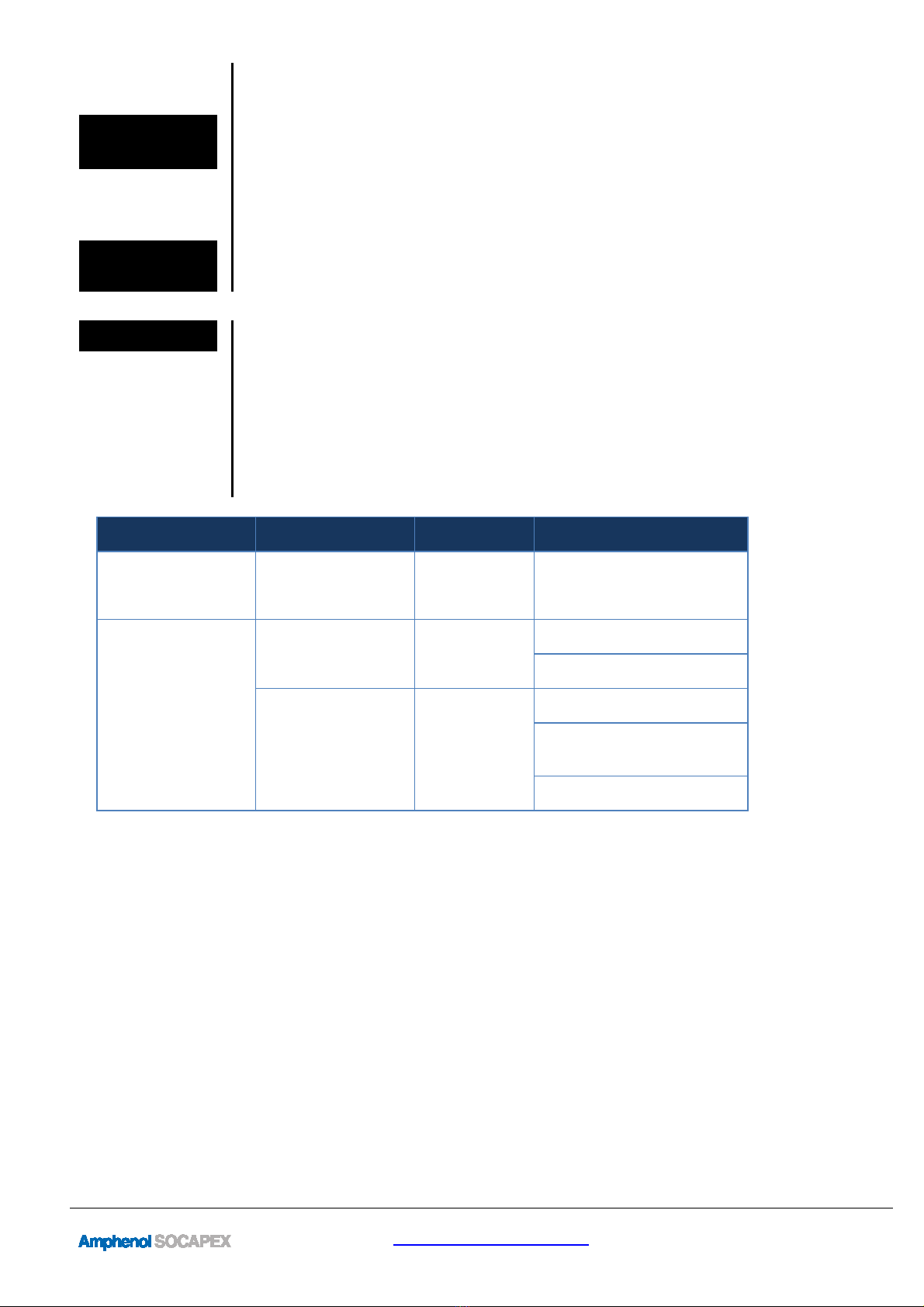
Each of the 12 LAN ports has two LED with dual color indication, Yellow and green.
Table 5 – LED Indicators
Indicator
LED
Marking
Descriptio
n
General
Indications
Power
Statu
s
Green LED ON: PW
R OK
Ethernet
Indications
Speed
Port number
100
Mbps Green
1000
Mbps Yellow
L nk/Act v ty
Port number
Green ON
–
L nk s OK
Green Fla
sh ng
–
Transm tt ng
or Rece v ng Data
OFF
–
No l nk and No Da
ta
RESMLAC
12E
MG
F35
-
UM
rev.
1
Page
5
/
16
www.amphenol-socapex.com
Tel: +33(0)4.50.89.28.00
Section 3 Installation
Selecting a
Site
As with any electronic device, you should place the switch where it will not be subject to
extreme temperatures, humidity, or electromagnetic interference that exceeds the
RESMLAC-12EMG-F35 profile. Specifically, the site you select should meet the following
requirements:
•The ambient temperature should be between -45 to +80 degrees Celsius.
•Surrounding electrical devices should not exceed the electromagnetic field (RFC)
standards for MIL-STD-461E.
CAPS for
unused
connectors
The switches are pre-equipped with caps on all ports, including power and Ethernet.

Make sure all connectors are protected with cap or sealed plug to ensure sealing
and prevent from deterioration of the contacts.
Mounting
The RESMLAC-12EMG-F35 Ethernet Switch can be fastened to any flat surface by
mounting the box directly. Refer to the mechanical drawings below. Make sure to allow
enough room to route your Ethernet and power cables.
The RESMLAC-12EMG-F35 weighs 1.150 Kg and is mounted via its four # 10-32UNF
Captive Screws.
The overall external dimensions of the RESMLAC-12EMG-F35 are 178(L) x 136(W) x 47(H)
millimeters.
RESMLAC
12E
MG
F35
-
UM
rev.
1
Page
6
/
16
www.amphenol-socapex.com
Tel: +33(0)4.50.89.28.00
RESMLAC
12E
MG
F35
-
UM
rev.
1
Page
7
/
16
www.amphenol-socapex.com
Tel: +33(0)4.50.89.28.00
Section 4 Wiring
Overview
These switches provide connections to Ethernet devices in harsh environment. Typically,
a port is used to connect to another Ethernet switch that is connected to the main Ethernet
backbone. The other Ethernet ports are then connected to Ethernet devices such as
communication systems, Ethernet I/O, or industrial computers. Electrical isolation is
provided on the Ethernet ports for increased reliability.
Please follow normal Ethernet wiring practices when installing these switches.
Power wiring
Power is provided to the switch through J1. The switches should be powered using
mating plugs and backshells compliant with MIL-DTL-38999 series III. We suggest using
hereunder accessories. Another backshell can be used but it must ensure a correct sealing
protection.
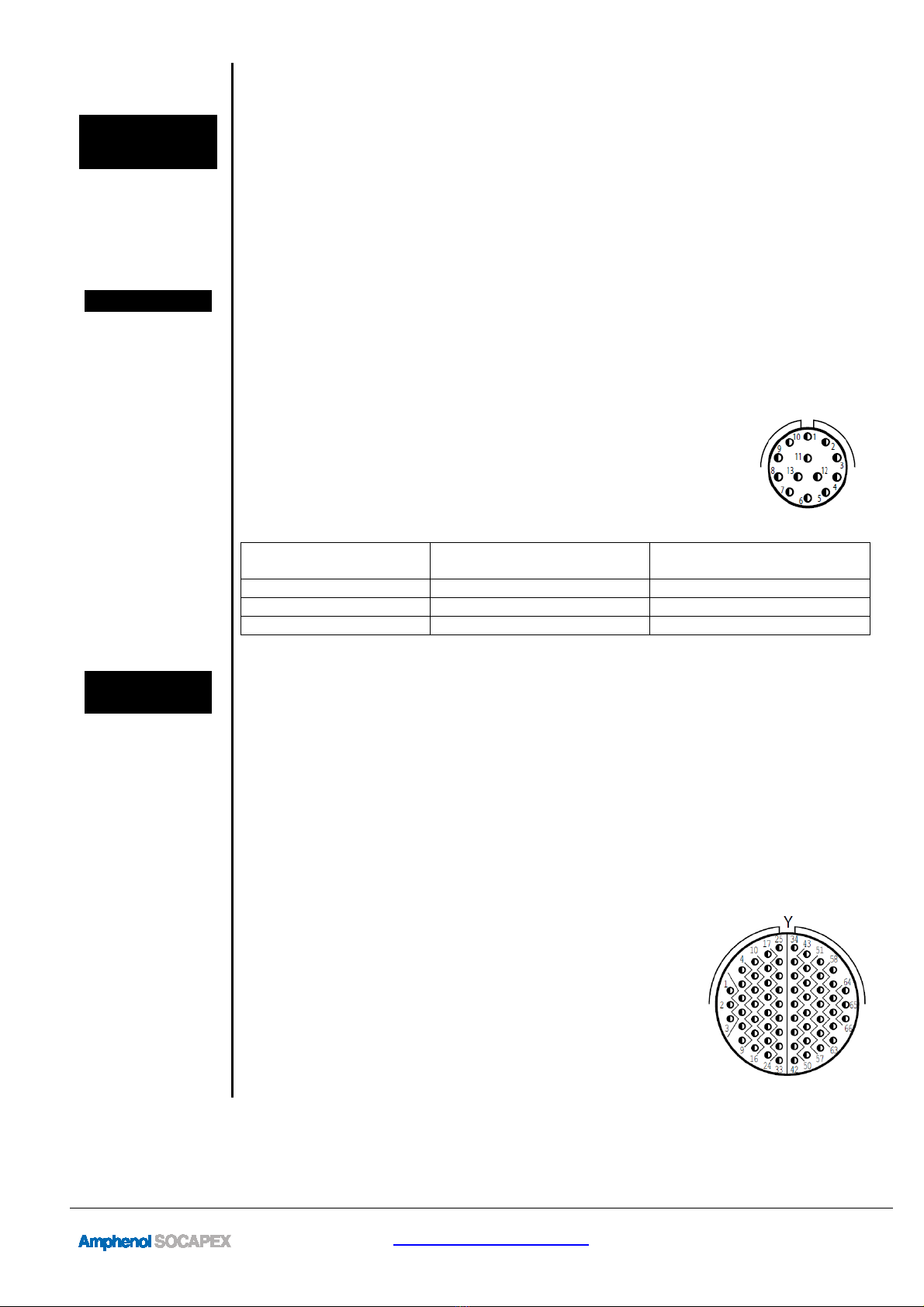
Power plug
part number
Amphenol designation: TV06 RW 11 35 SN
This plug is size 11. It is coming with 13 contacts size 22D
(designed for 5A nominal current).
Power plug
wiring
Contact Signal Suggested Harness
Color Table
6 24 V (+) red
3 24 V (-) black
All other contacts Not connected None
Ethernet
wiring
These switches provide connections to Ethernet devices on the battlefield. Typically, a
port is used to connect to another Ethernet switch or hub that is connected to the main
Ethernet backbone. The other Ethernet ports are then connected to Ethernet devices such
as communication systems, Ethernet I/O, or industrial computers. Electrical isolation is
provided on the Ethernet ports for increased reliability.
Please follow normal Ethernet wiring practices when installing these switches.
The switches should be connected using mating plugs and backshells compliant with
MIL-DTL-38999 series III. We suggest using hereunder accessories. Another backshell
can be used but it must ensure a correct sealing protection.
Ethernet plug
part number
LAN ports are shared through J2 and J3.
J2 & J3 Amphenol designation: TV06RW1935SN (F35)
These plugs are size 19. They are coming with 66 contacts
size 22D.
RESMLAC
12E
MG
F35
-
UM
rev.
1
Page
8
/
16
www.amphenol-socapex.com
Tel: +33(0)4.50.89.28.00
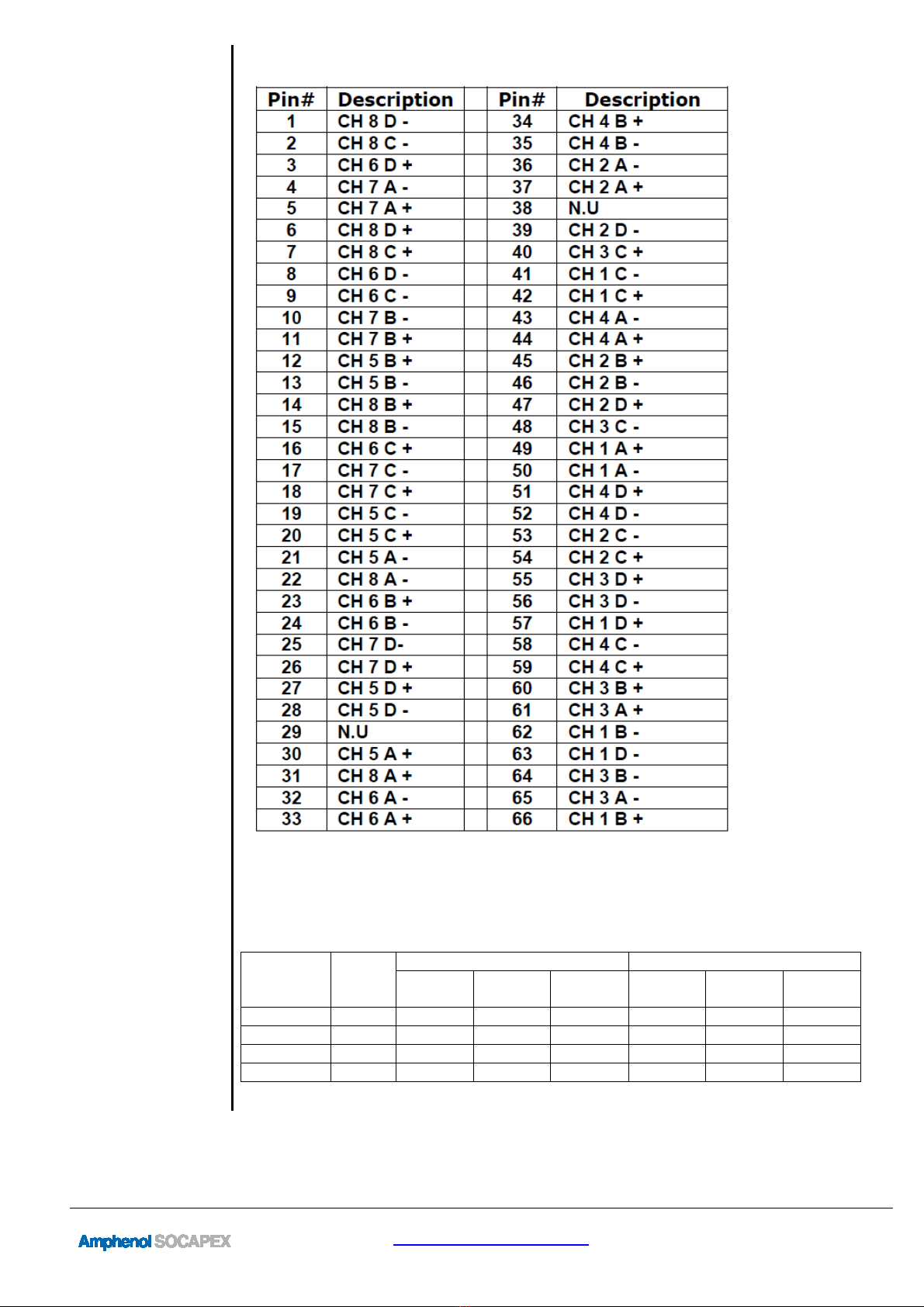
Ethernet plug
wiring Pinout for J2 connector
RESMLAC
12E
MG
F35
-
UM
rev.
1
Page
9
/
16
www.amphenol-socapex.com
Tel: +33(0)4.50.89.28.00
Ethernet ports
connection
Pinout for J3 connector
The following table indicates the appropriate wiring connections for the Gigabit Ethernet
ports relative to the available link speeds. Please note that MDI is the preferred
connection choice. The Ethernet switches are capable of connecting using the MDIX
scheme, but it is not advised.
Switch
Contacts
RJ-45
Pinout
P/N
MDI MDI-X
1000
Base-T
100
Base-T
10 Base-
T
1000
Base-T
100
Base-T
10 Base-
T
Pair 0 (+/-) 1/2 BI_DA+- TX+- TX+- BI_DA+- RX+- RX+-
Pair 1 (+/-) 3/6 BI_DB+- RX+- RX+- BI_DB+- TX+- TX+-
Pair 2 (+/-) 4/5 BI_DC+- Unused Unused BI_DC+- Unused Unused
Pair 3 (+/-) 7/8 BI_DD+- Unused Unused BI_DD+- Unused Unused
RESMLAC
12E
MG
F35
-
UM
rev.
1
Page
10
/
16
www.amphenol-socapex.com
Tel: +33(0)4.50.89.28.00
Serial wiring
To manage the switch via the WEB interface you can use all tweve ports.
You can access the CLI mode via port MNG through serial link.
The following table indicates the appropriate wiring connections for the serial port, spread
among J2 connector.