Amprobe TR300 User manual

TR300
Temperature and
Relative Humidity
Data Logger
Users Manual
• Mode d’emploi
• Bedienungshandbuch
• Manual d’Uso
• Manual de uso
• Användarhandbok

1
English
TR300
Temperature and Relative
Humidity Data Logger
Users Manual
TR300_Rev001
© 2008 Amprobe Test Tools.
All rights reserved.

2
Limited Warranty and Limitation of Liability
Your Amprobe product will be free from defects in material and workmanship for 1 year from the
date of purchase. This warranty does not cover fuses, disposable batteries or damage from accident,
neglect, misuse, alteration, contamination, or abnormal conditions of operation or handling.
Resellers are not authorized to extend any other warranty on Amprobe’s behalf. To obtain service
during the warranty period, return the product with proof of purchase to an authorized Amprobe
Test Tools Service Center or to an Amprobe dealer or distributor. See Repair Section for details.
THIS WARRANTY IS YOUR ONLY REMEDY. ALL OTHER WARRANTIES - WHETHER EXPRESS, IMPLIED
OR STAUTORY - INCLUDING IMPLIED WARRANTIES OF FITNESS FOR A PARTICULAR PURPOSE OR
MERCHANTABILITY, ARE HEREBY DISCLAIMED. MANUFACTURER SHALL NOT BE LIABLE FOR ANY
SPECIAL, INDIRECT, INCIDENTAL OR CONSEQUENTIAL DAMAGES OR LOSSES, ARISING FROM ANY
CAUSE OR THEORY. Since some states or countries do not allow the exclusion or limitation of an
implied warranty or of incidental or consequential damages, this limitation of liability may not apply
to you.
Repair
All test tools returned for warranty or non-warranty repair or for calibration should be accompanied
by the following: your name, company’s name, address, telephone number, and proof of purchase.
Additionally, please include a brief description of the problem or the service requested and include
the test leads with the meter. Non-warranty repair or replacement charges should be remitted in the
form of a check, a money order, credit card with expiration date, or a purchase order made payable
to Amprobe® Test Tools.
In-Warranty Repairs and Replacement – All Countries
Please read the warranty statement and check your battery before requesting repair. During the
warranty period any defective test tool can be returned to your Amprobe® Test Tools distributor
for an exchange for the same or like product. Please check the “Where to Buy” section on www.
amprobe.com for a list of distributors near you. Additionally, in the United States and Canada In-
Warranty repair and replacement units can also be sent to a Amprobe® Test Tools Service Center (see
address below).
Non-Warranty Repairs and Replacement – US and Canada
Non-warranty repairs in the United States and Canada should be sent to a Amprobe® Test Tools
Service Center. Call Amprobe® Test Tools or inquire at your point of purchase for current repair and
replacement rates.
In USA In Canada
Amprobe Test Tools Amprobe Test Tools
Everett, WA 98203 Mississauga, ON L4Z 1X9
Tel: 877-AMPROBE (267-7623) Tel: 905-890-7600
Non-Warranty Repairs and Replacement – Europe
European non-warranty units can be replaced by your Amprobe® Test Tools distributor for a nominal
charge. Please check the “Where to Buy” section on www.amprobe.com for a list of distributors near
you.
European Correspondence Address*
Amprobe® Test Tools Europe
Beha-Amprobe GmbH
In den Engematten 14
79286 Glottertal, Germany
Tel.: +49 (0) 7684 8009 - 0
*(Correspondence only – no repair or replacement available from this address. European customers
please contact your distributor.)


3
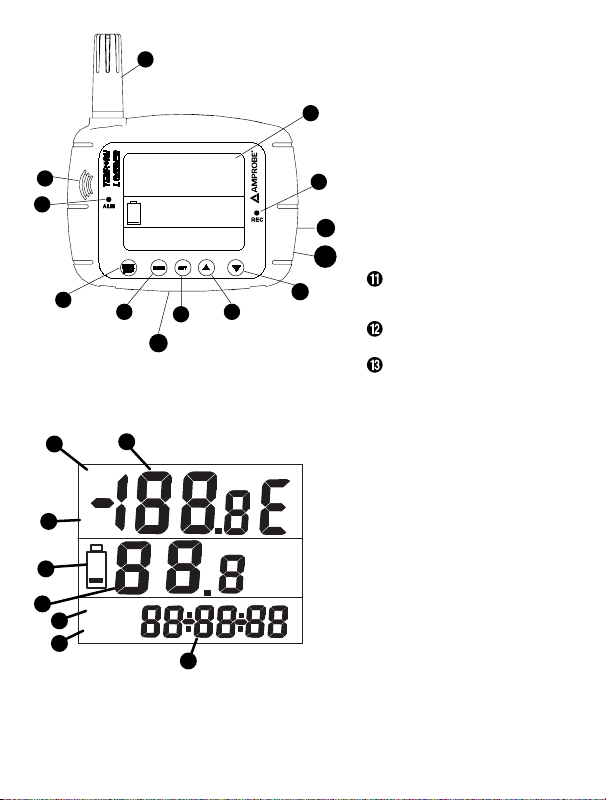
Sensor
2.5”X 2.0” LCD display
Speaker
Alarm LED
Record LED
Start/Stop to turn on and off
the unit
Mode
Set
Up scroll
Down scroll
9V DC adaptor (>= 500mA.
Depth:9mm Inner: 1.35mm.
Outer: 3.5mm) Not Included
USB adaptor (USB cable is
optional accessory)
Tripod mounting screw (tripod
not included)
Primary display: Displays the measured
temperature in °C or °F.
DP: Dew point indicator
REC: recording indicator
Low battery indicator
Secondary display: Displays the air
humidity
Date indicator
Time indicator
Date and time display: Alternates
between date and time display
DP
REC 20.8 °C
36.5 %
Y-M-D 08-02-13
1
2
5
3
4
6789
1 0
12
1 1
1 3
%
DP
REC
Y-M-D
H:M:S
2
3
4
5
6
7
1
8

4
TR300
Temperature and Relative Humidity Data Logger
CONTENTS
Introduction.........................................................................................................................................5
Unpacking and Inspection..................................................................................................................5
Operation ............................................................................................................................................5
Setting Mode .................................................................................................................................5
Sample point:.................................................................................................................................6
Start Mode: ....................................................................................................................................6
Start Time: ......................................................................................................................................7
Sample Rate ...................................................................................................................................8
Alarm Set........................................................................................................................................9
Real Time......................................................................................................................................10
Switch from °F to °C.....................................................................................................................10
Dew point measurement: DP......................................................................................................10
Instrument Connection.....................................................................................................................10
RS232 PC interface capabilities ...................................................................................................11
Download Suite Software installation .......................................................................................11
Operation.....................................................................................................................................11
Troubleshooting................................................................................................................................11
Specifications.....................................................................................................................................12

5
INTRODUCTION
The TR300 Temperature and humidity logger is well suitable to monitor indoor air quality. It
is designed with a wall-mounted hook in the back for easy installation. It has a very large LCD
display, an audible and visible alarm, and a quick response sensor to help monitor easily the
air temperature and humidity. It also has 16K memory capacity storage to record and save
continuous readings.
Please read this manual thoroughly before operation. You will find it very easy to operate and
a valuable instrument to measure & record the air temperature & humidity.
UNPACKING AND INSPECTION
The standard package of this product contains:
1 X TR300 meter
1 X Instruction Manual
1 X Download Suite CD
1 X USB Cable
4 X AA battery
OPERATION
Turn ON and OFF the unit
Press START/STOP pushbutton for less than 1 sec•
The display will show current temperature, humidity, the date and time in alternate fashion.•
Setting Mode (See Fig 4 for Symbols meaning)
Press SET pushbutton to enter the setting mode or use the software program .1.
Use Up and Down pushbuttons to select from:2.
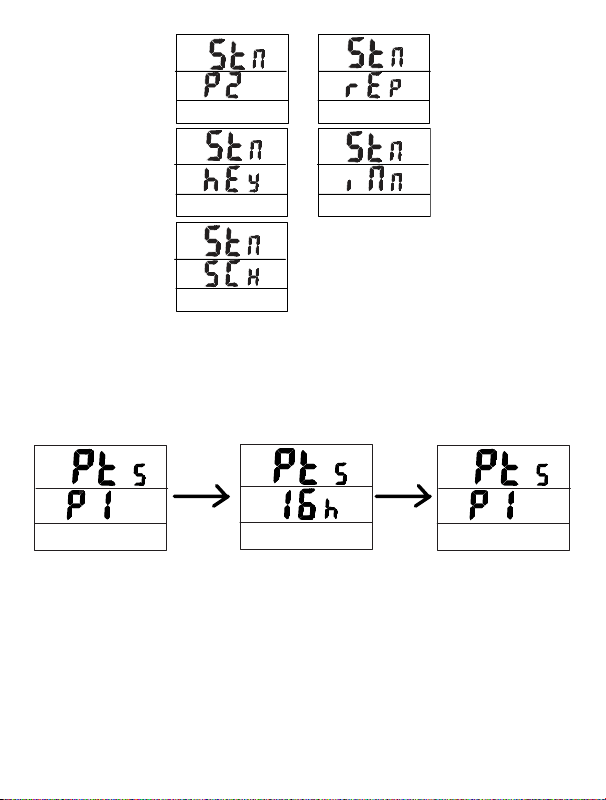
Sample point: ‘PtS’ & ‘P1’ show on the display•
Start mode: Stn’ and ‘P2’ show on the screen•
Start Time: ‘Stt’ & ‘P3’ show on the display•
Sample rate: ‘Sr’ & ‘P4’ show on the screen•
Alarm set: ‘AL’ & ‘P5’ show on the screen•
Real time: ‘rtC’ & ‘P6’ shown on the display•

6
Sample point:
From ‘Pts’ & ‘P1’, press SET key•
Press up and Down pushbuttons to select the sample point from 1h(1000)…….16h(16000).•
The sample point will be divided in half: ½ for temperature and ½ for humidity. Example:
16000 points= 8000 Temp + 8000 RH
Press SET to save and return to P1•
Press MODE to escape without saving the value•
Start Mode:
Press Up and Down keys to select from:
Repeat: ‘rEp’ is displayed on the bottom of the screen. In this mode the meter will•
automatically record again once the memories are uploaded to a PC.
From ‘Stn’ & ‘P2’, press SET key
Press Up or Down key to select ‘rEp’
Press SET to save and return to P2
Press MODE to escape
Press Up and Down Press SET to save

7
Key Start: ‘hEy’ is displayed on the bottom of the screen. In this mode, the meter will start•
recording when you press Start/Stop for more than 2 seconds.
From ‘Stn’ & ‘P2’, press SET key
Press Up or Down key to select ‘hEy’
Press SET to save and return to P2
Press MODE to escape
Immediately: ‘|Nn’ is displayed on the bottom of the screen. In this mode, the meter will•
start recording immediately after you save the setting.
From ‘Stn’ & ‘P2’, press SET key
Press Up or Down key to select ‘|Nn’’
Press SET to save and return to P2
Press MODE to escape and start recording.
To stop the recording, press and hold Start/Stop for more than 2 seconds.
Schedule: ‘SCh’ is displayed on the bottom of the screen. In this mode, the meter will start•
recording from the preset date and time.
From ‘Stn’ & ‘P2’, press SET key
Press Up or Down key to select ‘SCh’’
Press SET to save and return to P2
Press MODE to escape
Start Time:
Press SET to enter the setting mode•
Press Up or Down key to select ‘Stt’ & ‘P3’•
Press SET to enter edit mode for year ‘YEr’•
Press Up or Down key to adjust the year•
Press SET to enter edit mode for month ‘Mon’•
Press Up or Down key to adjust the month•
Press SET to enter edit mode for day ‘dAt’•
Press Up or Down key to adjust the day•
Press SET again to enter the edit mode foe hour’Hor’•
Press Up or Down key to adjust the hour•
Press SET again to enter the edit mode of minute’NI n’•
Press Up or Down key to adjust the minute•
Press SET again to enter the edit mode for Second ‘Sec’•
Press Up or Down key to adjust the second•
Press SET to save the date and time•
Press MODE to quit•

8
Sample Rate
Press SET key to enter sample rate mode•
Press Up or Down key to select ‘Sr & P4’•
Press SET to enter edit mode for HOUR•
‘Hor’
Press Up or Down key to adjust the hour•
Press SET to enter edit mode for MINUTE•
‘N| n’
Press Up or Down key to adjust the•
minute
Press SET to enter edit mode for SECOND•
‘SEc’
Press Up or Down key to adjust the second•
Press SET to save and return to P4•
Press mode to quit and return to main menu•
Y-M-D
Y-M-D
Y-M-D
H:M:S
H:M:S
H:M:S

9
Alarm Set
Press SET key to enter the alarm setting•
Press Up or Down key to select ‘AL & P5’•
Press set key to edit HIGH temperature ‘tH’•
Press Up or Down key to adjust the high temperature•
Press set key to edit LOW temperature ‘tLo’•
Press Up or Down key to adjust the low temperature•
Press set key to edit HIGH humidity ‘HH’•
Press Up or Down key to adjust the high humidity•
Press set key to edit LOW humidity ‘HL’•
Press Up or Down key to adjust the low humidity•
Press SET to save and return to P5•
Press MODE to quit and return to main menu•
Other manuals for TR300
1
Table of contents
Languages:
Other Amprobe Data Logger manuals