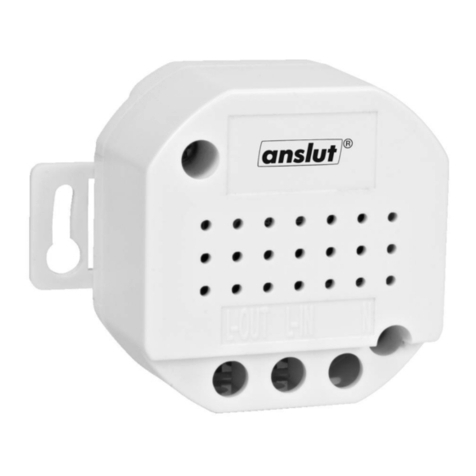
Figure 1 Figure 2
Remote control
Remote controlled socket (receiver):
408064 40-300W, 408063 2300W. Connect the receiver to a power source and the LED will light
Green and connect a lamp (figure 1) to the receiver.
Link a code
•Place the remote control close to the receiver, and press and hold the program button on the
receiver for 3 seconds (figure 2) the Green LED on the receiver will now flash slowly.
•Press the ON button on the remote control.
Using the remote controlled socket with on/off function, 408063.
•Press the ON button on the remote control to switch on the light.
•Press the OFF button to switch off the light.
Using the remote controlled socket with on/off function and dimmer function, 408064.
•Press the ON button on the remote control to switch on the light.
•Press the ON button on the remote control to start the dimming function.
•Press the ON button on the remote control at the desired lighting level.
Self programming receivers have two memory settings.
•It can be programmed for special effects as desired.
•It can be programmed to switch on once or to switch on and off in various combinations.
•This means that a receiver can be programmed for a maximum of two different combinations.
For example:
Suppose there are three receivers, where receiver 1 controls a table lamp, receiver 2 controls the night
lighting and receiver 3 controls the ceiling lighting. Receivers 1, 2 and 3 can be controlled individually,
with the remote control buttons 1, 2 and 3.
Receivers 1 and 3 can be programmed with remote control button 1, table lamp and ceiling lighting on/off
simultaneously.
Receiver 1, 2 and 3 can also be programmed for the group function, i.e. all on or off simultaneously (table
lamp, night lighting and ceiling lighting on or off simultaneously) if the remote control has this group
function.
NOTE: Do not program an on/off receiver and a dimmer receiver to the same remote control button. We
also recommend that you only program one dimmer receiver to each remote control button.
Change or remove the code
Remove individual codes
•Press and hold the self programming button on the receiver for 3 seconds.
•The LED flashes slowly (figure 2).
•Press the OFF button on the remote control, and the programmed code will be removed.
TROUBLESHOOTING
The system does not work:
•Check the battery in the remote control (transmitter).
•Check the code programming
•Remove old codes in the receiver and add a new code.
WARNING!
Do not place two receivers close to each other. The distance between two receivers must be at least one
metre.
Subject to printing errors and design changes over which we have no control. In the event of problems,
please contact our service department.
www.jula.com
10
POLSKI
POLSKI
ZASADY BEZPIECZEŃSTWA
Przed użyciem uważnie przeczytaj instrukcjęobsługi!
OSTRZEŻENIE! Nie przeciążaj systemu!
Systemu nie należy używaćw wilgotnych miejscach, np. w budynkach gospodarczych i piwnicach ani
w pobliżu łatwopalnych cieczy, rozpuszczalników, farb i podobnych substancji.
DANE TECHNICZNE
408064: funkcja ściemniania
Obciążenie (min./maks.) 40–300 W
Zasięg Do 30 m (wolna przestrzeń)
Klasa ochrony IP20
Klasa I
Temperatura robocza (maks.) 40°C
Częstotliwość 433,92 MHz
Napięcie 230 V~±10%, 50 Hz
408063: On/Off (Wł/Wył)
Obciążenie (maks.) 2300 W (wyłącznie wł/wył)
Zasięg Do 30 m (wolna przestrzeń)
Klasa ochrony IP20
Klasa I
Temperatura robocza (maks.) 40°C
Częstotliwość 433,92 MHz
Napięcie 230 V~±10%, 50 Hz
OPIS
1. LED
2. Przycisk programowania
INSTALACJA
Funkcje:
•Prosta instalacja bez użycia złączy
•Samoprogramujący, 67 milionów kodów, 2 konfiguracje pamięci
•Zielona dioda sygnalizuje uruchomienie i tryb programowania.
•Współpracuje ze wszystkimi pilotami/nadajnikami w systemie bezprzewodowym Anslut.
Rysunek 1 Rysunek 2
Pilot zdalnego sterowania
Gniazdko na pilota (odbiornik):
408064 40–300 W, 408063 2300 W. Podłącz odbiornik do źródła zasilania, a dioda zapali sięna zielono.
Następnie podłącz lampę(rysunek 1) do odbiornika.
Przypisywanie kodu
•Zbliżpilot do odbiornika, wciśnij przycisk programowania na odbiorniku na 3 sekundy (rysunek 2),
a zielona dioda na odbiorniku zacznie powoli migać.
•Naciśnij przycisk ON (WŁ) na pilocie.
Sposób użycia gniazdka na pilota z funkcjąwł/wył, 408063.
•Naciśnij przycisk ON (WŁ) na pilocie, aby zapalićświatło.
•Naciśnij przycisk OFF (WYŁ), aby zgasićświatło.
Sposób użycia gniazdka na pilota z funkcjami wł/wyłi ściemniania, 408064.
•Naciśnij przycisk ON (WŁ) na pilocie, aby zapalićświatło.
•Naciśnij przycisk ON (WŁ) na pilocie, aby włączyćfunkcjęściemniania.
•Naciśnij przycisk ON (WŁ) na pilocie po uzyskaniu żądanego natężenia światła.
Samoprogramujący odbiornik posiada dwie konfiguracje pamięci.
•Można nim zaprogramowaćefekty specjalne według potrzeb.
•Można nim zaprogramowaćjednorazowe zapalanie lub zapalanie i gaszenie w różnych
kombinacjach.
•Oznacza to, że w jednym odbiorniku można zaprogramowaćmaksymalnie dwie różne kombinacje.
Przykład:
Przyjmijmy, że mamy trzy odbiorniki, z których odbiornik 1 steruje lampąstołową, odbiornik 2 steruje
oświetleniem nocnym, a odbiornik 3 oświetleniem sufitowym. Odbiornikami 1, 2 i 3 można sterować
osobno za pomocąprzycisków 1, 2 i 3 na pilocie.
Odbiorniki 1 i 3 można zaprogramowaćprzyciskiem 1 na pilocie, lampęstołowąi oświetlenie sufitowe
funkcjąjednoczesnego włączania/wyłączania.
Odbiorniki 1, 2 i 3 można także zaprogramowaćopcjąsterowania grupowego, tzn. wszystkie będąsię
włączaćlub wyłączaćjednocześnie (lampa stołowa, oświetlenie nocne i sufitowe), jeśli pilot posiada
funkcjęprogramowania grupowego.
UWAGA! Nie przypisuj odbiornika z funkcjąwł/wyłi odbiornika z funkcjąściemniania do tego samego
przycisku na pilocie. Zalecamy także, aby do jednego przycisku na pilocie przypisywaćtylko jeden
odbiornik z funkcjąściemniania.
Zmiana lub usuwanie kodu
Usuwanie pojedynczego kodu
•Przytrzymaj przez 3 sekundy przycisk autoprogramowania na odbiorniku.
•Dioda zacznie powoli migać(rysunek 2).
•Naciśnij przycisk OFF (WYŁ) na pilocie, a zaprogramowany kod zostanie usunięty.
WYKRYWANIE USTEREK
System nie działa:
•Sprawdźbaterięw pilocie (nadajniku).
•Skontroluj programowanie kodów
•Usuństare kody w odbiorniku i wprowadźnowy kod.
OSTRZEŻENIE!
Nie umieszczaj dwóch odbiorników zbyt blisko siebie. Odległości pomiędzy dwoma odbiornikami powinny
wynosićco najmniej 1 metr.
Z zastrzeżeniem prawa do błędów w druku i zmian konstrukcyjnych, które sąod nas niezależne. W razie
ewentualnych problemów skontaktuj siętelefonicznie z naszym działem obsługi klienta pod numerem:
801 600 500.
Jula Poland Sp. z o.o., ul. Malborska 49, 03-286 Warszawa, Polska
www.jula.pl
7
ENGLISH
ENGLISH
SAFETY INSTRUCTIONS
Read the Operating Instructions carefully before use!
WARNING! Do not overload the system!
The system must not be used in damp places, e.g. on farms or in a cellar, and not in the vicinity of
inflammable liquids, solvents, paints or similar products.
TECHNICAL DATA
408064: dimmer function
Load (min/max) 40-300W
Range Up to 30 metres (clear view)
Safety class IP20
Class I
Operating temperature (max) 40 °C
Frequency 433.92 Mhz
Power supply 230V~±10%, 50 Hz
408063: On/Off
Load (max) 2300 W (only on/off)
Range Up to 30 metres (clear view)
Safety class IP20
Class I
Operating temperature (max) 40 °C
Frequency 433.92 Mhz
Power supply 230V~±10%, 50 Hz
DESCRIPTION
1. LED
2. Program button
INSTALLATION
Functions:
•Easy installation no connections.
•Self-programming, 67 million codes, 2 memory settings
•Green LED indicates on the program setting mode.
•Works with all remote controls/transmitters in a Connected wireless system.