manuals.online logo
Brands
  1. Home
  2. •
  3. Brands
  4. •
  5. Audiovox
  6. •
  7. LCD TV
  8. •
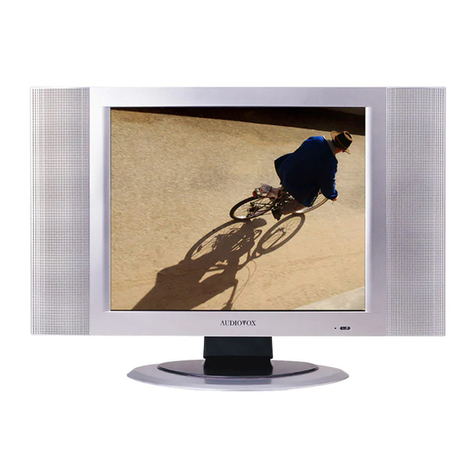
  9. Audiovox FPE1705 User manual

Audiovox FPE1705 User manual

This manual suits for next models

1

Other Audiovox LCD TV manuals

Audiovox FPE2000 User manual

Audiovox

Audiovox FPE2000 User manual
Audiovox FPE4207HR - 42" LCD TV User manual
Audiovox

Audiovox FPE4207HR - 42" LCD TV User manual

Audiovox FPE2705 User manual

Audiovox

Audiovox FPE2705 User manual
Audiovox FPE1909DVDC User manual

Audiovox

Audiovox FPE1909DVDC User manual
Audiovox D1210 User manual

Audiovox

Audiovox D1210 User manual
Audiovox FPE2706 User manual

Audiovox

Audiovox FPE2706 User manual

Audiovox FPE2705 User manual

Audiovox

Audiovox FPE2705 User manual
Audiovox FP1520 User manual

Audiovox

Audiovox FP1520 User manual
Audiovox D1210 User manual

Audiovox

Audiovox D1210 User manual
Audiovox FPE4707HR - 47" LCD TV User manual
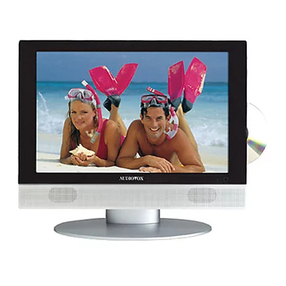
Audiovox

Audiovox FPE4707HR - 47" LCD TV User manual

Audiovox FPE1506DV User manual

Audiovox

Audiovox FPE1506DV User manual
Audiovox FP1500 - annexe 1 User manual
Audiovox

Audiovox FP1500 - annexe 1 User manual

Audiovox FPE1505DV - LCD TV With Built-in Progressive Scan DVD... User manual

Audiovox

Audiovox FPE1505DV - LCD TV With Built-in Progressive Scan DVD... User manual
Audiovox FPE1906DV - 19" LCD TV User manual
Audiovox

Audiovox FPE1906DV - 19" LCD TV User manual

Audiovox FPE2305 - 23" LCD TV User manual
Audiovox

Audiovox FPE2305 - 23" LCD TV User manual

Audiovox FPE5016P User manual

Audiovox

Audiovox FPE5016P User manual
Audiovox D1210 User manual

Audiovox

Audiovox D1210 User manual
Audiovox PLV16081 User manual

Audiovox

Audiovox PLV16081 User manual
Audiovox FPE2006 User manual

Audiovox

Audiovox FPE2006 User manual
Audiovox LCD1900 B User manual

Audiovox

Audiovox LCD1900 B User manual
Audiovox FPE1708DV - 17" LCD TV User manual
Audiovox

Audiovox FPE1708DV - 17" LCD TV User manual

Audiovox FPE1506 User manual

Audiovox

Audiovox FPE1506 User manual
Audiovox FP1500 - annexe 1 User manual

Audiovox

Audiovox FP1500 - annexe 1 User manual

Audiovox D1210 User manual

Audiovox

Audiovox D1210 User manual

Popular LCD TV manuals by other brands

Samsung LA32E420 E-manual

Samsung

Samsung LA32E420 E-manual

ViewSonic VS12119-1M user guide

ViewSonic

ViewSonic VS12119-1M user guide

iLO CIWL3706 owner's manual

iLO

iLO CIWL3706 owner's manual

LG 32LT560C Quick reference guide

LG

LG 32LT560C Quick reference guide

Sony WEGA KLV-27HR3 operating instructions

Sony

Sony WEGA KLV-27HR3 operating instructions

Zenith Z32LC2D Specifications

Zenith

Zenith Z32LC2D Specifications

Sony KDL-32S3000R - 32" Class Bravia S-series Digital Lcd... Specifications

Sony

Sony KDL-32S3000R - 32" Class Bravia S-series Digital Lcd... Specifications

Medion MEDION LIFE X14330 quick start guide

Medion

Medion MEDION LIFE X14330 quick start guide

Vizio HDTV30A VW32L Service manual

Vizio

Vizio HDTV30A VW32L Service manual

Sharp LC-24DV250K Operation manual

Sharp

Sharp LC-24DV250K Operation manual

SOYO Dymond DYLT032A user manual

SOYO

SOYO Dymond DYLT032A user manual

Kalley K-LED40FHDST2 Service manual

Kalley

Kalley K-LED40FHDST2 Service manual

Dynex DX-L40-10A Guide de l'utilisateur

Dynex

Dynex DX-L40-10A Guide de l'utilisateur

Hisense M3300 user manual

Hisense

Hisense M3300 user manual

Toshiba 42XV600A owner's manual

Toshiba

Toshiba 42XV600A owner's manual

Panasonic TX-26LX1A operating instructions

Panasonic

Panasonic TX-26LX1A operating instructions

HP LT3200 Illustrated parts & service map

HP

HP LT3200 Illustrated parts & service map

Sharp LC-32GA8 Service manual

Sharp

Sharp LC-32GA8 Service manual

manuals.online logo
manuals.online logoBrands
  • About & Mission
  • Contact us
  • Privacy Policy
  • Terms and Conditions

Copyright 2025 Manuals.Online. All Rights Reserved.

Before connecting, operating or adjusting this product, please read the manual completely.
LCD TV
Operating Manual
FPE1705
FOR ASSISTANCE CALL 1-800-619-3848
OR VISIT US AT WWW.AUDIOVOX.COM
1287353
Contents Index
Congratulations on your purchase of this LCD TV.
We recommend that you read this manual thoroughly before use to fully enjoy the
many functions and excellent features of this unit.
Keep this manual in an easily accessible location for future reference.
Note:Screen displays and illustrations in this manual may differ from the actual
model.
Important safety information 3
Important safety cautions 4
Identification of controls 6
Control buttons 6
Back 7
Remote control 8
Installation 10
Basic operations 18
Main on-screen-display (OSD) introduction 19
Operations 20
Picture adjustment 20
System setting 21
Audio setting 26
Channel setting 28
Selecting channel 30
OSD setting 31
Timer setting 32
Operations in VGA/YbPr mode 33
TV troubleshooting 35
Specifications 36
2
3
The lightning flash with the arrowhead symbol within an equilateral triangle is
intended to alert the user to the presence of uninsulated “DANGEROUS
VOLTAGE” within the product’s enclosure that may be of sufficient magnitude
to constitute a risk of electric shock to persons.
The Exclamation point within an equilateral triangle is intended to alert the user
to the presence of important operating and maintenance (Servicing instructions in
the literature accompanying the product).
This Equipment has been tested and found to comply with the limits for a TV Broadcast Receiver, pursuant
to Part 15 of the FCC Rules. These limits are designed to provide reasonable protection against harmful
interference in a residential installation. This equipment generates, uses and can radiate radio frequency
energy and, if not installed and used in accordance with the instructions, may cause harmful interference to
radio communications If this equipment does cause or receive interference, which can be determined by
turning equipment off and on, the user is encouraged to try to correct the interference by one of the
following measures:
?? Reorient or relocate the TV antenna
?? Increase the separation between TV and other equipment.
?? Connect TV into separate outlet from equipment.
? ?Consult the dealer or an experienced radio/TV technician for help
FCC Caution: Any changes or modifications not expressly approved by the party responsible for
compliance could void the user’s authority to operate this equipment
Federal Communication Commission
Information (FCC)
Important Safety Information
Important Safety Cautions
When any unusual situation occurs, turn off the power supply at once and remove
the plug from the wall outlet. Contact a qualified service department in your local
area.
Do not expose this unit in the rain or spatter by liquid. Do not use this product near
water - for example, near a bathtub, washbowl, kitchen sink, or laundry tub, in a wet
basement, or near a swimming pool, and the like. Do not use immediately after
moving from a low temperature to high temperature environment, as this causes
condensation, which may result in fire, electric shock, or other hazards.
Heat sources-Keep the product away from heat sources such as radiators,
heaters, stoves and other heat generating products (including amplifiers).
Requirement of environment temperature:
o o o o
0 C~50 C for storage; 5 C~40 C for working
The vents and other openings in the cabinet are designed for ventilation. Do not
cover or block these vents and openings since insufficient ventilation can cause
overheating and/or shorten the life of the product.
Do not place the product on a bed, sofa, rug or other similar surface, since they can
block ventilation openings.
This product is not designed for built-in installation; do not place the product in an
enclosed place such as a bookcase or rack, unless proper ventilation is provided
or the manufacturer's instructions are followed.
Unplug this product from the wall outlet before cleaning. Do not use liquid cleaners
or aerosol cleaners. Use a damp cloth for cleaning.
Do not place the product on an unstable trolley, stand, tripod or table. Placing the
product on an unstable base can cause the product to fall, resulting in
serious personal injuries as well as damage to the product. Use only a trolley,
stand, tripod, and bracket or table recommended by the manufacturer or sold with
the product.
4
5
Important Safety Cautions
Important Information Regarding use of
Video Games, Computer, captions or other
fixed images displays
The extended use of a fixed image program material can cause permanent “Shadow Image” on
the LCD panel. The background image is viewable on normal programs in the form of stationary
fixed images. This type of irreversible LCD panel deterioration can be limited by observing the
following steps:
* Reduce the Brightness and Contrast settings to a minimum viewing level
* DO NOT display the fixed image for extended periods of time
* Turn the power OFF when not in actual use
Recycling
This product utilizes tin-lead solder, and has a fluorescent lamp containing a small amount of
mercury. Disposal of these materials may be regulated in your community due to environmental
considerations. For disposal or recycling information please contact your local authorities, or the
Electronics Industries Alliance Environment at: http://www.eiae.org/
Identification of controls
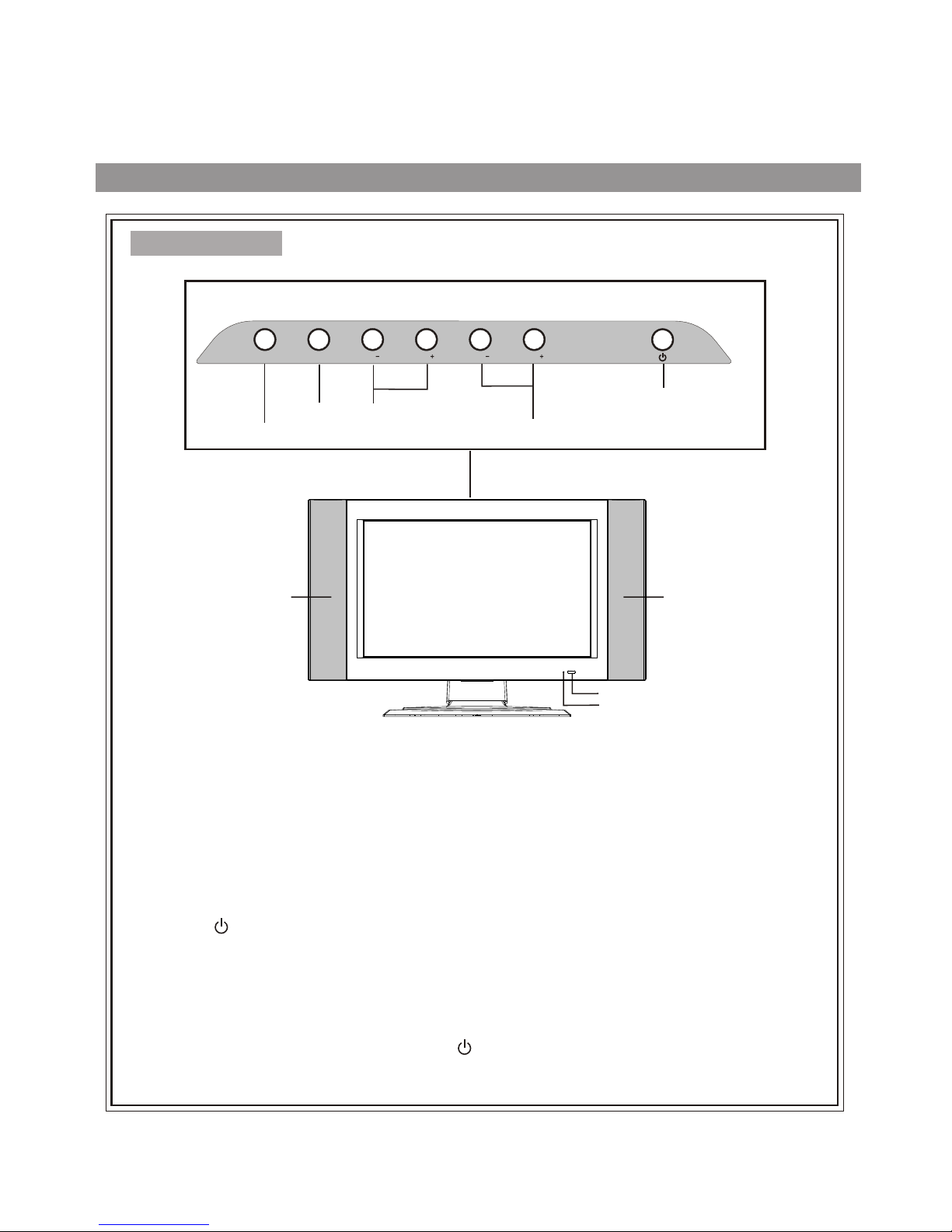
Control buttons
Note:
1. SOURCE
To access the SOURCE select menu
2. MENU
Press this button to access the MENU main page.
3. CH +/-
Change the TV channel.
In OSD Menu, press these buttons to choose the OSD items.
4. VOL +/-
Increase or decrease the sound volume level.
In OSD Menu, press these buttons to adjust the value or setting of each item
5. POWER ( )
Press this button to turn the unit ON from STANDBY mode. Press it again to turn the set back to
STANDBY.
SOURCE, MENU, CH+/-, VOL+/- and POWER( ) on the main unit have the same functions as the
corresponding buttons on the remote control.
This operation manual provides a description based on operating functions with the remote control.
The Power Indicator light will glow
yellow when the set is turned on,
and glows red when the set is in
the standby mode.
6
Speaker
Power On/
Standby
Control Panel
Select Input Signal
Menu
Volume Down/Up
Channel Down/Up
SOURCE MENU CHCH VOL VOL
Speaker
Remote sensor
Power Indicator
Back
RF
123567
1. VGA input / PC- Audio in
Connect to the VGA/audio output 3.5mm jacks on your PC.
2. HDTV input (Y, Pb, Pr, Audio L, R)
Connect to the Y/Pb/Pr (or Y/Cb/Cr) and audio output jacks of a Set-Top Box or DVD player.
3. Headphone 3.5mm jack
4. AV outputs (Video, Audio L, R)
Connect to the VCR input jacks to record programs.
VGA -
PC AUDIO PHONE -
S VIDEO
LRY P
bP
rL LR R
AUDIOAUDIO AUDIO
AV OUT AV INHDTV IN
VIDE O VIDEO
6. S-Video input
Receive a S-Video signal from external source such as VCR or DVD player.
5. AV inputs (Video, Audio L, R)
Receive video/audio signals from external sources such as VCR or DVD player.
4
7.Coaxial cable & Antenna input
7
Identification of controls (continued)
Remote Control
Display the current state
Mute
Previous channel
Auto correct picture
Channel up/down selector.
In menu operations, used
to select item.
Power on/standby
Direct channel selector
Select the input signal source
Setting sleep timer
Exit the menu
Sound preset mode selector
Change audio to mono, stereo or SAP
Volume up/down selector;
In the menu operation,
adjust the selected item
Access the menu
8
Select OSD menu position
Adjust the bass
Adjust the treble
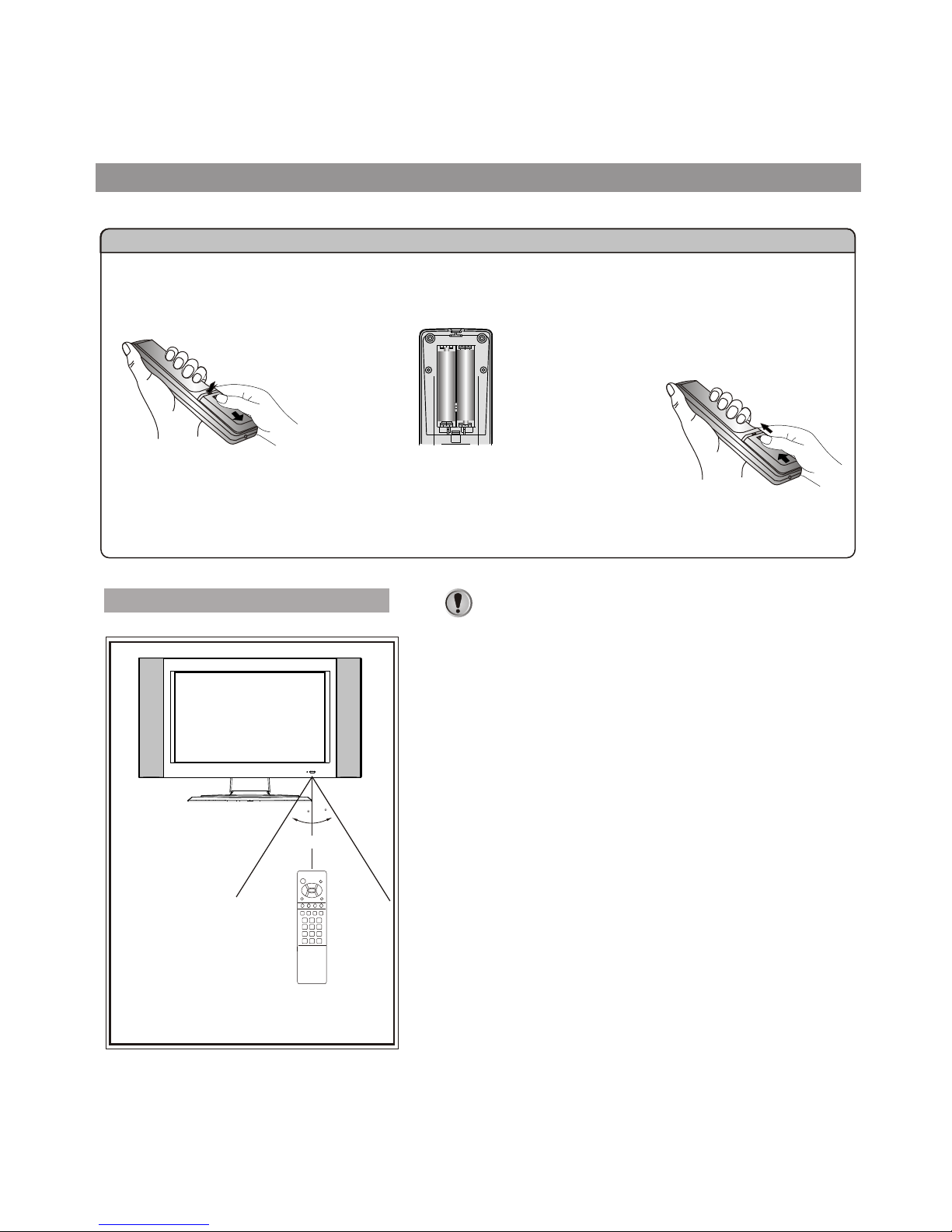
Flip the cover open in
the arrow direction.
Select picture mode between
Bright, Nature, Soft & User
S.M
Please install the batteries before using the remote control.
Effective range of the remote control
Notes:
1.When the remote control will not be used for a
long period of time or when the batteries are
worn out, remove the batteries.
2.Do not drop or dampen the remote control.
3.Do not disassemble the remote control.
4.There should be no obstacle between the TV
and the transmitter.
5.Use the remote control within the effective
range as shown in the figure on the left.
6.If the remote control does not work, please
check whether the batteries are exhausted or
if they have been installed properly.
7.When direct sunlight, and incandescent
lighting, fluorescent lamp or any other strong
light shines on the remote sensor of the TV,
the remote operation can be come erratic.
8.Do not mix different types of batteries in the
remote.
9
Batteries for the Remote Control
If the remote control fails to operate the LCD TV functions, replace the batteries in the remote control.
<(Slide the cover while
pressing down.)
<(Place the batteries with their
terminals corresponding to the (+)
and (-) indications in the battery
compartment.)
Open the battery cover.
1Insert two size-AAA batteries.
2
Replace the cover and slide
in reverse until the lock
snaps.
3
30
30
5m
Preparing the Remote Control
Installation
Install the unit in a room where direct light will not fall upon the screen.
Total darkness or a reflection on the picture screen may cause
eyestrain. Soft and indirect lighting is recommended for comfortable
viewing.
Antenna connections
OUTDOOR VHF/UHF ANTENNA CONNECTION (ANTENNA NOT INCLUDED)
Follow the instructions for the type of antenna system you intend to use. If using Cable or satellite, see
the next page.
Combination VHF/UHF
Antenna (Single 75 Ohm cable
or 300 Ohm twin-lead wire)
Connect the 75 Ohm cable from
combination VHF/UHF antenna
to the antenna jack.
OR
If your combination antenna has
a 300 Ohm twin-lead wire, use a
300-75 Ohm matching
transformer (NOT SUPPLIED).
Connect the UHF twin-lead wire
to a combiner (NOT SUPPLIED).
Connect the VHF twin-lead to a
300-75 Ohm matching
transformer (NOT SUPPLIED).
Attach the transformer to the
combiner. Attach the combiner to
the antenna jack.
Connect the 75 Ohm cable from
the VHF antenna and the UHF
antenna twin-lead wire to a
combiner (NOT SUPPLIED).
Attach the combiner to the
antenna jack.
NOTE: If your VHF antenna has
a twin-lead wire use a 300-75
Ohm matching transformer, then
connect the transformer to the
Combination VHF/UHF
Antenna (Separate VHF and
UHF 300 Ohm twin-leads)
VHF 300
Ohm VHF 75 Ohm
Combiner
Combiner
UHF 300 Ohm UHF 300 Ohm
10
VHF/UHF
75 OHM
Ohm