Audison bit one Setup guide

ADVANCED MANUAL
www.audison.eu
PRELIMINARY
Signal Interface Processor
audison is a part of elettromedia - 62018 Potenza Picena (MC) Italy - www.elettromedia.it

ADVANCED MANUAL / Bit One
2
Packaging Contents
- Bit One - Signal interface processor
- Printed Quick Start Guide
- 5.0 m AC Link (RJ-12) cable
- 5.0 m AD Link (RJ-45) cable
- 3.0 m USB cable
- N. 4 fixing screws
DRC Digital Remote Control
- DRC control panel
- 4.5 m DRC / AC Link cable
- N. 2 fixing brackets
- CD ROM with:
Bit One software
USB-ACNet drivers
This Advanced Manual (.pdf)
Test tracks
Warning: A PC with Windows XP is necessary to install the software and to
perform the Bit One.
Product Description
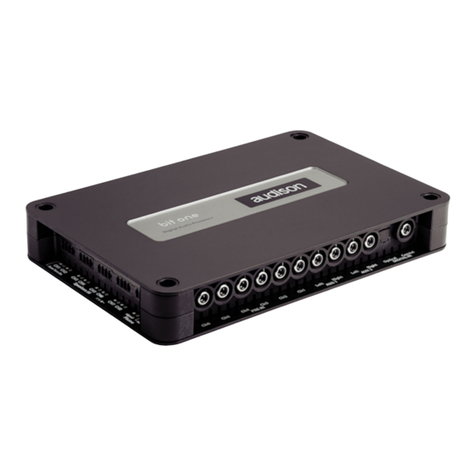
Bit One is a signal digital processor essential to maximize the acoustic performances of your Car Audio
system. It’s made with a 32 bit DSP processor and 24 bit AD and DA converters.
Its peculiarity is that it allows the system de-equalization of car factory systems with integrated audio pro-
cessor, to evolve and improve any car audio system.
It has 10 PRE Amp Level signal inputs, 8 Speaker Level signal inputs, optical and electrical S/PDIF digital
input and PHONE IN input for the use with cellular phones handsfree kit.
It provides 8 outputs both at preamplified and digital level.
Each channel has 32 bands equalizer, an electronic crossover and a digital delay. To adjust the several
regulations a connection with a PC is necessary.
ADVANCED MANUAL / Bit One
2

ADVANCED MANUAL / Bit One
3
Installation
External size
How to fix
Fixing size
ADVANCED MANUAL / Bit One
3

ADVANCED MANUAL / Bit One
4
1 • PRE IN (low level inputs)
Ch1 - Ch2 - Ch3 - Ch4 - Ch5 - Ch6 - AUX1 - AUX2
Connect the RCA cables coming from the analog
signal source.
Description of Input / Output connection panels
OUTPUT SIGNALS
3 • SPEAKER IN (high level inputs)
Ch1 - Ch2 - Ch3 - Ch4 - Ch5 - Ch6 - Ch7 - Ch8
Phone
Connect the specific cables coming from the used
sources.
5 • AD Link - OUT (digital signal)
S/PDIF digital output (Ch1÷Ch8) for amplifiers
provided with appropriate AD Link input.
6 • AC Link 1 - 2 (REMOTE CONTROLS)
DRC: Input for the processor function’s remote
control and for the devices connected to AMPS.
AMPS: Control bus to adjust the functions of the
amplifiers provided with AC Link connection, throu-
gh DRC or PC (with ACNet software) connected to
the processor.
2 • DIGITAL IN (digital inputs)
Optical - Coaxial (S/PDIF standard)
Connect the specific cables coming from the digital
signal source.
4 • PRE OUT (low level analog signal)
Ch1 - Ch2 - Ch3 - Ch4 - Ch5 - Ch6 - Ch7 - Ch8
IN/OUT REMOTE CONTROLS
INPUT SIGNALS
8 • REMOTE IN - IGNITION SWITCH
MEM: remember the state at shutdown - optional
ON - OFF: power on - optional
7 • REMOTE IN-OUT
IN: turn on the processor:
connect to source Rem Out lead.
OUT: turn on other devices of the system:
connect to other devices Rem In lead.
negative pole (ground)
positive pole
9 • POWER (power connection)
- 12V +
10 • USB
PC connection with Bit One software to manage all
aspects of the processor.
ADVANCED MANUAL / Bit One
4
3
9 1087
AMPSDRC
1 - AC Link - 2
AMPSDRC
1 - AC Link - 2

ADVANCED MANUAL / Bit One
5
Connections
POWER SUPPLY and REMOTE IN connection
PERSONAL COMPUTER and DIGITAL REMOTE CONTROL connection
1. Ignition switch Remote on/off control.
2. Ignition switch Remote on/off command with memory: recalls how it has been shut off; if the proces-
sor was turned off by DRC unit (optional) you can turn it on by proper DRC control. If the processor was
turned off by ignition switch, you can turn it on with the ON operation of the ignition switch.
WIRES FOR CONNECTION TO THE PROCESSOR
WARNING:
OPTIONAL controls:
Use turn on control 1 or
turn on control 2.
REMOTE ON/OFF (IGNITION SWITCH)
ADVANCED MANUAL / Bit One
5
TO AC Link PROVIDED AMPLIFIER
DRC IN
L: 7 mm (5/16”)
MAX: 16 AWG

ADVANCED MANUAL / Bit One
6
Connection: INPUT SIGNALS
PRE IN - AUX 1
DIGITAL OPTICAL
PRE IN - AUDIO CAR THEATRE
PRE IN - AUX 2
DIGITAL COAXIAL
PRE IN - STEREO
ADVANCED MANUAL / Bit One
6

ADVANCED MANUAL / Bit One
7
High level STEREO Front + Rear
Handsfree TELEPHONE kit connection
High level MULTICHANNEL
ADVANCED MANUAL / Bit One
7
Original amplified source

ADVANCED MANUAL / Bit One
8
Connection: OUTPUT SIGNALS
Output on TH amplifier system (AD Link + AC Link)
Output on non-TH amplifier system (PRE)
ADVANCED MANUAL / Bit One
8
AMPSDRC
1 - ACLink - 2
TH
amplifier
TH
amplifier
TH
amplifier
AMPSDRC
1 - AC Link - 2

ADVANCED MANUAL / Bit One
9
To regulate Bit One functions, connect the PC through the USB connection.
To start the software, click on the icon:
On the starting screen there is the choice between OFFLINE (Bit One not connected) or TARGET (Bit One
connected) mode.
SOFTWARE
OFFLINE mode (Bit One processor not connected to the PC)
In OFFLINE mode it’s possible to use the software without connecting the Bit One to the PC, just to make oneself
familiar with the different processor functions.
See section: “MAIN PAGE”.
Select MENU I/O Configuration Wizard to change inputs/outputs selections (n.4 of TARGET mode).
TARGET mode (Bit One processor connected to the PC)
Make sure that the Bit One is connected to the PC through the provided USB cable.
Before activating TARGET mode, connect power supply to Bit One and switch it on by REMOTE-IN wire as indicated
in “Connections”.
After the selection of the mode, press ENTER.
ADVANCED MANUAL / Bit One
9
bit one.exe
bit
one

ADVANCED MANUAL / Bit One
10
TARGET mode (Bit One processor connected to the PC)
1. When software starts, it scans the USB ports of the PC, searching for the Bit One;
2. Bit One found: the processor is connected to the PC;
3. Bit One NOT found: the processor is not connected to the PC; Press CANCEL to start the OFFLINE mode;
4. Inputs/outputs configuration wizard;
5. Select the MASTER inputs being used (low level or high level) and the auxiliary inputs AUX1 - AUX2 -
S/PDIF - OPTICAL - PHONE if used;
6. Assign the processor input channels to the signals coming from the sources (Ch1 Ch6);
7. MASTER input level setup (low / high level). Follow the instruction shown on the windows;
Note: the setup is necessary to adjust the Bit One input sensitivity to the signal coming from the sources;
8. Wait until the setup is completed;
9. Input level too low;
10.Selecting the MASTER High Level input, the OEM source de-equalization function will be active;
11. If the de-equalization function is active, follow the shown instructions;
12.Select the loudspeakers used in the system;
13.Select any passive crossover filter;
14.Assign the processor output channels to the corrispondent amplifier being used (Ch1 Ch8);
15. Specify any amplifier using AD Link / AC Link system.
ADVANCED MANUAL / Bit One
10
123
45
67
14 15
8 9 10
11
12 13
Other manuals for bit one
3
Table of contents
Other Audison Signal Processor manuals