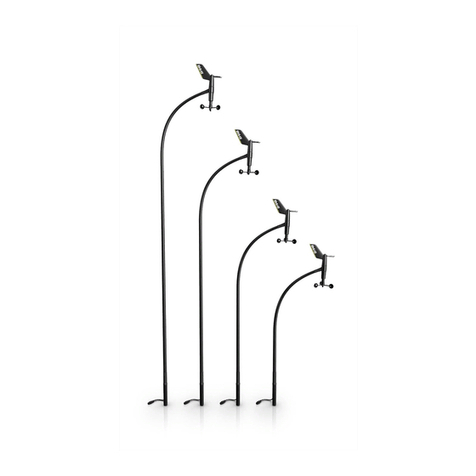
A
C
D
B
Wind pack Sensor only
A. WS320 wind sensor x x
B. Screws No.10 x 5/8 (4x) x x
C. Gasket x x
D. Masthead bracket x x
E. Battery x x
F. Bluetooth base station with
mounting accessories x
G. Screw M4 30 mm SS316 (2x) x
H. NMEA 2000 drop cable x
I. Micro-C T-Joiner x
WS320 WIND SENSOR
INSTALLATION GUIDE
*988-12029-002*
Regulatory statements
Parts included
United States of America
Navico declares under our sole responsibility that the product conforms with the requirements of:
• Part 15 of the FCC Rules.
Operation is subject to the following two conditions:
(1) this device may not cause harmful interference, and
(2) this device must accept any interference received, including interference that may cause undesired operation.
¼Note: The user is cautioned that any changes or modications not expressly approved by the party responsible for compliance could void the user’s
authority to operate the equipment
Warning: Used when it is necessary to warn personnel that they should proceed carefully to prevent risk of injury and/or damage to equipment/
personnel.
¼Note: This equipment generates, uses and can radiate radio frequency energy and, if not installed and used in accordance with the instructions, may
cause harmful interference to radio communications. However, there is no guarantee that the interference will not occur in a particular installation. If this
equipment does cause harmful interference to radio or television reception, which can be determined by turning the equipment o and on, the user is
encouraged to try to correct the interference by one or more of the following measures:
• reorient or relocate the receiving antenna
• increase the separation between the equipment and receiver
• connect the equipment into an outlet on a circuit dierent from that of the receiver
• consult the dealer or an experienced technician for help.
Europe
Navico declares under our sole responsibility that the product conforms with the requirements of:
• CE under RED directive 2014/53/EU
The relevant Declaration of Conformity is available on the following website: www.bandg.com
Canada
This device complies with Industry Canada license-exempt RSS
standard(s). Operation is subject to the following two conditions:
(1) this device may not cause interference, and
(2) this device must accept any interference, including interference that
may cause undesired operation of the device.
Le présent appareil est conforme aux CNR d’Industrie Canada applicables aux
appareils radio exempts de licence. L’exploitation est autorisée aux deux conditions
suivantes :
(1) l’appareil ne doit pas produire de brouillage, et
(2) l’utilisateur de l’appareil doit accepter tout brouillage radioélectrique subi, même
si le brouillage est susceptible d’en compromettre le fonctionnement.
Industry Canada Statement: Under Industry Canada regulations, this
radio transmitter may only operate using an antenna of a type and
maximum (or lesser) gain approved for the transmitter by Industry
Canada. To reduce potential radio interference to other users, the antenna
type and its gain should be so chosen that the equivalent isotropically
radiated power (e.i.r.p.) is not more than that necessary for successful
communication.
Conformément à la réglementation d’Industrie Canada, le présent émetteur radio
peut fonctionner avec une antenne d’un type et d’un gain maximal (ou inférieur)
approuvé pour l’émetteur par Industrie Canada. Dans le but de réduire les risques
de brouillage radioélectrique à l’intention des autres utilisateurs, il faut choisir le
type d’antenne et son gain de sorte que la puissance isotrope rayonnée quivalente
(p.i.r.e.) ne dépassepas l’intensité nécessaire à l’établissement d’une communication
satisfaisante.
Technical specications
WS320
Weight 0.32 kg (0.7 lbs)
Waterproof IPx6 and IPx7
Temperature -25°C to 65°C
Power usage Solar powered
Wind speed resolution 0.05 m/sec (0.1 Knots)
Wind speed accuracy +/- 0.1 m/sec (0.2 kt) from
1 - 40 m/sec (2 - 80 kt)
Wind speed range 0.25 - 50 m/sec (0.5 - 97 knots)
Wind angle resolution 0.1°
Wind angle accuray +/- 0.5°
Wireless connectivity <=30m (98 ft)
Data output Apparent wind speed and
angle at 5 Hz
Base station
Dimensions Ø 90 mm (3.54”)
H 38 mm (1.50”)
Power supply and
interface
9-16 V DC via Micro-C
network
Power consumption 1.2 W (<100 mA at 12 V DC)
Network Load 2 LEN (100 mA)
Temperature Operating: -25°C to +60°C,
Storage: -40°C to +85°C
Humidity 66°C, 95% RH, 18 hrs
Environmental protection IPx7
In-rush current 2 A for 20 ms (at internal 5 V)
Connection cable: Micro-C drop cable 1.8 m
(6 ft)
Australia and New Zealand
Navico declares under our sole responsibility that the product conforms with the requirements of:
• level 2 devices of the Radiocommunications (Electromagnetic Compatibility) standard 2017
• radiocommunications (Short Range Devices) Standards 2014
The relevant Declaration of Conformity is available on the following website: www.bandg.com
A
D E
H I
F
G
A. WS320 wind sensor
B. Bluetooth station
C. NMEA 2000 drop cable
D. Micro-C T-Joiner
E. Micro-C backbone
Wiring
Storage
During winter storage we recommend that the mast head unit (MHU) is removed from the mast and the battery removed to
prevent the battery from being drained.
When required again, the pairing process will need to be followed to pair the MHU and base station.