BEAN QSA User manual

User Manual

2
Introduction
QSA®stands for Quiet Sound Amplifier. The QSA
is a personal sound amplifier that automatically
enhances soft sounds. Loud sounds pass through
as though nothing is in the ears.
The QSA device provides the highest fidelity sound
amplification available at any cost. The sound
quality of QSA devices is superior to that of all
known custom-fitted devices, and is available
without medical referral or prescription.
The circuitry in QSA devices incorporates a patented
new ultra-low-distortion output amplifier, along
with all of the important features and benefits of the
original K-AMP®circuit first described over 30 years
ago by Mead Killion, Ph.D., Sc.D.(hon), a well known
engineer and professor of audiology. No circuitry,
including digital technology, has proven superior to
the sound quality of K-AMP circuitry – the engine
of QSA devices.

3
Intended Use
Etymotic’s QSA devices have high-frequency emphasis
for soft sounds, so the faint sounds of speech can be
heard more easily – especially if the speaker is farther
away than desirable or speaks very softly. The most
common example is someone asking a question from
another room. Soft speech can also be heard in a
house of worship, classroom, courtroom, lecture hall,
theatre, or TV dialog. For many users, QSA devices are
like reading glasses: they are used only part of the time.
Adjusting to QSA Devices
• Most QSA users find the eartips comfortable
to wear for many hours right away. Others do not.
• Take your time.
• You may want to wear QSA devices for short periods
until you can wear them for as long as you wish.
• If the eartips that come on QSA devices are not
comfortable or do not seal well in the ear, try other
eartip styles supplied to determine which size is
right for you.
4
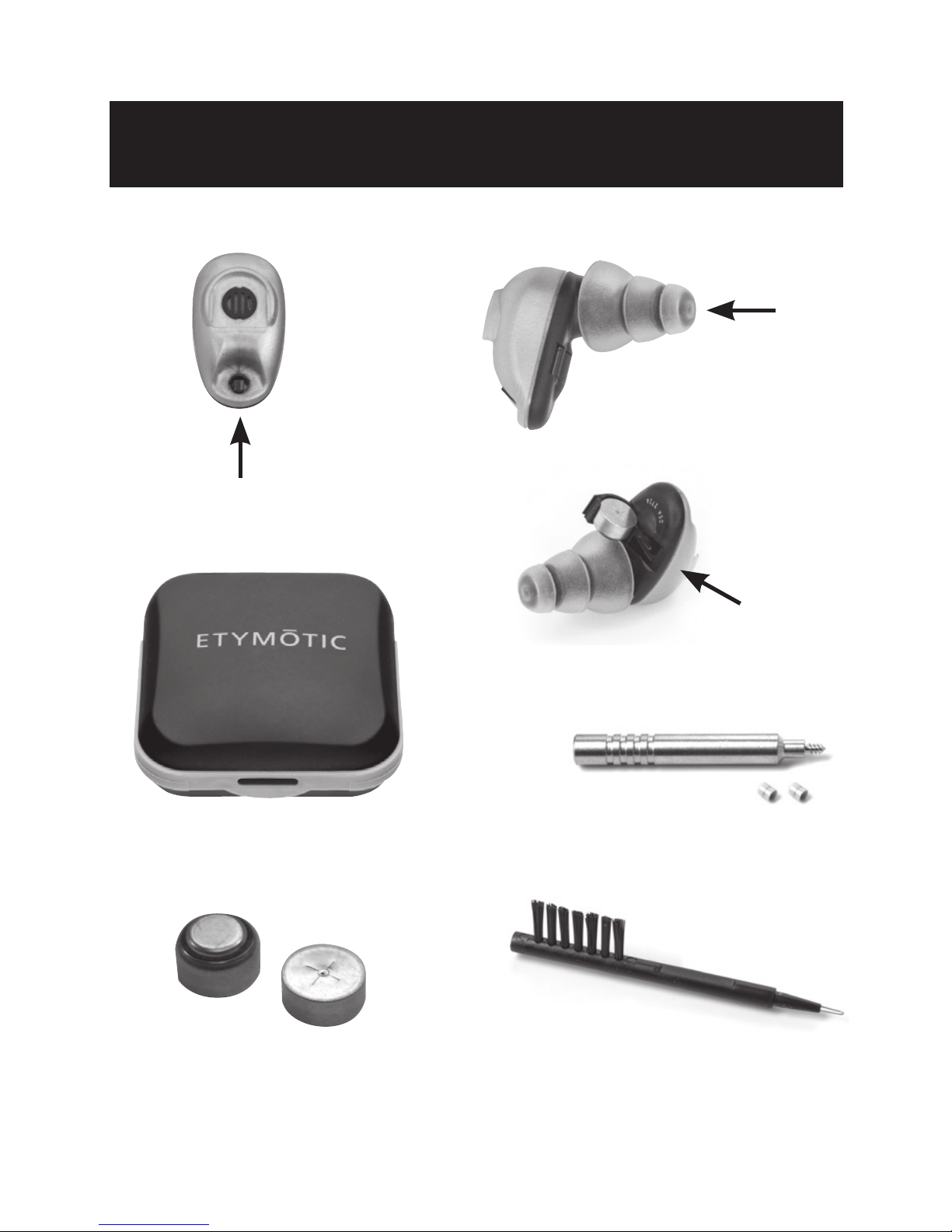
Identification
Tool and Extra FiltersProtective Case
Battery Door
2-Position Switch
Eartip
#10 Batteries Cleaning Tool
5
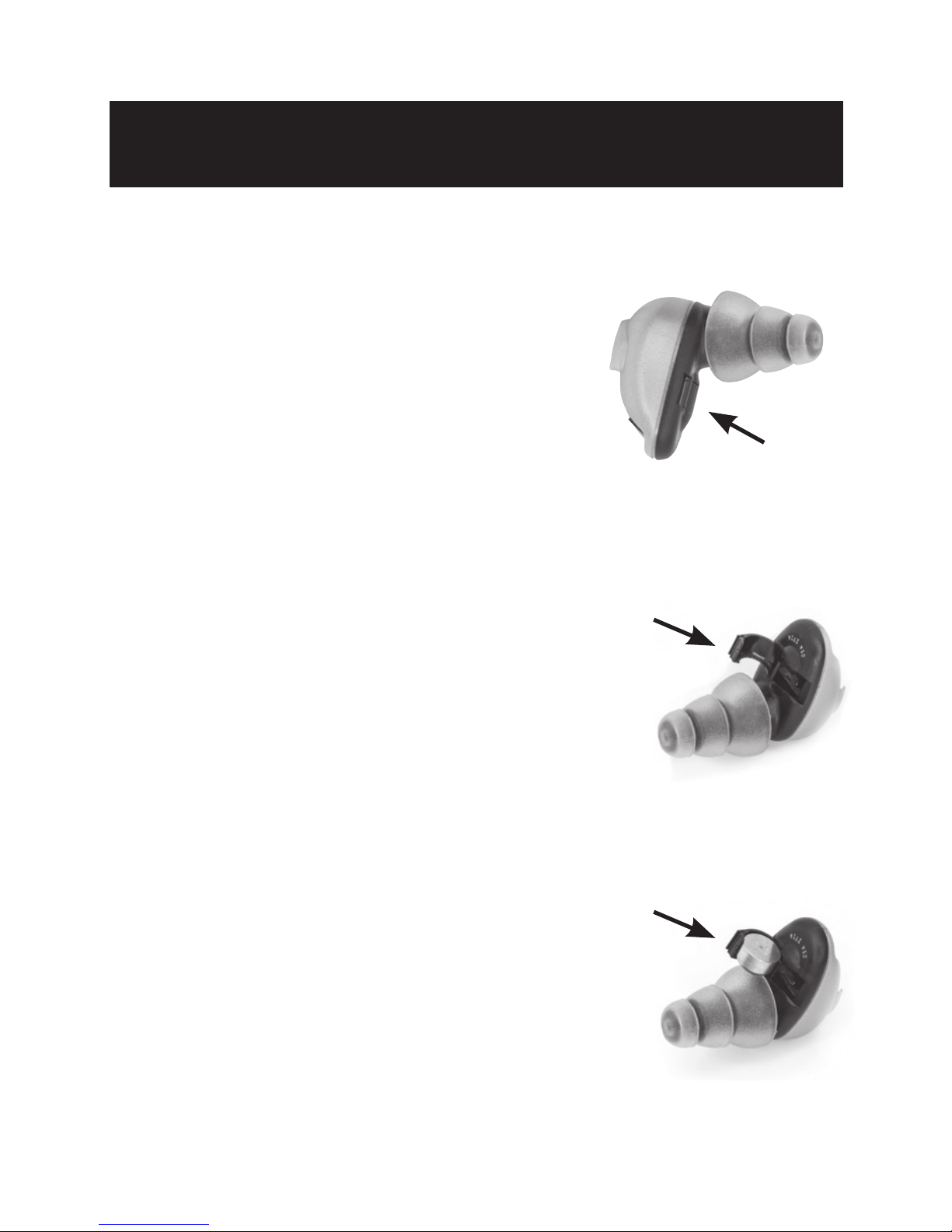
The battery must be inserted
correctly or the QSA will not work.
1. The battery compartment
is located on the underside
of the QSA.
2. Open the battery door.
3. Remove the yellow tab
from the battery.
4. Insert the battery
with the flat side facing up.
5. Do not force the battery
into the door.
Battery Insertion
Battery
Compartment
#10 Battery
Inserted
Battery
Door
Note: The door will not close
if the battery is not inserted correctly.

6
Batteries (continued)
Zinc-Air Batteries
QSAs use commonly-available #10 zinc-air hearing
aid batteries. They are easy to find in pharmacies,
online and other retail locations, including Radio Shack.
• Zinc-air batteries have a long shelf life, but once
the tab is removed, battery life is about 9 days for
continuous operation.
• Battery life is about 2 weeks if the devices are
turned off after each use.
• Once the tab is removed, zinc-air batteries may
self-discharge in about 4 weeks whether used
or not.
• The discharge rate varies with temperature
and humidity.
• It is sometimes possible to prolong the life of
a battery by replacing the tab over the air holes,
but results vary.

7
Low-Battery Warning
Low-Battery Warning
A feature called LOBAT™alerts you when the battery
is at the end of its life.
• A slow, quiet ticking sound gradually becomes
faster and louder, like the sound of a motorboat.
• After the warning sound first becomes audible,
it may be a few hours before the battery goes dead.
• QSA performance will not change while LOBAT
is sounding.
Batteries: Estimated Battery Life:
9 days continuous operation
2 weeks (approx) if turned off when not in use
• Each QSA uses one #10 zinc-air battery.
• Zinc-air batteries do not have to be recycled.
• Zinc-air batteries can be disposed in the trash.
• Zinc-air batteries are not rechargeable.
8
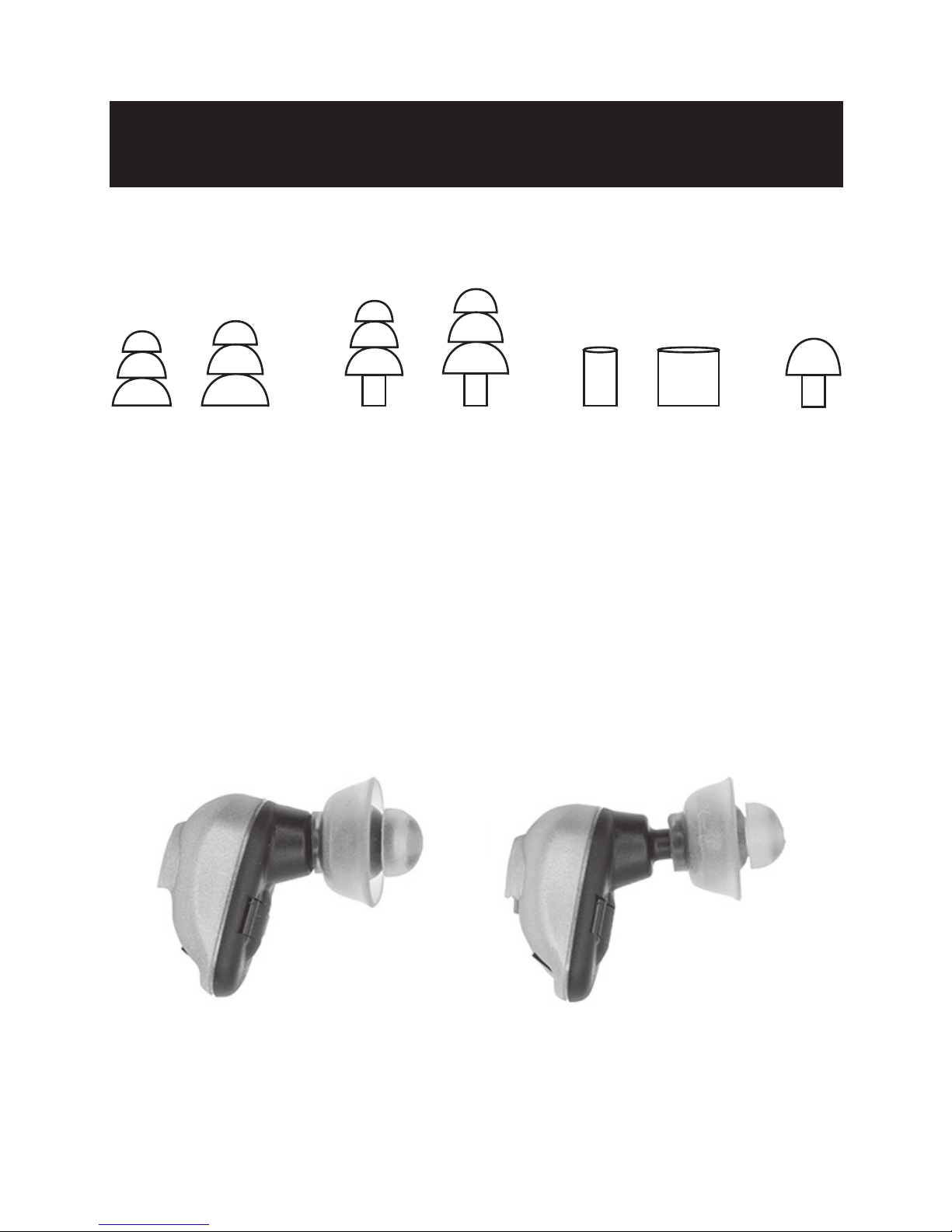
Selecting an Eartip
ACCU•Fit™Eartips
Selecting an eartip:
No two ears are exactly alike. The eartip that is most
comfortable is the best choice, but it must seal well
to prevent feedback (whistling).
When changing eartips make sure the eartip
fits securely on the stem of the device.
incorrectcorrect

9
Insertion & Removal
Insertion
• Make sure the eartip is clean.
• Pull the ear up and out
while inserting.
• Twist and push gently until the
eartip seals in the ear canal.
• When using 3-flange eartips,
moistening may ease insertion.
• When using foam eartips: Roll
down or compress the foam
eartip before inserting. Hold
the eartip in place for about
5 seconds while foam expands
to create a tight seal in the
ear canal.
• When using glider eartips
no compression is needed;
simply push it into your ear.
Removal
• Remove QSAs with a slow
twisting
motion.
• After removal, place your device(s) in a protective case.

10
Importance of a Deep Seal
A deep eartip seal ensures the best performance
and prevents the “hollow voice” sound, called the
occlusion effect.
• The occlusion effect is caused by sound transmission
into the ear from vibration of the ear canal wall when
the ear is occluded by an eartip.
• The vibration comes from sound pressure developed
in the back of the mouth.
• The occlusion effect is most commonly caused by
vibration from a person’s own voice, especially from
speaking the sounds “ee” and “uu,” or from playing
a brass or woodwind musical instrument.
• The occlusion effect is worse when there is a shallow
insertion of the eartip.
• Deeply-sealed eartips reduce the occlusion effect.
Note: QSA devices come with a large selection of eartips, including
two sizes of 3-flange eartips with long stems. Depending on your
ear geometry, the longer stems may allow the deepest seal.
This manual suits for next models
1
Table of contents
Other BEAN Hearing Aid manuals