BT FREESTYLE 3200 User manual

User Guide
BT FREESTYLE 3200

If you experience any problems, please call the Helpline on 0870 240 3962 or email [email protected]

■Digital call clarity with up to 300m range outdoors and
up to 50m indoors (in ideal conditions).
■Directory – lets you store up to 30 names and numbers
for easy dialling.
■Caller Display - lets you see who’s calling and your phone
stores details of the last 10 callers in a Calls list.1
■Use the handsfree facility to talk to callers without
holding the handset.
■Whilst on a call use the secrecy feature to talk to
someone in the same room without your caller
hearing you.
Welcome…
to your BT Freestyle 3200
digital cordless telephone
1 Requires subscription to a Caller Display service.
Aquarterly fee may be payable

If you experience any problems, please call the Helpline on 0870 240 3962 or email [email protected]
This User Guide provides you with all
the information you need to get the
most from your phone.
You must first set up your phone
before you can use it. This doesn’t
take long as it is easy to do. Just
follow the simple instructions on the
next few pages.
■Need help?
If you have any problems setting up or using your BT
Freestyle 3200, contact the Helpline on 0870 240 3962
■Hearing aid?
Please note that the BT Freestyle 3200 works by sending
radio signals between the base and handset. These
signals may interfere with some hearing aids, causing
ahumming noise.
Got everything?
■BT Freestyle 3200 handset with
belt clip
■BT Freestyle 3200 base
■2xNiMH AAA rechargeable
batteries (already fitted)
■Battery compartment cover
■Mains power adaptor
■Telephone line cord
If you have purchased a
BTFreestyle 3200 multiple
pack you will also have
the following for each
additional handset:
■BTFreestyle 3200 handset with
belt clip
■BT Freestyle 3200 charger
■2xAAA NiMH rechargeable
batteries (already fitted)
■Battery compartment cover
■Mains power adaptor
(for the charger)

Getting started ..................6
Location . . . . . . . . . . . . . . . . . . . . . . .6
Setting up . . . . . . . . . . . . . . . . . . . . . .6
Set the day and time . . . . . . . . . . . . . .8
Setting up the charger . . . . . . . . . . . . .9
Getting to know your phone .......11
Handset display icons . . . . . . . . . . . . .12
Base . . . . . . . . . . . . . . . . . . . . . . . . . .13
Charger . . . . . . . . . . . . . . . . . . . . . . . .13
Navigating the menus . . . . . . . . . . . . .14
Handset menu map . . . . . . . . . . . . . . .15
Using the phone .................16
Make a call . . . . . . . . . . . . . . . . . . . . .16
Preparatory dialling . . . . . . . . . . . . . . .16
End a call . . . . . . . . . . . . . . . . . . . . . .16
Receiving calls . . . . . . . . . . . . . . . . . . .16
Earpiece volume . . . . . . . . . . . . . . . . .17
Handsfree . . . . . . . . . . . . . . . . . . . . . .17
Make a call in handsfree . . . . . . . . . . .17
Answer a call in handsfree . . . . . . . . . .17
Switch to handsfree during a call . . . . .18
Secrecy . . . . . . . . . . . . . . . . . . . . . . . .18
Quick access buttons . . . . . . . . . . . . . .18
Redial . . . . . . . . . . . . . . . . . . . . . . . . .19
To copy a redial number
to the directory . . . . . . . . . . . . . . . . . .19
To delete a number from the redial list .20
To delete the entire redial list . . . . . . .20
Keypad lock . . . . . . . . . . . . . . . . . . . . .21
Ringer volume on/off . . . . . . . . . . . . . .21
Find the handset(s) . . . . . . . . . . . . . . .22
Making internal calls . . . . . . . . . . . . . .22
Receiving internal calls . . . . . . . . . . . .23
Transferring calls . . . . . . . . . . . . . . . . .23
3-Way conference calls . . . . . . . . . . . .24
Directory ......................25
Store a number . . . . . . . . . . . . . . . . . .25
Entering names . . . . . . . . . . . . . . . . . .25
Character map . . . . . . . . . . . . . . . . . .26
Dial/view a number . . . . . . . . . . . . . . .27
Edit a directory entry . . . . . . . . . . . . . .27
Delete a directory entry . . . . . . . . . . . .28
Handset settings ................29
Ringer melody . . . . . . . . . . . . . . . . . . .29
Ringer volume . . . . . . . . . . . . . . . . . . .29
Handset tones on/off . . . . . . . . . . . . . .30
Display language . . . . . . . . . . . . . . . . .31
Restore default settings . . . . . . . . . . . .32
Default settings . . . . . . . . . . . . . . . . . .32
4
In this guide
If you experience any problems, please call the Helpline on 0870 240 3962 or email [email protected]
5In this guide
If you experience any problems, please call the Helpline on 0870 240 3962 or email [email protected]
Base settings ...................33
Change PIN code . . . . . . . . . . . . . . . . .33
Mailbox number . . . . . . . . . . . . . . . . .33
Dial mode . . . . . . . . . . . . . . . . . . . . . .34
PBX access . . . . . . . . . . . . . . . . . . . . .35
Restore default settings . . . . . . . . . . . .36
Default settings . . . . . . . . . . . . . . . . . .36
Caller Display ...................37
Calls list . . . . . . . . . . . . . . . . . . . . . . .37
View/dial a number . . . . . . . . . . . . . . .37
Tocopy a Calls list number
to the directory . . . . . . . . . . . . . . . . . .38
Delete a number . . . . . . . . . . . . . . . . .38
Delete the entire Calls list . . . . . . . . . .39
BT Calling Features ..............40
BT Helpdesk . . . . . . . . . . . . . . . . . . . .40
BT Directory Enquiries . . . . . . . . . . . . .40
Call Divert On . . . . . . . . . . . . . . . . . . .40
Call Divert Off . . . . . . . . . . . . . . . . . . .41
Check Divert . . . . . . . . . . . . . . . . . . . .41
Call Waiting On . . . . . . . . . . . . . . . . . .42
Call Waiting Off . . . . . . . . . . . . . . . . . .42
Check Call Waiting . . . . . . . . . . . . . . .43
Add/edit a service . . . . . . . . . . . . . . . .43
Delete a service . . . . . . . . . . . . . . . . . .44
Help ..........................45
General information ..............47
Safety information . . . . . . . . . . . . . . . .47
Cleaning . . . . . . . . . . . . . . . . . . . . . . .48
Environmental . . . . . . . . . . . . . . . . . . .48
Product disposal instructions . . . . . . . .49
Switchboard compatibility . . . . . . . . . .50
Dialling mode . . . . . . . . . . . . . . . . . . .50
Recall (R) . . . . . . . . . . . . . . . . . . . . . . .50
Guarantee . . . . . . . . . . . . . . . . . . . . . .50
Technical information . . . . . . . . . . . . .53
How many telephones can you have? . .53
Additional handsets . . . . . . . . . . . . . . .53
R&TTE . . . . . . . . . . . . . . . . . . . . . . . .54

Location
You need to place your BT Freestyle 3200 base within 2
metres of a mains power and telephone socket so that
the cables will reach.
Make sure it is at least 1 metre away from other
electrical appliances to avoid interference.
Your BT Freestyle 3200 works by sending radio signals
between the handset and base. The strength of the
signal depends on where you site the base. Putting it as
high as possible ensures the best signal.
Setting up
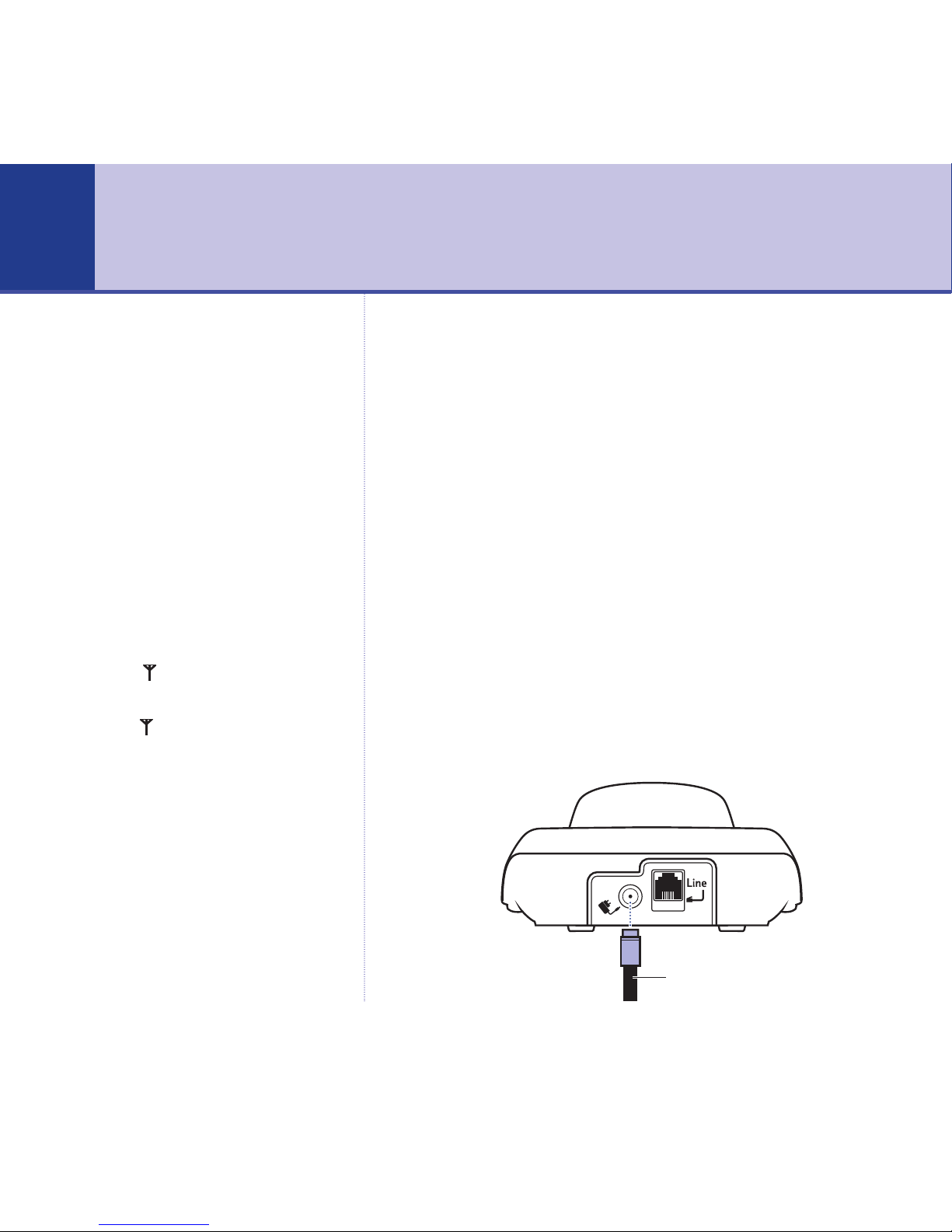
1. Plug the mains power cable into the power socket on the
back of the base. Plug the other end into the mains
socket and switch on.
WARNING
Do not place your BT Freestyle
3200 in the bathroom or other
humid areas.
Handset range
The BT Freestyle 3200 has a range
of 300 metres outdoors when there
is a clear line of sight between the
base and the handset. Any
obstruction between the base and
handset will reduce the range
significantly. With the base indoors
and handset either indoors or
outdoors, the range will normally
be up to 50 metres. Thick stone
walls can severely affect the range.
Signal strength
The symbol on your handset
screen indicates when you are in
range. When you are out of range,
the symbol flashes, and the
screen displays
Searching
. You
should move closer to the base if
this happens to ensure the full
functionality of your phone.
IMPORTANT
Do not connect the telephone line
until at least one of the handsets is
fully charged.
The base station must be plugged
into the mains power at all times.
Getting started
6
If you experience any problems, please call the Helpline on 0870 240 3962 or email [email protected]
Power adaptor cable

7
If you experience any problems, please call the Helpline on 0870 240 3962 or email [email protected]
Getting started
2. Batteries will come inserted in the battery compartment.
Pull the plastic tag as instructed to activate the batteries.
3. Place the handset on the base to charge the batteries for
at least 16 hours.
The main handset is pre-registered to the base as –1–
(Handset 1). This is shown on the display. When the
handset is fully charged the display shows the
symbol.
4. After 16 hours, connect the telephone line cord to the
base and plug the other end into the wall socket.
Which socket?
Power socket
Telephone line socket
Talk/Standby time
Under ideal conditions, fully
charged handset batteries should
give about 10 hours talk time or
100 hours standby time on a single
charge.
Battery low warning
If the symbol is flashing, you
will need to recharge your handset
before using it.
Battery performance
To keep your batteries in the best
condition, leave the handset off
the base for a few hours at a time
(after the initial 16 hour charge).
New NiMH batteries do not reach
full capacity until they have been in
normal use for several days.
Running the batteries right down
at least once a week will help them
last as long as possible.
IMPORTANT
Only use the power supply and
telephone line cord supplied with
your BT Freestyle 3200 otherwise
the telephone may not work.
Telephone line cord

Your BT Freestyle 3200 uses the
24 hour clock.
If you have more than one handset
registered to your base, you only
need to set the date and time on
one handset and the other
handsets will be automatically
updated.
Set the day and time
The default setting is 01/01/2004 12:01pm.
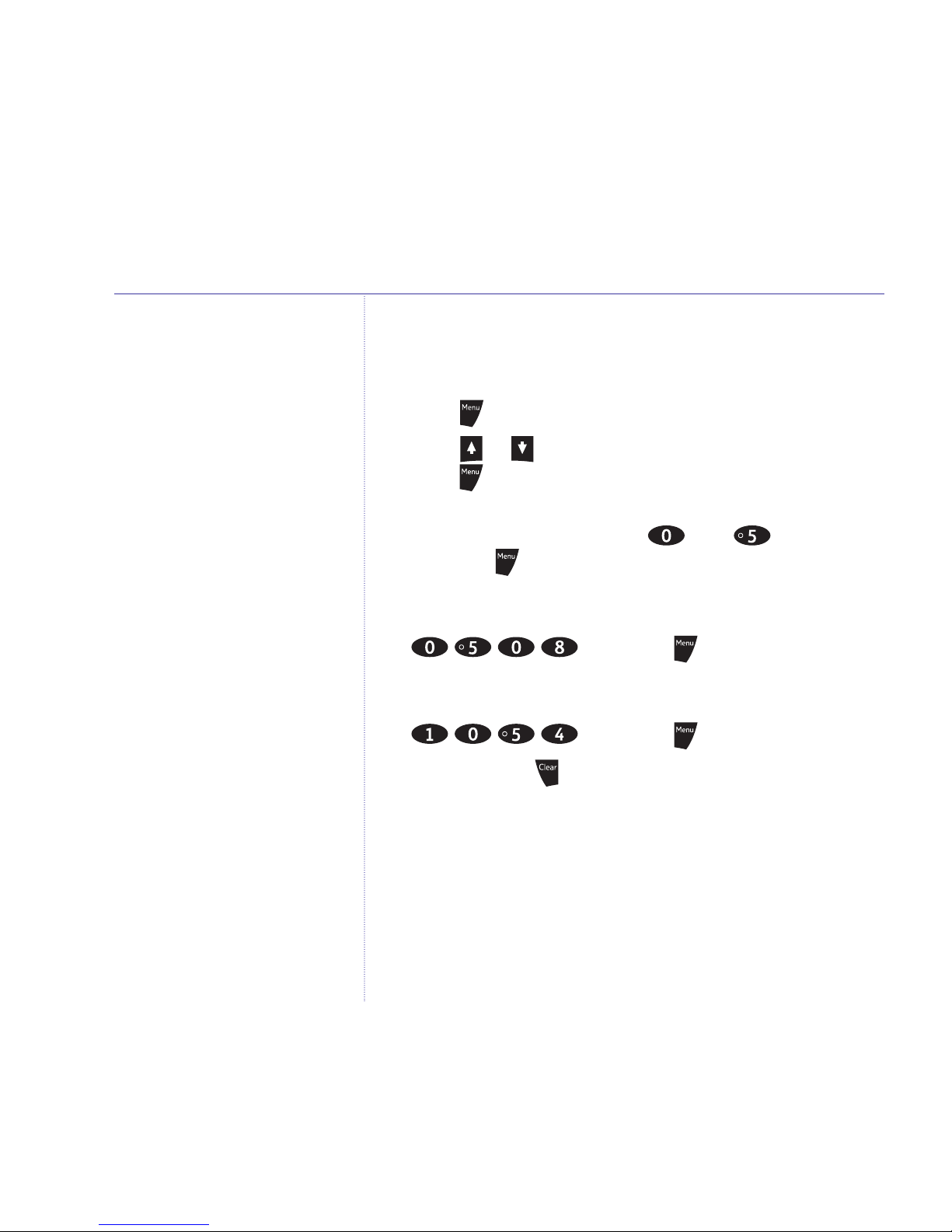
1. Press to open the main menu.
2. Press or until the display shows
Date/Time
and
press .
3. The current year setting is displayed, enter the last 2
digits of the year (e.g. press then for 2005)
and press .
4. The current month setting is displayed, enter 2 digits for
the date and 2 for the month (e.g. for 5th August, press
) and press .
5. The current time setting is displayed, enter 2 digits for
the hour and 2 for the minute (e.g. for 10.54pm, press
) and press .
Stored
is displayed.
6. Press and hold to return to standby.
Your BT Freestyle 3200 is now ready for use.
8 Getting started
If you experience any problems, please call the Helpline on 0870 240 3962 or email [email protected]
The charge capacity of
rechargeable batteries will reduce
with time as they wear out, so
reducing the talk/standby time of
the handset. Eventually they will
need to be replaced. New batteries
can be obtained from the BT
Freestyle Helpline 0870 240 3962.
Batteries and handset may become
warm during charging. This is
normal.

BT Freestyle 3200 multiple pack
owners only
Location
You need to place your BT Freestyle 3200 charger
close enough to a mains power socket so that the
cable will reach.
Setting up the charger
1. Plug the power adaptor cable into the underside of the
charger, plug the other end into the mains wall socket
and switch the power on.
9Getting started
If you experience any problems, please call the Helpline on 0870 240 3962 or email [email protected]
Under no circumstances use non-
rechargeable batteries. Only use
NiMH rechargeable batteries with
a recommended capacity of
750mAh. Using inappropriate
batteries will invalidate your
guarantee and may damage the
telephone.
Helpline
If you are having any difficulties
setting up or using your BT
Freestyle 3200, please call the
BT Freestyle Helpline on
0870 240 3962 or email
Power adaptor cable

2. Batteries will come inserted in the battery compartment.
Pull the plastic tag as instructed to activate the batteries.
3. Place the handset on the charger and charge for at least
16 hours.
Your BT Freestyle 3200 multiple pack is now
ready for use.
10 Getting started
If you experience any problems, please call the Helpline on 0870 240 3962 or email [email protected]
Table of contents
Other BT Cordless Telephone manuals

BT
BT DIVERSE 3000 CLASSIC User manual

BT
BT Reveal User manual

BT
BT BT3940 Specification sheet

BT
BT HUB PHONE 1010 User manual

BT
BT FREELANCE XD500 User manual

BT
BT Diverse 7100 Plus User manual

BT
BT PARAGON 500 User manual

BT
BT 2100 Classic User manual

BT
BT Diverse 5250 User manual

BT
BT QUARTET 2015 User manual