manuals.online logo
Brands
  1. Home
  2. •
  3. Brands
  4. •
  5. Bunn
  6. •
  7. Coffee Maker
  8. •
  9. Bunn Infusion Series Owner's manual

Bunn Infusion Series Owner's manual

Other manuals for Infusion Series

4

This manual suits for next models

3

Other Bunn Coffee Maker manuals

Bunn DUAL SH DBC WITH SMART FUNNEL DUAL068000 Installation instructions

Bunn

Bunn DUAL SH DBC WITH SMART FUNNEL DUAL068000 Installation instructions

Bunn CDBC Instruction and safety manual

Bunn

Bunn CDBC Instruction and safety manual

Bunn System III Instruction Manual

Bunn

Bunn System III Instruction Manual

Bunn CRTF5 Instruction Manual

Bunn

Bunn CRTF5 Instruction Manual

Bunn Single TF Instruction Manual

Bunn

Bunn Single TF Instruction Manual

Bunn Single SH Service manual

Bunn

Bunn Single SH Service manual

Bunn VLPF Instruction Manual

Bunn

Bunn VLPF Instruction Manual

Bunn Tiger Cool Froth Series User manual

Bunn

Bunn Tiger Cool Froth Series User manual

Bunn VP17 Series Operating instructions

Bunn

Bunn VP17 Series Operating instructions

Bunn Axiom Series Installation guide

Bunn

Bunn Axiom Series Installation guide

Bunn BX-B User manual

Bunn

Bunn BX-B User manual

Bunn My Cafe Single Cup User manual

Bunn

Bunn My Cafe Single Cup User manual

Bunn ThermaFresh User manual

Bunn

Bunn ThermaFresh User manual

Bunn CW-APS Configuration guide

Bunn

Bunn CW-APS Configuration guide

Bunn SINGLE TF DBC W/SMART FUNNEL Installation instructions

Bunn

Bunn SINGLE TF DBC W/SMART FUNNEL Installation instructions

Bunn VPR APS Instruction and safety manual

Bunn

Bunn VPR APS Instruction and safety manual

Bunn OT Instruction and safety manual

Bunn

Bunn OT Instruction and safety manual

Bunn TigerXL M-2 User manual

Bunn

Bunn TigerXL M-2 User manual

Bunn HC-2 HC-3 Instruction and safety manual

Bunn

Bunn HC-2 HC-3 Instruction and safety manual

Bunn AUTOPOD BREWER Owner's manual

Bunn

Bunn AUTOPOD BREWER Owner's manual

Bunn DUAL Instruction Manual

Bunn

Bunn DUAL Instruction Manual

Bunn CWT-APS-DV Instruction and safety manual

Bunn

Bunn CWT-APS-DV Instruction and safety manual

Bunn CWTF-APS-MV Instruction and safety manual

Bunn

Bunn CWTF-APS-MV Instruction and safety manual

Bunn Single SH Installation guide

Bunn

Bunn Single SH Installation guide

Popular Coffee Maker manuals by other brands

Taurus Livorno 6 manual

Taurus

Taurus Livorno 6 manual

Delta-q QUICK instruction manual

Delta-q

Delta-q QUICK instruction manual

Black & Decker BLACK DECKER HOME DE790 Use and care book

Black & Decker

Black & Decker BLACK DECKER HOME DE790 Use and care book

Saeco Vienna Plus Sup 018M operating instructions

Saeco

Saeco Vienna Plus Sup 018M operating instructions

DeLonghi DC300 Owner's instructions

DeLonghi

DeLonghi DC300 Owner's instructions

INCAPTO BXCO1470E Instructions for use

INCAPTO

INCAPTO BXCO1470E Instructions for use

Bosch TASSIMO finesse TAS16B Series user manual

Bosch

Bosch TASSIMO finesse TAS16B Series user manual

Exido 245-072 Specifications

Exido

Exido 245-072 Specifications

Animo OptiVend Choco user manual

Animo

Animo OptiVend Choco user manual

Siemens TQ505DF Series user manual

Siemens

Siemens TQ505DF Series user manual

DeLonghi ECI341 Instructions for use

DeLonghi

DeLonghi ECI341 Instructions for use

Krups KT406511 manual

Krups

Krups KT406511 manual

Cimbali M32 Classic manual

Cimbali

Cimbali M32 Classic manual

Philips HL3844N Service manual

Philips

Philips HL3844N Service manual

Bosch TES 515 SERIES instruction manual

Bosch

Bosch TES 515 SERIES instruction manual

Tekmatix TMFM - 65 Operation manual

Tekmatix

Tekmatix TMFM - 65 Operation manual

Scarlett SC-CM33005 instruction manual

Scarlett

Scarlett SC-CM33005 instruction manual

LAVAZZA CLASSY PLUS instructions

LAVAZZA

LAVAZZA CLASSY PLUS instructions

manuals.online logo
manuals.online logoBrands
  • About & Mission
  • Contact us
  • Privacy Policy
  • Terms and Conditions

Copyright 2025 Manuals.Online. All Rights Reserved.

PROGRAMMING MANUAL
Bunn-O-Matic Corporation
Post Office Box 3227, Springfield, Illinois 62708-3227
Phone (217) 529-6601 | Fax (217) 529-6644
www.bunn.com
To ensure you have the latest revision of the Operating Manual, or to view the Illustrated Parts Catalog, Programming Manual, or
Service Manual, please visit the Bunn-O-Matic website, at www.bunn.com. This is absolutely FREE, and the quickest way to obtain
the latest catalog and manual updates. For Technical Service, contact Bunn-O-Matic Corporation at 1-800-286-6070.
53669.0000 C 09/20 © 2017 Bunn-O-Matic Corporation
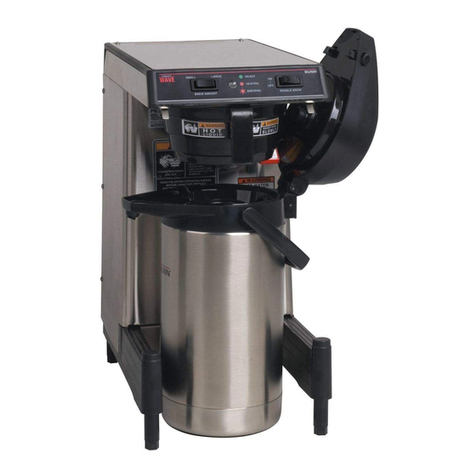
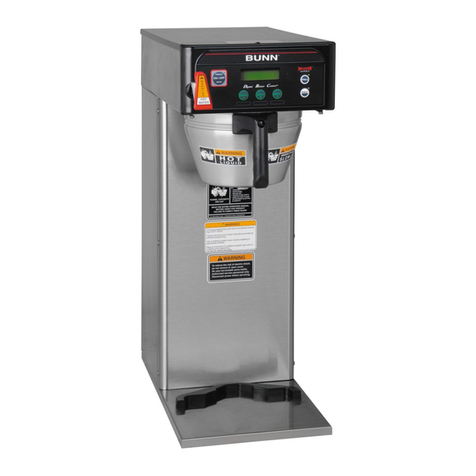
Infusion Series®SH Brewers
Batch brewers designed to adapt to many serving environments.
ICB Twin SH, ICB SH, ICBA SH
2
Bunn-O-Matic Corp. (“BUNN”) warrants equipment manufactured by it as follows:
1) Airpots, thermal carafes, decanters, GPR servers, iced tea/coffee dispensers, MCR/MCP/MCA single cup brewers,
thermal servers and ThermoFresh®servers (mechanical and digital) 1 year parts and 1 year labor.
2) All other equipment - 2 years parts and 1 year labor plus added warranties as specified below:
a) Electronic circuit and/or control boards - parts and labor for 3 years.
b) Compressors on refrigeration equipment - 5 years parts and 1 year labor.
c) Grinding burrs on coffee grinding equipment to grind coffee to meet original factory screen sieve analysis - parts
and labor for 4 years or 40,000 pounds of coffee, whichever comes first.
These warranty periods run from the date of installation BUNN warrants that the equipment manufactured by it will be
commercially free of defects in material and workmanship existing at the time of manufacture and appearing within the
applicable warranty period. This warranty does not apply to any equipment, component or part that was not manufactured
by BUNN or that, in BUNN’s judgment, has been affected by misuse, neglect, alteration, improper installation or
operation, improper maintenance or repair, non periodic cleaning and descaling, equipment failures related to poor
water quality, damage or casualty. In addition, the warranty does not apply to replacement of items subject to normal
use including but not limited to user replaceable parts such as seals and gaskets. This warranty is conditioned on the
Buyer 1) giving BUNN prompt notice of any claim to be made under this warranty by telephone at (217) 529-6601 or by
writing to Post Office Box 3227, Springfield, Illinois 62708-3227; 2) if requested by BUNN, shipping the defective
equipment prepaid to an authorized BUNN service location; and 3) receiving prior authorization from BUNN that the
defective equipment is under warranty.
THE FOREGOING WARRANTY IS EXCLUSIVE AND IS IN LIEU OF ANY OTHER WARRANTY, WRITTEN OR ORAL,
EXPRESS OR IMPLIED, INCLUDING, BUT NOT LIMITED TO, ANY IMPLIED WARRANTY OF EITHER MERCHANTABILITY
OR FITNESS FOR A PARTICULAR PURPOSE. The agents, dealers or employees of BUNN are not authorized to make
modifications to this warranty or to make additional warranties that are binding on BUNN. Accordingly, statements by
such individuals, whether oral or written, do not constitute warranties and should not be relied upon.
If BUNN determines in its sole discretion that the equipment does not conform to the warranty, BUNN, at its exclusive
option while the equipment is under warranty, shall either 1) provide at no charge replacement parts and/or labor
(during the applicable parts and labor warranty periods specified above) to repair the defective components, provided
that this repair is done by a BUNN Authorized Service Representative; or 2) shall replace the equipment or refund the
purchase price for the equipment.
THE BUYER’S REMEDY AGAINST BUNN FOR THE BREACH OF ANY OBLIGATION ARISING OUT OF THE SALE OF THIS
EQUIPMENT, WHETHER DERIVED FROM WARRANTY OR OTHERWISE, SHALL BE LIMITED, AT BUNN’S SOLE OPTION
AS SPECIFIED HEREIN, TO REPAIR, REPLACEMENT OR REFUND.
In no event shall BUNN be liable for any other damage or loss, including, but not limited to, lost profits, lost sales, loss
of use of equipment, claims of Buyer’s customers, cost of capital, cost of down time, cost of substitute equipment,
facilities or services, or any other special, incidental or consequential damages.
392, A Partner You Can Count On, Air Infusion, AutoPOD, AXIOM, BrewLOGIC, BrewMETER, Brew Better Not Bitter,
BrewWISE, BrewWIZARD, BUNN Espress, BUNN Family Gourmet, BUNN Gourmet, BUNN Pour-O-Matic, BUNN, BUNN with
the stylized red line, BUNNlink, Bunn-OMatic, Bunn-O-Matic, BUNNserve, BUNNSERVE with the stylized wrench design, Cool
Froth, DBC, Dr. Brew stylized Dr. design, Dual, Easy Pour, EasyClear, EasyGard, FlavorGard, Gourmet Ice, Gourmet Juice,
High Intensity, iMIX, Infusion Series, Intellisteam, My Café, Phase Brew, PowerLogic, Quality Beverage Equipment Worldwide,
Respect Earth, Respect Earth with the stylized leaf and coffee cherry design, Safety-Fresh, savemycoffee.com, Scale-Pro, Silver
Series, Single, Smart Funnel, Smart Hopper, SmartWAVE, Soft Heat, SplashGard, The Mark of Quality in Beverage Equipment
Worldwide, ThermoFresh, Titan, trifecta, TRIFECTA (stylized logo), Velocity Brew, Air Brew, Beverage Bar Creator, Beverage
Profit Calculator, Brew better, not bitter., Build-A-Drink, BUNNSource, Coffee At Its Best, Cyclonic Heating System, Daypart,
Digital Brewer Control, Element, Milk Texturing Fusion, Nothing Brews Like a BUNN, Picture Prompted Cleaning, Pouring Profits,
Signature Series, Sure Tamp, Tea At Its Best, The Horizontal Red Line, Ultra are either trademarks or registered trademarks of
Bunn-O-Matic Corporation. The commercial trifecta®brewer housing configuration is a trademark of Bunn-O-Matic Corporation.
BUNN-O-MATIC COMMERCIAL PRODUCT WARRANTY

3
Warranty ...............................................................................................................................2
Introduction ..........................................................................................................................3
Factory Defaults ....................................................................................................................4
Programming Flow Chart......................................................................................................5
Programming With Ad Card................................................................................................12
Programming......................................................................................................................13
Troubleshooting ..................................................................................................................31
ICB SH & ICB TWIN SH
This equipment will brew coffee into an awaiting dispenser. The brewer has an auxiliary hot water faucet. It is only for
indoor use on a sturdy counter or shelf.
The Infusion Series combines BrewWISE and CDBC into one. ICB SH and ICB Twin SH are able to brew coffee with recipe
settings. They have an LCD for digital readout and programming along with the Smart Funnel options for coffee. Other
features include: Pre-Infusion, Pulse Brew, and BrewWISE, Energy Savings mode, BUNNLink compatible, Smart Reader
compatible, Freshness Timer, Sanitation Alert, USB Flash Drive Programming Port, and SH Server Recipe Setting.
CONTENTS
INTRODUCTION
4
Brew Lockout Enabled Enabled
Set Language English English
Units English English
Review Recipes √√
Assign Recipes √√
Set New Recipe √√
Set (Master) Temp 200°200°
Ready Degree 5°5°
Enable Ads Disabled Disabled
Enable Sanitation Disabled Disabled
Enable Energy Saver Disabled Disabled
Enable Fresh Timer Disabled Disabled
Refill 155 155
Left Spray Oz. X40.0
Right Spray Oz. X41.0
Spray Oz. 40.0 X
Left Bypass Oz. X41.0
Right Bypass Oz. X38.0
Bypass 38.0 X
Calibrate Flow Reset Reset
Set Recipes Temps X X
Funnel Detect Enabled Enabled
FACTORY DEFAULTS
ICB ICB TWIN
5
Server Detect Enabled Enabled
SH Empty Detect Enabled Enabled
SH Heat Auto Off Disabled Disabled
Server Preheat Enabled Enabled
Server Indicators Enabled Enabled
FACTORY DEFAULTS (cont.)
ICB ICB TWIN
6
PROGRAMMING FUNCTIONS - FLOW CHART
RECIPES
REVIEW RECIPES
ASSIGN RECIPES
SET NEW RECIPE
CALIBRATION
SPRY HEAD CAL
BYPASS CAL
L SPRY OZ/M XX.X
L BYPS OZ/M XX.X
R SPRY OZ/M XX.X
R BYPS OZ/M XX.X
SETTINGS SERVICE
<< SELECT >>
<< SELECT >>
<< SELECT >>
<< SELECT >>
<< SELECT >>
<< SELECT >>
<< SELECT >>
<< SELECT >> << SELECT >>
(-) DONE (+)
(-) DONE (+)
(-) DONE (+)
(-) DONE (+)
PROCEED TO
COLUMN A
NEXT PAGE
PROCEED TO
COLUMN B
NEXT PAGE
7
PROGRAMMING FUNCTIONS - FLOW CHART (cont.)
PROCEED TO
COLUMN B
NEXT PAGE
SETTINGS
SET LANGUAGE
UNITS
SET TEMP: 200°
READY DEGREE 5°
BREW LOCKOUT
FUNNEL DETECT
SERVER DETECT
SH EMPTY DETECT

SH HEAT AUTO OFF
SERVER PREHEAT
ENABLE FRESH TIMER
ENABL ENERGYSAVR
ENABL ADS ?
BREW ALERT
SERVER INDICATORS
SERVICE
<< SELECT >>
<< SELECT >>
METRIC DONE ENG
<< SELECT >>
COLUMN A
(-) DONE (+)
(-) DONE (+)
NO DONE YES
NO DONE YES
NO DONE YES
NO DONE YES
NO DONE YES
NO DONE YES
NO DONE YES
NO DONE YES
NO DONE YES
NO DONE YES
NO DONE YES
8
SERVICE
TEST OUTPUTS
TEST SWITCHES
TEST FREQUENCY

ENTER ASSET #
ENTER SERVICE #
BREW COUNTERS
<< SELECT >>
<< SELECT >>
<< SELECT >>
<< SELECT >>
<< SELECT >>
<< SELECT >>
<< SELECT >>
COLUMN B
X REFILL XXX
(-) DONE (+)
FACTORY DEFAULTS
NO YES
PROGRAMMING FUNCTIONS - FLOW CHART (continued)
9
PROGRAMMING WITH AD CARD
Using an AD CARD to load ADS:
The information is loaded into the brewer’s memory by
holding the chip area up to the brewer’s SENSING COIL.
NOTE: Instructions to program the brewer are printed
on the AD CARD.
Procedure to program the AD:
1. Remove the funnel(s) if present.
2. Position the RECIPE CARD vertically, so that the
top end of the CHIP is beneath the (Left on Twins)
SENSING COIL (located on the underneath side of
the front display panel).
3. After a short pause the display will read CARD
CONTAIN ADS/SHOW-QUIT-SAVE.
4. To show (view) this information, select "SHOW".
The display will scroll through all of the ad on that
chip. The display will then return to CARD CONTAIN
ADS/SHOW-QUIT-SAVE.
5. If message is correct, press SAVE. The display will
read AD MESSSAGE SETUP COMPLETE. The ad is
now stored in the brewer’s memory.
6. If the ad is not correct, or it is desired to exit the
setup before the ad is loaded into the brewer’s
memory, press QUIT. The display will then return
to the MAIN SCREEN.
POSITION CARD UNDER
SENSOR COIL
SCROLLS THROUGH
COMPLETE MESSAGE
NOTE: ENABLE ADS must be
turned on in order for the newly
programmed ad message to be
displayed.
READY TO BREW
CARD CONTAIN ADS
AD MESSAGE
READY TO BREW
WATER TEMP XXX°
SHOW QUIT SAVE
SETUP COMPLETE
WATER TEMP 200°
BREW
A
BREW
B
BREW
C
BREW
A
BREW
B
BREW
C
ENABLE BREW
IO
ENABLE BREW
IO
Toreduce the risk of electric shock,
do not remove or open cover.
No user-serviceable parts inside.
Authorized service personnel only.
Disconnect power before servicing.
WARNING
10
BREW LOCKOUT
This function allows the operator to prevent or allow brewing if the water temperature is less than the set READY
temperature.
Procedure for setting Brew Lockout:
1. Press and hold the right hidden button until the display reads RECIPES. Press the right hidden button until
the display reads SETTINGS, then press SELECT. Press the right hidden button until the display reads BREW
LOCKOUT:
PROGRAMMING BREWER
2. The YES or NO should be flashing. Select YES to prevent brewing if the water temperature is below the set
READY temperature. Select NO to permit brewing at any water temperature.
3. When finished, select DONE. This will exit this function screen and return to the MAIN SCREEN.
Press here
for NO
Press here
for YES
Press here
for DONE
The functions in the second level of programming allow the operator to adjust brew settings and other feature
options.
To access the level 2 function screens press and hold the right hidden button for approximately 5 seconds.
Release when the display reads:
SET LANGUAGE
This function allows the operator to select the language used for the display.
Procedure for setting Language:
1. Press and hold the right hidden button until the display reads RECIPES. Press the right hidden button until
the display reads SETTINGS, then press SELECT. Press the right hidden button until the display reads SET
LANGUAGE?
2. Press YES to proceed. The display should now read ENGLISH. Using (-) and (+), scroll through the available
languages until the desired language is shown on the display.
3. When finished, press SELECT. If the language selected is different from the current settings,the display will
read CHANGE LANGUAGE? ARE YOU SURE? and then will change to CHANGE LANGUAGE? To convert the
display to the new language, select YES. To retain the current language, select NO.
4. The display should now read UNITS. To exit programming and return to the MAIN SCREEN, press ENABLE
BREW ON/OFF switch.
PROGRAMMING FUNCTIONS
(cont.)
BREW LOCKOUT?
NO DONE YES