Carbine 66CSR User manual
1
OWNER ’S MANUAL
®
REMOTE START with SECURITY & KEYLESS ENTRY SYSTEM

2
Congratulations
Congratulations on the purchase of this CARBINE keyless entry
and remote start system.
Reading this owners guide prior to using the system will familiarize
you with it’s many features. If issues arise or you have questions,
contact your installing dealer first. Additionally, you can contact us
online at www.carbine.com or call 310-735-2000.

3
Replacement Remote Controls
To purchase replacement remote controls, please
see your authorized dealer/installer or visit us at
www.carbine.com
Remote part numbers are found on the back of
the remote control.

4
Contents
Congratulations .........................................................................................2
Replacement Remote Controls...................................................................3
Remote Configuration ................................................................................5
LCD Configurations....................................................................................6
Arming/ Disarming.....................................................................................8
Disarm without a Transmitter .....................................................................8
Passive Arming/Locking.............................................................................9
Panic Alarm ...............................................................................................9
Trunk Release (CH#3) ................................................................................9
Car Finder................................................................................................10
AUX Output (CH#4)...................................................................................10
AUX Output (CH#5) (CH#6) .......................................................................11
Valet Mode...............................................................................................12
Trigger the System...................................................................................13
Progressive Door Trigger..........................................................................13
Tamper Warnings.....................................................................................13
Forced Passive Arming.............................................................................14
Automatic Starter Disable ........................................................................14
Nuisance Prevention System....................................................................14
Ignition Key Controlled Dome Light ..........................................................15
Remote Starting the Vehicle .....................................................................16
Key Takeover ...........................................................................................17
Quick Stop Mode .....................................................................................18
Timer Mode Starting ................................................................................19
Short-Run Turbo Timer Mode ...................................................................20
Automatic Rear Window Defogger............................................................20
Programming the LCD Remote Controller.................................................21
Pairing a Replacement Remote Control ....................................................24
System Maintenance / Battery Replacement ............................................25
5
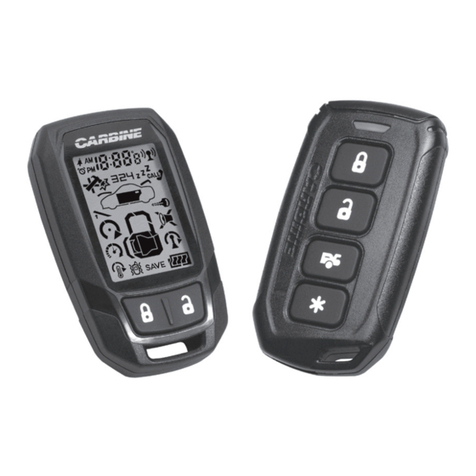
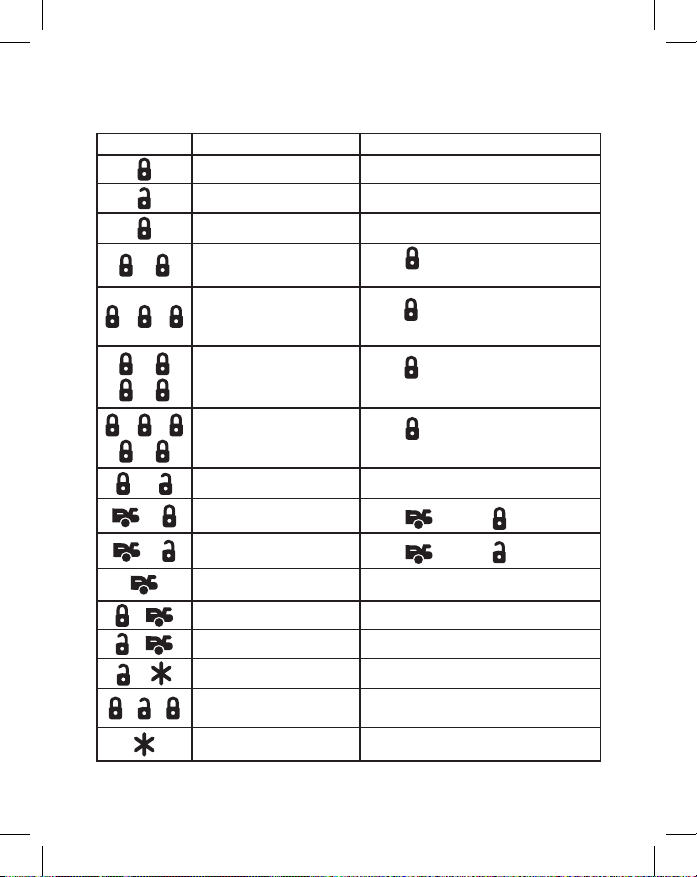
Remote Configuration
Button Feature Comment
Lock/ Arm Press and release.
Unlock/ Disarm Press and release.
Panic Alarm On Press and hold for 1.5 sec.
–
Arm and delete the
on-board shock sensor
Press two times within 5 seconds.
2 short chirps + 1 long
––
Arm and delete the option-
al sensor. On-Board shock
sensor is active.
Press three times within 10 seconds.
3 short chirps + 1 long
–
–
Arm and delete the
On-Board shock sensor
and the optional sensor.
Press four times within 15 seconds.
4 short chirps + 1 long
––
–
Arm and delete all trigger
devices. Ignition trigger
and Tilt sensor is active.
Press five times within 20 seconds.
5 short chirps + 1 long
or Panic Alarm Off Press and release either.
–Silent Arm/ Lock Press first then
–Silent Disarm/ Unlock Press first then
Activate Ch#3 (trunk) Press and hold for 1.2 sec.
+AUX Ch 4 Press together and hold.
+AUX Ch 5 Press together and hold.
+AUX Ch 6 Press together and hold.
––Remote Valet Mode On/Off Open a door first. Press and release
in sequence.
Remote Start On or Off Press and release.
6
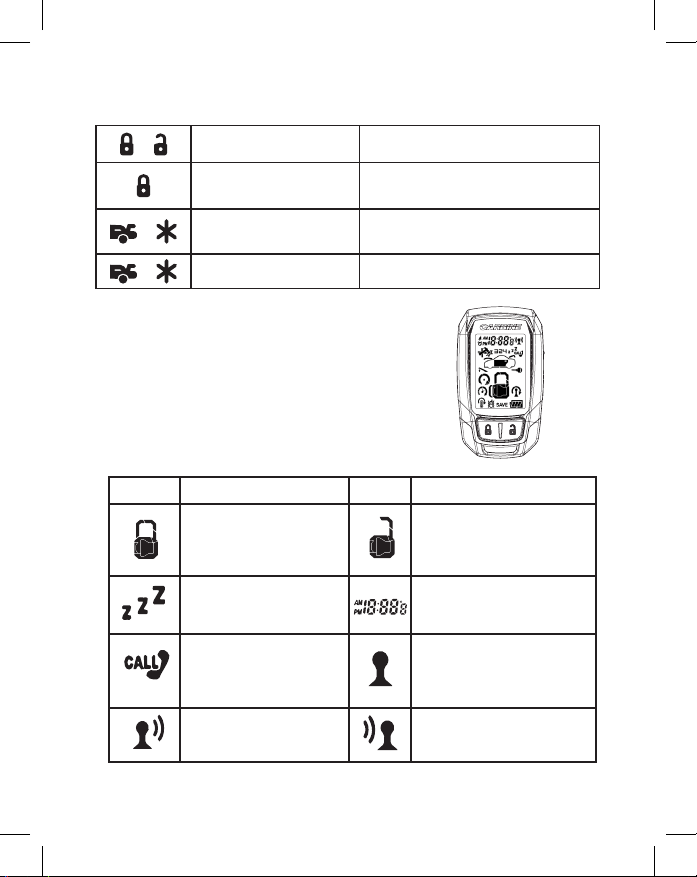
Standard LCD Icon Configurations
LCD Icon Description LCD Icon Description
The lock icon will be
displayed when the doors
are locked and the system
is armed
The unlock icon will be
displayed when the doors
are locked and the system is
disarmed
The valet mode icon will be
displayed when the system is
in valet mode
The time display shows actual
time, RS countdown time, alarm
clock time and countdown timer
Driver Paging
Someone is paging you from
your vehicle
The remote is in range
of the vehicle
The remote is transmitting The remote is receiving
Remote Configuration (continued)
+Timer or Temp Start Press together and release.
Arm While Driving Ignition must be on. Press and
hold for 1.0 sec.
+Turbo Timer Activation Engine Running. Press both
then release.
+Car Finder Press together and release.

7
LCD Icon Description LCD Icon Description
The remote battery needs to
be replaced
The remote battery is full
The door is open or the alarm
has been triggered from an
open door
The hood is open or the alarm
has been triggered from an
open hood
The trunk is open or the
alarm has been triggered
from an open trunk
Button lock is active or the
alarm was triggered by voltage
from the ignition key
The alarm was triggered by
the shock sensor
The shock sensor is inactive
The tilt sensor is active
The alarm was trigged by the
tilt sensor (flashing)
Manual transmission mode
is active
Engine is cranking Engine is running
Timer start mode is active
Temperature start mode
is active
Siren is active
The panic alarm is active or the
alarm is triggered
Transmitter battery save
mode is active
Melody mode is off, vibrate
mode is active
Alarm clock is active Countdown timer mode is active

8
Lock / Arm
Press and release the button to arm the security system and lock
the doors. The parking lights will flash one time. (door lock control
must be installed)
Unlock / Disarm
Press and release the button to disarm the security
system and unlock the doors. The parking lights will flash two
times. (door lock control must be installed)
Silent Arm / Disarm
Press and release the button before pressing the or
button to initiate silent mode. The system will LOCK or UNLOCK
without arming or disarming chirps.
Note: If the system had previously been triggered, the tamper
warning chirps will always sound upon disarm.
Disarm without the Remote Control
Your CARBINE system has an override mode that allows you to
disarm your system in the event that you have lost or damaged
your remote controller.
- While the alarm is sounding, turn the ignition key to On, then press
and release the valet switch button. This will disarm the system.
Note: If your system was installed and programmed to
“Automatically Arm”, the system should be placed into
“Valet Mode” to prevent it from becoming re-armed until
you can correct the issue with your remote control.

9
Passive Arming/Locking
Your CARBINE system can be programmed to Passive Arm and
Lock the doors. If this feature is programmed on, it will automat-
ically arm and lock the doors 30 seconds after the last protected
entrance is closed.
During the 30 second countdown, the RCC LED will flash fast and
the siren/horn will chirp after 20 seconds to warn that the system
is about to arm and lock.
Panic Alarm
1. Press and hold the button for 3 seconds to activate panic
alarm. Once activated, the panic alarm will sound the horn or siren
and flash the parking lights for 30 seconds.
2. Press and release the or button to stop the panic mode.
Trunk Release (CH#3)
Press and hold the button for 1.2 seconds to release
the trunk/ hatch lid
- The vehicle must have electronic trunk control
- The trunk release control option must be installed

10
Car Finder
The Car Finder feature will help you locate your
vehicle by flashing the parking lights.
To Activate the Car Finder feature
1. Press and release the and buttons at the same time.
2. The vehicle parking lights will flash (5) times.
3. Repeat the procedure as needed to locate your vehicle.
AUX Output Activation (CH#4)
Depending on your installation, your installer may have connected
the channel #4 output to your vehicle. To activate the AUX/CH#4
output, press and hold the + buttons together.
This action will energize the AUX/CH#4 output for as long as
you hold the buttons down. The operation of AUX Channel #4
is programmable.
Table of contents
Other Carbine Remote Starter manuals