Contec EAD(LPCI)SF User manual

PC-HELPER
PCI Bus Expansion Adapter
for Low Profile PCI PC-Slot
EAD(LPCI)SF
User’s Manual
CONTEC CO.,LTD.

EAD(LPCI)SF i
Check Your Package
Thank you for purchasing the CONTEC product.
The product consists of the items listed below.
Check, with the following list, that your package is complete. If you discover damaged ormissing items,
contact your retailer.
Product Configuration List
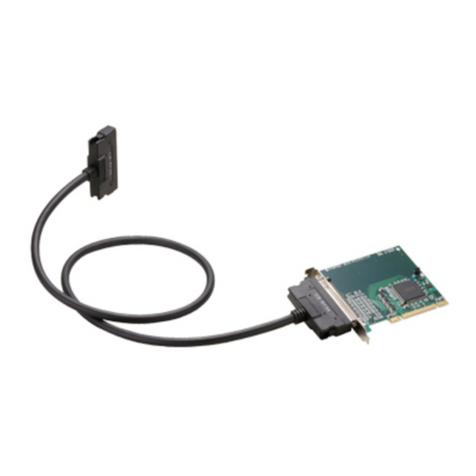
- Expansion adapter board [BUS-PC(LPCI)SF] …1
- Connection cable
[STP-category, 5e straight cables (12m)] …2
- User’s Manual (this booklet) …1
- Bracket for the PCI …1
- Warranty Certificate …1
- Serial number label …1
User's Manual
Expansion adapter board Connection cable Bracket for the PCI
User's Manual
Warranty Certificate
XXXX XXXXXX XXX
XXXX XXXXXX XXX
Serial number label
Warr ant y
Certificate

ii EAD(LPCI)SF
Copyright
Copyright 2012 CONTEC CO., LTD. ALL RIGHTS RESERVED.
No part of this document may be copied or reproduced in any form by any means without prior written
consent of CONTEC CO., LTD.
CONTEC CO., LTD. makes no commitment to update or keep current the information contained in this
document. The information in this document is subject to change without notice.
All relevant issues have been considered in the preparation of this document. Should you notice an
omission or any questionable item in this document, please feel free to notify CONTEC CO., LTD.
Regardless of the foregoing statement, CONTEC assumes no responsibility for any errors that may
appear in this document or for results obtained by the user as a result of using this product.
Trademarks
MS, Microsoft, Windows and Windows NT are trademarks of Microsoft Corporation. Other brand and
product names are trademarks of their respective holder.

EAD(LPCI)SF iii
Table of Contents
Check Your Package............................................................................................................................ i
Copyright ............................................................................................................................................ii
Trademarks .........................................................................................................................................ii
Table of Contents...............................................................................................................................iii
1. BEFORE USING THE PRODUCT 1
About the Adapter............................................................................................................................... 1
Features........................................................................................................................................ 1
Expansion chassis (Option) ......................................................................................................... 1
Connection cable (Option)........................................................................................................... 1
Combinations of Expansion Adapters and Expansion Chassis................................................... 2
Restrictions .................................................................................................................................. 3
Customer Support ............................................................................................................................... 4
Web Site....................................................................................................................................... 4
Limited One Year Warranty............................................................................................................... 4
How to Obtain Service ....................................................................................................................... 4
Liability............................................................................................................................................... 4
Safety Precautions .............................................................................................................................. 5
Safety Information....................................................................................................................... 5
Handling Precautions................................................................................................................... 6
Environment................................................................................................................................. 7
Inspection..................................................................................................................................... 7
Storage ......................................................................................................................................... 7
Disposal ....................................................................................................................................... 7
2. SETUP 9
What is Setup? .................................................................................................................................... 9
Step 1 Preparation............................................................................................................................... 9
Items to be prepared .................................................................................................................. 10
Names of major parts................................................................................................................. 11
Step 2 Installing the Expansion Board ............................................................................................. 11
Step 3 Installing the expansion adapter board.................................................................................. 12
Step 4 Connecting the Cable ............................................................................................................ 13
Connecting the connection cable to the BUS-PC(LPCI)SF...................................................... 13
Connecting the connection cable to the Expansion Chassis ..................................................... 13
Plugging the Power Cable ......................................................................................................... 14

iv EAD(LPCI)SF
Step 5 Setup and Check.................................................................................................................... 15
Starting the system.....................................................................................................................15
Setting up the hardware in Windows......................................................................................... 16
Setup the “Add New Hardware Wizard”...................................................................................16
Checking the hardware in Windows.......................................................................................... 20
Setup Troubleshooting...................................................................................................................... 22
Symptoms and Actions.............................................................................................................. 22
If your problem cannot be resolved...........................................................................................23
3. ABOUT HARDWARE 25
Hardware specification..................................................................................................................... 25
BUS-PC(LPCI)SF......................................................................................................................25
Restrictions and Notes...................................................................................................................... 26
Replacing the Bracket................................................................................................................ 26

1. Before Using the Product
EAD(LPCI)SF 1
1. Before Using the Product
This chapter provides information you should know before using the product.
About the Adapter
The EAD(LPCI)SF is an expansion adapter that connects the optional expansion chassis [ECH(PCI)SF]
to a PC to extend a PCI bus expansion slot in the PC, thereby providing additional PCI bus expansion
slots. The expansion adapter can connect the expansion chassis to the PC over a distance of up to 12m.
Features
- Using high-speed serial transfer (2.5 Gbps), capable of extending the PCI bus to up to 12m.
- PCI-bus compatible, eliminating the need for changing PCI bus board software.
- Using a, noise-immune, STP-category, 5e cable easy to wire and install.
- Capable of expand the PCI bus (5V/32-bit, 33 MHz) from a single PCI bus slot in the PC.
- Expansion chassis free of choice according to the number of PCI bus slots and the board size required.
- Power supply controllable in response to the turning on/off of the PC’s power supply.
- Supporting both of Low Profile and standard PCI slots (exchangeable with the bundled bracket).
Expansion chassis (Option)
PCI Bus Expansion Chassis
PCI Bus Expansion Chassis (Short x 2Slots) : ECH(PCI)SF-H2B
PCI Bus Expansion Chassis (Long x 2Slots) : ECH(PCI)SF-F2B
PCI Bus Expansion Chassis (Short x 4Slots) : ECH(PCI)SF-H4B
PCI Bus Expansion Chassis (Long x 4Slots) : ECH(PCI)SF-F4B
PCI Bus Expansion Chassis (Short x 4Slots) : ECH(PCI)SF-H4A
PCI Bus Expansion Chassis (Short x 7Slots) : ECH(PCI)SF-H7A
PCI Bus Expansion Chassis (Long x 7Slots) : ECH(PCI)SF-F7A
PCI Bus Expansion Chassis (Short x 13Slots) : ECH(PCI)SF-H13A
PCI Bus Expansion Chassis (Long x 13Slots) : ECH(PCI)SF-F13A
Check the CONTEC’s Web site for more information on these expansion chassis.
Connection cable (Option)
Connection cables (12-meter, STP-category, 5e straight cables) are bundled with this product. The
following options can also be available:
UTP-category, 5e straight cables (3m): TP-03 *1*2
UTP-category, 5e straight cables (5m): TP-05 *1*2
UTP-category, 5e straight cables (10m): TP-10 *1*2
*1: A pair of cables are required for connection.
*2: When used in an environment susceptible to extraneous noise, UTP cables may cause link
connection. It is advisable to use STP cables available on the market.

1. Before Using the Product
2EAD(LPCI)SF
Combinations of Expansion Adapters and Expansion Chassis
The expansion adapters and expansion chassis can be used in the following combinations:
Expansion chassis ECH(PCI)SF
Expansion
adapter -H2B -F2B -H4B -F4B -H4A -H7A -F7A -H13A -F13A
EAD(CB)SF Ο Ο Ο Ο Ο x x x x
EAD(LPCI)SF Ο Ο Ο Ο Ο Ο Ο Ο Ο
EAD-SF-LPE ○○○○○○○○○
Expansion chassis
ECH(PCI)SF-H2B ECH(PCI)SF-F2B ECH(PCI)SF-H4B ECH(PCI)SF-F4B
ECH(PCI)SF-H4A ECH(PCI)SF-H7A ECH(PCI)SF-F7A
ECH(PCI)SF-H13A ECH(PCI)SF-F13A
Expansion adapter
EAD(LPCI)SF EAD(CB)SF EAD-SF-LPE

1. Before Using the Product
EAD(LPCI)SF 3
Restrictions
EAD(LPCI)SF has restrictions on the types of PCs and boards that can be used.
Be sure to check the following restrictions before use.
< Restrictions of PC >
EAD(LPCI)SF uses the switch fabric to extend the bus.
The PCI boards plugged in PCI slots in the EAD(LPCI)SF are recognized if the switch fabric is
recognized as the PCI-to-PCI bridge by the BIOS in the PC used. Ask the PC vendor for whether the
BIOS recognizes the PCI-to-PCI bridge.
< Restrictions on transfer rate >
When the expansion chassis accommodates a board that performs high-speed transfer such as bus
mastering, the overall transfer rate may be lower than that of PCI bus slots in the main unit of a desktop
PC.
This is caused by bus extension by the PCI-to-PCI Bridge.
The transfer rate may vary with the system configuration and the type of the PC.
< Restrictions of PCI board >
None of the following types of boards can be used in any expansion slot in the expansion chassis.
- Video display board (VGA board)
- Board to connect a PCI bus expansion unit
- Board explicitly stated not to be used with the PCI-to-PCI Bridge
Some boards, even PCI-compliant ones, may not work depending on their specifications.

1. Before Using the Product
4EAD(LPCI)SF
Customer Support
CONTEC provides the following support services for you to use CONTEC products more efficiently and
comfortably.
Web Site
Japanese http://www.contec.co.jp/
English http://www.contec.com/
Chinese http://www.contec.com.cn/
Latest product information
CONTEC provides up-to-date information on products.
CONTEC also provides product manuals and various technical documents in the PDF.
Free download
You can download updated driver software and differential files as well as sample programs available in
several languages.
Note! For product information
Contact your retailer if you have any technical question about a CONTEC product or need its price,
delivery time, or estimate information.
Limited One Year Warranty
CONTEC products are warranted by CONTEC CO., LTD. to be free from defects in material and
workmanship for up to one year from the date of purchase by the original purchaser.
Repair will be free of charge only when this device is returned freight prepaid with a copy of the original
invoice and a Return Merchandise Authorization to the distributor or the CONTEC group office, from
which it was purchased.
This warranty is not applicable for scratches or normal wear, but only for the electronic circuitry and
original products. The warranty is not applicable if the device has been tampered with or damaged
through abuse, mistreatment, neglect, or unreasonable use, or if the original invoice is not included, in
which case repairs will be considered beyond the warranty policy.
How to Obtain Service
For replacement or repair, return the device freight prepaid, with a copy of the original invoice. Please
obtain a Return Merchandise Authorization number (RMA) from the CONTEC group office where you
purchased before returning any product.
* No product will be accepted by CONTEC group without the RMA number.
Liability
The obligation of the warrantor is solely to repair or replace the product. In no event will the warrantor
be liable for any incidental or consequential damages due to such defect or consequences that arise from
inexperienced usage, misuse, or malfunction of this device.

1. Before Using the Product
EAD(LPCI)SF 5
Safety Precautions
Understand the following definitions and precautions to use the product safely.
Safety Information
This document provides safety information using the following symbols to prevent accidents resulting in
injury or death and the destruction of equipment and resources. Understand the meanings of these labels
to operate the equipment safely.
DANGER DANGER indicates an imminently hazardous situation which, if not avoided, will
result in death or serious injury.
WARNING WARNING indicates a potentially hazardous situation which, if not avoided, could
result in death or serious injury.
CAUTION CAUTION indicates a potentially hazardous situation which, if not avoided, may
result in minor or moderate injury or in property damage.
Table of contents
Other Contec Adapter manuals