manuals.online logo
Brands
  1. Home
  2. •
  3. Brands
  4. •
  5. Data Video
  6. •
  7. Media Converter
  8. •
  9. Data Video DAC-30 Service manual

Data Video DAC-30 Service manual

Other manuals for DAC-30

2

Other Data Video Media Converter manuals

Data Video DAC-9 User manual

Data Video

Data Video DAC-9 User manual

Data Video DAC-9P User manual

Data Video

Data Video DAC-9P User manual

Data Video STC-100 User manual

Data Video

Data Video STC-100 User manual

Data Video DAC-8PA User manual

Data Video

Data Video DAC-8PA User manual

Data Video DAC-8P User manual

Data Video

Data Video DAC-8P User manual

Data Video DAC-70 User manual

Data Video

Data Video DAC-70 User manual

Data Video DAC-50 User manual

Data Video

Data Video DAC-50 User manual

Data Video NVD-30 User manual

Data Video

Data Video NVD-30 User manual

Data Video DAC-7 User manual

Data Video

Data Video DAC-7 User manual

Data Video DVK-400 User manual

Data Video

Data Video DVK-400 User manual

Data Video BAC-03 Reference guide

Data Video

Data Video BAC-03 Reference guide

Data Video NVD-25 User manual

Data Video

Data Video NVD-25 User manual

Data Video VS-100 User manual

Data Video

Data Video VS-100 User manual

Data Video NVS-40 User manual

Data Video

Data Video NVS-40 User manual

Data Video NVS-40 User manual

Data Video

Data Video NVS-40 User manual

Data Video DAC-70 User manual

Data Video

Data Video DAC-70 User manual

Data Video NVD-35 MARK II User manual

Data Video

Data Video NVD-35 MARK II User manual

Data Video DAC-07 User manual

Data Video

Data Video DAC-07 User manual

Data Video DAC-9P User manual

Data Video

Data Video DAC-9P User manual

Data Video DAC-60 User manual

Data Video

Data Video DAC-60 User manual

Data Video RP-64 User manual

Data Video

Data Video RP-64 User manual

Data Video DAC-6 User manual

Data Video

Data Video DAC-6 User manual

Data Video DAC-70 User manual

Data Video

Data Video DAC-70 User manual

Data Video ZEK-1 User manual

Data Video

Data Video ZEK-1 User manual

Popular Media Converter manuals by other brands

TR-Electronic CMS582M-4096/4096 IOL DMS 14H7 KRF Assembly instructions

TR-Electronic

TR-Electronic CMS582M-4096/4096 IOL DMS 14H7 KRF Assembly instructions

Korenix JetCon 2301S user manual

Korenix

Korenix JetCon 2301S user manual

StarTech.com ET91000LCOAM manual

StarTech.com

StarTech.com ET91000LCOAM manual

Alesis AI-3 Reference manual

Alesis

Alesis AI-3 Reference manual

Caton Vpro 5100 user guide

Caton

Caton Vpro 5100 user guide

Cypress CSC-5500 Operation manual

Cypress

Cypress CSC-5500 Operation manual

H&B TX-100 Installation and instruction manual

H&B

H&B TX-100 Installation and instruction manual

Bolin Technology D Series user manual

Bolin Technology

Bolin Technology D Series user manual

IFM Electronic Efector 400 RN30 Series Device manual

IFM Electronic

IFM Electronic Efector 400 RN30 Series Device manual

GRASS VALLEY KUDOSPRO ULC2000 user manual

GRASS VALLEY

GRASS VALLEY KUDOSPRO ULC2000 user manual

Linear Technology DC1523A Demo Manual

Linear Technology

Linear Technology DC1523A Demo Manual

Lika ROTAPULS I28 Series quick start guide

Lika

Lika ROTAPULS I28 Series quick start guide

Weidmuller IE-MC-VL Series Hardware installation guide

Weidmuller

Weidmuller IE-MC-VL Series Hardware installation guide

Optical Systems Design OSD2139 Series Operator's manual

Optical Systems Design

Optical Systems Design OSD2139 Series Operator's manual

Tema Telecomunicazioni AD615/S product manual

Tema Telecomunicazioni

Tema Telecomunicazioni AD615/S product manual

KTI Networks KGC-352 Series installation guide

KTI Networks

KTI Networks KGC-352 Series installation guide

Gira 0588 Series operating instructions

Gira

Gira 0588 Series operating instructions

Lika SFA-5000-FD user guide

Lika

Lika SFA-5000-FD user guide

manuals.online logo
manuals.online logoBrands
  • About & Mission
  • Contact us
  • Privacy Policy
  • Terms and Conditions

Copyright 2025 Manuals.Online. All Rights Reserved.

Ó«´¬·óÚ±®³¿¬ Ü·¹·¬¿´ Ê·¼»± ݱ²ª»®¬»®
DAC-30
Quick Reference Guide
http://www.datavideo-tek.com
All manuals and user guides at all-guides.com
all-guides.com
ï
Table of contents
Warnings and Precautions --------------------------------------------------------------- 2
Warranty and Tech support -------------------------------------------------------------- 3
Introduction ---------------------------------------------------------------------------------- 5
Features -------------------------------------------------------------------------------------- 6
Functions ------------------------------------------------------------------------------------- 7
Front Panel ---------------------------------------------------------------------------- 7
Rear Panel -------------------------------------------------------------------------- 10
Dip Switches for Mode settings ------------------------------------------------ 13
Installation ---------------------------------------------------------------------------------- 14
Editing with a DV NLE System from Digital Betacam --------------------- 14
Transferring a DV source to SDI and AES output-------------------------- 15
Transferring from DV to Betacam Deck with RS-422 control------------ 16
Transferring from SDI + XLR Balanced Audio to DV output to NLE --- 17
Specifications ----------------------------------------------------------------------------- 18
All manuals and user guides at all-guides.com
î
Warnings and Precautions
1. Read all of these warnings and save them for later reference.
2. Follow all warnings and instructions marked on this unit.
3. Unplug this unit from the wall outlet before cleaning. Do not use liquid or aerosol cleaners. Use a
damp cloth for cleaning.
4. Do not use this unit in or near water.
5. Do not place this unit on an unstable cart, stand, or table. The unit may fall, causing serious
damage.
6. Slots and openings on the cabinet top, back, and bottom are provided for ventilation. To ensure
safe and reliable operation of this unit, and to protect it from overheating, do not block or cover
these openings. Do not place this unit on a bed, sofa, rug, or similar surface, as the ventilation
openings on the bottom of the cabinet will be blocked. This unit should never be placed near or
over a heat register or radiator. This unit should not be placed in a built-in installation unless
proper ventilation is provided.
7. This product should only be operated from the type of power source indicated on the marking label
of the AC adapter. If you are not sure of the type of power available, consult your Datavideo dealer
or your local power company.
8. Do not allow anything to rest on the power cord. Do not locate this unit where the power cord will
be walked on, rolled over, or otherwise stressed.
9. If an extension cord must be used with this unit, make sure that the total of the ampere ratings on
the products plugged into the extension cord do not exceed the extension cords rating.
10. Make sure that the total amperes of all the units that are plugged into a single wall outlet do not
exceed 15 amperes.
11. Never push objects of any kind into this unit through the cabinet ventilation slots, as they may
touch dangerous voltage points or short out parts that could result in risk of fire or electric shock.
Never spill liquid of any kind onto or into this unit.
12. Except as specifically explained elsewhere in this manual, do not attempt to service this product
yourself. Opening or removing covers that are marked Do Not Remove may expose you to
dangerous voltage points or other risks, and will void your warranty. Refer all service issues to
qualified service personnel.
13. Unplug this product from the wall outlet and refer to qualified service personnel under the following
conditions:
a. When the power cord is damaged or frayed;
b. When liquid has spilled into the unit;
c. When the product has been exposed to rain or water;
d. When the product does not operate normally under normal operating conditions. Adjust
only those controls that are covered by the operating instructions in this manual; improper
adjustment of other controls may result in damage to the unit and may often require
extensive work by a qualified technician to restore the unit to normal operation;
e. When the product has been dropped or the cabinet has been damaged;
f. When the product exhibits a distinct change in performance, indicating a need for service.

All manuals and user guides at all-guides.com
í
Warranty and Tech support
Datavideo warrants that the equipment it manufactures shall be free from defects in material and
workmanship for a period of 12 months from the date of product purchased. If equipment fails due to such
defects, Datavideo will, at its option, repair or provide a replacement for the defective part or product.
Equipment that fails after the warranty period, has been operated or installed in a manner other than that
specified by Datavideo, or has been subjected to abuse or modification, will be repaired for time and
material charges at the Buyers expense. All out-of-warranty repairs are warranted for a period of ninety

days (90) from the date of shipment from the factory.

Datavideo maintains six offices worldwide to support this and other products.
Datavideo Technologies Co., LTD.
10F, No. 176, Jian-Yi Rd.,
Chung Ho City, Taipei Hsien 235, Taiwan
Tel: +886-2-8227-2888 www.datavideo.com.tw
Datavideo Corporation USA
12300-U East Washington Blvd.
Whittier CA 90606 USA
Tel: +1-562- 696-2324 www.datavideo.us
Datavideo Technologies Europe BV
Californiedreef 26
3565 BL Utrecht, the Netherlands
Tel: +31-30 261 9656 www.datavideo.info
Datavideo Technologies China Co.
2F-D, No 2, Lane 777, West Guang-zhong Rd
Zhabei District, Shang-Hai, China
Tel: +86-21 5603-6599 www.datavideo.cn
Datavideo UK Limited
Unit 2 Waterside Business Park
Hadfield, Glossop, Derbyshire SK13 1BE, UK
Tel: +44-1457 851000 www.datavideo.info
Datavideo Technologies (S) PTE Ltd.
100 Lor 23, Geylang Rd, #01-03 D'Centennial, Building
Singapore 388398
Tel: +65-6749-6866 www.datavideo.sg
All manuals and user guides at all-guides.com
ì
Introduction
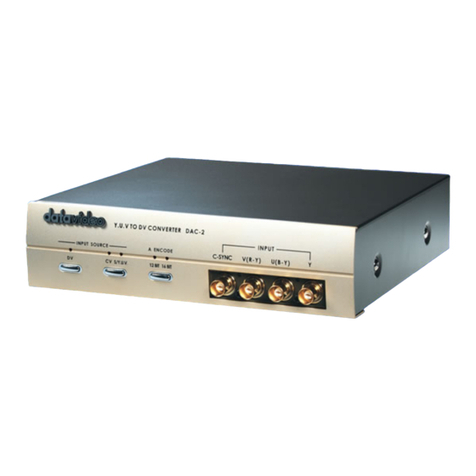
DAC-30 is a professional quality bi-directional SDI/DV video converter designed for use
with broadcast studio equipment. The unit provides SDI and AES/EBU Audio I/O allow
bi-directional conversion of DV-to-SDI. Features component Y, U, V (or Y, B-Y, R-Y) Y/C,
Composite video and two channels balanced/unbalanced audio for bi-directional
Analog-to-SDI, Analog-to-DV and Analog-to-Analog conversion, all outputs work
simultaneously for flexible application.
Front panel controls allow audio level control and VU metering of audio levels. Balanced
audio signals are also converted to unbalanced signals for standard amplifier monitoring.
Build-in RS-422A interface for controlling VCRs via the DV connection from an NLE
system, such as AVID, Adobe or Final Cut Pro
The DAC-30 is housed in a half wide 3U cabinet. DAC-30 is an ideal SDI in/out solution
for any DV interface in a studio environment.
Whats in the Package
Item Description Qty
1 DAC-30 unit 1
2 1.2M BNC to BNC 4
3 30 cm Cable adaptor D-Sub 15 Pin to BNC-Male x 2 1
4 2 m D-Sub 9-Pin to 9-Pin RS-422 cable 1
5 1.2m Y/C Cable s-plug to s-plug 1
6 Stereo Audio RCA 2R to 2R 1
7 IEEE 1394 6Pin to 4Pin Cable 1.8m 1
8 IEEE 1394 6Pin to 6Pin Cable 1.8M 1
9 AC cord 1
10 Switching Adaptor 12V / 4.2A 1
11 Users Guide 1
All manuals and user guides at all-guides.com
ë
Features
ó Multi-format video converter for SDI, DV, YUV, Y/C and Composite video.
ó SDI video compliant with SMPTE 259M standard at 270Mbps Data transfer rate.
ó Encodes 4:2:2 SDI video and AES-3id audio to DV25 stream.
ó Decodes from DV25 stream to 4:2:2 (SDI) video and AES-3id digital audio.
ó Three IEEE-1394 6-pin FireWire (iLink) I/O ports with 12V bus power. Available in
DV25 NTSC 4:1:1/ PAL 4:2:0 format.
ó AES-3id digital audio input and output for interconnection with professional digital
audio equipments.
ó Component YUV, Y/C, composite Video analog video inputs and outputs.
ó Selectable NTSC/PAL video system.
ó Features Video color processor control of Brightness, Color, Contrast, and Tint
(NTSC Only), (DV input only available for Color and Brightness adjustment.)
ó Locked or Unlocked DV audio.
ó Selectable audio sampling rate: 32 KHz (12-bit) or 48 KHz (16-bit) for both balanced
and unbalanced audio input.
ó Two channels Balanced (XLR) and unbalanced (RCA) Analog audio input and output.
ó Analog audio input level calibration and audio output level meter on front panel.
ó RS-422 Sony control protocol and time code encoding for DV data stream.
ó Fully compatible with existing NLE and Operating System software of Windows 98,
XP, 2000 and MAC OS.
All manuals and user guides at all-guides.com
all-guides.com
ê
Functions: Front Panel
Select a Video input source:
Select Video Input source from component YUV video
Select Video Input source from S-video (Y/C)
Select Video Input source from Composite video
Select Video Input source from DV
Select Video Input source from SDI
All manuals and user guides at all-guides.com
é
Select an Audio input source:
Video Color correction
Push on the button to select the adjust item of color, contrast,
brightness or Tint (NTSC only)
Turn the button clockwise to increase the value.
Note: Press on the knob and hold for three seconds to reset
all adjustments back to default (unity) setting
Two channels Input Audio level calibration
Power switch
Additional DV port on front panel
Two channels Audio level meter
All manuals and user guides at all-guides.com
è
RS-422A Sony protocol VTR Control interface
 9-pin serial port (AV/C-RS422 command convert function)
 Converts DV device control signals to RS-422, to control an external
VTR.
AES/EBU Digital Audio Input and output
Two channels AES/EBU Ch1/Ch2 In and Out thru a DSub 15 pin to
BNC cable adaptor. Please refer to below the cable adaptor.
AES/EBU terminals to support operation with a professional audio
mixer.
AES-3id unbalanced Audio Cable adaptor ch1 / ch2 In and Out
AES-3id cable adaptor, connecting D-Sub 15 Pin to unbalanced 75
Ohm AES-3id BNC connectors
All manuals and user guides at all-guides.com
ç
Pin assignment
Pin 1 Reserved
Pin 2 Reserved
Pin 3 BNC in (signal)
Pin 4 Reserved
Pin 5 Reserved
Pin 6 Ground
Pin 7 Ground
Pin 8 BNC in ground
Pin 9 BNC out ground
Pin 10 Ground
Pin 11 Reserved
Pin 12 Reserved
Pin 13 BNC out (signal)
Pin 14 Reserved
Pin 15 Reserved
SDI Digital Video Input and Output
4:2:2 SDI Video data supports SMPTE 259 M-C standard at 270 Mbps
SDI transfers professional level video signals and can connect to long
distance transmission systems.
4-Pin XLR 12Volt Power locked connector
Connecting 12VDC 2.5A input from an external DC adaptor.
All manuals and user guides at all-guides.com