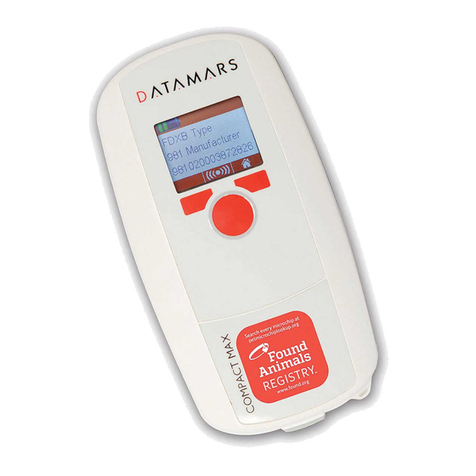
Datamars COMPACT MAX User manual

QUICK START GUIDE
KURZANLEITUNG
GUIDE DE DÉMARRAGE RAPIDE
GUÍA DE INICIO RÁPIDO
GUIDA RAPIDA
V 2.0
© 2017 DATAMARS
Corporate Headquarters:
Via ai Prati
6930 Bedano-Lugano
Switzerland
Phone: +41 91 935 73 80
Fax: +41 91 945 03 30
www.pet.datamars.com
COMPACT MAX

1 Before you start
We recommend to fully charge the battery before first
usage. As the device may discharge during storage,
please make sure that the battery is charged regularly.
COMPACT MAX can be charged either by
connecting the USB cable to the wall-mounted adapter
or to a USB port on your PC.
To conveniently interface the scanner to your computer,
to check for newer versions of the firmware or to
modify the default settings, we recommend using S-ID
companion sw, freely downloadable from
www.pet.datamars.com
Microchip technologies supported
• FDX-B, FDX-A/Fecava
Calendar setup (date, time and format)
Memory File enabled (recording) /
Memory File disabled (no recording)
USB as Key Board Wedge /
USB as Virtual Com Port
Microchip code displayed on 15 digits /
displayed on 23 digits
Delete memory content
Info (Firmware and bootloader versions)
Icons Legend of the Settings menu
Right Navigation Button
Left Navigation Button
ON/Read
USB port

01/01/17
16:53:10
2 Screen Navigation
• Press the “ON/Read” button to power-up Date
Time
Battery Level
Recording is ON
No icon if OFF)
Home
Tag successfully read
01/01/17
16:53:10
Read
999000000068665
Manufacturer : 999
Type : FDXB
01/01/17
16:53:10
Read
READING
No tag
01/01/17
16:53:10
Read
TAG NOT FOUND
01/01/17
16:53:10
Shut Down
SHUTDOWN
01/01/17
16:53:10
Settings
User information when battery charge
is less than 50%
01/01/17
16:53:10
Please recharge
battery

Connecting COMPACT MAX to a PC via the USB port
• Connect COMPACT MAX to your PC using the USB cable provided with the reader.
• To access the ID codes stored in the reader’s memory via USB, the reader must be turned off. Up to 4’000 ID codes can be stored in
reader. The COMPACT MAX memory is accessible thanks to S-ID companion SW, or in mass storage configuration.
In this configuration, available both on PC and MAC, COMPACT MAX is seen like a standard USB stick. Codes are recorded in the
“Session.txt” file, stored in a folder named CMAX and available on your PC or MAC.
• If the reader is turned ON while connected to a PC, the reader will behave as a PC peripheral and ID Codes will be sent to the PC via the
USB cable at each reading.
Two interfaces are supported, as described in the “Icons Legend of the Settings menu”:
Keyboard wedge: the reader is seen by the PC as a keyboard. The codes will be displayed on the PC screen in any window
where a mouse cursor is active. No configuration on the PC is needed.
VCP: reader is connected to one of the Virtual Com Ports of the PC and sends the codes using RS232 protocol.
Codes are received on a hyper-terminal or using Datamars S-ID SW.
(Requires a specific PC driver that can be downloaded from www.pet.datamars.com)

3 Using COMPACT MAX to Scan Microchips
Scanning a Microchip (fig. 1)
• Once the reader is switched on, hold it close to the animal and press the “ON/Read” button
• COMPACT MAX will emit an audible “beep” when the scanner successfully detects a microchip
• To stop scanning if no tag is found, press the “ON/Read” button once again
Effective Scanning (fig. 2)
• Hold the scanner close to, or touching the animal
• For optimal reading, keep the scanner parallel to the animal’s body rather than pointing it at the animal
• Scan slowly and repeatedly over the entire body to check whether or not a microchip is present
• Wave the scanner back and forth slowly while scanning, because microchips can be in various
orientations within the animal
• Scan first in a horizontal, then a vertical “S” pattern down the animal’s body, as shown in the diagram
beside
• Consider scanning each animal more than once to ensure any present microchip can be localized by the
scanner
4 Battery
COMPACT MAX can be charged in two ways. You can connect the USB cable to the wall-mounted adapter
or you can connect the USB cable to a USB port on your PC. To extend battery life, COMPACT MAX has an
“Auto-off” function that automatically turns off the reader after 2 minutes (default value) of inactivity.
As the device may discharge during storage, please make sure that the battery is charged regularly.
CO MPACT
MA X
fig. 1
fig. 2

1 Einleitung
Wir empfehlen die Batterien vor dem ersten Gebrauch
des Lesers vollständig zu laden.
Die Batterie kann sich bei Nichtnutzung entladen, bitte
denken Sie daran den Leser regelmässig zu laden.
Die einfachste Art eines Datenaustausches des
COMPACT MAX Lesers mit dem Computer ist über die
S-ID Software.
Die S-ID Software ist kostenlos von der Datamars
Website www.pet.datamars.com herunterzuladen.
Über diese Software können Sie auch auf die aktuelle
Firmware zugreifen.
Unterstützte Transponder-Technologien
• FDX-B, FDX-A/Fecava
Kalender Einstellungen (Datum, Zeit und Format)
Speichern EIN / Speichern AUS
USB als Key Board Wedge /
USB als virtueller Com Port
Anzeige der 15-stelligen Nummer /
Anzeige der 23-stelligen Nummer
Speicher löschen
Info (Firmware und Bootloader-Versionen)
Einstellungsmöglichkeiten
Rechter Bedienknopf
Linker Bedienknopf
EIN/Lesen
USB Port

01/01/17
16:53:10
2 Display-Navigation
• Schalten Sie das Lesegerät ein Datum
Zeit
Batterie-Ladezustand
Speichern Ein
(Keine Anzeige Aus)
Home
Transponder erfolgreich
gelesen
01/01/17
16:53:10
Lesen
999000000068665
Manufacturer : 999
Type : FDXB
01/01/17
16:53:10
Lesen
READING
Kein Transponder
gefunden
01/01/17
16:53:10
Lesen
TAG NOT FOUND
01/01/17
16:53:10
Ausschalten
SHUTDOWN
01/01/17
16:53:10
Einstellungen
Information wenn der
Batterieladezustand unter 50% fällt
01/01/17
16:53:10
Please recharge
battery

Anschluss des COMPACT MAX an einen PC via USB Schnittstelle
• Verbinden Sie den COMPACT MAX mittels des beigefügten USB Kabels mit dem PC.
• Um via USB auf die gespeicherten Transponderummern im Lesegerät zugreifen zu können, muss der Leser ausgeschaltet sein.
Bis zu 4’000 Nummern können auf dem Leser gespeichert werden. Auf den Speicher des Lesegerätes kann mit Hilfe der S-ID Software
zugegriffen werden, oder im Massenspeicherung Modus.
In dieser Konfiguration, verfügbar im PC oder MAC, wird der COMPACT MAX als Standard USB stick erkannt. Die Nummern sind in der
Datei “Session.txt” gespeichert,sichtbar in dem Ordner CMAX auf Ihrem PC oder MAC.
• Ist der COMPACT MAX eingeschaltet während er an den PC angeschlossen ist, agiert der Leser als Peripheriegerät.
Die Transpondernummern werden dann einzeln über das USB Kabel an den PC gesendet.
Zwei Anschlussmöglichkeiten sind wählbar:
Keyboard wedge: Der Leser wird durch den PC als Tastatur erkannt. Die Nummern werden auf dem PC Bildschirm auf der
Position dargestellt, auf der sich der Cursor befindet. Keine zusätzliche Konfiguration des PC’s nötig.
VCP: Der Leser wird über ein Virtual Com Ports des PC verbunden und übermittelt die Daten als RS232 Protokoll.
Die Nummern werden mit Hilfe von hyper-terminal oder der Datamars S-ID Software dargestellt.
(Ein spezieller PC Treiber wird benötigt, der von www.pet.datamars.com geladen werden kann)

3 Verwendung des COMPACT MAX zur Transponderlesung
Scannen eines Transponders (Abb. 1)
• Schalten Sie das Lesegerät ein, danach drücken Sie erneut den Einschaltknopf, um den Leseprozess zu
starten
• Das erfolgreiche Ablesen wird durch ein “Piep” akustisch angekündigt
• Der Leseprozess endet nach 30 Sekunden oder durch das erneute Drücken des Einschalt-/Leseknopfes
Richtiges Lesen (Abb. 2)
• Halten Sie das Lesegerät waagerecht über das Tier oder berühren sie es damit
• Die grösste Lesedistanz erhalten Sie, wenn Sie das Lesegerät parallel, wellenförmig über das Tier
bewegen. Die Lesedistanz ist geringer, wenn man die Spitze des Lesegerätes auf das Tier ausrichtet
• Scannen Sie das Tier langsam und wiederholt über den gesamten Körper um sicherzustellen, ob ein
Transponder vorhanden ist
• Die Transponder können unterschiedlich ausgerichtet sein. Schwenken Sie das Lesegerät langsam
wellenmässig hin und her, um so den Leseerfolg zu erhöhen
• Scannen Sie das Tier, wie in der Zeichnung dargestellt, erst horizontal und dann vertikal
• Scannen Sie das komplette Tier, um eventuelle weitere Transponder zu erkennen
4 Batterie
Der COMPACT MAX Leser kann auf zwei Arten geladen werden. Sie können das USB Kabel mit dem
Wandstecker verbinden oder direkt mit der USB Schnittstelle ihres PCs. Um die Batteriedauer zu erhöhen,
schaltet sich der COMPACT MAX bei Nichtnutzung nach 2 Minuten automatisch ab.
Die Batterie kann sich bei Nichtnutzung entladen, bitte denken Sie daran den Leser regelmässig zu laden.
CO MPACT
MA X
Abb. 1
Abb. 2

1 Avant de commencer
Nous vous conseillons de charger complètement la
batterie du lecteur avant la première utilisation.
Comme l’appareil peut se décharger pendant le
stockage, assurez-vous que la batterie soit chargée
régulièrement. COMPACT MAX peut être rechargé
grâce au chargeur mural fourni en accessoire ou en
connectant le lecteur au port USB d’un PC.
Afin d’utiliser au mieux toutes les fonctionnalités et les
mises à jour logiciel de COMPACT MAX, nous vous
recommandons d’installer sur votre PC le logiciel S-ID
téléchargeable gratuitement depuis le
site www.pet.datamars.com
Technologies de lecture compatibles
• FDX-B, FDX-A/Fecava
Réglage calendrier (date, heure et format)
Enregistrement des codes puce activé /désactivé
Port USB configuré en émulateur de clavieur/
en port série virtuel
Affichage du code puce sur 15 digits / sur 23 digits
Supprimer le contenu de la mémoire
Info (Versions Firmware et Bootloader)
Légende des icônes du menu réglages
Curseur de navigation droit
Curseur de navigation gauche
ON/Lecture
Porte USB
Other manuals for COMPACT MAX
2
Table of contents
Languages:
Other Datamars Scanner manuals