摺線
摺線
摺線
反面
Exterior RGB light settings
Switching Angle snapping Surface material adjustment
Warranty confirmation form Reseller
114 台北市內湖區陽光街381號7樓
7F., No.381, Yangguang St., Neihu Dist.,
Taipei City 114, Taiwan (R.O.C.)
TEL: +886 2 2797-7288
FAX: +886 2 2797-1859
http://www.duckychannel.com.tw
Ducky Secret
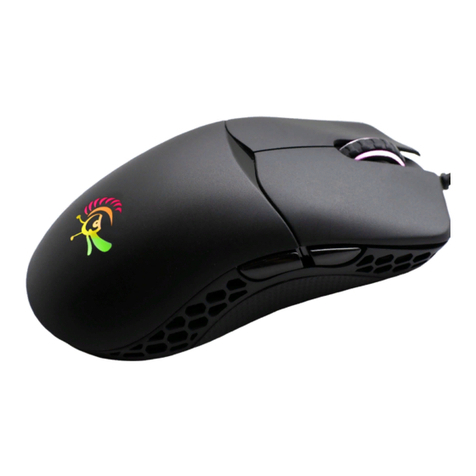
● Model Name:DMSE15O
Interface:USB 2.0●
Sensor type:Optical type●
Sensor Name:Pixart PMW3310DH●
Microprocessor:NXP 32-bit ARM●
Material:PBT●
Micro Switch:Omron Micro Switch x 5 (Made in Japan)●
DPI Key Switch:Omron Tact Switch x 1 (Made in China)●
Roller:ALPS Encoder●
LED:RGB LED●
Feet:Black Teon●
Screw:Exposed designed to facilitate the replacement for ●
Micro Switch and counterweight
DPI:400 / 800 / 1200 / 1600 / 2400 / 3200 / 5000DPI●
USB Report Rate:125 / 250 / 500 / 1000Hz●
Cable length:1.8M●
Dimensions:58 x 124.5 x 38 mm●
:●Weight 120g + 6g ( weight without cable ) : 120g ( original weight ) :
6g ( option 1 ) : 11g ( option 2 )
Origin of Production:China●
● Left button
● Right button
● 4th button
● 5th button
● buttonDPI
● Roller scroll / Middle button
● Function Indicator
● Exterior Light
400 DPI 800 DPI 1200 DPI 1600 DPI 2400 DPI 3200 DPI 5000 DPI
125 Hz 250 Hz 500 Hz 1000 Hz
USB (Report Rate)
Note: The larger number represented in the same time, the computer detects
the mouse data with faster frequency.
Mouse DPI Sensitivity levels
DPI button Sequential switching 400 / 800( Default ) / 1200 / 1600 / 2400 /
3200 / 5000DPI
Note: The larger DPI ( Dots Per Inch ) on the mouse to move the same
distance, the cursor on the screen move the longer distance.
● This feature will appear with RED light
● This feature will appear with GREEN light
DPI button + Right button Sequential switching 125 / 250 / 500 /
1000( Default ) Hz
SECRET
● Left button
● Middle button
● 4th button
● This feature will appear with BLUE light
Note: To improve the support from the sensor for particular surface use different
materials data for different materials, If you want to use Best sensors effect,
users are recommended to detect surface material using a custom function.
Cloth pads Plastic mats Metal pads WoodenDesktop Customize
surface material
Tip: Customize mouse pad surface
material Procedure
DPI button + 4th button Sequential switching disable ( Default ) /
enable level 1 / enable level 2 / enable level 3
Note: The greater number of correction level means the straighter the curved
line will become.
disable enable level 1 enable level 2
● This feature will appear with YELLOW light
DPI button + Middle button Switch RGB color cycling ( default ) / single
color LED
DPI button + Adjust the color of a single LED
Roller scroll
UP / DOWN
DPI button + ON / OFF light display
Double Click
Middle button
enable level 3
●Ducky的全系列滑鼠在出售後,會提供給消費者與授權分銷商㆒年保固。
保修期間內僅㊜用於在正常使用㆘發生材料和/ 或加工缺陷所造成的問題,會提供維修與更換零件●
的服務,保固期內的運費為雙方㆒㆟支付㆒趟。
如果產品損壞是由㆟為所造成,將依Ducky㆟員判定為主。若可以維修,將會依照損壞情況收取維●
修費用;反之則與消費者討論後續處理事宜。因此若消費者要㉂行拆解產品本體與更換零件,在過
程㆗請務必小心。
如果產品超過保固期,來回兩趟運費將由客戶端支付,維修也需要收費。●
產 品 保 固
Ducky Warranty
●All series of Ducky Mouse are covered with a one-year warranty starting from the day of purchase.
Warranty only applies to defects in materials and/or workmanship, which can occur during normal ●
use. We will provide RMA procedure, maintenance and replacement parts within the warranty
period. Customers are responsible for one way shipping charges.
Ducky RMA center will determine whether the product fault caused by human damage or not. ●
If products are caused by human error will not be covered under warranty. Fees will be charged
for any repair done by human error, but there is no guarantee of a successful repair.
Some defective items will not be repaired if the damage is too extensive.
Warranty will be voided if the original serial number on the product, warranty sticker, or product ●
itself is disassembled. If the product is no longer under the warranty period, repair fees will be
charged and customers will be responsible for both shipping charges.
1. HOLD Left button + Middle button + 4th button for 3
seconds, it will start to detect automatically, then the
appearance of the indicator will ash yellow lights 3
seconds for surface detection.
2. DRAW a circle in the same direction on a custom
surface while detection, it will take 7 seconds to
detect and the exterior of the Red light will ashing
slowly.
3. After the detection, the exterior and the light on the
bottom will appear in Green light for 3 seconds to
conrm the setting and apply the data immediately.
DPI button + Left button
Sequential switching Cloth pads ( Default ) /
Plastic mats / Metal pads / Wooden Desktop /
Customize surface material