Page 2of 2
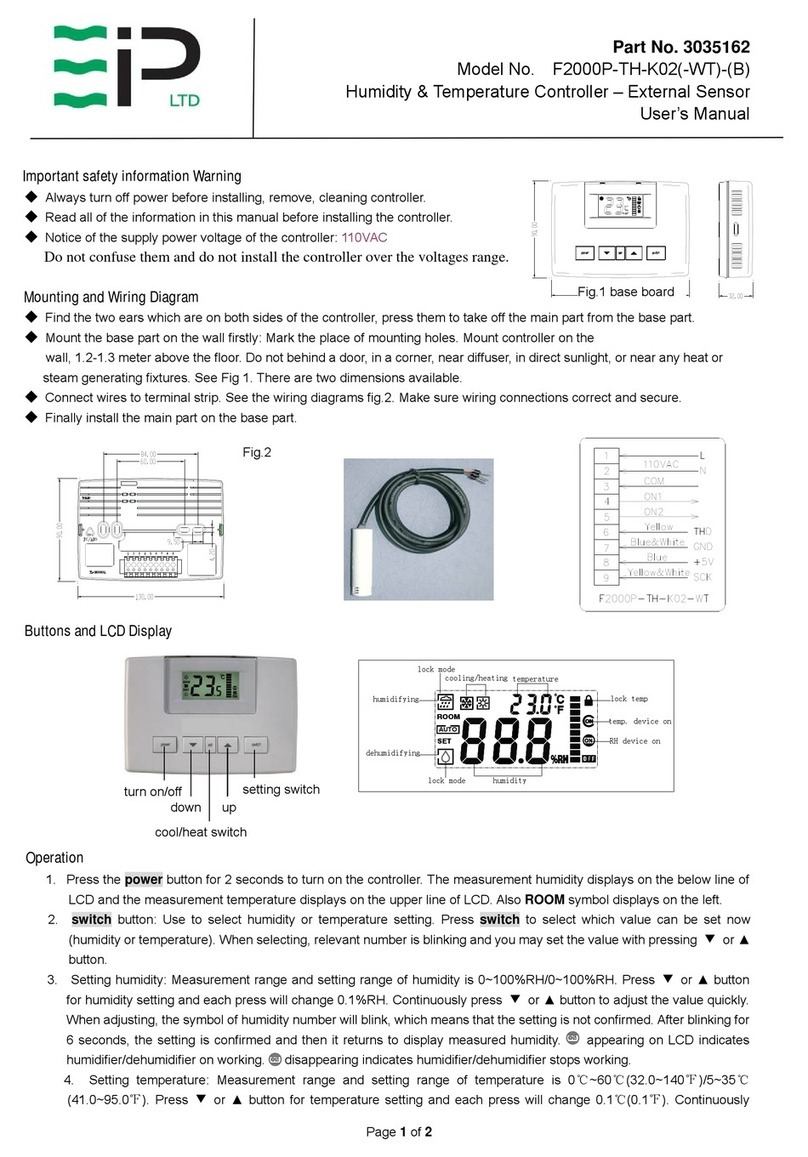
of LCD. In heating, symbol appears on the top left of LCD. Press set button for 6 seconds until or appearing.
It indicates that the cooling/heating mode is locked. Now the working mode can not be changed.
6. Lock the set point:Press ▼and ▲at the same time for about 6 seconds until the symbol appearing on the top right
of LCD, which indicates that the set points of humidity and temperature are locked, after that, it’s impossible to adjust
humidity or temperature by ▼and ▲button.
7. Unlock set point : press ▼and ▲at the same time for about 7 seconds under the locking mode until the symbol disappearing.
Advanced Setup (V.A031)
Please use the below parameter setup carefully. Don’t change any default setting before you read and understand
all parameters.
Cut off power and press the ears on both sides to take off the main part from the base part. Then you will find a set
of four DIP switches DIP1~DIP4 on the top left of the circuit board.
DIP1: ON—parameterssetting OFF—normaluse (leavefactory:OFF)
DIP2: ON—Fahrenheit for temperature display
OFF—Celsiusfortemperaturedisplay (leavefactory:OFF)
DIP3: ON—Dehumidifymode; OFF—humidifymode (leavefactory:OFF)
DIP4: Ineffective for model F2000P-TH-K01
Put the DIP1 to ON (up is ON, down is OFF) and put the main part to the base part, then you can set up the following
parameters. Press switch button to select parameter and set up its value by press ▼or ▲.
Warning: must cut off power before open the controller.
LCD Parameter Range of setup Default
-1 RS485 communication address
(Ineffective for model F2000P-TH-K02) 1~255 1
-2 RS485 communication rate
(Ineffective for model F2000P-TH-K021) 1-4800, 2-9600, 3-14400, 4-19200, 5-38400 4
-3
RS485 communication odd/even calibration
and stop bit
(Ineffective for model F2000P-TH-K02)
1- none 1 stop bit
2- none 2 stop bits
3- odd calibration 1 stop bit
4- even calibration 1 stop bit
1
-4 Temperature modification ±3℃/±6℉0℃
-5 Humidity modification ±5%RH 0%RH
-6 Maximum limit of temperature setting 0~60℃/32~140℉35℃
-7 Minimum limit of temperature setting 0~60℃/32~140℉5℃
-8
Differential humidity to control the replay action 0~5%RH
For example, when it is set 2 and humidity set point is 40%RH, in humidify mode, the relay1 will be on
when measurement humidity< setting; if measurement humidity> (40+2)%RH, the relay1 will be off.
Dehumidifier working is in reverse mode.
2
-9
Differential temperature to control the relay action 0.0~3℃/0.0~6.0℉
For example, when it is set 1 and the setting temperature is 25℃, in heating mode, the relay2 will be on
when measurement temperature< setting; if measurement temperature>(25+1) ℃, the relay2 will be off. In
cooling mode it is in reverse mode.
1
-10 The state when the controller electrify again
after power broken
0- Turn off after electrify
1- Turn on after electrify
2- Keep the same state before power broken
2
Reset: in the state of parameter setup (DIP1=ON), cover the main part and turn it on. Press switch for about 25 seconds
until the controller turns off. The all parameters reset to default. After finish parameter setup, you must cut off the
power open the main part again, put the DIP1 to OFF, then the controller can work again.