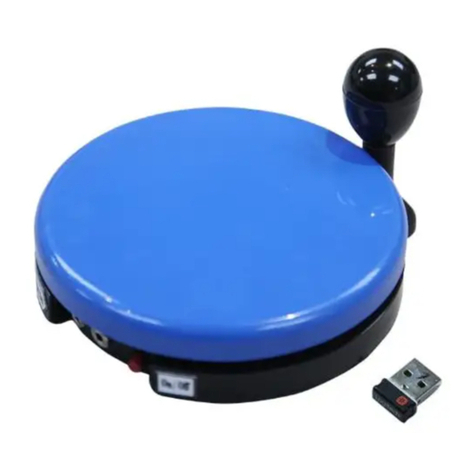
The most accessible communicator ever!
Our sequencer communicator allows the user to first hear a series of words and then select one
by simply activating its capability switch. Available on a 24" ooseneck. Features:
• 6 levels
• 300 seconds of recording time
• 5 second messages
• Auditory Cueing
• Auditory Scanning
• Playback delay of 1 to 5 seconds
• Level changer
• Jack for external capability switch
Size: 26"H x 6"W. Requires 4 AA Batteries. Weight: 3 lbs.
Operation:
Operation:Operation:
Operation:
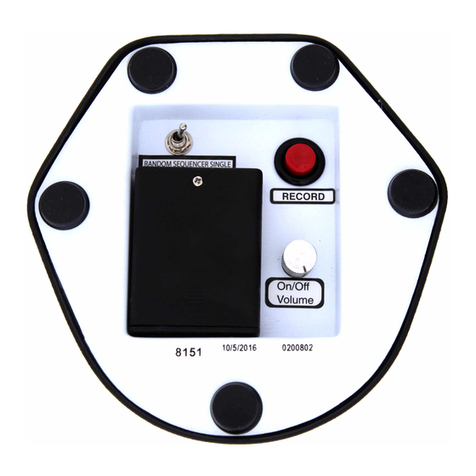
1. Locate the two battery compartments on the control center at the base of the gooseneck.
Next remove the small screws from the battery compartments. Slide the battery
compartment covers off. Observing polarity, install four AA size batteries (Not included) into
the holders. Use alkaline batteries only (e.g. Duracell or Energizer brand). Do not use
rechargeable batteries or any other type of batteries because they supply lower voltage
and the unit will not perform properly. Never mix old and new batteries together or
different brands or types together. Replace the battery compartment covers and screws.
2. Make sure that the volume is set to an audible level by turning the silver
ON/OFF/VOLUME
ON/OFF/VOLUMEON/OFF/VOLUME
ON/OFF/VOLUME knob clockwise. To record press and HOLD
HOLDHOLD
HOLD the RECORD button first.
Next press and HOLD
HOLDHOLD
HOLD the PLAY/RECORD
PLAY/RECORDPLAY/RECORD
PLAY/RECORD button. Speak your message clearly, with your
mouth preferably about 6" from the microphone (the small “fuzzy” circle on the control
center) then release the Play/Record
Play/RecordPlay/Record
Play/Record button, but continue to hold the
continue to hold the continue to hold the
continue to hold the RECORD
RECORD RECORD
RECORD button
buttonbutton
button.
DO NOT RELEASE THE RECORD BUTTON IF YOU WISH TO CONTINUE THE SEQUENCE OF
MESSA ES. If recording a Single message release both.
3. If you wish to continue recording additional messages, press the PLAY/RECORD
PLAY/RECORDPLAY/RECORD
PLAY/RECORD
button
again and record your next message in the exact same way. For each new message you
must release only the PLAY/RECORD
PLAY/RECORDPLAY/RECORD
PLAY/RECORD
button after each message is recorded. When
finished recording release both. Messages have a maximum record time of 5 seconds. The
units maximum total recoding time is 300 seconds, plan your messages accordingly.
4. RECORDIN LEVEL ANNOUNCEMENT MESSA E:
RECORDIN LEVEL ANNOUNCEMENT MESSA E:RECORDIN LEVEL ANNOUNCEMENT MESSA E:
RECORDIN LEVEL ANNOUNCEMENT MESSA E:
Your Level Announcement Messages may be changed at any time and can be renamed
"Level One the Food Level" or "Level One Jimmie's Messages", etc. Simply press the Record
button first, then press the Level button and speak your Level Announcement Message
into the microphone. Note: to hear your new level message you must either cycle through
all 6 levels by repeatedly pressing the Level announcement button until it returns to Level
One
or
turn the unit OFF, wait several seconds and turn the unit back ON. Your new Level
One Announcement Message will now play.
5. CHAN IN LEVELS:
CHAN IN LEVELS:CHAN IN LEVELS:
CHAN IN LEVELS:
Each time the Level button is pressed, the communicator will advance to the next level.
Pressing the Level button on Level 6 will return the unit to Level One.
6. PLAYIN YOUR MESSAN ES
PLAYIN YOUR MESSAN ESPLAYIN YOUR MESSAN ES
PLAYIN YOUR MESSAN ES:
::
:
Once you have recorded all your level announcements and messages you are now ready to
use the communicator. Turn the unit ON, the first level announcement will play, pressing
the switch plate and then releasing it will start the unit scanning sequentially through your
recorded messages for that level at a lower volume level. Once you hear the desired
message press the switch plate again to play the selection at the normal volume level. To
advance to the next level press and hold the switch plate until you hear the next level
announcement, then release the switch. To scan though the messages on this level press
and release the switch as before.
7. VOICE DELAY:
VOICE DELAY:VOICE DELAY:
VOICE DELAY:
There is a voice delay setting which during message playback will give a time delay
between messages from (1 to 5 seconds). Turning the knob counter clockwise will decrees
the delay, clock wise will increase it. This delay is useful for users with mental and or
physical response delays.
8. When you are done using the unit, turn it off. If you will not be using the unit for a
prolonged period of time, remove the batteries from the battery compartment.
9. The Announcer can also be activated by another external capability switch, via the switch
input jack located on the control center. Make sure your switch is plugged in all the way
with no gaps. External switch activation will replicate as if the large switch plate on the
device was depressed.
Troubleshooting:
Troubleshooting:Troubleshooting:
Troubleshooting:
Problem:
Problem:Problem:
Problem: The unit fails to operate, or operates incorrectly.
Action #1:
Action #1:Action #1:
Action #1: Make sure that you have fresh batteries in the unit and that they are installed
according to proper polarity. You will hear a tone emitted from the unit when you install the
batteries correctly.
Action #2:
Action #2:Action #2:
Action #2: Make sure that the volume is turned up to an audible level
Action #3:
Action #3:Action #3:
Action #3: Make sure that there is nothing inhibiting the depression of the switch plate OR
holding the switch plate down (i.e. icons, crumbs, sticky juice, etc.)
Action #4:
Action #4:Action #4:
Action #4: If you are using an external capability switch, make sure that there is a TI HT
connection between the switch and the unit (there should be NO gaps). Especially check this
when using adapters. Any gaps will cause the unit to function incorrectly or not work at all.
Action #5:
Action #5:Action #5:
Action #5: If you are using an external capability switch, test that switch with another device to
rule out the switch as the source of the problem. Do the same with any adapters that you may
be using.
Rev
RevRev
Rev
5/25/17
5/25/175/25/17
5/25/17