EnglishDeutsch
 logo
Brands
  1. Home
  2. •
  3. Brands
  4. •
  5. Enabling Devices
  6. •
  7. Recording Equipment
  8. •
  9. Enabling Devices 8151 User manual

Enabling Devices 8151 User manual

This manual suits for next models

2

Other Enabling Devices Recording Equipment manuals

Enabling Devices 1165 User manual

Enabling Devices

Enabling Devices 1165 User manual

Enabling Devices 5015 User manual

Enabling Devices

Enabling Devices 5015 User manual

Enabling Devices 3285 User manual

Enabling Devices

Enabling Devices 3285 User manual

Enabling Devices 1166 User manual

Enabling Devices

Enabling Devices 1166 User manual

Popular Recording Equipment manuals by other brands

Philips CDR 765 null

Philips

Philips CDR 765 null

Philips CDR770 null

Philips

Philips CDR770 null

KV2 Audio 500 Series user guide

KV2 Audio

KV2 Audio 500 Series user guide

Robotics Technologies microBus-Cam II installation manual

Robotics Technologies

Robotics Technologies microBus-Cam II installation manual

Seca 460 quick start guide

Seca

Seca 460 quick start guide

Cognex MVS-8000 Series Hardware manual

Cognex

Cognex MVS-8000 Series Hardware manual

Mect MPNC006 Series user manual

Mect

Mect MPNC006 Series user manual

Bad Caf THE LEASH operating manual

Bad Caf

Bad Caf THE LEASH operating manual

Strymon NIGHTSKY user manual

Strymon

Strymon NIGHTSKY user manual

Mitsubishi Electric 16CH DIGITAL RECORDER DX-TL5000U user manual

Mitsubishi Electric

Mitsubishi Electric 16CH DIGITAL RECORDER DX-TL5000U user manual

Tews Technologies TPMC465 user manual

Tews Technologies

Tews Technologies TPMC465 user manual

Honeywell Excel 50 user guide

Honeywell

Honeywell Excel 50 user guide

SeaLevel COMM+8.LPCI user manual

SeaLevel

SeaLevel COMM+8.LPCI user manual

Arturia AUDIOFUSE STUDIO user manual

Arturia

Arturia AUDIOFUSE STUDIO user manual

Rukra RK-1240 quick start guide

Rukra

Rukra RK-1240 quick start guide

Samson SCOM owner's manual

Samson

Samson SCOM owner's manual

Dynacord DPS260 owner's manual

Dynacord

Dynacord DPS260 owner's manual

Pyle Pro PSS8 manual

Pyle Pro

Pyle Pro PSS8 manual

https://manuals.online logo
https://manuals.online logoBrands
  • About & Mission
  • Contact us
  • Privacy Policy
  • Terms and Conditions

Copyright 2026 Manuals.Online. All Rights Reserved.

Troubleshooting:
Problem: The unit fails to operate, or operates incorrectly.
Action #1: Make sure that you have fresh batteries in the unit and that
they are installed according to proper polarity. You will hear a tone
emitted from the unit when you install the batteries correctly.
Action #2: Make sure that the volume is turned up to an audible level
Action #3: Make sure that there is nothing inhibiting the depression of
the switch plate OR holding the switch plate down (i.e. icons, crumbs,
sticky uice, etc.)
Action #4: If you are using an external capability switch, make sure that
there is a TIGHT connection between the switch and the unit (there
should be NO gaps). Especially check this when using adapters. Any
gaps will cause the unit to function incorrectly or not work at all.
Action #5: If you are using an external capability switch, test that switch
with another device to rule out the switch as the source of the problem.
Do the same with any adapters that you may be using.
Care of the Unit:
The Small Talk Sequencer can be wiped clean with any mild household
multi-purpose, non-abrasive cleaner and disinfectant. We recommend
Simple Green, which is a non toxic biodegradable all-purpose cleaner.
Do not use abrasive cleaners, as they will scratch the surface of the
unit.
Do not submerge the unit, as it will damage the electrical components.
For Technical upport:
Call our Technical Service Department
Monday through Friday, 9 a.m. to 5 p.m. (EST)
1-800-832-8697
customer_support@enablingdevices.com
mall Talk equencer #8151 & 8151Y
( et of 3 Red) # 4107
U ER’ GUIDE
50 Broadway
Hawthorne, NY 10532
Tel. 914.747.3070 / Fax 914.747.3480
Toll Free 800.832.8697
www.enablingdevices.com
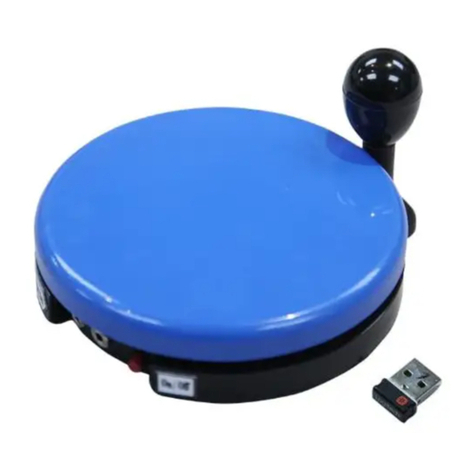
Carry on a conversation!
A spectacular combination with single, sequential, and random message
capabilities with an output for activating other devices. Sequential
capability is great for storytelling, singing songs, telling a oke or carrying
on a conversation with your friends. Press the plate the first time and the
first message is spoken; press it again and the second message is
heard; etc. Random capability is great for playing games that use dice,
spinners, cards and more. Record up to 250 messages. Total record
time is 300 seconds. Also can be activated by an external switch. Comes
with a clear cover. Size: 6¼"L x 6¼"W x 3"H. Requires 4 AAA Batteries.
Operation:
Battery Installation:
1. Carefully turn unit over and remove the small screw from the battery
compartment. Slide the battery compartment cover off. Observing
polarity, install four AAA size batteries (Not included) into the holder.
Use alkaline batteries only (e.g. Duracell or Energizer brand). Do not
use rechargeable batteries or any other type of batteries because
they supply lower voltage and the unit will not perform properly.
Never mix old and new batteries together or different brands or types
together. Replace the battery compartment cover and replace the
screw.
ettings:
2. Make sure that the volume is at an audible level by turning the
ON/OFF/VOLUME knob clockwise. Set the
Random/ equencer/ ingle switch to equence. Please Note: The
Random/ equencer/ ingle switch only has two positions;
equencer/ ingle position controls both the equencer and ingle
switch functions.
ingle Message Recording:
3. Press and HOLD the red record button on the bottom of the unit.
Next press and HOLD the round plate switch on the top of the unit.
Speak your message clearly, with your mouth preferably about 6"
from the microphone (the small “fuzzy” circle on the back side of the
unit) then release the plate, but continue to hold the red record
button on the bottom of the unit. DO NOT RELEASE THE RED
RECORD BUTTON IF YOU WISH TO CONTINUE THE SEQUENCE
OF MESSAGES. If only recording a Single message release both.
equential Message Recording:
4. If you wish to continue recording additional messages, press the
switch plate again and record your next message. For each new
message you must release only the top round switch plate after each
message is recorded. When finished recording release both round
plate and Record button. You have a maximum of 250 recordings on
this unit. Messages can be any length the units maximum total
recoding time is 300 seconds.
Message Playback:
5. To use the device for playback, set the Random/ equence/ ingle
switch to the desired position. Each time the user presses and
releases the switch plate on the top of the unit, they will hear the
messages recorded either in the sequence in which they were
recorded or randomly depending on your settings. There is also a
1/8" female ack that will accept most external capability switches.
When using an external switch, make sure there are no gaps
between the connections, push cables in tightly.
6. When you are done using the unit, turn it off. If you will not be using
the unit for a prolonged period of time, remove the batteries from the
battery compartment.
7. A removable clear plastic cover can be used to hold picture icons or
words. To remove the cover, carefully lift up on one side of the clear
cover. Place your icon then place the cover over the plate and press
the cover down gently. Do not hit or press the cover down, doing so
can damage the unit and make removal of the cover difficult.
8. The Small Talk Sequencer can also be activated by another external
capability switch, via the switch input ack located on the side of the
unit. Make sure your switch is plugged in all the way with no gaps.
External switch activation will replicate as if the large switch plate on
the device was depressed.
Rev 6/5/17