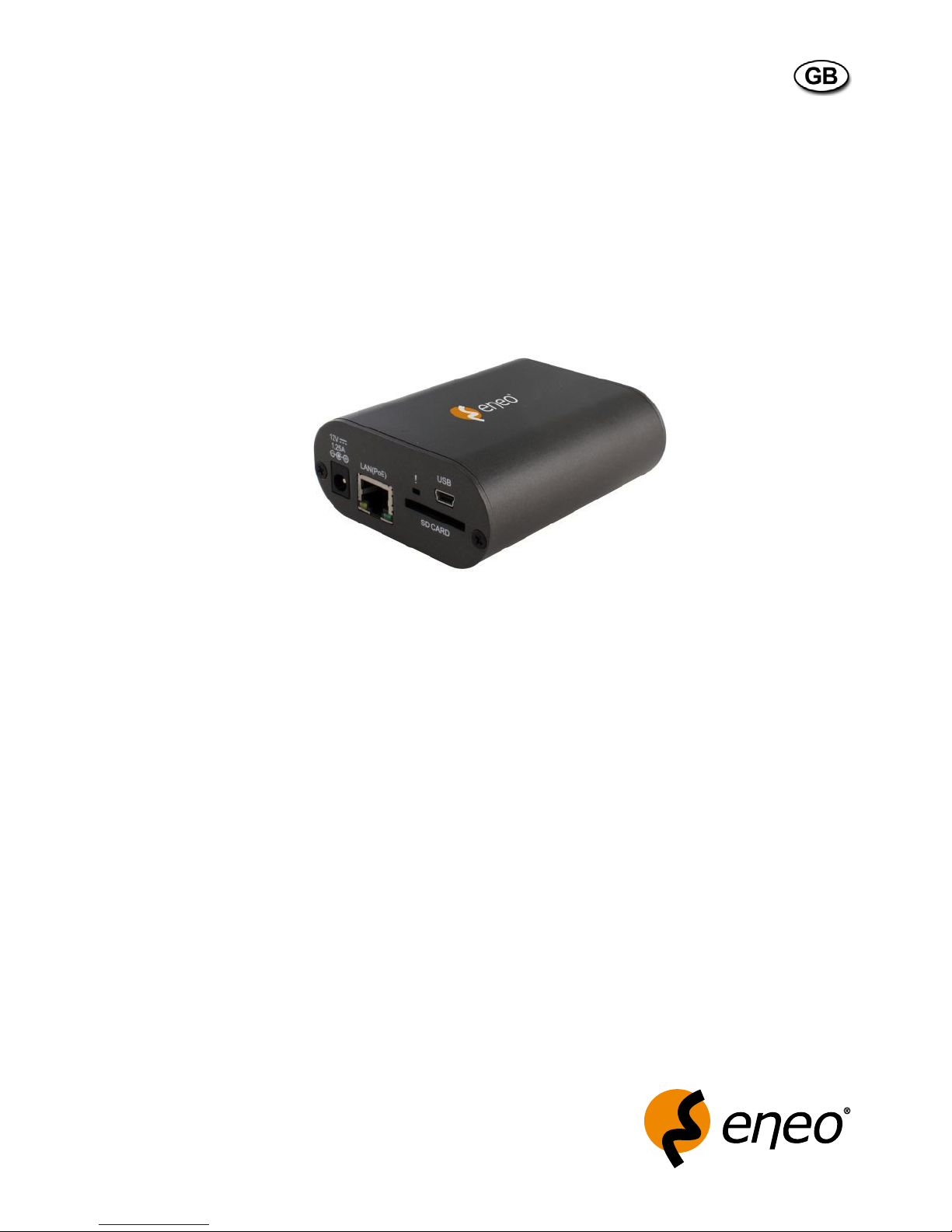
Eneo GLS-2302H User manual
1
Operating Manual
Network Server, Video/Audio, 1 Channel,
H.264, MPEG-4, MJPEG
GLS-2302H

2
Betriebsanleitung
Installation and Operating Instructions
Mode d’emploi
Instrukcja instalacji i obsługi
www.videor.com
www.eneo-security.com
⇒

3
Contents
1. Safety Instructions / Maintenance.......................................................................................................................4
2. Product Features ................................................................................................................................................5
2.1 Product Introduction .................................................................................................................................5
2.2 General Description ..................................................................................................................................6
3. Description of the Front/Rear View......................................................................................................................7
3.1 Front Panel ...............................................................................................................................................7
3.2 Rear Panel................................................................................................................................................7
3.3 The DI/DO Schematic ...............................................................................................................................8
3.4 The USB Function.....................................................................................................................................9
4. Installation........................................................................................................................................................10
4.1 Connecting with a Camera......................................................................................................................10
4.2 Updating System Software .....................................................................................................................10
5. Network Configuration......................................................................................................................................11
5.1 Cable Connections..................................................................................................................................11
5.2 Configure your Video Server Network Settings ........................................................................................12
5.2.1 Enable DHCP Function .................................................................................................................12
5.2.2 Set IP Address ..............................................................................................................................13
5.3 TCP/IP Communication Software ............................................................................................................14
5.4 TCP/IP Installation...................................................................................................................................16
5.5 TCP/IP Configuration Setting...................................................................................................................17
5.6 Connection Testing .................................................................................................................................18
6. Operating Instructions for Image Software and Network ...................................................................................20
6.1 Microsoft Internet Explorer......................................................................................................................21
6.1.1 Connecting the Video Server......................................................................................................21
6.1.2 Live Video..................................................................................................................................22
6.1.3 Setup ........................................................................................................................................24
7. Advanced Operation .........................................................................................................................................62
8. Specifications...................................................................................................................................................65
9. Dimensional Drawings......................................................................................................................................67
APPENDIX 1 – How to run the Video Server UPnP......................................................................................................68
APPENDIX 2 – Register as a DDNS Member ..............................................................................................................79
APPENDIX 3 – MPEG4 Bit Rate Table for the Video Server..........................................................................................83
APPENDIX 4 – PoE Installation Method......................................................................................................................84

4
1. Safety Instructions / Maintenance
• Read these safety instructions and the operation manual first before you install and commission the unit.
• Keep the manual in a safe place for later reference.
• The system may only be commissioned and maintained by personnel authorized to do this and it must only be
carried out in accordance with relevant standards and guidelines.
• Never cover the ventilation slots to avoid overheating.
• Never insert metal objects or any other items into the vents. This may permanently damage the unit.
• Protect your unit from contamination with water and humidity to prevent it from permanent damage.
Never switch the unit on when it gets wet.
Have it checked at an authorized service center in this case.
• Never operate the units outside of the specifications as this may prevent their functioning.
• Do not operate the unit beyond their specified temperature, humidity or power ratings.
• The unit should be protected against excessive heat, dust, damp and vibration.
• Do not place any heavy objects on the unit.
• To disconnect the power cord of the unit, pull it out by the plug. Never pull the cord itself.
• Pay attention when laying the connection cable and observe that the cable is not subject to heavy loads, kinks, or
damage and no moisture can get in.
• Contact your local dealer in case of malfunction.
• The connection cable should only be changed by Videor E. Hartig GmbH.
• Installation, maintenance and repair have to be carried out only by authorized service centers.
Before opening the cover disconnect the unit from mains input.
• The warranty becomes void if repairs are undertaken by unauthorized persons. Do not open the housing.
• Only use original parts and original accessories from Videor E. Hartig GmbH.
• Do not use strong or abrasive detergents when cleaning the dome. Use a dry cloth to clean the dome surface.
In case the dirt is hard to remove, use a mild detergent and wipe gently.
NOTE: This is a class A digital device.
This digital device can cause harmful interference in a residential area; in this case the user may be
required to take appropriate corrective action at his/her own expense.

5
2. Product Features
2.1 Product Introduction
The Video Server Encoder is a versatile solution that allows you to make the most of your existing analog surveillance
infrastructure. The Video Server is a standalone system with a built-in video encoder that converts an analog camera
into a full-featured IP-based system. The Video Server can be remotely accessed and controlled using a Web browser
over an Intranet or the Internet.
The Video Server’s Video Encoder makes it possible to integrate a pre-existing analog surveillance infrastructure into
a fully-functional IP surveillance system. The Video Server is an ideal choice for banks, airports, factories, govern-
ment buildings, prisons, and traffic surveillance applications - any location where surveillance equipment is already
installed and functioning.
This video server adapts Texas Instrument‘s (TI‘s) newest digital media processor -- the TMS320DM 365 for efficient
image operation, while also offering simultaneous triple-codec ( H.264 / MPEG-4 / MJPEG ) video compressions with
the highest resolution of Full D1, at 30 / 25 frames per second in the NTSC / PAL systems, respectively. In addition,
users based on different bandwidths can choose multi-profile video streaming at different resolutions.
The video server provides stable, reliable and convenient network surveillance. It safely downloads automatic video
codec and other components, and lets you set up the control settings very easily. It provides UPnP features as well. Its
USB interface is for basic network setting and updating. The SD card slot supports alarm and event recording and up-
dating. Furthermore, this encoder board comes with the Power over Ethernet (PoE) function, and its RS-485 interface
can be connected with all kinds of Pelco-D PTZ cameras.
Alarm handling features provide alerts in the event of loss of video or loss of network connection. Motion alarms
with configurable detection areas allow for effective surveillance and help to mitigate the need for constant human
supervision. A buffer system allows the server to capture images to the built-in SD card slot before and after an event
occurs.
We have launched this triple-codec video server for the more advanced digital surveillance solutions demanded by
our clients. We believe this unit is the right answer to your Network surveillance problems. You will find it practical,
precise and indispensable.

6
FACTORY DEFAULT • IP Address: 192.168.1.168
• Password: 9999
2.2 General Description
• 1 channel video/audio server for LAN/WAN
• Resolution 720 x 576 max.
• Simultaneous video streaming (H.264/MJPEG/MPEG-4)
• USB connector for configuration
• Shared access (up to 10 simultaneously)
• Up to 3 password levels
• Integral motion detection
• Audio and alarm input and outputs
• Alarm-recording (Micro SD card/SDHC)
• ONVIF conformity
• Privacy zone masking
• Client management software included

7
3. Description of the Front/Rear View
3.1 Front Panel
3.2 Rear Panel
1. Plug Inlet: A DC 12V inlet that connects to an external power supply.
2. ETHERNET 10/100 connector:
This is a standard RJ-45 connector for 10/100 Mbps Ethernet networks. PoE (Power over Ethernet) function:
Provides power to the device via the same cable as used for the network connection.
3. SD indicator: The green light indicates the SD card cannot be removed.
4. SD/SDHC CARD slot: This is used for updating system software and archiving / accessing critical images.
5. USB port: The user can use a USB device cable to connect the Video Server to the USB port on the PC.
1. AUDIO IN: The connector is used to connect the audio output from other devices to the Video Server.
2. AUDIO OUT: Provides the Video Server’s audio signal to a speaker or stereo
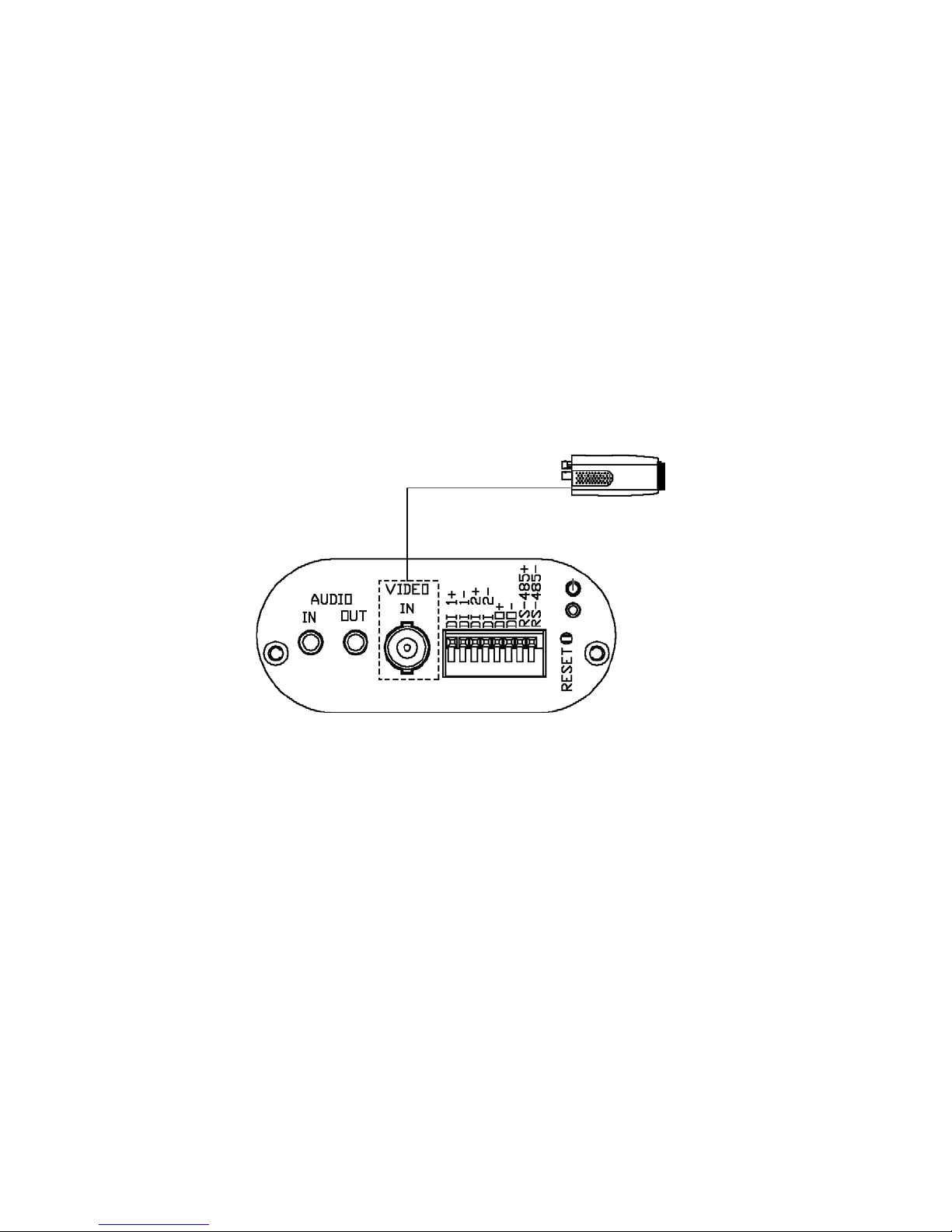
3. Video in connectors: The BNC connector is used to connect to the video output from the camera.
4. ALARM I/O: This is an 8-PIN connector including the DIGITAL IN/OUT and RS-485 items for connecting with
external devices.
5. RESET: Returns to factory default
6. POWER indicator: Indicates the power status of the unit
8
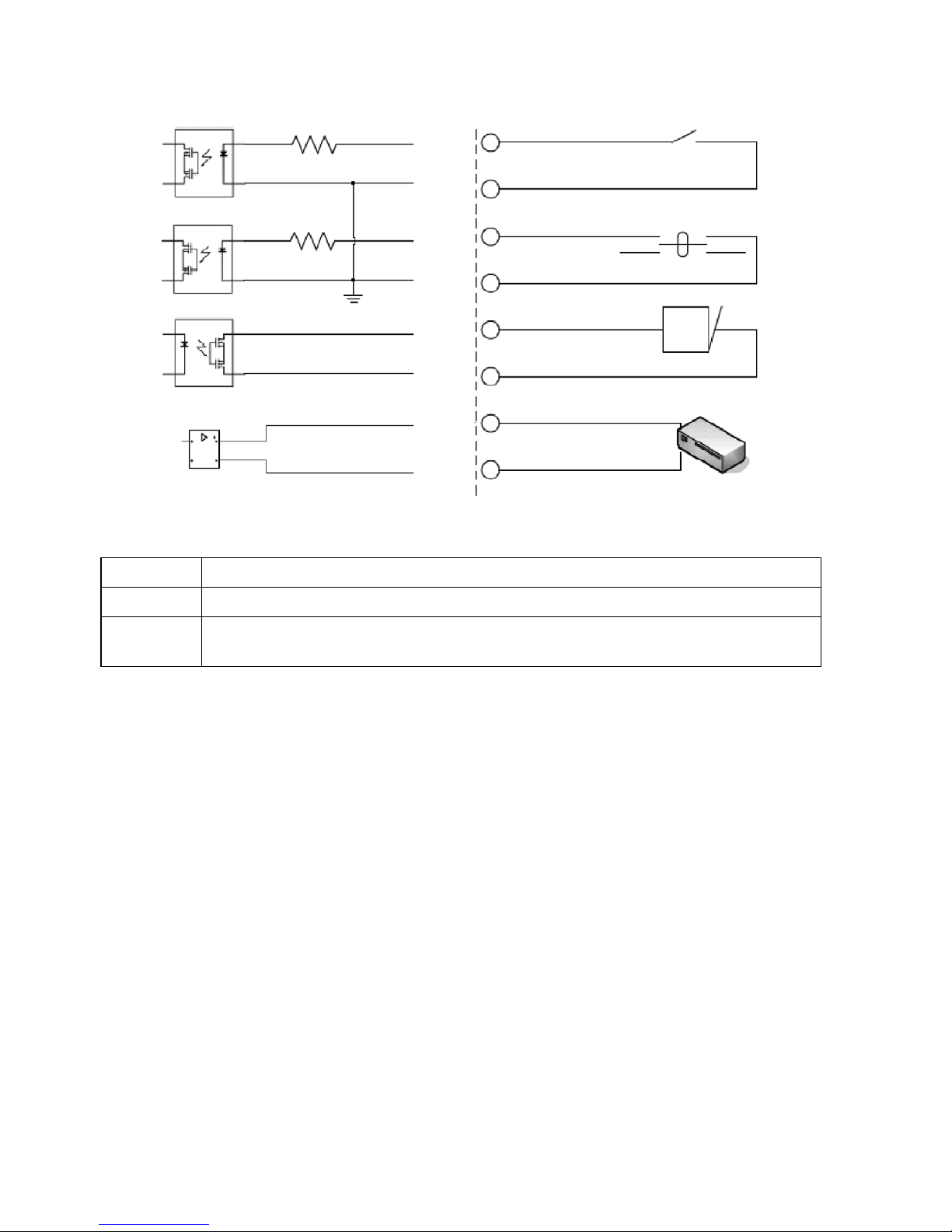
3.3 The DI/DO Schematic
DI Receives signals from a reed switch, vibration sensor, or any other external security device
DO Connects to an alarm or buzzer
485+/485- Connects to an RS-485 interface for controlling auxiliary equipment such as an external camera
enclosure for pan, tilt, and zoom functionality
Photo Relay
Photo Relay
Photo Relay
RS-485 Transceivers
Reed Switch
Vibration Sensor
ALARM
RS-485 Device
DI 1+
DI 1–
DI 2+
DI 2–
DO +
DO –
485+
485–

9
3.4 The USB Function
By connecting the Video Server board with a PC via the USB connector, the Video Server board can provide different
functions.
1. Insert an SD card: As a card reader
Insert an SD card into the Video Server, then connect to the PC. You might transfer files between the SD card
and the PC. Once you’ve connected your Video Server to your computer, the Windows system will detect the
connection and ask you what you want to do with your SD card.
In other words, if the user connects the Video Server with an SD card and the PC via the USB connector, the
Video Server can be used as a normal card reader.
2. Remove an SD card: As a configuring tool
By connecting the Video Server with a PC via the USB connector, you can set the Network and PPPoE functions
of the Video Server directly by your PC.
Network
Setting
DHCP ON
DHCP OFF (default)
NOTE: After changing the settings, please click the „Apply” button. All of the options will be effective after
removing the USB connector.
NOTE: After the IP address has been changed, please unplug the network cable, then plug it once again to
make sure the network connection is in normal mode.
10
4. Installation
Please follow the instructions and the diagram below to set up the system.
NOTE: The Video Server is linked by its Video Out connection via a BNC connector to a monitor’s Video In
connection. If this connection is there, you can see some information on the monitor screen, such as
the Video Server factory default Static IP address (192.168.1.168). But the Video Server Static IP
address can only appear if there is a connection between the Video Server and another device.
If there is no such connection, the Video Server factory default Static IP address will not appear on
the monitor screen.
4.1 Connecting with a Camera
to camera BNC connector
Digital or analog camera
4.2 Updating System Software
If the system software of the Video Server needs to be upgraded, please take the following steps to safely process it.
IMPORTANT: Before carrying out the following procedures, please ensure the SD card is working and the file
of the system firmware is intact
1. Create a directory named UPGRADE (upper-case or lower-case letters are no difference) in the SD card if it does
not exist.
2. Copy the file of UPDATE.BIN to the UPGRADE directory.
3. If the Video Server is running, please power it off first.
4. Insert the SD CARD into the Video Server.
5. Remove the Ethernet cable from the RJ-45 port and then power on the Video Server.
Table of contents
Other Eneo Server manuals