extronics iSCAN201 User manual

Date: 27.03.2015
User Manual
Bluetooth Handheld Scanner
iSCAN201

Operating Instructions_iSCAN201_001
Table of contents
1 Important notes on the Operating Instructions................................................................................................2
1.1Safety information..........................................................................................................................................2
1.2Notes on the Operating Instructions..............................................................................................................3
1.3 General notes of caution...............................................................................................................................4
2 Product information ...........................................................................................................................................6
2.1 Manufacturer.................................................................................................................................................6
2.2 Explosion protection......................................................................................................................................6
2.3 Scanner technical data..................................................................................................................................6
2.4 Base charging station technical data.............................................................................................................7
2.5 Components..................................................................................................................................................8
2.6 Serial numbers..............................................................................................................................................8
2.7 Application.....................................................................................................................................................8
3 System assembly................................................................................................................................................9
3.1 System assembly 1.......................................................................................................................................9
3.2 System Assembly 2.....................................................................................................................................10
3.3 Cable range in system assembly 1..............................................................................................................11
3.4 Cable range in system assembly 2..............................................................................................................11
4 Step-by-step guide on installation and operation..........................................................................................12
4.1 Preparation handheld iSCAN201 scanner for system assembly 1 and 2 ....................................................12
4.2 Using the base charging station for system assembly 1 (hazardous areas)................................................14
4.3 Using the base charging station for system assembly 2 (non-hazardous areas).........................................15
4.4 Pin assignment power supply with RS232 interface....................................................................................16
4.5 Pin assignment power supply with USB interface........................................................................................18
5 Attachment........................................................................................................................................................20
5.1 EC type examination certificate: ISCAN201 and ISCAN201 base charging station.....................................20
5.2 EC type examination certificate: Power supply ISCANPS...........................................................................22
6 Contact..............................................................................................................................................................26

Operating Instructions_iSCAN201_001 2
1 Important notes on the Operating Instructions
1.1 Safety information
Warnings are highlighted by a special symbol and a different font colour:
Danger
Non-compliance may result in life-threatening situations.
This warning must be heeded.
Warning
This type of warning concerns dangerous situations that may result in minor injuries.
Info Important and helpful notes and information.

Operating Instructions_iSCAN201_001 3
1.2 Notes on the Operating Instructions
Before starting up the equipment please read the Manual thoroughly.
The Operating Instructions contain important information on functionality as well as safety rules. If these
are not heeded, normal operations within hazardous areas cannot be guaranteed.
The notes contained in this manual are important for starting up and operating the product.
These instructions may be updated at any time. Extronics Limited reserves the right to make changes to this
document.
Before they use the product, users must ensure that they have the most up-to-date version of the operating
instructions.
To make sure this is the case, please check Extronics’ website, www.extronics.com, or contact one of the
company's staff.
The drawings contained in these operating instructions are for illustration purposes only and may differ somewhat
from the actual design.
No changes may be made to the device that were not intended or approved
by Extronics Limited.
If the handheld scanner is not used properly, the operating permission for hazardous areas may lapse for the
device in question.
Non-adherence to the instructions will void any warranty.
For the full commission of the iSCAN201 handheld scanner, the programming information contained in
the manual issued by SICK AG (www.SICK.com) is also required.

Operating Instructions_iSCAN201_001 4
1.3 General notes of caution
Caution / Notes
The devices may only be operated when fully assembled.
In hazardous areas, the devices must not be wiped or cleaned with a dry
cloth.
The device must be switched off immediately if it is likely that it can no
longer be operated safely as a result of damaging impact or general
peculiarities (such as ingress of water or other fluids, temperatures outside
of the specified range, etc.).
General statutory requirements or health and safety rules and accident
prevention guidelines and environmental laws must be adhered to (e.g. the
German Occupational Health and Safety regulation).
Users must not open the device.
Users must not make any changes to the device. Components may not be
exchanged or replaced. If non-specified components are used, explosion
protection is no longer guaranteed.
Ensure safe handling with firm footing and sufficient room for movement.
If the enclosure is in any way damaged the device must be removed from
the hazardous area immediately.
In accordance with IEC 60079-19 and IEC 60079-17, operators of electrical
installation in hazardous areas are obliged to have them serviced by
qualified electricians.
Do not insert any sharp objects into the enclosure or any other openings of
the handheld barcode scanner. Any openings at the device may not be
covered or blocked.
The device and any accessories must be properly disposed of, i.e. as
legally specified, for example by a certified company.
Notes on installation Electrical plants are subject to certain regulations concerning installation
and operation (e.g. RL 99/92/EG, RL 94/9EG, or the national rules such as
IEC 60 079-14 and VDE 0100).
In the hazardous area it is the operator's responsibility to carry out any
repair and maintenance in compliance with applicable rules.

Operating Instructions_iSCAN201_001 5
Caution
on laser devices
Devices fitted with laser fall under standards US 21 CFR 1040.10 and EN
60825-1. The laser's classification is stated on a plate affixed to the device.
Class 1 lasers are deemed inherently safe during normal use, but users must
not look directly into the light source. The following declaration is required by
American and international laws:
Usage of control elements, adaptations or the use of procedures that differ from
these instructions may result in a dangerous exposure to laser beams.
Class 2 lasers use a visible low-voltage LED. As with any source of bright light,
such as the sun, the user should avoid looking directly into the light. Brief
exposure to a class 2 laser is deemed not dangerous.
Maintenance Provided the device is operated and assembled according to instructions and
the ambient requirements are being met continuous maintenance is not
necessary.
Servicing Operators of electric equipment in hazardous areas are obliged to have them
serviced by qualified electricians (IEC 60079-19 and IEC 60079-17).
Repairs Repairs may only be carried out by the manufacturer or by persons trained and
commissioned for this purpose by the manufacturer.
The device is closed ex-factory. It may only be opened in the factory by specifically trained personnel.
Software installation For instructions on how to install the software at the PC please refer to the
manual issued by SICK.
Operation Before operating the device you must ensure that all necessary components are
available.
Operating Instructions_iSCAN201_001 6
2 Product information
2.1 Manufacturer Extronics Limited
1 Dalton Way
Midpoint 18
Middlewich, UK
CW10 0HU
Device iSCAN201
2.2 Explosion
protection II 2G Ex ib IIC T4
II 2G Ex ib IIC T4 Gb
II 2D Ex ib IIIC T135C
II 2D Ex ib IIIC T135C Db
Protection category IP65
2.3 Scanner technical
data
Nominal values
Light source: Visible red light, 630nm
Ambient temperature: -20 °C to +50 °C
Test certificate: IBExU 12 ATEX 1162
Bluetooth: V2.1 EDR
Weight: 260g inc. batteries
Bluetooth range up to 30 m

Operating Instructions_iSCAN201_001 7
2.4 Base charging
station technical data
Ambient temperature
Base charging station -20°C to +50°C
Bluetooth
Base charging station Bluetooth V 2.1 EDR, Class 2
2.4 ... 2.4835 GHz (ISM band)
Terminal assignment
(Base charging station) USB cable
USB/D+ green
USB/D- white
GND black
+UB brown
RS 232 cable
RS 232-TXD white
GND brown
+UB
y
ellow
Operation
Base charging station The base charging station may be operated in hazardous areas. Its purpose is to
receive data captured by the associated handheld scanner (1D bar codes or 2D stacked
codes) via Bluetooth.
Nominal values of the
hazardous base charging
station
maximum input voltage Ui 4.9 V (ISCAN201CAB 5, 6, 9, 10)
5.6 V (ISCANCAB7, 8)
maximum input current li 490 mA
maximum input power Pi 1.25 W
maximum internal inductance Li: negligible
maximum internal capacitance Ci 109 µF (ISCAN201CAB 5, 6, 9, 10)
46 µF (ISCANCAB7, 8)
Nominal values
of the non-hazardous
base charging station
Operating voltage U = 5V
Power requirement I = 85 mA in standby mode

Operating Instructions_iSCAN201_001 8
2.5 Components
iSCAN201
iSCAN201PDF
Standard version
Stacked PDF version
Both are for use with the battery ISCAN201BATT
and a base charging station of your choice (see below)
With an explosion-protected connection cable USB/RS232
or a non-explosion-protected connection cable USB/RS232
and a power supply ISCANPS, depending on voltage and interface
iSCAN201EXB Explosion-protected base charging station
iSCAN201B Non-explosion-protected base charging station
iSCAN201BNOBT Non-explosion-protected charging station without Bluetooth
2.6 Serial numbers
Serial key: year of manufacture serial number
2 numbers 4 numbers
Example: 130001
2.7 Application
The scanner is a handheld device.
Its purpose is the portable capture and direct transfer of data in hazardous areas. The device has been designed
for use in hazardous areas zones 1 and 21.
Operating Instructions_iSCAN201_001 9
3 System assembly
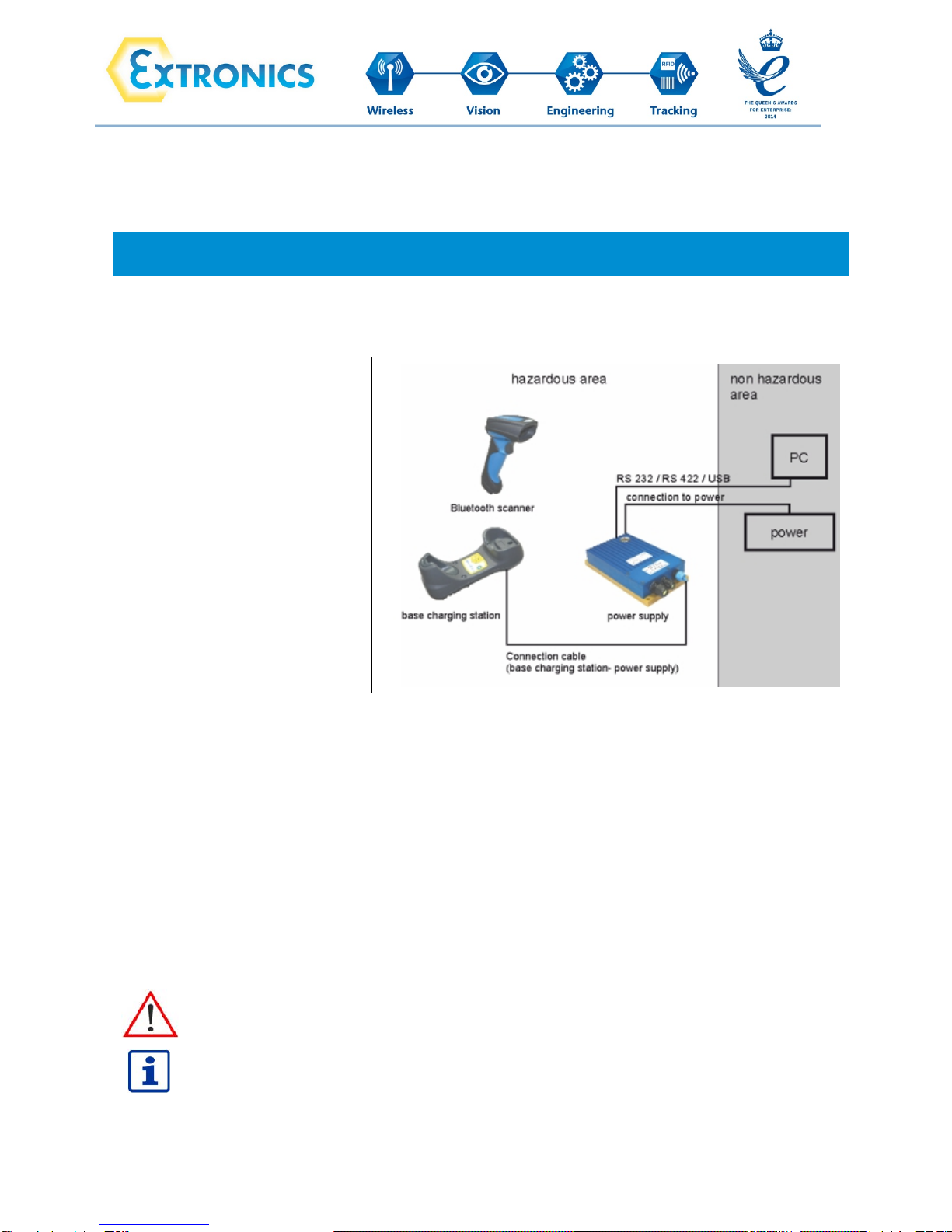
3.1 System assembly 1
Overview of the complete
system assembly 1,
Bluetooth handheld scanner
iSCAN201
Assembly with base charging
station and power supply in
hazardous area
Description:
The Bluetooth handheld iSCAN201 was designed for use in hazardous areas. Normal operation requires a base
charging station, a connection cable between the base charging station and the iSCANPS power supply, and a
connection cable between the power supply and a PC.
Required connection cable to a PC: USB: 0.2 - 2.5 mm², 4-wire
or RS232: 0.2 - 2.5 mm², 3-wire
The Bluetooth handheld scanner, the base charging station and the power supply can be connected and operated
in the hazardous area. For safe installation of the power supply please refer to the manual issued by SICK AG
(www.SICK.com)
The warnings and notes of caution contained in these operating instructions and in the
manual issued by SICK AG (www.SICK.com) must be adhered to.
For the professional use of the power supply iSCANPS the operating instructions of the
manual of the power supply are necessary.
Table of contents
Other extronics Barcode Reader manuals