b) Turn on as valve. Switch on electrical power to
appliance. Red neon should li ht.
c) Li ht oven as detailed in User Instructions with
cook thermostat at 200
o
C. The as supply may
contain some air so repeat li htin procedure,
payin particular attention to instructions to be
followed in event of controls safety lockout.
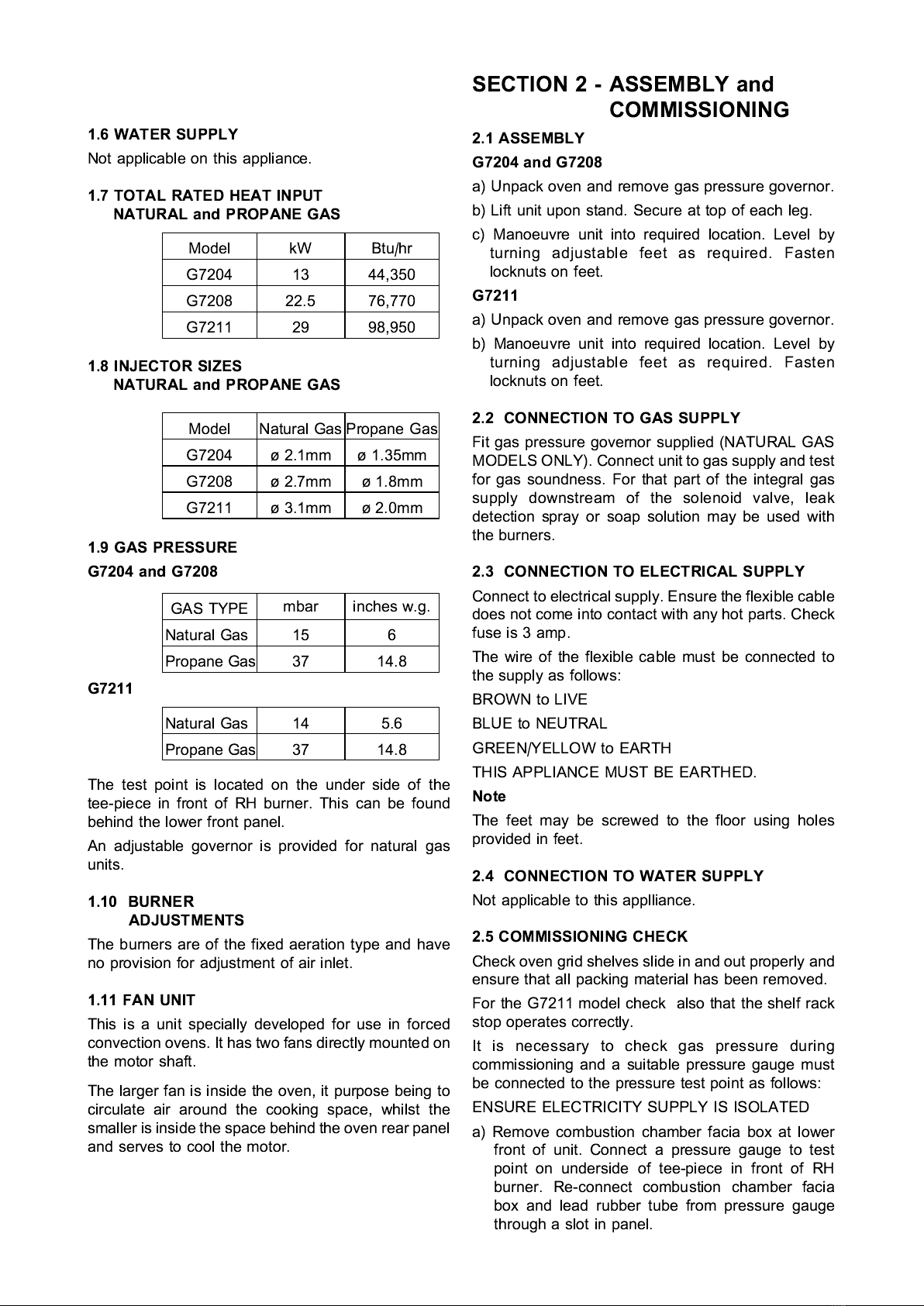
d) Adjust pressure overnor (NATURAL GAS ONLY)
to set burner pressure (Section 1.9). To increase
pressure turn screw inside overnor turret
clockwise. Anti-clockwise to reduce pressure.
Check pressure a ain after 15 minutes and adjust
if necessary.
e) Isolate electrical supply. Remove combustion
chamber facia box and disconnect pressure
au e from test point. Replace test point sealin
screw and test for soundness. Replace facia box.
Checking Performance of Controls
a) Ensure electrical supply is ON. Li ht oven as
detailed in User Instruction. Check that controls
produce a healthy spark to both burners and
i nition is smooth and without delay. Repeat this
operation several times.
b) Open oven doors. Check oven fan rotates in a
clockwise direction. (Anti-clockwise for G7204)
c) Ensure cook mode is selected. Turn cook
thermostat knob to any temperature settin and
observe that amber heat indicator neon
illuminates. The neon will li ht and o out as
thermostat and burner o on and off.
d) Select temperature of 200
o
C on cook thermostat
knob and allow oven to heat. With a suitable
thermometer, check that centre oven temperature
corresponds with this settin .
e) Check fan stops and oven burners o out when
doors are opened.
f) Check that fan rotates with oven doors open or
closed when fan switch is pressed to COOL
DOWN position.
) Returh to heat up mode and check timer operation.
This should switch the burners off to sound a
buzzer at the end of a pre-set time interval. Turn
timer knob to MAN settin and observe that cook
thermostat is activated and the buzzer stops.
h) With mode switch at Cook and Hold settin , check
COOK and HOLD timer works and that at end of
pre-set time interval selected control switches from
cook to hold thermostat.
j) With oven in HOLD mode (i.e. hold timer at 0 and
mode switch at cook and hold) check that centre
oven temperature is approximately 80
o
C.
k) Press oven li ht switch and observe that li ht
works (G7204 and G7208 models only) and that it
oes out when switch is released.
2.6 INSTRUCTIONS TO USER
After installin and commissionin the unit, hand
USERS INSTRUCTIONS to user or purchaser.
Ensure the instructions for li htin , turnin off, correct
use and cleanin are properly understood.
The location of the as isolatin cock and electrical
supply switch should be made known to the user and
the procedure for operation in event of an emer ency
demonstrated.
SECTION 3 - SERVICING
and CONVERSION
Warning
BEFORE CARRYING OUT ANY MAINTENANCE
ON THIS APPLIANCE ENSURE THAT THE
ELECTRICITY AND GAS SUPPLY TO THE UNIT
ARE ISOLATED.
D ring Servicing
1. Test for as soundness as specified in IGE/UP/1
after any as connection has been disturbed.
2. Check for correct operation as appropriate (see
commissionin the appliance).
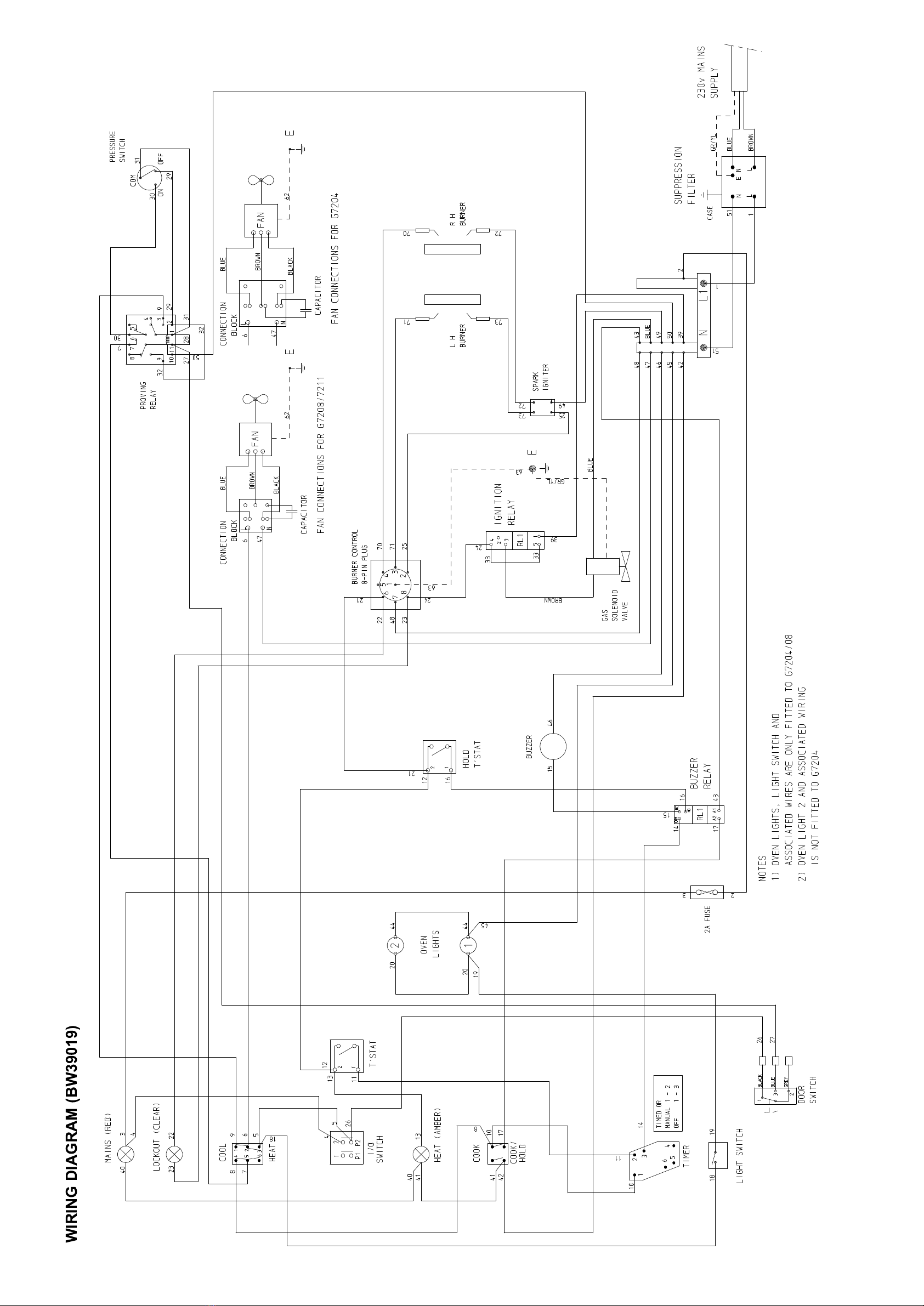
3. When replacin wirin connections, refer to
dia ram at rear of this manual, note that all wires
are numbered.
4. Plastic clips on wirin looms are not reusable.
These should be renewed after removal.
3.1 CONVERSION TO OTHER GASES
From NATURAL GAS to PROPANE or vice versa.
a) Remove burners as detailed in Section 3.3.
b) Remove injectors as detailed in Section 3.4.
c) Insert appropriate injectors and replace burners.
d) Remove as overnor. (When convertin from
PROPANE to NATURAL GAS a overnor MUST
be applied to as circuit.)
e) Ensure that all as circuit joints disturbed durin
conversion are ti ht and as leak tested.
3.2.1 Comb stion Chamber Facia Box
Open doors and remove fixin s which secure panel to
front frame. Withdraw panel.
3.2.2 Drop Down Control Panel
Remove fixin s at top ed e and drop hin ed panel
down.
3.2.3 RH O ter Side Panel
a) Open drop down control panel as Section 3.2.2.
b) Remove side panel fixin s. Slide panel to rear to
remove.