Flame mMLFO User manual

µMLFO
MANUAL
Version 1.00
FLAME

Manual FLAME MLFO Version 1.00
Contents
1. Short description................................................................ 3
2. Hardware / connections..................................................... 3
2.1 Connection to the modular system (Doepfer bus) 3
2.2 Module overview 4
2.3 MIDI connections 5
3. Handling ........................................................................... 6
3.1 RATE - CLOCK MODI 6
3.2 LFO WAVE (Waveforms) 7-8
3.3 LFO PHASE (Phase shift) 9
3.4 SYNC - RESET 9
3.5 PATCH select - LEARN function 10
4. Patch overview .................................................................... 11
4.1 List of Preset Patches 1-4 11
4.2 List of Preset Patches 5-8 12
4.3 List of Preset Patches 9-12 13
4.4 SYSEX Data format 14-15
4. Appendix and technical informations .............................. 16
4.1 Technical details
4.2 Warrenty
4.3 Terms of production
4.4 Disposal
4.5 Support
4.6 Acknowledgment
2

1. Short description
2. Hardware / Connection
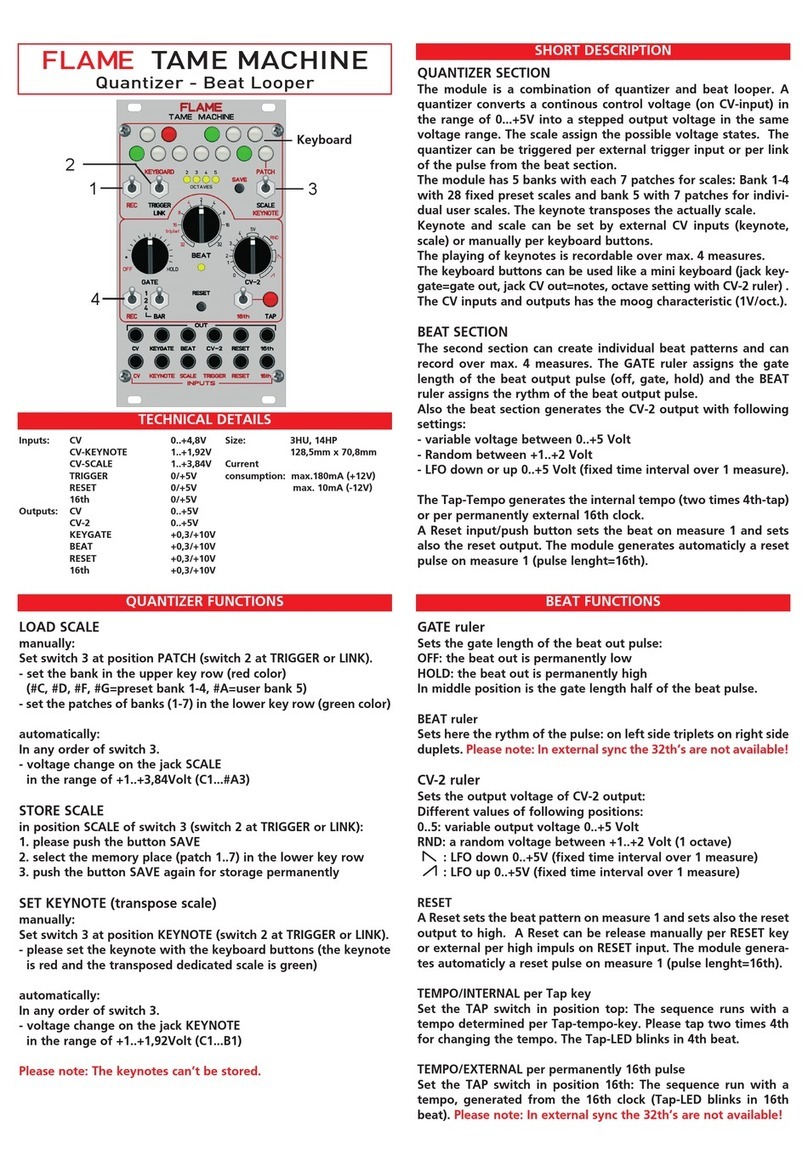
The "µMLFO" module provides 14 synchronizable (or free-running) LFOs with bipolar voltage
output (+-5V). It can be operated via MIDI or analog clock. The tempo of the LFOs is determi-
ned by the speed of the corresponding clock and the divider settings (rate).
After receiving a MIDI Start command, the LFOs will run to MIDI clock and will then sync their
rate accordingly. One of 24 patches can be selected via MIDI. The receive MIDI channel is set
with the LEARN button. Up to 12 of your own patches can be loaded per SYSEX dump. These
are individual settings for the 14 LFOs. This includes the waveform, rate, sync and phase (shif-
ting the start point of the waveform).
When stopped (i.e. after receiving a MIDI stop command or after switching on), the module can
be operated with 16th analog clock.
3
2.1 Connection to the euro rack modular system (Doepfer bus)
The module is delivered with a connected
ribbon cable for the Doepfer bus. The red
lead marks -12 volt. Connecting the module
please note the right polarity!
If the module is poled accidentally wrong
safety diodes avoid the immediate destruc-
tion of the module but further damages can-
not be excepted.
So please pay attention: Check the con-
nection various times before switching on!
The current consumption of the module is on
average 50mA, but can reach peaks up to a
maximum of +80mA!
CAUTION!
Do not accidentally connect the MIDI THRU
output to high CV voltages! This can possibly
damage the hardware!
-12V
Ground
Ground
Ground
+12V

4
u
w
x
yz
v
2.2 Modul overview
Analog 16th clock Gate/Trigger input (0/+5v)
Analog Reset Gate/Trigger input (0/+5v)
14 LFO outputs bipolar (-5v..+5v)
LEARN key
MIDI input (MIDI TRS-B standard)
MIDI THRU output (MIDI TRS-B standard)
u
w
v
x
y
z

5
KEYBOARD/SEQUENCER
2.3 MIDI connections
The module has two MIDI sockets (TRS-B standard mini jacks) INPUT and THRU. Connect the MIDI
input to the MIDI output of your keyboard / sequencer or computer. The data received at MIDI-IN is
forwarded via MIDI-THRU. Acorresponding commercially available adapter (MIDI-DIN to Mini TRS-
B) or a 3.5mm (1/8 inch) stereo jack cable is used for the MIDI connection.
Examples of possible connections:
Forwarding the MIDI data via
THRU to other MIDI modules
Adaptor schemata
MIDI DIN jack to
3,5mm (1/8 inch) mini jack
MIDI TRS-B standard
3,5mm (1/8 inch) mini jack
stereo cabel
COMPUTER

6
3. Handling
RATE (LFO Speed)
The LFO speed results from the tempo of the external analog or MIDI clock and from the RATE divi-
ders specified in the patch (see list of patches and SYSEX values). Values between 32nd notes and
128 bars can be set. The speed does not reach into the higher audio range!
MIDI CLOCK
Connect the module's MIDI input to the MIDI output of a device that can send MIDI start/stop and MIDI
clock commands. After starting the MIDI clock, the module needs one beat to sync to the tempo. With
this second beat, all LFOs are reset (i.e. restarted with the set phase) . After that, only those LFOs that
are activated in the active patch are reset. The reset time is defined globally in the patch. This can be
between one and 12 bars.
When the MIDI clock is stopped, the LFOs continue to spin at the same speed, free and unsynced.
The MIDI tempo should be in the range of 40-200 bpm.
ANALOG CLOCK
Send 16th pulse trains to the analog clock input of the module (with the MIDI clock stopped).
The LFOs synchronize after one bar (16 clock pulses). With the reset input you reset the LFOs
(common starting point of the set phases).
3.1 RATE - CLOCK MODI
KEYBOARD/SEQUENCER
14 LFO OUTPUTS
16th ANALOG CLOCK IN RESET IN
MIDI-CLOCK IN
ADVICE:
Note that the clock (MIDI or analog) must have an even
tempo. When the tempo changes, the module needs at least
a 16th note to recognize the new tempo. The LFOs only run in
sync again after the next reset.

7
The module has 17 different waveforms (numbers 0-16). These are or can be placed on any out-
put. The assignments of the outputs are defined in 12 unchangeable preset patches, but anot-
her 12 patches can be loaded via SYSEX file.
The waveforms are generated digitally according to the DDS principle (Digital Direct Synthesis).
They are in tables and have a resolution of 10bit with 16bit values. They are output via 12-bit
DA converters, which are smoothed with passive RC filters.
3.2 LFO - WAVE (Waveform)
0. Sine
Classic sine waveform. This waveform can be used to create floating or
evenly rising and falling effects.
1. Triangle
Classic triangle waveform. With the help of this waveform, you can cre-
ate floating effects or effects that rise and fall evenly and linearly.
2. Square (square puls)
Square waveform with 50% duty cycle.
7. SH1 (Sample & Hold 1 - sequence)
16 step square sequence.
3. Down-lin (Down 1 - falling sawtooth)
Linear falling sawtooth.
4. Down-exp (Down 2 - decay waveform)
Exponentially fast decay wave (slowing down).
5. UP-Lin (rising sawtooth)
Linear increasing waveform.
6. UP-Log (rising waveform)
Logarithmic fast rising waveform (slowing down).

8
9. SH3 (Sample & Hold 3 - sequence)
16 step square sequence.
10. SH4 (Sample & Hold 4 - sequence)
16 step square sequence.
11. ECHO1 (pulse echo)
Linearly decreasing 8 step pulse sequence.
12. ECHO2 (Pulse Echo)
Linearly decreasing 16 step pulse sequence.
13. Jump1 (bouncing ball)
Pulse sequence (getting faster)
14. Jump2 (bouncing ball)
Pulse sequence (slowing down)
15. Jump3 (bouncing ball - PingPong)
Pulse sequence (faster and slower again)
16. RANDOM (Random sequence of 1024 values)
Determined noise waveform (digital noise).
Note: The waveform contains 1024 specified random values that repe-
at on each iteration.
8. SH2 (Sample & Hold 2 - sequence)
16 step square sequence.

9
The starting point of the waveform can be set in 22.5° increments. This allows, for example, offbeat
waveforms to be realized at the same rate (180° shift).
In the 12 preset patches you will find some preset phase shifts (see list).
You can change the phases of the LFOs in the 12 user patches via SYSEX (see appendix SYSEX).
3.3 LFO - PHASE (Phase shift)
Example with three SINE waves
Sine 0°
shifted Sine +90°
shifted Sine -90°
0° 90°
180°
ADVICE:
The LFOs are set back to the set phase during a reset. If the LFO Sync is switched on, the LFO
is automatically reset to the clock according to the rate. Free-running LFOs are only reset at
MIDI start and when changing a patch.
The phase change only becomes effective after a successful reset. Arate change in sync occurs
at the next 16th note and the LFO is re-synced at the next (set) beat.
After starting the MIDI clock, the module needs one beat to sync to the tempo of the clock. At the start
and at the second bar, all LFOs are reset (i.e. restarted with the set phase) . After that, those LFOs that
are activated in the active patch are automatically reset. The reset time is defined globally in the patch.
This can be between one and 12 bars. The analog RESET input is ineffective for SYNC with MIDI
clock.
With an analog clock, all 14 LFOs can be reset using the RESET input. Then, as with MIDI Clock, it is
automatically reset (with the appropriate settings of the patch). The RESET input behaves like START
with MIDI Clock: After another bar it is automatically reset and then automatically at the point in time
that is specified in the patch (between 1 and 12 bars).
3.4 SYNC and RESET

The module has 24 patches with LFO settings. The first 12 patches are included preset patches
(see lists below). You can save your own settings on a further 12 user patches via SYSEX dump
(see SYSEX below). The SYSEX file of type “GLOBAL SETUP” can be used to determine which
patch is loaded when the module is switched on (as well as the MIDI receive channel for chan-
ging the patch). The default is MIDI channel 1 and preset patch 1.
To change the patch, send MIDI notes on the set receive channel. The patches are over 2 octa-
ves starting at note number 36 (see graphic).
On the Flame website in the download area you will find some ready-made SYSEX files for
USER presets and GLOBAL SETUPs.
3.5 PATCH SELECT - LEARN FUNCTION
10
USER PATCHES
Note Nr 48-59
PRESET PATCHES
Note Nr 36-47
1 2 3 4 5 6 7 8 9 10 11 12 1 2 3 4 5 6 7 8 9 10 11 12
LEARN (MIDI channel and PATCH Load number)
With the LEARN function you can specify the MIDI receive channel and the PATCH, which is
automatically loaded when switching on:
To do this, press the LEARN button until it flashes. Then send any note from your connected
MIDI keyboard on the desired MIDI channel. The new MIDI channel is automatically saved per-
manently.
If the received MIDI note is in the range from 36 to 59, the PATCH assigned to the note (see gra-
phic above) is loaded. In addition, this number is saved and now this PATCH is automatically loa-
ded when switching on.
The LEARN mode is automatically terminated after receiving the note (button LED off).
ADVICE:
If you only want to change the MIDI channel with LEARN, then select a note outside the PATCH
note range.
Factory reset:
To reset to the default, press and hold the LEARN button while powering on the module until it
is lit. Release the button.
The default settings are MIDI channel 1 and preset patch 1.
Table of contents
Other Flame Synthesizer manuals