manuals.online logo
Brands
  1. Home
  2. •
  3. Brands
  4. •
  5. Focal
  6. •
  7. Speakers
  8. •
  9. Focal EASYA User manual

Focal EASYA User manual

Other manuals for EASYA

1

Other Focal Speakers manuals

Focal ARIA CC900 WHITE HG User manual

Focal

Focal ARIA CC900 WHITE HG User manual

Focal 100 AC User manual

Focal

Focal 100 AC User manual

Focal UNIVERSAL ISU130 User manual

Focal

Focal UNIVERSAL ISU130 User manual

Focal ISC 100 User manual

Focal

Focal ISC 100 User manual

Focal CHORUS 700 V series User manual

Focal

Focal CHORUS 700 V series User manual

Focal ARIA 900 series User manual

Focal

Focal ARIA 900 series User manual

Focal LITTORA 200 OD STONE 8 User manual

Focal

Focal LITTORA 200 OD STONE 8 User manual

Focal Dome Flax User manual

Focal

Focal Dome Flax User manual

Focal ST6 SOLO6 User manual

Focal

Focal ST6 SOLO6 User manual

Focal Performance PC 165 V1 User manual

Focal

Focal Performance PC 165 V1 User manual

Focal VESTIA  1 User manual

Focal

Focal VESTIA 1 User manual

Focal Sib User manual

Focal

Focal Sib User manual

Focal SM8 User manual

Focal

Focal SM8 User manual

Focal ELECTRA BERYLLIUM 1000 BE User manual

Focal

Focal ELECTRA BERYLLIUM 1000 BE User manual

Focal PS J65 User manual

Focal

Focal PS J65 User manual

Focal CHORUS 706 WHITE (X2) User manual

Focal

Focal CHORUS 706 WHITE (X2) User manual

Focal Hip User manual

Focal

Focal Hip User manual

Focal KANTA N1 User manual

Focal

Focal KANTA N1 User manual

Focal ALPHA EVO Series User manual

Focal

Focal ALPHA EVO Series User manual

Focal MAESTRO UTOPIA III EVO User manual

Focal

Focal MAESTRO UTOPIA III EVO User manual

Focal CHORA User manual

Focal

Focal CHORA User manual

Focal CHORA 806 User manual

Focal

Focal CHORA 806 User manual

Focal ON WALL 300 Instruction Manual

Focal

Focal ON WALL 300 Instruction Manual

Focal ARIA 900 serie User manual

Focal

Focal ARIA 900 serie User manual

Popular Speakers manuals by other brands

Yamaha DXR10 null

Yamaha

Yamaha DXR10 null

argon audio IE20 quick start

argon audio

argon audio IE20 quick start

Denon SC-N7 owner's manual

Denon

Denon SC-N7 owner's manual

Gemline Ace 3952 user manual

Gemline

Gemline Ace 3952 user manual

HEADRUSH Maximus HRSP 5024 manual

HEADRUSH

HEADRUSH Maximus HRSP 5024 manual

SoundLogic BCCS-6/6395 instruction manual

SoundLogic

SoundLogic BCCS-6/6395 instruction manual

Peavey DTH 218 Specification sheet

Peavey

Peavey DTH 218 Specification sheet

Avantree Pluto Air user guide

Avantree

Avantree Pluto Air user guide

Morel Integra Series INTEGRA OVATION 4 install guide

Morel

Morel Integra Series INTEGRA OVATION 4 install guide

Oppo SONICA quick start guide

Oppo

Oppo SONICA quick start guide

Bose SoundLink Wireless Music System owner's guide

Bose

Bose SoundLink Wireless Music System owner's guide

Rocksteady Stadium owner's manual

Rocksteady

Rocksteady Stadium owner's manual

Bowers & Wilkins 4 owner's manual

Bowers & Wilkins

Bowers & Wilkins 4 owner's manual

Sonance SONOS OUTDOOR Series installation manual

Sonance

Sonance SONOS OUTDOOR Series installation manual

Electro-Voice EVID FM4.2 Brochure & specs

Electro-Voice

Electro-Voice EVID FM4.2 Brochure & specs

Pioneer XW-HTD630 manual

Pioneer

Pioneer XW-HTD630 manual

Onn BWA16AA002 Product guide

Onn

Onn BWA16AA002 Product guide

HP GL313AA - USB Speakers PC Multimedia quick start guide

HP

HP GL313AA - USB Speakers PC Multimedia quick start guide

manuals.online logo
manuals.online logoBrands
  • About & Mission
  • Contact us
  • Privacy Policy
  • Terms and Conditions

Copyright 2025 Manuals.Online. All Rights Reserved.

Engl1sh page
16
Fran~a1s
page
28
EASY
A®
User
manual
I
Manuel
d'utilisation
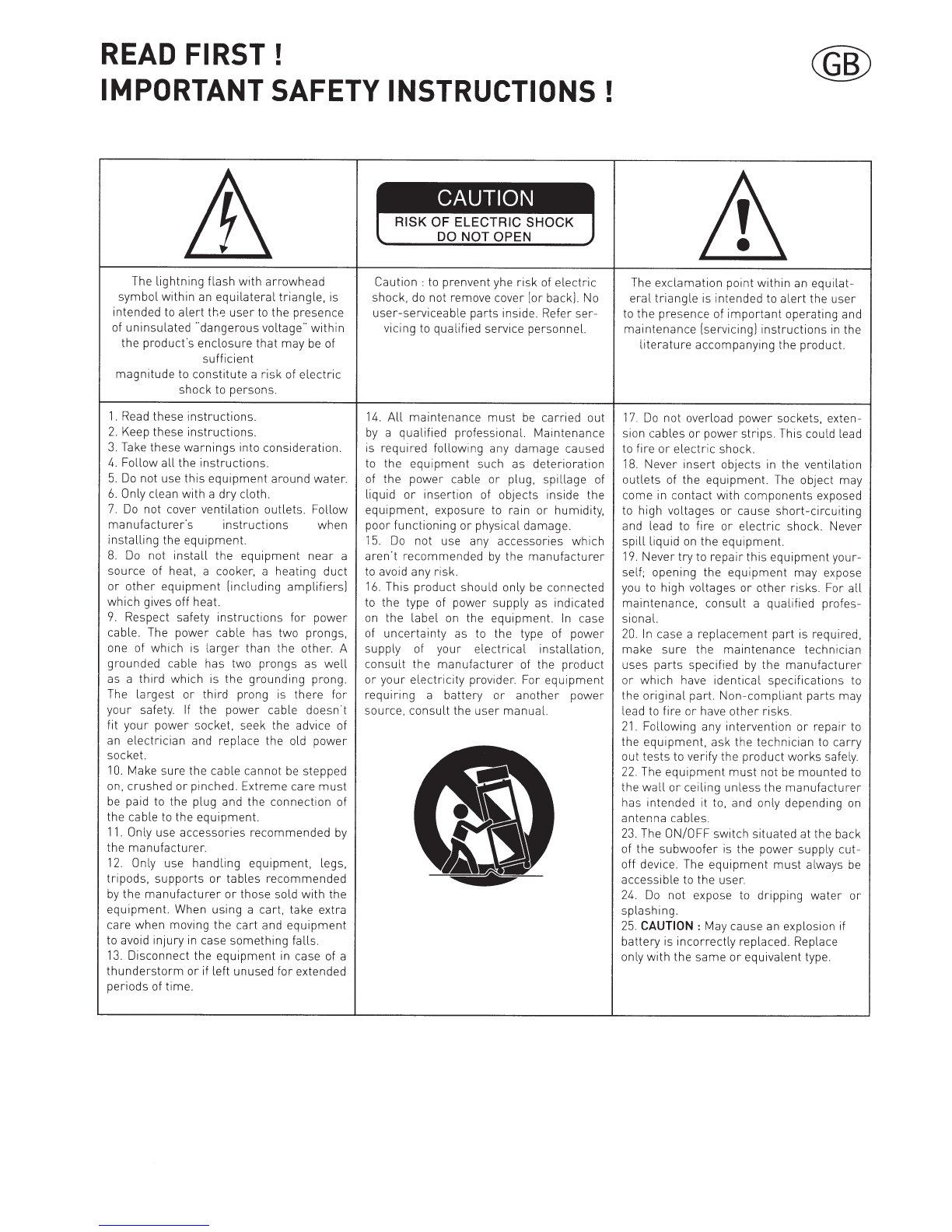
READ
FIRST!
IMPORTANT
SAFETY
INSTRUCTIONS
!
The
lightning
flash
with
arrowhead
symbol
within
an
equilateral
triangle,
is
intended
to
alert
th~
user
to the
presence
of
uninsulated
"
dangerous
voltage"
within
the
product's
enclosure
that
may
be of
sufficient
magnitude
to
constitute
a
risk
of
electric
shock
to persons.
1.
Read these
instructions.
2.
Keep these
instructions
.
3. Take these
warnings
into
consideration
.
4.
Follow
all
the
instructions
.
5.
Do
not
use this
equipment
around
water
.
6.
Only clean
with
a
dry
cloth.
7.
Do
not cover
ventilation
outlets
.
Follow
manufacturer's
instructions
when
installing
the
equipment.
8.
Do
not
install
the
equipment
near
a
source
of heat, a cooker, a heating
duct
or
other
equipment
[including
amplifiers]
which
gives off heat.
9.
Respect safety
instructions
for
power
cable. The
power
cable has
two
prongs,
one of
which
is
larger
than the
other
. A
grounded
cable has two
prongs
as
well
as a
third
which
is the
grounding
prong.
The
largest
or
third
prong is
there
for
your
safety. If the
power
cable doesn't
fit
your
power
socket, seek the advice of
an
electrician
and replace the old
power
socket.
10.
Make sure the cable cannot be stepped
on,
crushed
or
pinched. Extreme care
must
be paid to the plug and the
connection
of
the cable to the
equipment.
11.
Only use
accessories
recommended
by
the
manufacturer
.
12.
Only use
handling
equipment,
legs,
tripods,
supports
or
tables
recommended
by
the
manufacturer
or
those sold
with
the
equipment.
When using a cart, take extra
care
when
moving the
cart
and
equipment
to avoid
injury
in case
something
falls.
13.
Disconnect
the
equipment
in case of a
thunderstorm
or
if
left
unused
for
extended
periods
of
time
.
Caution : to prenvent yhe
risk
of elec
tric
shock, do not remove cover [or back]. No
user-serviceable
parts
inside. Refer
ser-
vicing to
qualified
service
personnel.
14.
All
maintenance
must
be
carried
out
by
a
qualified
professional.
Maintenance
is
required
following
any
damage
caused
to the
equipment
such as
deterioration
of the
power
cable
or
plug,
spillage
of
liquid
or
insertion
of objects inside the
equipment.
exposure to rain
or
humidity,
poor
functioning
or
physical damage.
15.
Do
not
use any
accessories
which
aren't
recommended
by
the
manufacturer
to avoid any
risk
.
16
.
This
product
should
only be
connected
to
the
type of
power
supply
as indicated
on
the
label
on the
equipment.
In
case
of
uncertainty
as to the type of
power
supply
of
your
electrical
installation,
consult
the
manufacturer
of the
product
or
your electricity
provider. For
equipment
requiring
a
battery
or
another
power
source.
consult
the
user
manual.
The
exclamation
point
within
an
equilat-
eral
triangle
is intended to
alert
the
user
to the
presence
of
important
operating
and
maintenance
[servicing]
instructions
in the
literature
accompanying
the
product
.
17.
Do
not
overload
power
sockets, exten-
sion cables
or
power
strips
. This could lead
to fire
or
electric
shock
.
18
.
Never
insert
objects in
the
ventilation
outlets
of the
equipment
. The object
may
come in
contact
with
components
exposed
to high
voltages
or
cause
short-circuiting
and lead to
fire
or
electric
shock. Never
spill
liquid
on
the
equipment.
19.
Never
try
to
repair
this
equipment
your-
self
; opening the
equipment
may
expose
you to
high
voltages
or
other
risks. For
all
maintenance,
consult
a
qualified
profes-
sional.
20.
In
case a
replacement
part
is required,
make
sure
the
maintenance
technician
uses
parts
specified
by
the
manufacturer
or
which
have
identical
specifications
to
the
original
part. Non-
compliant
parts
may
lead to
fire
or
have
other
risks.
21.
Following
any
intervention
or
repair
to
the
equipment,
ask the
technician
to
carry
out
tests
to verify the
product
works
safely.
22.
The
equipment
must
not
be
mounted
to
the
wall
or
ceiling
unless
the
manufacturer
has
intended
it to, and only depending
on
antenna
cables
.
23
. The ON/OFF
switch
situated
at the back
of
the
subwoofer
is the
power
supply
cut-
off device. The
equipment
must
always
be
accessible to the
user
.
24.
Do
not expose to
dripping
water
or
splashing.
25.
CAUTION
:
May cause an explosion if
battery
is
incorrectly
replaced. Replace
only
with
the
same
or
equivalent
type.
BITTE
ZUERST
LESEN!
WICHTIGE
SICHERHEITSMASSNAHMEN! ®
Das
Blitzsymbolin
einem
Dreieckweist
den
Nutzer
darauf
hin, dass eine
Beruh-
rungsgefahr
mit
nicht
isolierten
Teilen
im
Gerateinneren, die
einegefahrliche
Span-
nung fuhren, besteht. Die Spannung kann
so
hoch sein dass sie die Gefahr eines
elektrischen
Schlags bei Personen
birgt
1.Bitte lesen Sie diese
Bedienungsanleitung
aufmerksam
durch
. Sie
sollten
wirklich
alle
Hinweise zum
Betrieb
und
zu
lhrer
Sicherheit
lesen, bevor Sie das
Produkt
in
Betrieb
nehmen.
2.Alle Warnhinweise auf dem(n]
Produkt[en]
oder
in
der
Bedienungsanleitung
mussen
unbedingt
beachtet werden.
3.Beachten Sie die Anleitung. Befolgen
Sie bitte
unbedingt
alle
Bedien-
und
Gebrauchshinweise.
5.
Benutzen Sie dieses
Produkt
nicht
in
der
Nahe von Wasser.
6.
Verwenden Sie
zur
Reinigung keine
flussigen
Reinigungsmittel
oder
solche
aus
der
Spruhdose, sondern
nur
ein
weiches
Tuch.
7.
Schlitze und Offnungen im Gehause
dienen
der
Entluftung
und sorgen
fur
zuverlassigen Betrieb.
Daher
durfen
sie
nicht
verstellt
oder
abgedeckt
werden
.
Stellen Sie dieses
Produkt
so
auf, wie vom
Hersteller
empfohlen.
8.
Stellen Sie das
Produkt
nicht
in
der
Nahe von
Warmequellen
auf
(Heizstrahler,
Heizkbrper, Ofen usw.l. Sollten Sie es in
unmittelbarer
Nahe eines
Verstarkers
aufstellen, klaren Sie
mit
dem Hersteller, ob
das zulassig ist.
9.
Netzleitungen
sollte
man
immer
so
verlegen, dass
niemand
auf
sie
steigt
und dass sie
nicht
durch
irgendwelche
Gegenstande
eingeklemmt
werden.
Besonders
vorsichtig
sollte
man
mit
Netzkabeln
an Steckern und
Mehrfachdosen
umgehen
und an
der
Stelle, wo das Kabel
aus dem Gerat
kommt
(Knick-Gefahr'l.
10
. Verwenden Sie ausschliefJtich Zubehbr,
das
der
Hersteller
empfiehlt.
11. Benutzen Sie ausschliefJtich
fahrbare
oder
sonstige Untergestelle, dreibeinige
Standfur3e,
Untersetzbugel
oder
Tische,
die
der
Hersteller
empfiehlt
oder
die
mit
den
Lautsprechern
gekauft
wurden.
Verwenden Sie ein
fahrbares
Untergestellt,
mussen
Sie
darauf
achten, das dieses
samt
Lautsprecher
nicht
umkippt
und
Verletzungen
verursacht
.
Achtung:
um
sich
nicht
der
gefahr
eines
elektrischen
schlags, auszusetzen,
durfen
sie
nicht
den deckel (oder die
ruckseite]
entfernen
.
lm
gerateinneren
befinden sich
keine vom
nutzer
reparierbare
teile.
Uber-
lassen sie
reparaturen
dem
qualifizierten
kundendienst
12.
Sie
sollten
dieses
Produkt
wahrend eines
Gewitters
oder
einer
langeren Zeitspanne,
in
der
es
nicht
verwendet
wird (z.B.
wahrend
des
Urlaub].
vom
Stromnetz
trennen.13.
Uberlassen
Sie bitte Reparaturen
unbedingt
qualifizierten
Servicetechnikern. Bei den
folgenden Beschadigungen
trennen
Sie bitte
das Gerat vom
Stromnetz
und suchen Sie
eine
autorisierte
Werkstatt
auf: defektes
Netzkabel
oder
Netzstecker, Ins Gehause
sind Gegenstande
oder
Flussigkeiten
eingedrungen,
das Gerat
wurde
Regen
oder
Wasser
ausgesetzt, das Gerat
arbeitet
nicht
einwandfrei
oder
fiel
herunter
.
14.
Verwenden Sie kein Zubehbr, dass
vom
Hersteller
nicht
ausdrucklich
freigegeben wurde,
sonst
riskieren
Sie einen
Kurzschluss
oder
andere Schaden.
15.
Dieses
Produkt
darf
nur
mit
derjenigen
Netzspannung
betrieben werden, die
auf
dem
Hinweisschild
angegeben ist.
Sollten
Sie
nicht
genau wissen,
welche
Netzspannung
in
lhrem
Haus vorhanden
ist,
fragen
Sie lhren Handler. Hinweise
zur
Handhabung
von Produkte, die von
Batterien,
Akkus
oder
einer
anderen
Energiequelle
gespeist werden finden Sie
in
der
entsprechenden
Bedienungsanleitung
.
16.
Vermeiden Sie eine
Uberlastung
von
Steckdosen,
Verlangerungskabeln
oder
Mehrfachdosen,
weil
das
zu
Brandgefahr
und
Stromschlagrisiko
fuhren
kbnnen.
Ein
Ausrufungszeichen
in
einemDreieck
weist
den
Nutzer
auf
wichtige
Bedien-
ungs-
und
Wartungsanweisungenin
den
Dokumenten
hin, die
dem
Gerat beiliegen.
17
. Achten Sie darauf, dass
niemals
irgendwelche
Fremdkbrper
durch
die
Offnungen ins Gerateinnere fallen. Diese
kbnnten
mit
Spannung
fuhrenden
Teilen in
Beruhrung
kommen
oder
einen
Kurzschluss
auslbsen. Dadurch
entsteht
moglicherweise
die Gefahr eines
Stromschlags
oder
dass ein
Gerat in
Brand
gerat. Verschutten Sie auch
niemals
irgendwelche
Flussigkeiten
uber
dem
Gerat.
18.
Versuchen Sie
niemals
das Gerat
selbst
zu
reparieren
. Wenn Sie die Abdeckung
abnehmen
oder
entfernen,
kbnnen Sie sich
gefahrlichen
Spannungen
oder
anderen
Gefahrenquellen
aussetzen.
Uberlassen
Sie
bitte Reparaturen
unbedingt
qualifizierten
Servicetechnikern.
19. Wurden Ersatzteile benbtigt,
vergewissern
Sie sich, dass
der
Servicetechniker
Originalteile
des
Herstellers
verwendet
hat
oder
dass
die
verwendeten
Ersatzteile die
gleichen
technischen
Werte besitzen
wie
die
Originalteile.
Der
Einbau von
ungeeigneten
Ersatzteilen kann
zu
Brand,
Stromschlaggefahr
oder
anderen Schaden
fuhren.
20
.
Bitten
Sie nach
allen
Service-
oder
Reparaturarbeiten
den
Servicetechniker
einen
Sicherheitstechniker
einen
Sicherheitstest
durchzufuhren,
um
zu
gewahrleisten,
dass das Gerat in einem
ordnungsgemar3en
Betriebszustand
befindet.
21.
Montieren
Sie die
Lautsprecher
nur
dann
an
einer
Wand
oder
an
der
Decke, wenn
es
der
Hersteller
2mpfiehlt
und folgen Sie
dabei seinen Anweisungen.
EASY
A
User
manual/Manuel
d'installation
•
•
Nous vous remercions d'avoirchoisi les enceintes Focal et
de
partager
avec nous notre philosophie "the Spirit of Sound".
Ces enceintes
de
haute technicite integrent les
ultimes
perfectionnements
Focal
en
matiere
de
conception
de
haut-
parleurs
pour
la
haute fidelite et le Home Cinema. Afin d'exploiter toutes
leurs
performances, nous vous conseillons
de
lire les
instructions
de
ce
livret puis
dele
conserver avec precaution
pour
vous y
referer
ulterieurement.
Thank
you
for
choosing Focal loudspeakers.
We
are pleased to share with you
our
philosophy : "the Spirit of Sound".
These
high-performance
speakers feature the latest technical developments
from
Focal
in
terms
of speaker design,
whether
it is
for
high fidelity
or
Home Cinema systems.
In
order
to enjoy the
maximum
of
their
performance,
we
advise
you to read this user's
manual
and to keep it carefully so that
you
can
consult
it later.
Gracias
por
elegir
sistemas
de
altavoces
de
Focal. Nos complace
compartir
con usted nuestra filosoffa: "The Spirit of
Sound". Estos
sistemas
de
altavoces
de
altas prestaciones
de
Focal
se
caracterizan
por
estar
dotatos
de
los
ultimos
avances technol6gicos
de
Focal
en
terminos
de
diseno, tanto para sistemas
de
alta fidelidad como
de
Home Cinema.
Con el objetivo de que
disfrute
al
maximo
de
las prestaciones
de
los equipos le recomendamos lea este
manual
detenodamente y conserve el
mismo
para
futuras
consultas.
La
garantia Focal solo
se
aplicara
si
la
tarjeta incluida
en
el embalaje
es
devuelta a nosotros
en
el plazo
de
diez dlas
tras
su
compra.
•
Grazie
per
aver scelto i diffusori acustici Focal. Siamo felici
di
condividere con voi
la
nostra filosofia: "The Spirit of
Sound". Questidiffusori
ad
alte prestazioni adottano gli
ultim
sviluppi tecnici Focal in
termini
di
design, sia
per
sistemi
hi-fi, sia
per
home theater. Per godere
il
massimo
delle lora prestazioni,
vi
invitiamo a leggere questa manuale e
conservarlo per future consultazioni.
La
garanzia Focal-JMlab e valida solo se
il
certificate viene rispedito entro
10
giorni dall'acquistio.
Vielen Dank, dass Sie sich FUr
Focallautsprecher
entschieden haben. Gerne teilen
wir
mit
Ihnen unsere Philosophie:
"The Spirit of Sound. Was das design von HiFi Und Heimkinosystemen anbelangt, bieten diese
Hochleistungslautsprecher
den neuesten technischen Stand von Focal. Um diese
lautsprecher
vall nutzen und ihre Maximalleistung genief3en
zu
konnen, sollten Sie das Benutzerhandbuch sorgfaltig lesen und fUr die spatere Einsichtnahme gut aufbewarhen.
Die Focal-JMlab Garantie findet
nur
Anwendung, wenn die beigefUgte Garantiekarte
innerhalb
von
10
Tag
en
nach Kauf
bei uns eingeht.
6naroAapV1M
Bac
3a
8bl6op
npOAYKU.V1V1
KOMnaHV1V1
Focal.
Mbl
c
YA080JlbCT8V1eM
Ae11111MCH
c
BaMV1
Hawe~
cpV1nococpV1e~:
«Aywa
38yKa».
npV11113rOT08JleHV1V1
HaWV1X
rpOMKOro80p111TeJle~
V1CnOJlb3YIOTCH
CaMble
nepeA08ble
TeXHOJ10rii1V1
pa3pa6oTaHHble
KoMnaHV1e~
Focal,
OTJ1V14V1TeJlbHO~
4epTo~
Hawe~
npOAYKU.111V1
H8J1HeTCH
nepeA08o~
AV13a~H
V1
cnoco6HOCTb
pa6oTaTb
npe8ocxoAHO
KaK
8
CV1CTeMax
KJlacca
Hi-Fi,
TaK
V1
8
AOMawHeM
KV1HOTeaTpe.
AnH
Taro
4T06bl
OW,YTII1Tb
MaKCV1MYM
B03Mo:>KHOCTe~
npesocxoACTBa
Hawe~
npOAYKLJ.V1V1
Mbl
coseTYeM
saM
BHII1MaTeJlbHO
03HaKOMV1TbCH
c
pyKOBOACTBOM
noJlb30BaTeJ1H
V1
coxpaHV1Tb
ero,
TaK
KaK
OHO
MO)f(eT
npV1roAII1TbCH
BaM
B
6yAyW,eM
.
•
~R
~
'~
~
im
1~
mt.J
~
j!
00
Easy
a
tm
Pi
H
o ft
ifHR
!El
~
fi~
!51~
f)-~
ft
iilt¥-HI~
:
r
Pi
"1i
1¥-1
1.~·m~
*
,
"1i
*
1¥-1
*H
~lt~
t~
J
o
xi~~~~
mtli
Pliil
~
~11!~
~
~
!1f
,
i&
~
•ti
fi~
tm
Pi
HiJ!
-i-
Fo
caiA~Ilfa*~
lili
m
i.~it'~
Pi
li:iji*
a*
,
~
~
mtli
Pial
[email protected]~7ft~~F~I¥-J~ft·R,
ftffi~~500~*m~~M,
~~--~~~5~~·
~0
EASY
A
User
manual/Manuel
d·installation
•
•
~O)f.iiJ:
'7~-1JJ1-At:-1J-~cn~L
l_tJJ'L
lf-:t2~tf.>l)1Ji'(:
-5
~'~'L
1~9
o
"At:
1
J
'V
I'-;1"7+J'J/
1..:-"
(+jr-J/
1--:'0)ffif$)
c
L
1-5
fbt-:t:,O)rg-~~~~
G
7 L
lf-:f2ltt-:~
cxl:.~~$
G
_ttj'~9
o
J\-1'7
J7
-1'1J)I1\-
bY75l-YAT
bO)A
t:-1J-c'&y~1J)t:·.:s1J)I:.~bG
T,
~'li~gA
t:-1J-I:.IJ:,
A
t:-1J
-O)~ttrm-r''
7
~
-1JJ1-0)~*1f0)1~1Jf'Lflffl~~~/\
G
7 L
1~9
o
~:kO)J\7
~-~/A('*
GA.,
c'L lf-:t2
<f.:
it.>/:.
,
~
--tj-
"X~=~
7
JL-~
J:
<en~~#<
t2~
Ll
o
~t-:f~k
1:.~~~
('~
~
d:
-5
:ki:JJI:.i~g~
n~
~
(:
~
dSiJJi1.>
G
~9
o
4D
Focal
A
I£171
~
~
~
oH-?
A~
A-i
f:f
A~~
L-1
c~.
~2.1~1
~~'CJ
"The
spirit of
Sound"~
~lf-"0~7-H
£10-iAi
71!!!!711
~Zf~L-Ic~.
g
Xil~~
¥10i8
~
~.il~
CIA:~'CJ '21~1A-i
Focal~!
~~
71~~
A~§oH
7H~~!{;;;L-Ic~.
g
Xil~~
~cH~
~~-?
~1711,
~~Ai
~
~iOi-?AI.:ll-¥-~1
N~~-?
~l.I~
~£1-oH
2JS-~AI.2..
u.a
Focal4£y!.
~
~~
..::...I.J_,.hill
~~1
uc
o~
~>b\'1
~~
..::..._,.....ll
.
..::...l_fo
~
"..::..._,.....ll
~~"
:~
~
~.Jt..!.:i.i
ul
liY"':!
.Focal
..::..._,.....ll
wl.fo
.J~H
..!l.4illfo!a-
~
"-:1)
tP..)l"-!.l:.t£h'J'I_,
r~l
~
o~>l.fo.
~
,~\'1
~I
~J
~>b\'4
tti..Li...'J'I
U.O
~
~
.~JWI
c~l
~1_,1
~t...\'1
~
~>b~
u.its
~>1_,....
~I
~\..i
~~
Y-?:!
~_,_jiS.l\'1_,
~4_;tS.ll
..::...1~1
ul
_;..)11~
~
.rl~)'l
o.l~)
_,It_,
..
>.u~l
o.l~)'
~u_,
o.l~l
~
..::...li_fo.._,
.llya
u.-
Focai-Jmlab
~
..>:!).a:i_,
~
r:i-
.o~YI
U.O
t_,llll~
~I
..>:!_,..ull
o.l~)
pya
_,1
~I
~I
U:.ii
.))
..jij
~
~~~~
U.O
~I
c..r...>:!
.~11..\yoc.
~>~I
.l£
~WI
~L.ill
uc
~
~
4-l.A
.4-:!i
~~~I
~I~~~~~~
EASY
A
User
manual
.
.,,,
Breaking
in
your
speakers
The
drivers
used in Easya are
made
up of
comp
lex
mechanical
elements
and
requires
an adaptation period before
it
delivers the best
of
its
performances.
It
must
get
adapted to the
temperature
and
humidity
conditions
of
their
environment.
This break
ing-in
period depends upon the encountered
conditions
and can
last
several weeks.
In order to sho
rt
en
this
period, we advise you to
let
your
loudspeakers operate
for
about
twenty
hours
consecutively
at
medium
leve
l,
playing standard
music
programs,
but
with
a large
amount
of bass. Once the
components
of
the
drivers
arecompletely
stabilized, it is possible to enjoy
the
real
performances
of
your
Easya loudspeakers.
Carton contents:
• 2 loudspeakers, 2
mains
power
cables [EU+US]
• 1
user
manual
• 1 Hub, 1 power
supply+
4 connectors [EU+US, UK, China]
• 4 decoupling spikes
• 4
lock
nuts
• 4 spike
protectors
Specifications
Please val1date vour
Focal-JMlab
guarantee
by
returnmg
the
guarantee
form
enclosed w1thm
10

days
Aluminium/Magnesium
alloy inverted dome®TNV2
Tweeter
:
the
tweeter
developed
for
the
Easya
speaker
range
uses Focal exclusive inverted
dome
technology,
for
optimal
energy
transfer
and
limited
directivity. The
dome's
Aluminium/Magnesium
alloy
guarantees
outstanding
stiffness
and
damping
. The
mechanical
properties
of
the
new
suspension, a system
using
Paron, an open
cell
polyurethane
microcellular
foam, provide
numerous
benefits:
excellent
dimensional
stability
and no
degradation
over times. The advantages of the use
of
Paron in
this
tweeter
are obvious in
terms
of
linearity
and
distortion
reduction. This leads to a silkier,
more
precise sound
with
greater
harmonic
richness.
Polyglass®
membrane
midrange and bass drivers:
impregnated
paper cones
with
a fine
layer
of silica
micro
balls
for
a
fully
dynamic
bass
impact,
precise and
distortion-free.
BASH®
amplifier
:A
powerful
85 W RMS BASH®
amplifier
is
seamlessly
integrated
into
each loudspeaker.
Optimized to
work
with
the speakers.
Digital Wireless Transmitter:The Hub is a
digital
wireless
transmitter
which
transm
its the
audio
to
the
loudspeake
rs
in a
quality
of
sound
that
is
absolutely
identical
to
that
of a
CD.
Retained
wireless
transm
iss
ion technology [radio
frequency] is independent to any
Wi
-
Fi
network,
making
it
robust and sturdy. Thanks to
its
numerous
inputs,
the
Hub
connects
Easya
or
any
other
compatible
wi
reless
device to
all
audio
sources:
smartphones,
tablets, compu
ter
s, TV,
and
CD
players
...
It is
also
compatible
with
the 8/uetooth® aptX® tehnology.
Profiled vent:
powerful
,
distortion
-free
ba
ss.
High-efficiency acoustic wadding: excellent
internal
damping, sustained,
deeper
bass.
Decoupling spikes included.
Duetoconstanttechnologicaladvances, Focal reserves
it
s
right
to
modify
spec
ifi
ca
tions
without
notice.
Image
smaynot
conform
exactlytospecific
product
..
EA
SY
A
User
manual
Setting up the system
Connect the speakers to the
mains
using the cables supplied
for
your
region
[EU
or
U.S.]
Press the "ON" switch on the speakers to
turn
them
"ON".
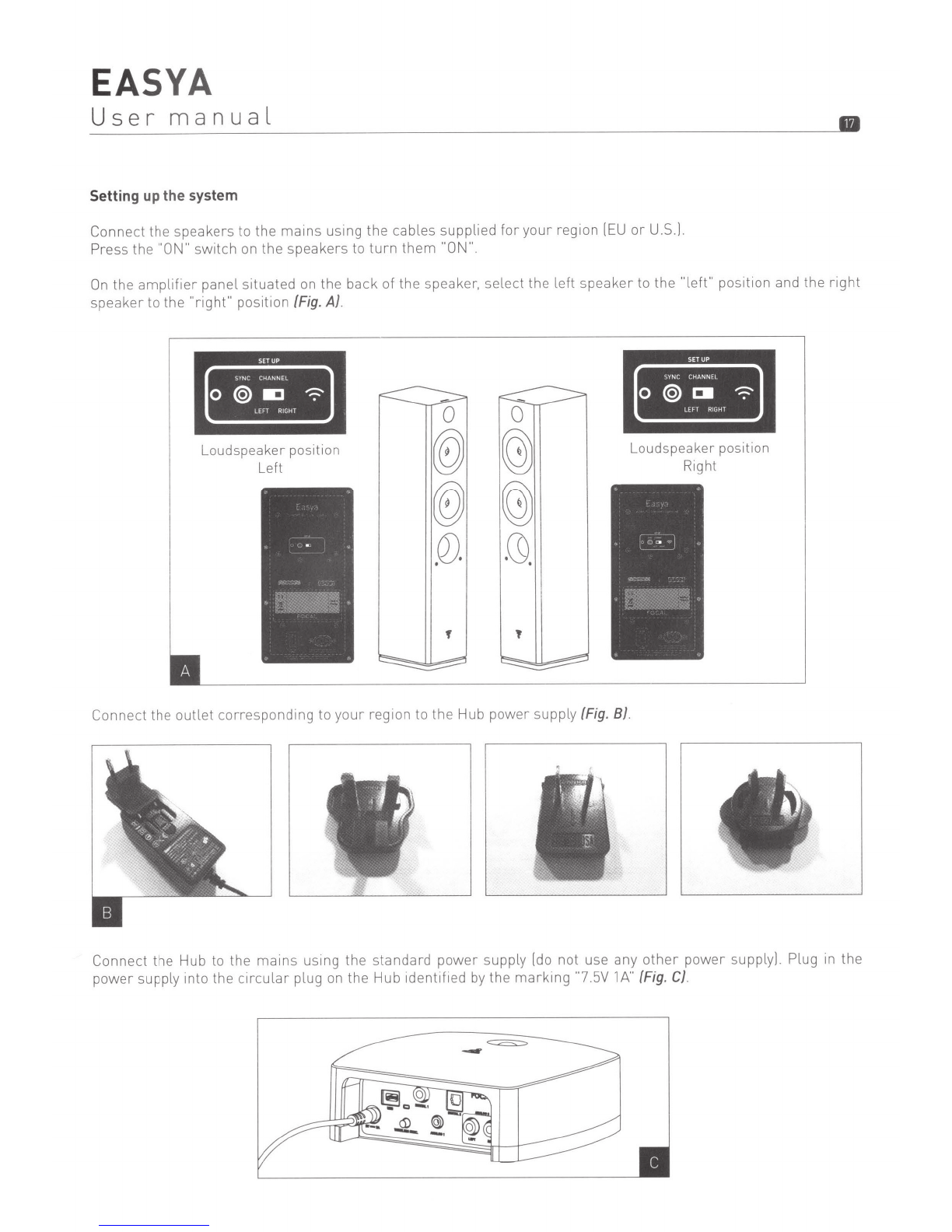
On
the
amplifier
panel situated on the back
of
the speaker, select the
left
speaker
to the "
left"
position and the
right
speaker to the
"right"
position (Fig. A).
Loudspeaker position
Left
-
0
®)
®)
Q)
.
.
f '
Connect the
outlet
corresponding
to
your
region to the Hub power supply (Fig. B).
Loudspeaker position
Right
Connect the Hub to the
mains
using the standard
power
supply [do not use any
other
power
supply]
Plug in
the
power supply into the circul
ar
plug on the Hub identified
by
the
mark
ing
""7.5V
1A"
(Fig.
C).
EASY
A
User
manual
•
Hub
Connections
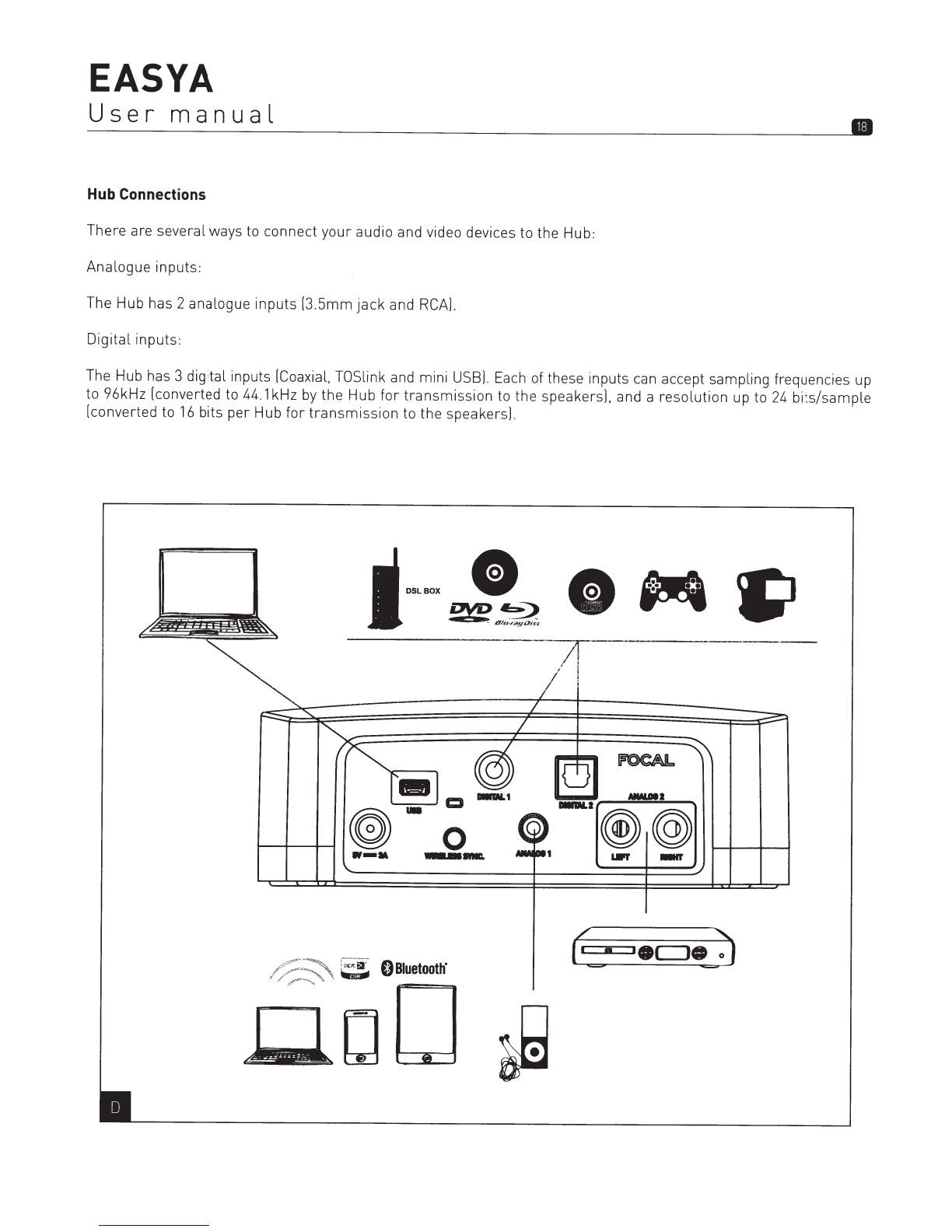
There
are
several
ways to
connect
your
audio and video devices to
the
Hub:
Analogue
inputs:
The
Hub
has 2
analogue
inputs
[3.5mm
jack
and RCA].
Digital
inputs:
The Hub has 3
digital
inputs [Coaxial, TOSlink and
mini
USB]. Each of these
inputs
can accept
sampling
frequencies up
to 96kHz [converted to
44.1
kHz by
the
Hub
for
transmission
to
the
speakers].
and a
resolution
up to 24
bits/sample
[converted
to
16
bits
per
Hub
for
transmission
to
the
speakers].
0
__
...
EASY
A
User
manual
•
Bluetooth®
wireless
technology
input:
In
order
to
link
a device
with
the Hub, it
must
be
Bluetooth®
compatible
and the aptX®
"Bluetooth®"
input
must
be
selected on the Hub.
There are
two
ways to set the Hub to
linked
mode:
• By pressing and holding down the sync
button
located on the back of
the
Hub
for
3 seconds.
• By pressing and holding down the
"Down
Arrow"
remote
control
button
for
3 seconds.
When the Hub is in
Bluetooth
linked mode, the aptX®
Bluetooth®
input
LED on the
front
starts
to
flash
quickly
.
The Hub is
identifiable
on the linked device as "Focal
Bluetooth
Receiver
Hub"
.
To
complete
the link, please
refer
to
the
manual
for your device
for
linking with the Hub. If
no
device
is
linked within
30
seconds, the Hub
will
exit linked mode.
Once a device has been linked
with
the
Hub, it
will
remain
in
the
memory.
Link
ing only needs to take place once. The
Hub can store
twenty
linked devices. If
more
than
twenty
devices are linked
with
the
Hub, it replaces the
oldest
device
with
the
most
recent one linked.
Only one device at a
time
can
be
linked
with
the Hub. If you
want
to
connect
a device,
ensure
that
no
other
devices
are already connected.
It is advisable to increase the
volume
of the device connected to the Hub and to
control
the
volume
using the
supplied
remote
control.
EASY
A
User
manual
Remote Control
Functions
and use of
buttons:
{Fig.
E)
ON/OFF
'
INPUT
SELECT/
SELECTION
DES
ENTREES
0
~-
......
~
~
.....
0 0 '
0
oA··
·····{+
-4>»)
(
.....
)
............
0 0
....
········~
[EO············
0
0.~
.·
o~·······~
0
ASSOCIATION
....
·····
.·
.·
0
.......
.............
....
0
Bluetooth"
REMOTE
LEARNING
PROGRAMMA
liON
TELECOM
MAN
DE
..
FOCAL
•
•
Power
OFF:
allows
you to
manually
set
the
Hub
to
standby
mode.
All
LEOs on
the
front
panel
are
turned
off. Does
not
allow
auto
ON
mode
,
the
speaker
goes
straight
to
standby
mode
. Press again to
return
to
the
same
status
before
setting
Power
Off.
Only
the
Power
Off
button
allows
you to
return
to
ON
mode
.
•
Input
selection:allows
you to
select
different
inputs
for
the Hub on a
cyclical
basis.
•
Volume
Control
:
allows
you to reduce,
increase
or
mute
the Hub
volume.
In
silent
mode,
the
input
LED selected on
the
front
flashes
. Press again to
disable
silent
mode. When
the"+
"
or"_"
button
is activated,
the
input
LED selected
flashes
on
the
Hub, and
when
the
minimum
or
maximum
volume
is reached, the LED
stops
flashing.
•
Controlling
tracks:
these
functions
are valid only
when
the
Bluetooth®
or
USB
inputs
are selected. Left
Arrow
for
"previous
track"
and
right
arrow
for
"next
track".
These
functions
allow
you to move to
the
next
or
previous
tracks
only i.
e.
it is
not
a fast
forward
or
rewind
function.
The
"Play
I
Pause"
middle
button
is used to
start
playback
or
pause
the
source. [Please note:
certain
Smartphones
are too old,
or
do
not
support
the
AVRCP protocol, and do not
allow
this
feature
to
be
used.)
• Bluetooth®
linking:
by
selecting
the
Bluetooth®
input
button
on the Hub,
the
Hub can be
linked
with
Bluetooth®
devices. Press and hold down
the
button
for
3 seconds. When the
linked
mode
is activated, the
Bluetooth®
input
LED
starts
to
flash
on
the
front
of
the
Hub.
This
mode
is deactivated once
the
device is
linked,
or
after
30 seconds
if no device has been linked.