manuals.online logo
Brands
  1. Home
  2. •
  3. Brands
  4. •
  5. Fudakang
  6. •
  7. Blood Pressure Monitor
  8. •
  9. Fudakang FT-B12W User manual

Fudakang FT-B12W User manual

This manual suits for next models

13

Popular Blood Pressure Monitor manuals by other brands

Truly DB68 user manual

Truly

Truly DB68 user manual

ReliOn HEM-412CREL instruction manual

ReliOn

ReliOn HEM-412CREL instruction manual

Omron BP654 instruction manual

Omron

Omron BP654 instruction manual

HOFFEN KF-65B manual

HOFFEN

HOFFEN KF-65B manual

Omron HBP-1100 instruction manual

Omron

Omron HBP-1100 instruction manual

eks Vision Plus 0300 user manual

eks

eks Vision Plus 0300 user manual

Omron M2 Compact instruction manual

Omron

Omron M2 Compact instruction manual

Beurer medical BM 16 Instructions for use

Beurer medical

Beurer medical BM 16 Instructions for use

Nellcor SYMPHONY N-3100 Service manual

Nellcor

Nellcor SYMPHONY N-3100 Service manual

Terraillon TENSIOSMART user manual

Terraillon

Terraillon TENSIOSMART user manual

Braun ActivScan 9 quick start guide

Braun

Braun ActivScan 9 quick start guide

A&D UA-767S-W instruction manual

A&D

A&D UA-767S-W instruction manual

AEG BMG 4922 user guide

AEG

AEG BMG 4922 user guide

Yuwell YE660D user manual

Yuwell

Yuwell YE660D user manual

Microlife BP A1 Easy instructions

Microlife

Microlife BP A1 Easy instructions

A&D AccuFit manual

A&D

A&D AccuFit manual

AND UA-1020-W instruction manual

AND

AND UA-1020-W instruction manual

Medline MDS3002 Operation guide

Medline

Medline MDS3002 Operation guide

manuals.online logo
manuals.online logoBrands
  • About & Mission
  • Contact us
  • Privacy Policy
  • Terms and Conditions

Copyright 2025 Manuals.Online. All Rights Reserved.

Wrist Blood Pressure Monitor
(Electronic Sphygmomanometer)
User Manual
Thank your for purchasing our product.
Please read this manual carefully before using the product.
Please keep the manual appropriately for future reference.
This User Manual is suitable to the following models: FT-B11W, FT-B12W,
FT-B13W, FT-B14W, FT-B21Y, FT-B22Y, FT-B11W-V, FT-B12W-V, FTB13W-V,
FT-B14W-V, FT-B21Y-V, FT-B22Y-V, FT-B13W-UR and FT-B13W-BT.
Table of Contents
(I) General Information
(II) Precaution for Use and Maintenance
(III) Name of Each Part
(IV) Measure Procedure
(V) Troubleshooting
(VI) Model List
I. General Information
Intended Use and Indications For Use
Fudakang Wrist Blood Pressure Monitor are non-invasive blood measurement
system intended to measure the diastolic, systolic blood pressures and pulse rate of
an adult individual in hospitals, hospital-type facilities and home environments.
The BT series Blood Pressure Monitor with the wireless communication function that
is connect to the PC or a mobile phone for record archiving and printing purpose.
Specification
Product Name Wrist Blood Pressure Monitor
Applied Models
FT-B11W, FT-B12W, FT-B13W, FT-B14W, FT-B21Y,
FT-B22Y, FT-B11W-V, FT-B12W-V, FTB13W-V,
FT-B14W-V, FT-B21Y-V, FT-B22Y-V,
FT-B13W-UR (for UART port connection)
FT-B13W-BT (for Bluetooth connection )
Measurement Principle Oscillography
Cuff Soft cuff, Cuff size 290mm×72mm (+/- 5mm)
11.4 inch ×2.8 inch(+/- 0.2 inch)
Measurable Wrist
Circumference Range About 135~195mm ( 5.3~ 7.7 inch)
Measurement Range Pressure: 0~300mmHg
Pulse: 30~180 times/minute
Bluetooth Version Bluetooth 4.1 BLE
Bluetooth Modulation Type
GFSK
Accuracy Pressure: ±3mmHg
Pulse: ±5%
Power Supply 2 x 1.5V AAA Alkaline batteries 3V
Battery Life
Approx. 250 times (180mmHg, 1 time/day, 22°C)
Each measurement takes around 60 seconds, and
each memory checking takes about 1 second
Protection against electric
shock Type BF Cuff
IP classification IP22
Working Environment
Temperature: 5~40°C
Humidity: <90%RH
Pressure: 86~106 kPa
Transport and storage
Environment
Temperature: -20~55°C
Humidity: <95%RH
Pressure: 86~106 kPa
Electric Shock Protection Internal power unit
Memory Capacity 90 sets of data including date and time
See VI. Model List
Inflation Automatic Inflation by internal pump
Deflation Automatic speed deflation system controlled by
internal electromagnetic valve.
Display LCD digital display ; It can show Pressure, Pulse,
Date, Time
Color Backlight display on
LCD (Optional)
White backlight display when power on
Green backlight display when result is normal
Red backlight display when result is abnormal
Switch 2 (ON/OFF, Memory) or 3 (ON/OFF, Set, Memory)
Life Time Machine : 5 years or 10000 times
Cuff : 10000 times
Contents
-2 x 1.5V AAA alkaline batteries 3V (Optional)
-Storage case
-Instruction Manual
Contraindications:
1. Heart disease
2. High blood pressure or other circulatory disease
3. Wrist injury
Patient Populations:
The device is intended to use for adults. DO NOT use this device on infants or small
children.
Cleaning Information:
1. If the device is very dirty, wipe it clean with a cloth moistened with sterilizing alcohol or
a neutral detergent. Then wipe it with a dry cloth.
2. NEVER clean the blood pressure monitor with thinners or benzene, as they may
damage it.
3. To clean the cuff, wipe it with a moist cloth. Avoid hard rubbing as this will cause air
leakages. Take care also not to get water into the air hose.
Maintenance:
This product is designed for use over an extended period of time; however, it is generally
recommended that it be inspected every five years to ensure proper function and
performance. The device doesn’t need to be calibrated in five years of reliable service.
Modification of this equipment is allowed except change the batteries.
Protect the Nature Environment:
Please help to protect natural environment by respecting national and/or local recycling
regulations when disposing of the battery and the product at the end of their useful live.
II. PRECAUTION FOR USE AND MAINTENANCE
Precautions for Use:
1. If you suffer from heart disease, high blood pressure or other circulatory disease,
consult your physician before using the device. It is intended for adult indoor use
only. The device is not suitable for public use.
2. The patient is an intended operator. The patient can measure, transmit data and
charge battery under normal circumstances and maintain the device and its
accessories according to the user manual.
3. If the cuff pressure feels abnormal or you experience any other irregularity while using
the cuff, reduce the pressure immediately by pressing the “START/STOP” switch and
then consult the sales outlet where you purchased the device.
4. If you think the measurement is abnormal or if measurement makes you feel unwell,
discontinue use and consult your physician.
5. Blood pressure measurement may not be possible for anyone with a weak pulse or
arrhythmia.
6. Repeated blood pressure measurement may cause problems such as congestion or
swelling in some people.
7. Frequently repeated blood pressure measurements will not give accurate results.
Allow an interval of about 3 minutes between measurements.
8. If you suffer from a severe problem with blood circulation in your arms, consult your
physician before using the device. Failure to do so could be hazardous to your health.
9. Measurement may not be possible for anyone with insufficient blood flow to the area
where measurements will be taken or who suffers from a frequent irregular heartbeat.
Consult your physician for advice on whether to use the device.
10. DO NOT wrap the cuff around an injured wrist.
11. DO NOT wrap the wrist cuff around a wrist in which a drip (intravenous infusion) is
inserted or which is being used for blood transfusion as part of medical treatment.
Doing so could result in an injury or a serious accident.
12. DO NOT wrap the cuff on the wrist on the side of a mastectomy.
13. DO NOT use the device in the vicinity of flammable gases such as those used for
anaesthesia. Doing so could ignite the gases and cause an explosion.
14. DO NOT use the device in enriched oxygen environments such as a hospital’s
hyperbaric chamber or oxygen tent. Doing so could ignite the oxygen and cause a
fire.
15. DO NOT use mobile phones near the device as this could result in a malfunction.
DO NOT use the device with hf surgical equipment.
16. If you use a cardiac pacemaker, consult your physician before using the device.
17. Be sure to use this device only for measuring blood pressure. DO NOT use it for any
other purpose.
18. DO NOT use this device on infants, pregnant women or pre-eclamptic patients.
19. DO NOT use this device for patients that transport outside a healthcare facility.
20. Blood pressure measurement may not be possible for anyone with common
arrhythmias such as arterial or ventricular premature beats or arterial fibrillation.
21. Be careful to strangulation due to cables and hoses, particularly due to excessive
length. It will not cause any potential alergic reaction or contact injury. If you are
allergic to dacron or plastic, please don’t use this device.
Precautions for Maintenance:
1. DO NOT store the blood pressure monitor in locations exposed to direct sunlight, high
temperatures (over 60°C), low temperatures (below -20°C), high relative humidity
(over 85%) or excessive amounts of dust.
2. DO NOT drop the blood pressure monitor or subject it to other shocks or vibration.
3. Remove the batteries if the device will be left unused for a long period.
4. DO NOT attempt to disassemble the device. User can open battery cover for new
battery installation.

5. NEVER clean the blood pressure monitor with thinners or benzene, as they may
damage it.
6. DO NOT hard rub when clean the cuff.
7. DO keep the device out of reach of children, pets and insects.
III. Name of Each Part
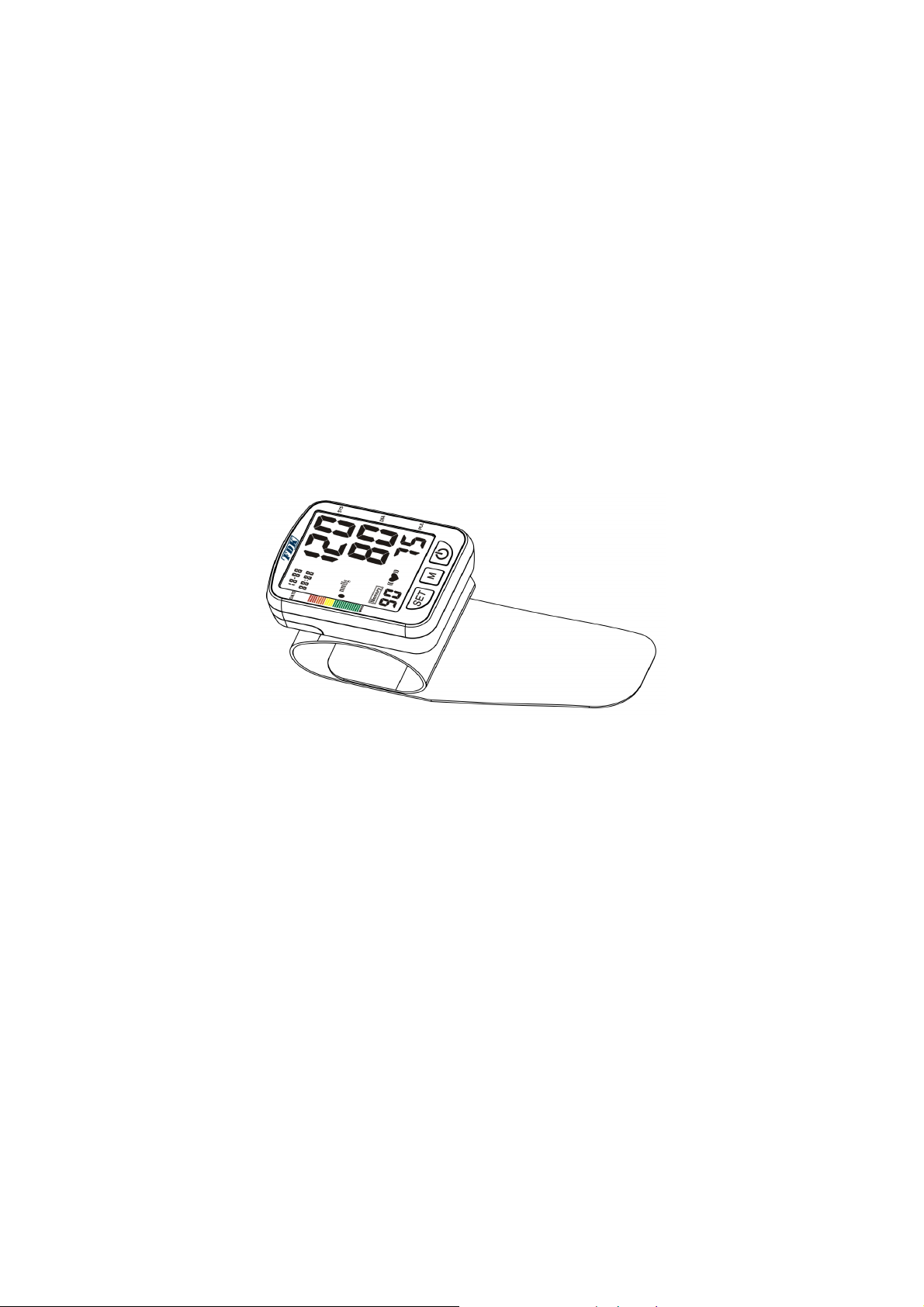
Figure 1 - Appearance
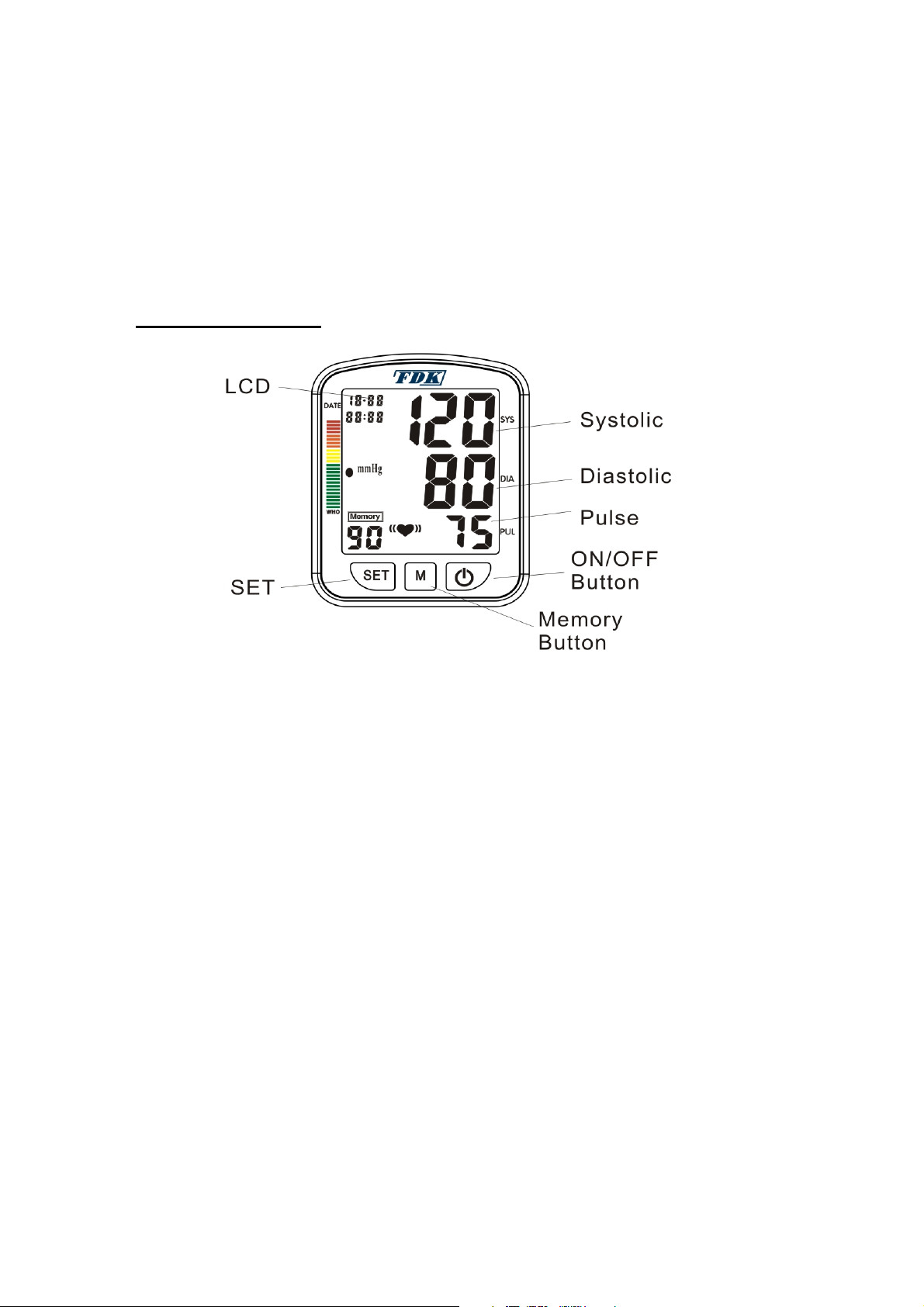
LCD Display
“SET” Button / Calendar, Clock Setting Mode
“MEMORY” Button / Calendar, Clock Setting Adjustments
ON/OFF Button
Pulse Indicator
Systolic Indicator
Diastolic Indicator
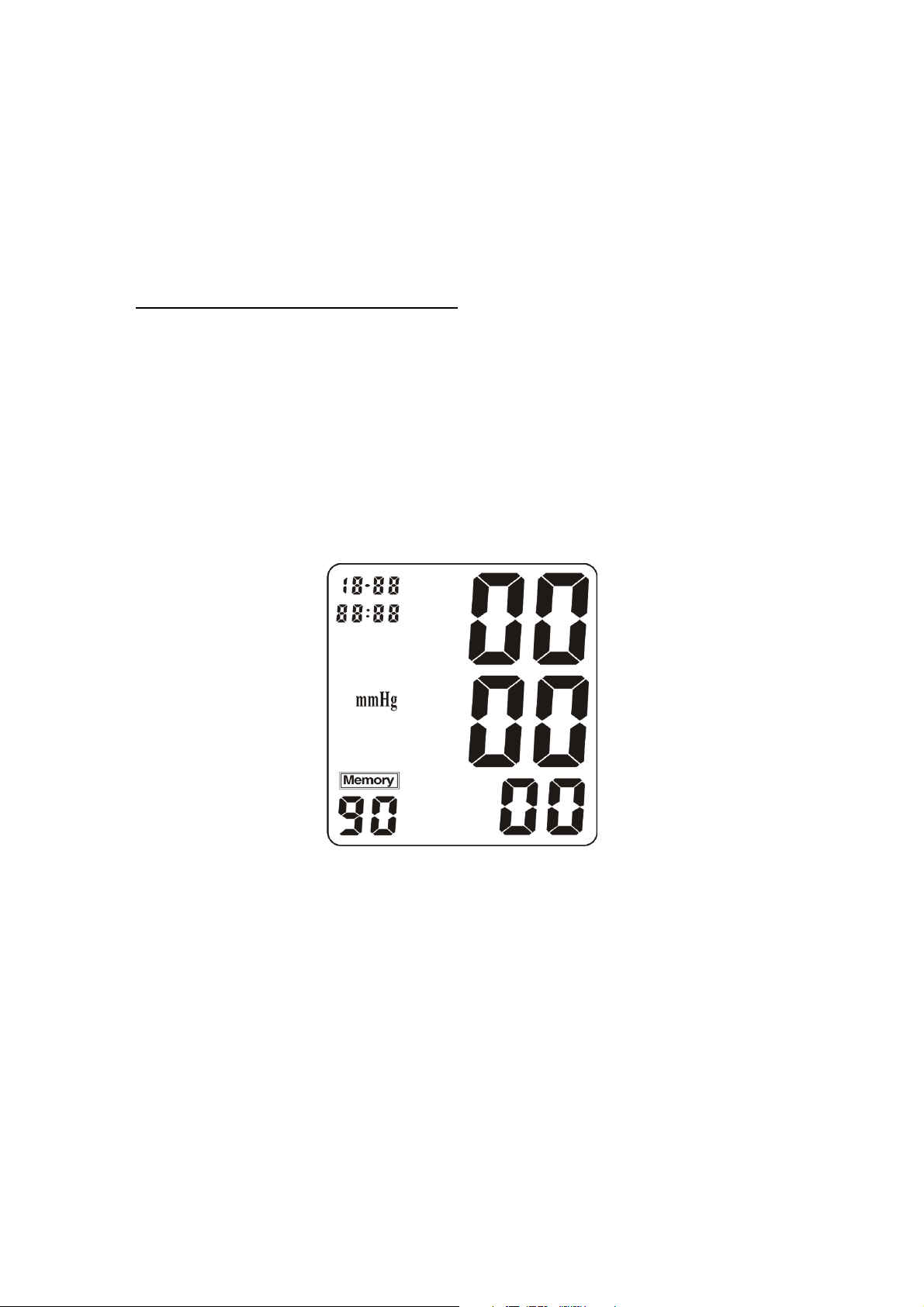
Figure 2 – Display of LCD
Note for LCD display:
* Back light display function is optional.
IV. Measure Procedure
Battery Loading
Remove the battery compartment cover by gently pushing down on arrow and sliding
cover forward.
(1) Date: Month
–
Day
(2) Time: Hour – Minute
(3) Systolic Blood Pressure (unit: mmHg)
(4) Diastolic Blood Pressure (unit: mmHg)
(5) Pulse Rate (unit: beat/minute)
(6) WHO Blood Pressure Classification Indicator
(7) Inflation / Deflation Indicator
(8) Blood Pressure Measurement Unit
(9) Battery Symbol
(10) Irregular heartbeat Indicator
(11) Memory Record Number
Place batteries with positive “+” and negative “-“ terminals into compartment and make
sure they match the indicated terminals in the compartment.
Close the battery cover by gently sliding it into the compartment and pressing it into
place.. See Figure 3.
Note:
::
:
When the LCD display shows “Low Battery” signal ,the batteries must be replaced for
accurate readings. See Figure 4
Do not use rechargeable batteries (voltage 1.2V). They are not suitable for this product,
can damage the monitor and will cause inaccurate readings to be obtained.
Remove the batteries if the monitor will not be used for six month or longer to avoid
damage from the possibility of leaking batteries.
All the measurements will remain in the memory should the batteries become drained,
removed, or replaced.
Figure 3 Figure 4
Clock Adjusting and Unit Change
During the monitor is turned off, if you continually press and the “SET” buttons for about 5
seconds, the number of the YEAR signal will begin to blink on the LCD display. Press the
“M” (for memory) button to change the YEAR. Each time when you press the “M” button,
it will change one YEAR forward.
When the YEAR is set up, if you continually press and release the “SET” button, the
MONTH signal will begin to blink. Press the “M” button to change the MONTH. Each time
when you press the “M” button, it will change one MONTH forward.
When the MONTH is set up, if you continually press and release “SET” button once, the
DAY signal will begin to blink. Press the “M” button to change the DAY. Each time when
you press the “M” button, it will change one DAY forward. Don't keep on clicking on the
'SET' button without being released during programming.
REPEAT THIS PROCESS FOR SETTING THE TIME.
Use the “SET” button to change (Hours/Minutes) and the “M” button will change the
numbers forward . See Figure 5.
After you change the batteries, you have to readjust the date and time. Time is
maintained using a 24 HOUR clock. AM/PM is not displayed.
NOTE:
WHEN EVERYTHING IS SET-UP COMPLETELY, THE MONITOR WILL AUTOMATICALLY SWITCH OFF.
BUT, WHEN YOU PRESS “ON/OFF” BUTTON AGAIN, THE MONITOR WILL ACTIVATE.
Figure 5
For the unit change, you can select the mmHg or Kpa; and the mmHg is the definition
unit.
When the machine is turned off, press the button “ON/OFF” more than about 10 seconds
till LCD blinks, then press Memory button to switch between mmHg and Kpa .
Wrist Cuff Connecting
★Place the cuff around your left bare wrist ½” - ¾” above the wrist joint on the
opened-hand (inside) side of the wrist.
★Keep the cuff at approximately the same level as your heart. Do not inflate before
fitting the cuff.
★Unless your physician recommends otherwise, use the left wrist to measure pressure.
★The cuff should be snug but not too tight. You should be able to insert two fingers
between the cuff and your wrist. See Figure 6.
★Only use the manufacturer cuff with the main unit to ensure accurate measurement.
NOTE: CONTINUOUS CUFF PRESSURE MAY EFFECT BLOOD FLOW AND CAUSE
HARMFUL INJURY
Figure 6
Note: The cuff is “ TYPE BF APPLIED PART”
Measuring Process
CORRECT POSTURE FOR TAKING BLOOD PRESSURE MEASUREMENT
★Cuff should be at approximately the same height as your heart.
TIPS FOR BLOOD PRESSURE MONITORING
★Relax for about 5 minutes before measurement.
★Do not smoke or ingest caffeine at least 30 minutes prior to measurement.
★Remove any constricting clothing and place the cuff on a bare wrist.
★Keep still and do not talk until the measurement is complete.
★The cuff must be neither too tight nor too loose. Using a little force, you should be
able to place two fingers between the cuff and your wrist..
★Make yourself comfortable and sit-up straight. legs uncrossed, feet flat on the floor.
★Place and rest the wrist with the cuff in front of you on the table with your palm facing
up. Do not bend your wrist or curl your fingers.