FWE LCH-SK-G Series User manual
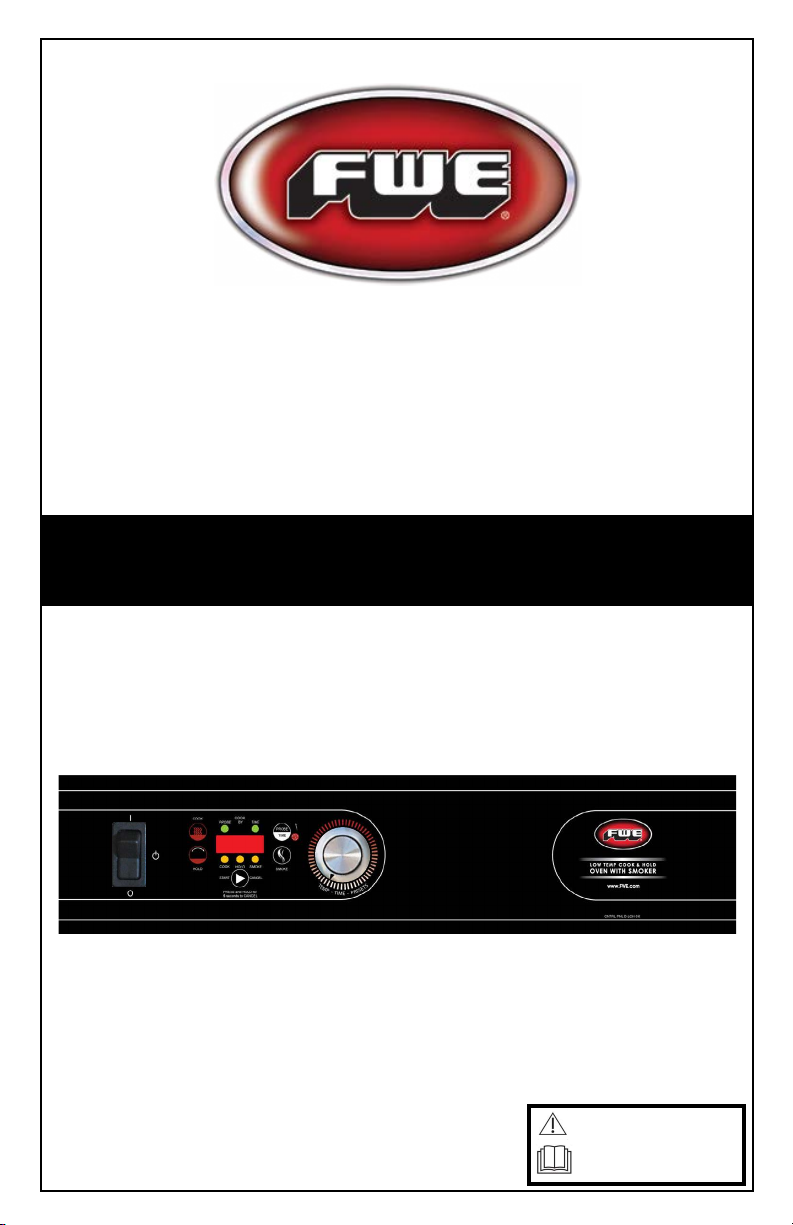
COOK & HOLD SMOKER OVEN
OPERATING
INSTRUCTIONS
LCH-SK-G2 SERIES
Original Instructions
Caution: Read the
instructions before
using the machine.
INTERNATIONAL/DOMESTIC

2FWE COOK & HOLD SMOKER OVEN
FWE COOK & HOLD SMOKER OVEN
WARNING SYMBOLS AND EXPLANATIONS
WARNING SYMBOLS *
To indicate hazards arising from dangerous
voltages
To identify the terminals which, when connected
together, bring the various parts of an equipment or of a
system to the same potential.
To identify the terminal which is intended for
connection to an external conductor for protection against
electric shock in case of a fault, or the terminal of a
protective earth (ground) electrode
To indicate that the marked item can be hot and should not
be touched without taking care
To indicate the “ON” condition for a part of
equipment
To indicate the “OFF” condition for a part of
equipment
To indicate the stand-by or preparatory state for a part of
equipment
To indicate maximum ll level
To indicate minimum water level
*Symbols will vary from unit to unit.
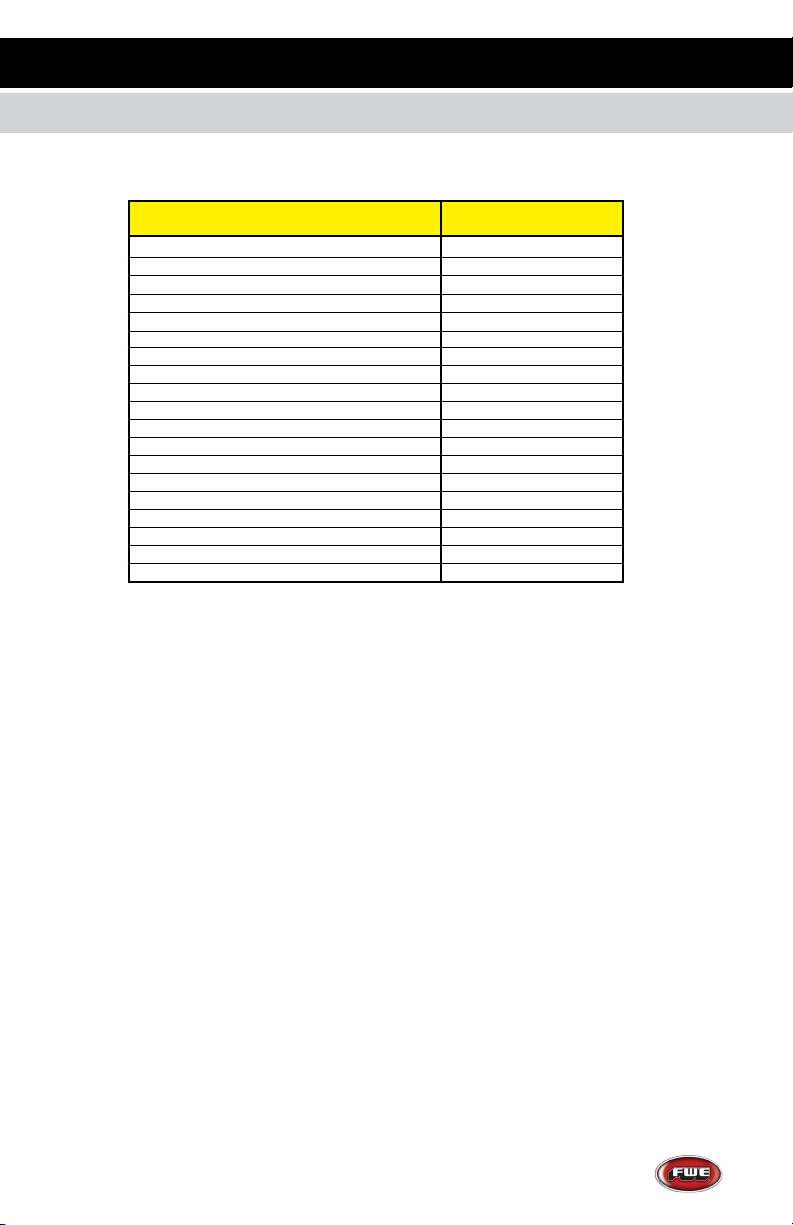
CASTER WEIGHT LIMIT AND SERVICE
3
FWE COOK & HOLD SMOKER OVEN
CASTER DESCRIPTION
2” GREY RUBBER CASTER,SWIVEL W/BRK
CASTER 2” RIGID
CASTER 3” RIGID
CASTER 3.5” RIGID HEAVY DUTY
CASTER 4X2” EZ ROLL RIGID POLYBLUE
CASTER 5” RIGID HEAVY DUTY
CASTER 5” RIGID SUPER DUTY
CASTER 5” SWIVEL BRAKE RB GRS FIT Poly
CASTER 5” RIGID EZ ROLL POLY
CASTER 5” SWIVEL BRAKE EZ ROLL POLY
CASTER 6” RIGID HEAVY DUTY
CASTER 6” RIGID SUPER DUTY
CASTER 6” SWIVEL BRAKE EZ ROLL POLY
CASTER 6” RIGID EZ ROLL POLY
CASTER 8” PNEUMATIC RIGID
CASTER 8” RIGID HEAVY DUTY
CASTER 8” RIGID SUPER DUTY
CASTER 8” SWIVEL BRAKE EZ ROLL POLY
CASTER 8” RIGID EZ ROLL POLY
MAX WEIGHT
34Kg
68Kg
68Kg
113Kg
272Kg
124Kg
226Kg
340Kg
362Kg
362Kg
158Kg
272Kg
453Kg
453Kg
113Kg
226Kg
272Kg
544Kg
544Kg
IN THE EVENT OF ACCIDENT OR
BREAKDOWN - UNPLUG UNIT.
FOR SERVICE INQUIRIES PLEASE CALL
FWE SERVICE - 800-222-4393
Improper use of this machine can result in injury and/or death.
A schedule should be put in place for inspections and
preventative maintenance.
New users should be properly trained in the use of this
equipment.
No special protective equipment is required to operate
this unit.
Unplug unit before servicing.
SEE SHIPPING LABEL FOR CASTER SIZE

For U.S. and Canada Models:
The amperage of your cabinet is stamped on the name plate serial tag attached
to the unit. FWE models are equipped with a grounded cord plug for your pro-
tection against possible shock hazards. Be sure to plug only into a properly
grounded wall receptacle. If you have any questions with regard to adequate
wiring or grounding in your building, a qualified electrician should be contacted
before using your cabinet.
For International Models:
May be shipped with no cord or plug
Contact qualified service personnel for cord and plug installation.
DO NOT, UNDER ANY CIRCUMSTANCES, CUT OR REMOVE THE
GROUNDING PRONG FROM THE
CORD PLUG.
WARNING: ONLY A QUALIFIED SERVICE PERSONNEL WILL REMOVE,
REPAIR OR REPLACE ELECTRICAL COMPONENTS OR WIRING.
BE SURE THAT MODEL IS UNPLUGGED FROM ELECTRICAL SOURCE
BEFORE REMOVING
CONTROL PANEL, MOVING, CLEANING, OR SERVICING UNIT.
Keep your cabinet clean by simply wiping the interior and
exterior, as needed, with a damp cloth or sponge and a mild soapy solution.
NEVER USE ABRASIVES, ACIDS, OR STRONG CLEANERS.
Do not flood or allow electrical parts to become wet. The interior tray slide
assemblies are removable for easy cleaning. A stainless steel cleaner/polish is
recommended for the exterior to maintain a “like-new” appearance.
DO NOT USE WAX OR STRONG CLEANERS ON DOOR GASKETS OR
VINYL TRIM.
WARNINGS AND CLEANING CARE
4FWE COOK & HOLD SMOKER OVEN
ELECTRICAL REQUIREMENTS AND GROUNDING
FWE COOK & HOLD SMOKER OVEN
CLEANING
INTENDED USE AND REQUIREMENTS
This unit is to be used for cooking only.
Unit must be installed level.

5
...and thank you for purchasing an FWE Cook & Hold Smoker Oven.
Your unit has been designed and manufactured under rigid
controls to assure you the most efficient service. It is a full time unit,
and may be used continuously.
Please take a moment to read through this booklet of important
information pertaining to your cabinet. By following a routine of
proper use and care described on the following pages, your cabinet
will last for many years.
IMPORTANT: Your Manufacturer Registration Card must be
returned within 30 days after initial delivery to activate the warranty.
FWE COOK & HOLD SMOKER OVEN
SERIAL AND MODEL NUMBER
UNPACKING
After uncrating your cabinet, remove all tape and padding
which held all doors, shelves, racks, cord, etc., in place during
shipment.
These numbers are found on the nameplate (serial tag) affixed
near the electrical cord portal. Please record them in this
booklet, in the space provided on page 14. When calling in
regards to service, you will need to provide this information.
The voltage and amperage of the unit are also stamped
on the serial tag.
CONGRATULATIONS...

6FWE COOK & HOLD SMOKER OVEN
FWE COOK & HOLD SMOKER OVEN
• Press COOK
• Rotate Dial to Oven Temp Set Point
• Press PROBE/TIME 1X to select Cook By Probe
• Rotate Dial to Probe Temp Set Point
• Press HOLD
• Rotate Dial to Hold Temp Set Point
• Press START/CANCEL to begin preheat cycle
• Load food after ‘rdY’ is displayed
• Press START/CANCEL to begin cooking cycle
TO COOK MANUALLY BY PROBE
• Press COOK
• Rotate Dial to Oven Temp Set Point
• Press PROBE/TIME 2X to select Cook By Time
• Rotate Dial to Cook Time
• Press HOLD
• Rotate Dial to Hold Temp Set Point
• Press START/CANCEL to begin preheat cycle
• Load food after ‘rdY’ is displayed
• Press START/CANCEL to begin cooking cycle
TO COOK MANUALLY BY TIME
GENERAL OPERATING INSTRUCTIONS
COOK PROBE/TIME
HOLD
START/CANCEL
SMOKE
DIAL
GENERAL OPERATING INSTRUCTIONS
FWE COOK & HOLD SMOKER OVEN
7
• Press COOK
• Rotate Dial to Oven Temp Set Point
• Press PROBE/TIME 1X to select Cook By Probe
• Rotate Dial to Probe Temp Set Point
• Press HOLD
• Rotate Dial to Hold Temp Set Point
• Press SMOKE
• Rotate Dial to Smoke Time
• Press START/CANCEL to begin preheat cycle
• Load food after ‘rdY’ is displayed
• Press START/CANCEL to begin cooking cycle
TO COOK MANUALLY BY PROBE AND SMOKE
• Press COOK
• Rotate Dial to Cook Temp Set Point
• Press START/CANCEL to begin cooking cycle - display shows oven set temp.
NOTE: Unit must manually be canceled or shut off to end cook cycle.
TO COOK MANUALLY WITH NO TIME OR PROBE CONTROL
• Press COOK
• Rotate Dial to Oven Temp Set Point
• Press PROBE/TIME 2X to select Cook By Time
• Rotate Dial to Cook Time
• Press HOLD
• Rotate Dial to Hold Temp Set Point
• Press SMOKE
• Rotate Dial to Smoke Time
• Press START/CANCEL to begin preheat cycle
• Load food after ‘rdY’ is displayed
• Press START/CANCEL to begin cooking cycle
• To bypass Preheat, press START/CANCEL again
TO COOK MANUALLY BY TIME AND SMOKE

FWE COOK & HOLD SMOKER OVEN
8FWE COOK & HOLD SMOKER OVEN
GENERAL OPERATING INSTRUCTIONS
• Press SMOKE Display shows “ -- ˮ
• Rotate Dial to set Smoke Time
• Press START/CANCEL to begin cold smoke
NOTE: Decimal point in right-most 7-segment display will be lit to indicate smoke element has
been activated.
TO COLD SMOKE
• Press and hold the SMOKE button for 5 seconds. Set desired smoke time
• Rotate Dial to set Smoke Time
• Press START/CANCEL to start
NOTE: This overrides a smoke cycle in process or may add the desired smoke time.
If the probe temperature or cook time expires during this addition, the smoke will be canceled
and hold will be initiated.
TO ADD SMOKE TO ANY COOK CYCLE
• Press and hold START/CANCEL for 5 seconds
TO CANCEL ANY COOK CYCLE
• Display will alternate between ‘PrHE’ and ‘Actual Temp’ until ‘rdY’ is displayed
• To display Set and Actual temperatures, Press COOK The display shows
“Set” for 1 second, then the oven set temp for 2 seconds, followed by “Act” for
1 second, then the actual oven temp for 2 seconds, then return to the original display.
If there is no set point, the display will show “ - ˮ in place of the set temperature.
• To display Set and Actual Probe temperatures during preheat, ready and cook
states, press PROBE The display shows “Set” for 1 second, then the set
probe temp for 2 seconds, then returns to the original display.
• To display Set Cook Time during preheat, ready and cook states, press PROBE
The display shows “Set” for 1 second, then the set cook time for 2 seconds,
then returns to the original display.
• To display Set Hold Temp, press HOLD The display shows “Set” for 1
second, then the hold set temp for 2 seconds. If hold was not programmed, the
default hold set temp of 160°F (71°C) will be shown.
NOTE: this function is inoperable in manual cook preheat, manual cook ready
and manual cook.
NOTE (applies to all cooking modes):
GENERAL OPERATING INSTRUCTIONS
FWE COOK & HOLD SMOKER OVEN
DEFAULT PRESETS (EDITABLE):
No: Smoke Oven Temp. Cook Time Probe Temp. Hold Temp.
1
2
3
4
5
6
7
8
NONE
4:00
2:00
2:00
NONE
4:00
2:00
2:00
190°F /
225°F /
350°F /
NONE
190°F /
225°F /
350°F /
225°F /
NONE
NONE
NONE
NONE
6:00
8:00
3:00
6:00
130°F /
180°F /
160°F /
NONE
NONE
NONE
NONE
NONE
NONE
140°F /
155°F /
150°F /
140°F /
155°F /
150°F /
150°F /
• To edit a preset, from idle press and hold the COOK for 5 seconds
• After 2 seconds, display will show “PrE1” and after 5 seconds, the display will flash
indicating programming mode
• Rotate dial to show the desired program to edit and press the SMOKE
• The display shows current value
• Rotate dial to obtain the desired value (00:00 is off)
• Press COOK to display the current oven temperature
• Adjust as desired (for cold smoke, set to “oFF”), if set to off, no other settings will be
available
• If oven temp is not Off, press PROBE/TIME once to set probe temperature or
twice to set time.
• If pressed twice, the probe will be canceled and time will override. As above, the
current value will be displayed and adjust to the desired value.
• Press HOLD and adjust as above
• Press the START/CANCEL to save the preset and return to idle
TO EDIT PRESETS
9
• Power on while pressing START/CANCEL
• Turn dial clockwise to select °F or counterclockwise to select °C
TO SET °F/°C UNITS
• Press and hold COOK for 2 seconds
• Dial preset selection (PrE1 - PrE8)
• Press START/CANCEL to begin cooking by preset
TO COOK BY PRESETS
107°C
177°C
88°C
107°C
177°C
107°C
54°C
82°C
71°C
60°C
68°C
66°C
60°C
68°C
66°C
66°C
88°C
10
FWE COOK & HOLD SMOKER OVEN
FWE COOK & HOLD SMOKER OVEN
SMOKE DRAWER
• PRESOAK the wood chips
in water (or liquid of choice).
The chips should be covered
completely with liquid for a
minimum of 2 hours
prior to using them.
• Shake off any excess water.
• Fill smoke drawer
according to desired smoke
setting.
• Close smoke drawer.
SMOKE SETTING CHIPS APPLICATION
LIGHT
SMOKE FLAVOR
NORMAL
SMOKE FLAVOR
EXTENDED
SMOKE FLAVOR
1
HR
2
HR
4
HR
ll 1/4 of compartmnet
ll 1/2 of compartmnet
ll full compartmnet
Subtle smoke avor: for foods
that absorb smoke easily such
as cheese or delicate sh
Standard smoke avor: for
every day items such as chicken,
turkey, salmon, etc.
Robust smoke avor: for dis-
tinct smoky avor in pulled pork,
beef, lamb, brisket, etc.
Please note that smoke may vary due to amount of wood chips and the soak time of wood chips.
Smoke will maintain in the unit for multiple hours if not released through the door.
Food product will not stop absorbing this smoke until the smoke is released or the product is removed.
SMOKE DRAWER
SWEETNESS WOODSY NUTTY SPICY HARDY ROBUST PUNGENT BITTER HARSH OVER-POWERING
LIGHT NORMAL STRONG EXCESSIVE
SMOKE FLAVOR INTENSITY CHART
1HOUR 2HOURS 4HOURS 4+HOURS
This manual suits for next models
1
Table of contents
Other FWE Oven manuals