manuals.online logo
Brands
  1. Home
  2. •
  3. Brands
  4. •
  5. Genesis
  6. •
  7. Speakers
  8. •
  9. Genesis G7.1c User manual

Genesis G7.1c User manual

Other Genesis Speakers manuals

Genesis G6.1c User manual

Genesis

Genesis G6.1c User manual

Genesis Gen 750 User manual

Genesis

Genesis Gen 750 User manual

Genesis G7.1p User manual

Genesis

Genesis G7.1p User manual

Genesis G2jr User manual

Genesis

Genesis G2jr User manual

Genesis Genesis 2.2 Junior User manual

Genesis

Genesis Genesis 2.2 Junior User manual

Genesis 1.1 User manual

Genesis

Genesis 1.1 User manual

Genesis 5.2 Convertible User manual

Genesis

Genesis 5.2 Convertible User manual

Genesis 200 User manual

Genesis

Genesis 200 User manual

Genesis G5.3 User manual

Genesis

Genesis G5.3 User manual

Genesis 350 User manual

Genesis

Genesis 350 User manual

Genesis 7.1 Petite User manual

Genesis

Genesis 7.1 Petite User manual

Genesis 450XS User manual

Genesis

Genesis 450XS User manual

Genesis 5.3 User manual

Genesis

Genesis 5.3 User manual

Genesis Helium 100 BT User manual

Genesis

Genesis Helium 100 BT User manual

Genesis Helium 400BT User manual

Genesis

Genesis Helium 400BT User manual

Genesis 700 User manual

Genesis

Genesis 700 User manual

Genesis 200 User manual

Genesis

Genesis 200 User manual

Genesis G6.1 User manual

Genesis

Genesis G6.1 User manual

Genesis 5.3 User manual

Genesis

Genesis 5.3 User manual

Genesis G5.2 User manual

Genesis

Genesis G5.2 User manual

Genesis Genesis 6.1e User manual

Genesis

Genesis Genesis 6.1e User manual

Genesis G6.1sr User manual

Genesis

Genesis G6.1sr User manual

Genesis G4 User manual

Genesis

Genesis G4 User manual

Genesis AMP-1 User manual

Genesis

Genesis AMP-1 User manual

Popular Speakers manuals by other brands

Electro-Voice LR4S engineering data

Electro-Voice

Electro-Voice LR4S engineering data

Definitive Technology Sound Cylinder user guide

Definitive Technology

Definitive Technology Sound Cylinder user guide

AudioSource LS545 user manual

AudioSource

AudioSource LS545 user manual

Paso C402-T Instructions for use

Paso

Paso C402-T Instructions for use

Altec Lansing 416-8C LF SPEAKER manual

Altec Lansing

Altec Lansing 416-8C LF SPEAKER manual

Kenwood KFC-1072 Servise manual

Kenwood

Kenwood KFC-1072 Servise manual

Peavey ProSys 112 user guide

Peavey

Peavey ProSys 112 user guide

JBL Control Contractor 60 Series installation instructions

JBL

JBL Control Contractor 60 Series installation instructions

Aura STORM-8 owner's manual

Aura

Aura STORM-8 owner's manual

Oontz ANGLE 3 PLUS quick start guide

Oontz

Oontz ANGLE 3 PLUS quick start guide

Electro-Voice LR4A engineering data

Electro-Voice

Electro-Voice LR4A engineering data

Rave RK-650-ICA-B owner's manual

Rave

Rave RK-650-ICA-B owner's manual

Flux Reference Series installation manual

Flux

Flux Reference Series installation manual

Lanzar AQAWBS64BK installation manual

Lanzar

Lanzar AQAWBS64BK installation manual

DAPAudio DCS-6230 manual

DAPAudio

DAPAudio DCS-6230 manual

Aluratek ABS03F quick start guide

Aluratek

Aluratek ABS03F quick start guide

Kenwood KES-5A instruction manual

Kenwood

Kenwood KES-5A instruction manual

Sonance ORIGINAL SERIES instruction manual

Sonance

Sonance ORIGINAL SERIES instruction manual

manuals.online logo
manuals.online logoBrands
  • About & Mission
  • Contact us
  • Privacy Policy
  • Terms and Conditions

Copyright 2025 Manuals.Online. All Rights Reserved.

ver 1.0
1
11
1
absolute fidelity

READ THIS FIRST
Genesis loudspeakers in general are heavy and slippery. This is as
a result of the fine veneer, and high gloss finishes that we put on
the speaker to make them beautiful and an object of art. They have
a luxurious feel as well as an elegant look.
The cabinet is solidly made of high quality MDF and/or composite
material. Transducers have large magnetic assemblies and the
crossovers use large, high grade components. All of this leads to a
very heavy object for its size.
Due to the weight, and also to the waxy finish, the loudspeaker may
be slippery and difficult to handle. We always recommend a
minimum of two people to unpack, move them around, and set
them up.
Your speakers will come wrapped in a 100% cotton “sock” inside a
double corrugated cardboard carton. Examine the carton for
shipping damage. Dented corners are an indication of something
having gone wrong during shipping.
Enlist a friend to help you unpack and set up the loudspeaker. Not
only is it safer, it is more fun than doing it yourself.
Lift the speaker in its sock out of the shipping carton. Don’t just
grab the sock to lift the loudspeaker. The sock may break. Be
careful that you do not inadvertently put a finger through a driver.
Unwrap the loudspeaker, and store the sock in the shipping carton.
Store the shipping carton in a safe, dry place.
Read this owner’s manual, and then get started.
ver 1.0
2
22
2
absolute fidelity

Owners Manual and Set-up Guide:
Genesis 7.1 onvertible Loudspeaker
ontents
1 A QUICK START SET-UP GUIDE 5
1.1 U
NPACKING
5
1.2 P
LACEMENT
5
1.3 C
ONNECTIONS
6
1.4 A
DJUSTMENTS
6
2 SETTING UP: MULTI-CHANNEL 7
2.1 P
OSITIONING FOR
C
ENTER
C
HANNEL
7
2.2 L
OUDSPEAKER
C
ONTROLS
7
2.2.1 T
WEETER
C
ONTROL
7
2.2.2 T
WEETER
D
EFEAT
7
3 SETTING UP AS STEREO PAIR
3.1 P
OSITIONING
3.2 L
OUDSPEAKER
C
ONTROLS
3.2.1 T
WEETER
C
ONTROL
8
3.2.2 T
WEETER
D
EFEAT
9
3.3 T
UNING THE SYSTEM
9
3.4 O
NE
C
HANGE AT A
T
IME
9
3.5 I
MAGING AND
S
OUNDSTAGE
9
3.6 D
EFINING THE
S
OUNDSTAGE
11
3.7 R
OOM
T
REATMENT
11
3. M
ASTERING THE
R
EFINEMENTS OF THE SYSTEM
12
4 THE TECHNOLOGY USED 14
4.1 D
IPOLAR
C
ONFIGURATION
14
4.2 T
HE
T
RANSDUCERS
14
4.2.1 T
HE
G
ENESIS
R
IBBON
T
WEETER
14
ver 1.0
3
33
3
absolute fidelity

4.2.2 T
ITANIUM
M
ID
-W
OOFER
15
4.3 C
ROSSOVER
15
4.4 V
IBRATION
-
FREE
C
ABINET
16
5 SPECIFICATIONS 17
ver 1.0
4
44
4
absolute fidelity

A Message from Genesis
Congratulations! You are now the owner of one of the finest
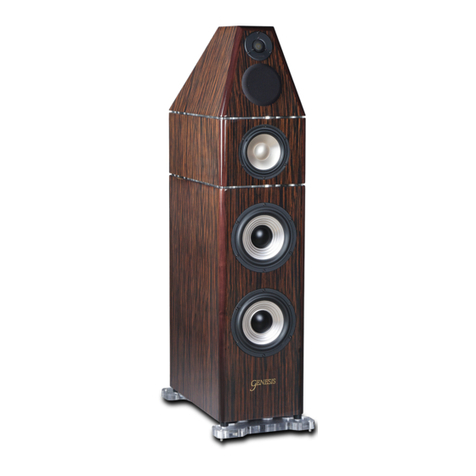
loudspeakers in the world. The Genesis 7.1 Convertible (G7.1c)
features the world’s first solid titanium cone mid woofer, and shares
technologies developed for our flagship Genesis 1.1.
The G7.1c is designed to be as flexible as possible. It can be used
as a pair of audiophile stereo loudspeakers or, in a multi channel
system, can also be used as main left/right speakers, a center
channel speaker, or as surround or rear channels.
So that it will fit into the décor of any home, the cabinet design is a
combination of acoustic, furniture, interior design and architectural
principles. Care was taken in the selection of fine furniture quality
natural wood veneer finishes, and high gloss “Italian” or automotive
finish.
Sound structural engineering principles have been applied to make
the G7.1c cabinet rigid and well damped. All construction is of ¾
inch MDF and panels have been “tongue and grooved” to ensure
that the cabinet is the best environment on which to mount the
transducers. This results in extremely low cabinet coloration, and
excellent soundstaging and imaging. The proportions are also
designed to be visually pleasing and elegant.
Please read this Owners Manual and Set up Guide to get the
maximum enjoyment out of your purchase. Also, check out our
website at www.genesisloudspeakers.com for the latest updates,
tips & tricks, and support for our owners.
Please write the serial number and purchase details of your Genesis 7.1c
here for future reference.
Purchased at: _________________ Date: __________
ver 1.0
5
55
5
absolute fidelity

1 A Quick Start Set-up Guide
Now that you have your new Genesis 7.1 Convertible (G7.1c), we
realize that you can’t wait to hook it up and start playing! However,
please read this quick set up guide (even if your dealer is setting it up for
you) before you proceed.
1.1 Unpacking
Your loudspeakers will come to you in two shipping cartons weighing
over 35lbs (16kgs) each. Care must be taken when moving the carton
around, and taking the speaker out of the box. While the speaker is
small, it is also slippery and heavy. Use correct lifting techniques utilizing
the muscles in your legs, and not just your back.
We will not be held liable for damage to either the speakers or your
backs during unpacking and setting up. Be careful as you may
inadvertently damage the drivers if the cabinet slips and you grab at it
and put a finger into the woofers. Do not try to lift the cabinet by the
shield (it is not a handle!) or by grabbing the woofers as handles.
1.2 Placement
As a stereo pair of speakers, a good starting position for your G7.1c
is at least 18 inches (45cm) into the room as measured from the front
wall (the wall you look at as you are seated listening to the speakers) to
the back of the speakers. Place the speakers vertically on a stand that is
at least 18 inches high, and about five feet (1.5 metres) apart with the
tweeters closest together. Toe the speakers in very slightly towards the
listeners – by about 3 to 10 degrees – no more.
Used as a center channel, the G7.1c can be placed below or above
your screen. If you have a perforated, sonically transparent projector
screen, you may place it behind the screen. In all cases, do not point
the tweeter directly at the ears of the listeners. Angle the speaker so
that the tweeter points 12 inches (30cm) below the ears or over the
top of the head.
You will want to sit nine to twelve feet (three to four metres) away from
the speakers. When sitting further away, you should place the speakers
further apart. When sitting nearer the speakers, move the speakers
closer together.
If you are using the G7.1c as surround or rear speakers, and you are
hanging them on the wall, you will need a qualified installer to mount
them on very strong brackets. The speakers weigh over 30 pounds
ver 1.0
6
66
6
absolute fidelity

(13.6 kgs) each, and can cause death or severe injury if it falls on
someone’s head!
1.3 onnections
The speakers should be connected directly to the speaker level output
of your power amplifiers using high quality speaker cables and the 5
way binding posts.
The high level thru put binding posts are for connecting to a subwoofer.
We recommend the Genesis ServoSub™ 4/8 as the perfect
complement to this speaker. The correct cable for connecting a
loudspeaker to a ServoSub is an interconnect cable, and not a
loudspeaker cable.
The ServoSub has a high impedance input, and the speaker and power
amplifier has a low impedance output. A computer networking CAT6
cable can be used as this “jumper” if a good interconnect cable is not
available.
1.4 Adjustments
Don’t be too worried by the knob and switches on the back of the G7.1c.
Set knob (tweeter level) to the 12 o’clock position, and the stand
alone/with sub switch depending on whether you have a ServoSub™
connected.
If you have at least 12 inches (30cm) of space between the back of
the speaker and the rear wall, the rear tweeter should be left ON.
Otherwise, turn the rear tweeter off with the tweeter defeat switch on
the back panel.
That is a good place to start. The G7.1c will sound great, straight out of
the box. As you play your system for the next hundred hours or so, the
speaker will settle down and break in.
Once you familiarize yourself with its performance, putting a little bit of
additional effort into tuning the speaker properly for your system (which
includes the room), will give you greater long term enjoyment and
benefits.
ver 1.0
7
77
7
absolute fidelity

2 Setting up: Multi-channel
2.1 Positioning for enter hannel
A good starting position is for the G7.1c to be placed horizontally about
20 inches from the floor, and angled upwards by 3 to 5 degrees. This is
assuming that the speaker doesn’t block the screen in this position.
Use a good quality stand that is solidly built and as rigid as possible. The
Genesis ServoSub™ 4/8 is a unique subwoofer that complements the
G6.1c to turn it into a full range absolute fidelity™ system, and also
makes a perfect stand for the G7.1c.
An alternative is to place the speaker horizontally above the television
set, and angle it downwards by 3 to 5 degrees. In either case, do not
point the speaker directly at the head of the listener, but either over her
head, or at her chest.
As these speakers are dipolar with a rear firing tweeter, there should be
at least 12 inches (30cm) of space between the back of the speaker and
the wall. If this space is not available, turn the rear tweeter off with the
tweeter defeat switch.
On the home theatre processor, set the speaker to “LARGE” as the
G7.1c plays below 60Hz.
2.2 Loudspeaker ontrols
2.2.1 Tweeter ontrol
The knob marked T
WEETER
on the plate on the back of the speaker is
used to tailor the high frequency response of the G7.1c. It is a subtle
control, but can make a great difference in gaining that last bit of
additional performance from your speakers.
Turning this control clockwise will increase the level of the tweeters. Use
this control if you need a bit more treble, or to increase the apparent
space of the soundstage. Too high a tweeter level, and you can feel that
voices are too sibilant. With music, crashing cymbals are leaping out at
you, and nylon stringed guitars sound steely. Start with this control at the
12 o'clock position. There is about a ± 1dB range for this control.
2.2.2 Tweeter Defeat
The G7.1c should be placed at least 12 inches (30cm) away from the
wall behind the speaker. If this is not possible, turn the rear firing tweeter
off to configure your loudspeaker as a monopole. This is perfectly
acceptable and will not compromise the performance for multi channel
surround movies.
ver 1.0
8
88
8
absolute fidelity

3 Setting up as Stereo Pair
3.1 Positioning
Used as a stereo pair, the G7.1c should be placed vertically at least 18
inches (0.45m) into the room as measured from the front wall (the wall
you look at as you are seated listening to the speakers), to the back of
the speaker. They should be placed on good, solid speaker stands
about 18 to 24 inches (60cm) high.
Start with the speakers five feet (1.5m) apart with the tweeters placed
closest together, and angled in (toed in) towards the listener by about 3
degrees. You will want to sit 9 to 12 feet (3 to 4 metres) away from the
speakers (if you have the space). We will experiment with moving the
speakers around later.
As these speakers are dipolar in the high frequencies, they are pretty
room friendly and you are free to move the speakers closer to, or further
away from the front and side walls. We do recommend, however, that
you give the speakers a little bit of breathing space behind them, so
don’t push them up tight against the wall.
If you have the speakers too close to the front wall, you will find that the
image depth is not as good the soundstage becomes a little two
dimensional. If you have the space to move the speakers away from the
wall, do so. You will be rewarded with the deep, broad soundstage that
this loudspeaker is capable of. You should be able to “see” the
soundstage behind, as well as in front of, the loudspeakers. The sound
stage will also extend outside the left and right sides of the speakers.
3.2 Loudspeaker ontrols
3.2.1 Tweeter ontrol
The knob marked TWEETER on the plate on the back of the speaker
tailors the high frequency response of the G7.1c. It is a subtle control,
but can make a great difference in gaining that last bit of additional
performance in tuning your speakers for the room in which you are
using them. It can turn your system from very good to exceptional, so
take the time to work through this process.
Turning this control clockwise will increase the level of the front tweeter.
Use this control if you need a bit more treble, or to increase the apparent
space of the soundstage. Too high a tweeter level, and you can feel that
crashing cymbals are leaping out at you, and nylon stringed guitars
sound steely. Start with this control at the 12 o'clock position. There is
about a ± one dB range for this control.
ver 1.0
9
99
9
absolute fidelity

3.2.2 Tweeter Defeat
The optimal way to use these speakers as a stereo pair is to leave the
rear tweeters on, and run them as dipole and at least 18 inches from the
front wall. However, in some cases, this may not be possible.
Should the speakers have to be placed with their backs less than 12
inches from the wall, the rear tweeters should be turned off.
3.3 Tuning the system
Music is the best way to begin your set up procedure. We suggest that
video sources be used only after you have set up the system to properly
reproduce music. There is no “perfect” setting for the G7.1c
loudspeaker. Every listening room is different, and we recommend that
you take the time to carefully tune the system for the environment in
which it is placed.
Your Genesis loudspeakers should sound great straight out of the box. If
you don’t like the sound, several hundred hours of breaking in will not
change the sound of your speakers, although it may break in your ears!
3.4 One hange at a Time
One rule of thumb you should always keep in mind: Make one change
at a time! Do not, for instance, change position of the speakers and
make an adjustment to the tweeter all at once. Make each of these
changes separately and note the difference by listening with each
adjustment then make the next change.
3.5 Imaging and Soundstage
We suggest that you start with a single vocal with simple instrumental
accompaniment because the sound of the human voice is more easily
recognizable than many instruments and is a less complex sound to
deal with. Use a good recording that you know has atmosphere and
low bass content.
The performer should appear to be positioned behind the loudspeakers
and be at the appropriate height for a standing person. If it is not, there
are several remedies that will address this shortfall:
If the vocal appears to be larger than life, you should first check the
system volume. Is it a volume that would be appropriate for
someone actually singing in your room? If there is too much volume
the artist will appear too big and the opposite is true for too little
volume. If the volume is set correctly and the image is still too big,
place the speakers closer together and re listen. Place the speakers
ver 1.0
10
1010
10
absolute fidelity

no less than 5 feet apart. If the image is still too big, toe the
speakers in a slight amount.
Conversely, if the image is too small, move the speakers apart. The
speakers should be no more than eight feet apart. Repeat this process
until you have it right.
The wider apart you have the speakers, relative to your seating
position, the more you will have to toe the speakers in. However, this
may result in “audiophile itis”. You get a huge soundstage, but only a
tiny sweet spot and you have to sit exactly in the center. Also, when
the speakers are very far apart, you may have to play them louder
before you can enjoy a realistic soundstage. The images are more
diffuse, and can seem larger than life.
If you have the speakers 18 inches into the room, and you are not
getting enough front to back depth (the singer not appearing behind the
speaker enough), pull the speakers away from the front wall a little bit at
a time. However, slightly more than 1/3 of the way into the room is
about as far as you want to go. Pulling them half way into the middle
of the room is unlikely to help.
Find the best compromise for your room, your tastes and your space
requirements. If you are not getting proper focus on the voice, you may
angle the left and right speaker up to about 10 to 15 degrees (toe in)
towards your listening position until you have a properly defined center
image. If the speakers are too far apart, the mid bass will de couple and
you will lose the side image. If they are too close together you will have
too small and congested a center stage.
When properly set up, very little sound should appear to come
directly from the speaker. Instead, the sound stage should extend far
beyond the left and right edge of the loudspeakers and they should have
tremendous front to back depth. When the recording is close miked
(when the instrument or performer is very close to the recording
microphone), the music may appear to come directly from the
loudspeaker. This is normal. Typically, however, the sound should
appear to be detached from the loudspeakers.
A simple rule of thumb to follow is that focus will be achieved by placing
the speakers closer together or farther apart, and front to back depth
can be adjusted by the distance from the rear wall. Further, as the
system “breaks in”, the depth and width of the soundspace will increase
and so will the “smoothness” of the sound.