Gtran Wireless GQ8 User manual

-1-
Content
1General Information.................................................................................................................................................2
2Your phone.................................................................................................................................................................3
2.1Phone overview............................................................................................................................................... 3
2.2Functions of Keys........................................................................................................................................... 4
2.3Technical specifications.................................................................................................................................. 5
3Input method.............................................................................................................................................................6
3.1Icons for Input Methods.................................................................................................................................. 6
3.2English input and numeric input:.................................................................................................................... 6
4Using the Menu .........................................................................................................................................................6
4.1Phonebook....................................................................................................................................................... 6
4.2Call history...................................................................................................................................................... 7
4.3Services........................................................................................................................................................... 7
4.4Multimedia...................................................................................................................................................... 8
4.5Calendar.......................................................................................................................................................... 9
4.6Camera.......................................................................................................................................................... 10

4.7Messages....................................................................................................................................................... 10


-2-
4.8User profiles.................................................................................................................................................. 10

4.9Audio player.................................................................................................................................................. 10
4.10FM radio ....................................................................................................................................................... 10
4.11Fun & Games................................................................................................................................................ 10

4.12Organizer....................................................................................................................................................... 10

4.13File manager...................................................................................................................................................11
4.14Java ................................................................................................................................................................11
4.15Settings.......................................................................................................................................................... 12
4.16Bluetooth....................................................................................................................................................... 13
4.17Lock keypad.................................................................................................................................................. 13
4.18Power off....................................................................................................................................................... 13
5Appendix..................................................................................................................................................................13
1General Information
Please read this pamphlet carefully in order to make your phone in perfect condition.Our company may
change this mobile phone without prior written notice and reserves the final right to interpret the performance
of this mobile phone.Due to different software and network operators, display on your phone may be
different, refer to your phone for details.

-3-
2Your phone
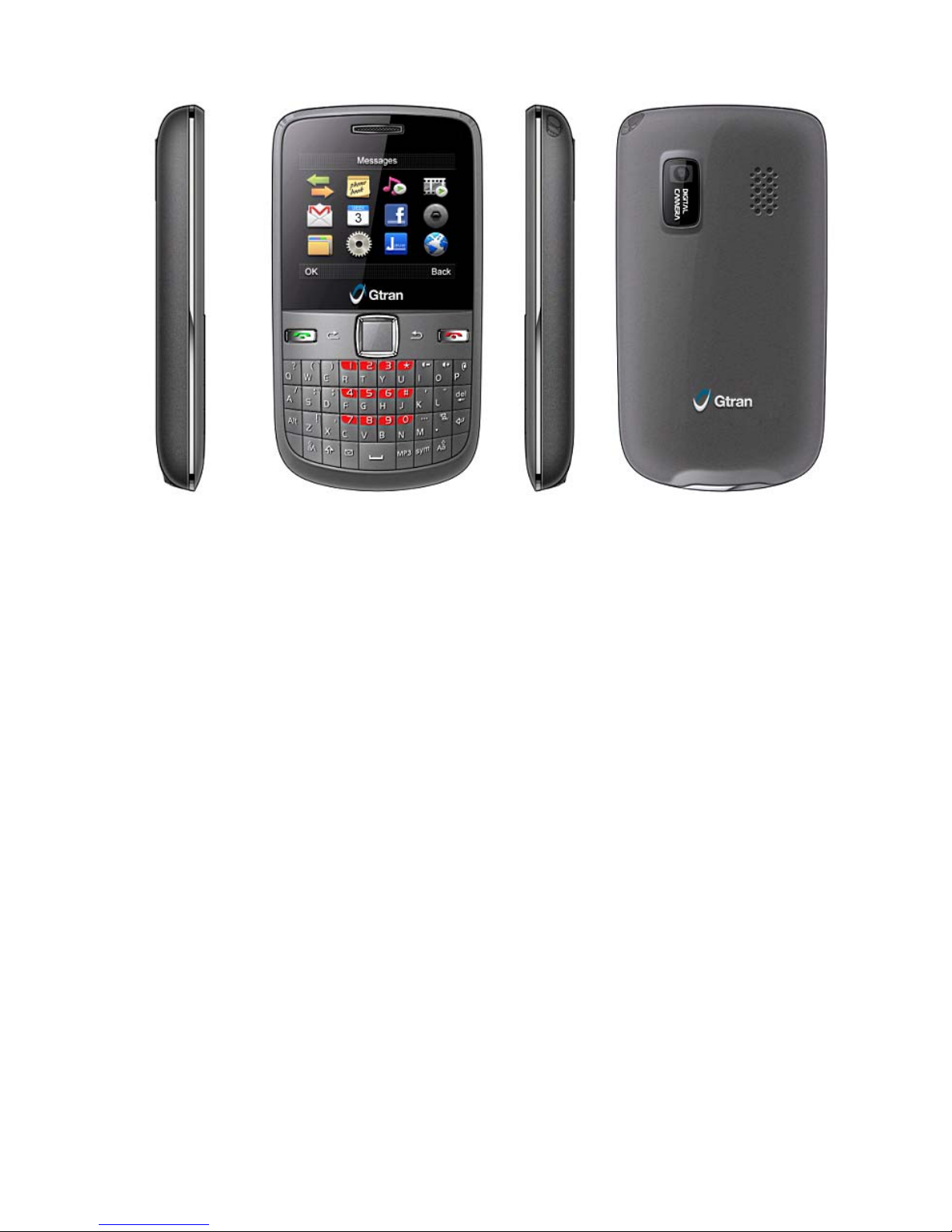
2.1 Phone overview

-4-
2.2 Functions of Keys
The mobile phone provides the following keys:
Dial key
Press it to originate a call by entering the called number or selecting a contact from the phonebook; or
press it to receive an incoming call; or press it in standby state to show the latest call
End key
Press it to end a call being dialed or end an ongoing call; or press it to exit the menu and return to the
standby state; or hold it for two or three seconds to power on or off the mobile phone.
Direction key
Press them to scroll the options when browsing a function list. In edit state, press direction keys to
navigate.
OK key
Press it to confirm your selection.
Left and right soft key
In standby interface, press left soft key can enter the main menu interface, press right soft key can enter
the phonebook interface. In submenu interface, the bottom line on the screen displays the functions of
the Left and Right soft key.
Space key
Press it in the edit interface to get a blank.
Del key
Press it to delete a character before cursor.
Linefeed

-5-
In idle screen, this key helps to switch to another line.
Sym key
Press it in the edit interface to input a symbol.
Shift key
Press it to switch between input methods.
Alt key
In edit interface, press it to input an alternative symbol or number.
Caps key
In edit interface, you can press it to switch between upper case and lower case;
Number keys, letter keys
Press number keys 1 through 9 in input or edit state to input numbers and characters; Press letter keys A
through Z in input or edit state to input letters and characters;
2.3 Technical specifications
Phone
Dimensions (W×D×H):99 x54x14.1 mm
Weight: 64 g
Lithium battery
Rated capacity: 850 mAh
Continuous standby duration: 120-144 hrs (Relates to network status)
Continuous conversation duration: 2-3 hrs (Relates to network status)
Please refer to their labels for other data related to the battery and the charger.

-6-
3Input method
This mobile phone provides multiple input methods, including Smart English input, Normal English input
and numeric input. You can use these input methods when editing the phonebook, short messages, files and
greeting text.
3.1 Icons for Input Methods
- Numeric input:“123”
-Smart English input:“ES,Es, es”
-Normal English input:“ABC, Abc, abc”
3.2 English input and numeric input:
You can input numbers with the numeric input method. Press a number key to input the corresponding
number.
Press space key to get a vacancy.
To clear wrong inputs, press the Delete key.
Press the sym key to enter the Select symbol interface, use direction keys to select a symbol you want.
4Using the Menu
4.1 Phonebook
The mobile phone can store up to 500 telephone numbers. The number of telephone numbers that an SIM
card can store depends on the storage capacity of the SIM card. The telephone numbers stored in the mobile
phone and in the SIM cards form a phonebook.

-7-
4.2 Call history
Through this function, you can view a list of all calls, missed calls, dialed call and received calls.
4.3 Services
Internet service
This function enables you to view the internet. Your phone will ask you with existed way. You can start to
view only by starting corresponding way.
Homepage: indicates the default website of the internet
Bookmarks: used to save most commonly-used websites
Input address: input the website to be searched and press OK key to access to the network.
Last web address: You can view your last visited web address through this function.
Recent pages: browse the record of the recently browsed web pages
Settings: set up WAP-related service
Note: Consulting the local network operator for related fee and specific setup.
Licence manager
This function enables you to manage a list of Licences.
STK
STK service is the tool kit of SIM card. This phone supports the service function .The specific items are
depended by SIM card and network. Service menu will be auto added to the phone menu when supported by
network and SIM card.

-8-
4.4 Multimedia
TV
You are able to access this menu to watch mobile TV programs. Before you watch TV programs, you’d better
select the right area. Then you can search available channels and select channel to play. In TV player
interface, you can press * key to start auto search; press # key to switch to full screen play; press I/- or O/+
key to tune volume.
Camera
The phone is provided with a camera, which supports the photographing functions. Roll the phone to align
the camera to the picture and then press OK key to capture photos. In the capture interface, you can press left
or right direction key to tune exposure value; up or down direction key to zoom in and zoom out.
Image viewer
You can view the pictures or images through this function.
Video recorder
This function enables you to record dynamic pictures. Press OK to start or pause recording.
Video player
This function enables you to play video clips.

-9-
Audio player
Use this function to play audio files.
Sound recorder
The phone support WAV and AMR. The AMR takes the compression algorithm. So in the same memory
condition, it has longer recording time than WAV.
FM radio
Your phone is equipped with an FM radio. You can use the application as a traditional FM radio with
automatic tuning and saved channels.
Bluetooth
You can transfer data, such as music to other device using Bluetooth. Search the device and accept/transfer
data.
File manager
The phone provides a certain space for users to manage files and supports the memory card. You can use the
file manager to conveniently manage various directories and files on the phone and the memory card.
4.5 Calendar
Once you enter this menu, there is a monthly-view calendar for you to keep track of important appointments,
etc. Days with events entered will be marked.

-10-
4.6 Camera
The phone is provided with a camera, which supports the photographing functions. Roll the phone to align
the camera to the picture and then press OK key to capture photos. In the capture interface, you can press left
or right direction key to tune exposure value; up or down direction key to zoom in and zoom out.
4.7 Messages
Through this function, you can create, read or send a new message.
4.8 User profiles
The mobile phone provides multiple user profiles, so that you can customize some settings to adapt to the
specific events and environments.
4.9 Audio player
Use this function to play audio files.
4.10 FM radio
Your phone is equipped with an FM radio. You can use the application as a traditional FM radio with
automatic tuning and saved channels.
4.11 Fun & Games
Two games are embedded in this menu. For specific operation, please refer to ‘help’option of the game.
4.12 Organizer
Calendar: Once you enter this menu, there is a monthly-view calendar for you to keep track of
Table of contents















